Termfolio
A terminal/CLI-themed personal portfolio, blog, and digital business card. Syncs directly with your Obsidian vault - No database required. Just fork it, paste your CV into any AI to generate your config file, and deploy in minutes. Built with Next.js 15, React 19, TypeScript, and Tailwind CSS

termfolio
Your portfolio should boot like a terminal, not load like a Squarespace.
Write in Obsidian. Push to GitHub. Your site updates.
No database. No CMS. No writing in two places.







Deploy in 3 Minutes
No local setup required. Click, paste, done.
| Step | Action | Time |
|---|---|---|
| 1 | Click Deploy with Vercel below — it forks the repo and creates your project | 30s |
| 2 | Vercel asks for 3 env variables — get them from resend.com (free tier) | 90s |
| 3 | Click Deploy — your site is live | 60s |
How to get the 3 env variables (2 minutes)
- Sign up at resend.com (free — 3,000 emails/month)
- RESEND_API_KEY — API Keys → Create API Key → copy
- RESEND_AUDIENCE_ID — Audiences → Create Audience → copy the ID
- NOTIFY_SECRET — Any random string. Generate one:
openssl rand -hex 32
After deploy, clone your fork and edit one file — content/site.ts — to make it yours. Push. Done.
Want a full walkthrough with screenshots? Read the step-by-step tutorial.
See It in Action
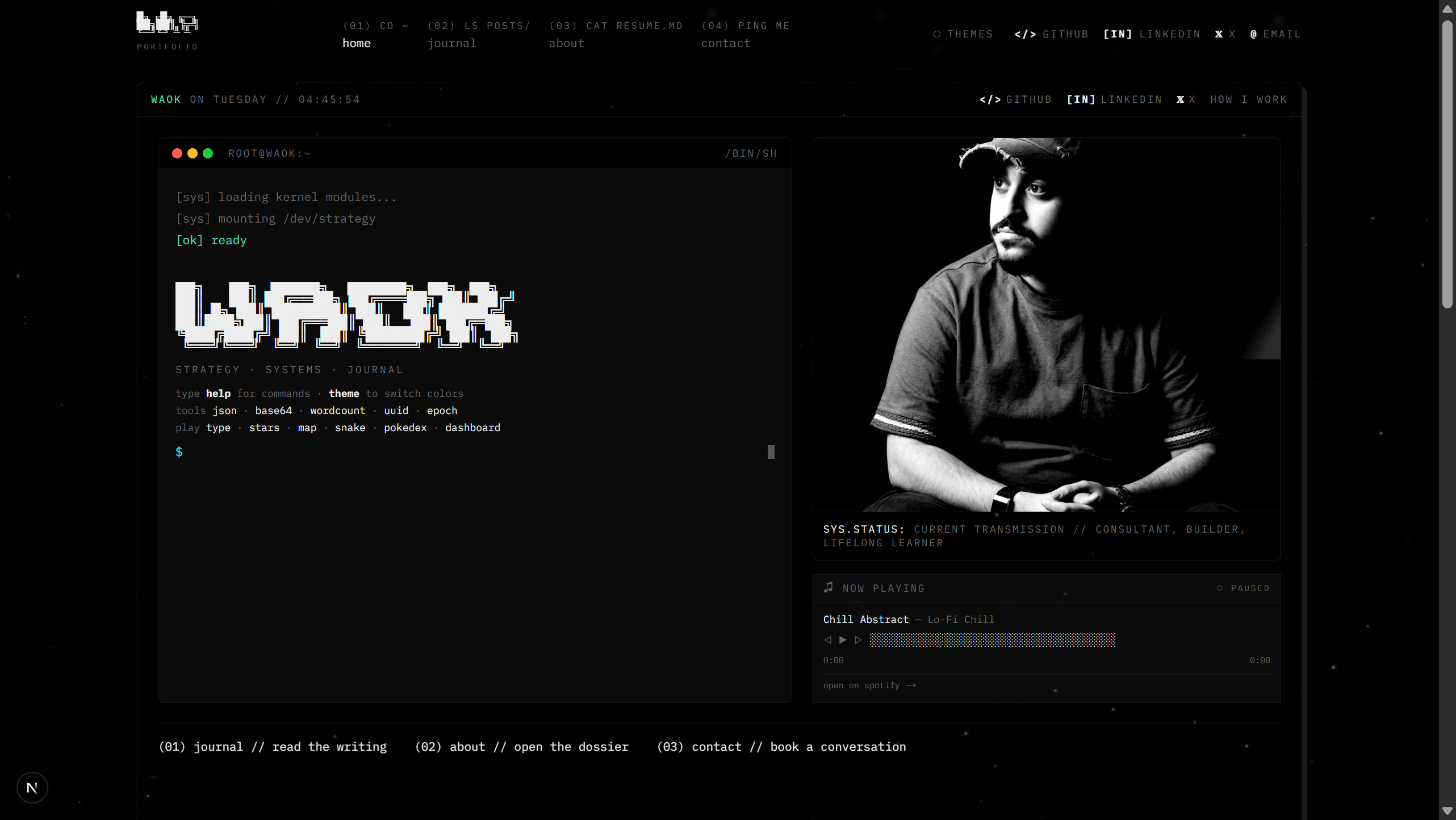
|  |
| Home — Boot sequence, interactive terminal, halftone profile | Journal — Search, tag filters, writing activity heatmap |
 |  |
| Blog Post — 3 reading themes, ToC, focus mode, progress bar | About — Experience timeline, skills, certifications |
 |  |
| Contact — Cal.com scheduling embed, newsletter signup | Card — Digital business card with vCard, QR, WhatsApp |
Why termfolio?
Most portfolio templates make you choose: look good or easy to maintain.
| Traditional portfolio | termfolio | |
|---|---|---|
| Write content | CMS dashboard | Obsidian / VS Code / any editor |
| Content storage | Database (Postgres, Notion, Contentful) | Plain .md files in your repo |
| Write in one place | No — CMS + code | Yes — just markdown |
| Vendor lock-in | Tied to CMS provider | Zero — it's just files |
| Works offline | No | Yes |
| Deploy | Complex pipeline | git push |
| Customize | Dig through 50+ files | Edit one file (content/site.ts) |
What's Inside
The Best Reading Experience
We obsessed over reading UX so your visitors actually finish your posts:
- 3 reading themes — Terminal (dark), Light, and Sepia. Readers switch mid-article without losing their place
- Adjustable font size — Small, medium, large. Readers pick what's comfortable
- Focus mode — Hides everything except the article. No nav, no sidebar, no distractions
- Reading progress bar — Shows how far through the post they are
- Table of contents — Auto-generated from headings, highlights current section as you scroll
- Estimated reading time — Shown before they start
- Syntax highlighting — Code blocks with proper language coloring
- Full RTL/Arabic support — Set
language: "ar"in frontmatter and the entire post flips — layout, fonts, everything
14 Built-in Terminal Commands
Your visitors won't just read — they'll play. The home page terminal is a real command parser:
| Command | What it does |
|---|---|
snake | Classic Snake game — playable right in the terminal |
pokedex | Browse Pokemon with stats, types, and pixel art |
typing-test | Speed typing challenge with WPM tracking |
starmap | Interactive constellation map based on your coordinates |
worldmap | SVG world map highlighting your city |
json | Paste and format/validate JSON instantly |
dashboard | System dashboard with live clock and stats |
base64 | Encode/decode Base64 strings |
wordcount | Count words, characters, and lines |
epoch | Convert Unix timestamps to human dates |
uuid | Generate random UUIDs |
whoami | Shows your identity (reads from config) |
skills | Shows your skills (reads from config) |
theme | Toggle light/dark mode |
Every command reads from your config — whoami outputs your name, starmap shows your sky.
Write in Obsidian, Publish Everywhere
Obsidian (write) → content/posts/*.md → git push → Live site
Your markdown files are the blog. No database. No CMS. No API calls to fetch content.
- Symlink your vault → posts update when you save in Obsidian
- GitHub Action included → auto-syncs from a separate vault repo on push
- Works with any editor — VS Code, Vim, iA Writer — if it saves
.mdfiles, it works
See Obsidian Integration for setup instructions.
Comments Powered by GitHub
Readers comment on your posts using their GitHub account. Comments live in your repo's Discussions tab — no database, no moderation dashboard, no third-party service.
Setup takes 2 minutes:
- Go to giscus.app
- Enter your repo name — it checks if Discussions are enabled
- Pick a category (use "Announcements")
- Copy the 4 values it gives you
- Add them to your
.env.local:
NEXT_PUBLIC_GISCUS_REPO=your-username/termfolio
NEXT_PUBLIC_GISCUS_REPO_ID=R_xxxxxxxxxx
NEXT_PUBLIC_GISCUS_CATEGORY=Announcements
NEXT_PUBLIC_GISCUS_CATEGORY_ID=DIC_xxxxxxxxxx
Comments appear at the bottom of every blog post. Moderate them from GitHub Discussions.
Everything Else
- Digital business card — Shareable
/cardpage with vCard download, QR code, WhatsApp, and Apple Wallet pass. Data lives in a single YAML file (content/card.md) — edit in Obsidian, no code changes needed - Newsletter — Email subscriptions + new-post notifications via Resend (free: 3,000 emails/month)
- Halftone image effect — Your profile photo renders as a canvas-based halftone
- Animated starfield — Star field background on the home page
- Writing heatmap — GitHub-style contribution graph for your blog activity
- Cal.com embed — Scheduling widget on the contact page
- Spotify widget — Links to your music profile
- SEO optimized — Dynamic OG images, sitemap, robots.txt, structured metadata
- Vercel Analytics — Built-in analytics and speed insights
- Security hardened — HSTS, CSP headers, rate limiting, timing-safe auth, input validation
Configure from One File
Open content/site.ts and make it yours. This single file controls your entire site:
export const siteConfig = {
  name: "Your Name",           // site title, metadata, emails, footer
  handle: "you",               // terminal prompt, top bar
  tagline: "your · tagline",   // below ASCII art
  email: "you@example.com",    // contact page, comment fallback
  siteUrl: "https://you.com",  // metadata, sitemap, emails

  // Terminal commands read from these
  whoami: { focus: "what you do", status: "what you're up to" },
  terminalSkills: ["skill1 // skill2 // skill3"],

  // Your location powers the star map and world map
  coordinates: { lat: 40.7128, lon: -74.0060, label: "New York" },

  // Social links in the nav bar
  socials: {
    github: { url: "https://github.com/you", label: "GitHub", icon: "</>" },
    linkedin: { url: "https://linkedin.com/in/you", label: "LinkedIn", icon: "[in]" },
  },

  // Generate ASCII art at patorjk.com/software/taag
  asciiArt: { home: [...], about: [...] },

  // About page
  bio: [...], experience: [...], skills: [...], certifications: [...],
}
Full field reference
| Field | Controls |
|---|---|
name | Site title, metadata, email sender, footer |
handle | Terminal prompt, top bar display |
title | Meta title, about page header |
tagline | Text below ASCII art on home page |
description | Meta/OG description across all pages |
email | Contact page, comment fallback |
siteUrl | Metadata, sitemap, robots.txt, email links |
twitterHandle | Twitter/X card metadata |
calUrl / calEmbedUrl | Contact page calendar widget |
spotifyUrl | Music widget link |
coordinates | Star map location, world map pin |
asciiArt.home / asciiArt.about | ASCII banners (generate here) |
socials | Nav bar links (GitHub, LinkedIn, X, etc.) |
whoami | Terminal whoami command output |
terminalSkills | Terminal skills command output |
terminalPrompt | Shell prompt (e.g. root@you:~) |
developedBy | Footer attribution (links to this repo) |
customizedBy | Your attribution — { name: "You", url: "..." } |
bio, stats, experience, skills, certifications, credentials | About page content |
Blog Posts
Create .md files in content/posts/. That's your entire CMS:
---
title: "My First Post"
date: "2026-01-15"
excerpt: "A brief description for cards and SEO"
tags: ["topic", "another"]
status: "published"
language: "en"
---

Your markdown content here. Supports GFM: tables, task lists,
strikethrough, footnotes, syntax-highlighted code blocks.
| Field | Required | Notes |
|---|---|---|
title | Yes | Post title |
date | Yes | ISO date (YYYY-MM-DD) |
status | Yes | "published" or "draft" (drafts are hidden) |
excerpt | No | Used in cards, SEO, and email notifications |
tags | No | Array of strings for filtering |
language | No | "en" (default) or "ar" for full RTL Arabic |
coverImage | No | Path relative to public/ |
author | No | Defaults to siteConfig.name |
Obsidian Integration
Option A: Copy files (simplest)
Copy .md files from your Obsidian vault to content/posts/.
Option B: Symlink (best for local dev)
Point content/posts/ at your vault. Posts update live when you save in Obsidian:
# macOS/Linux
ln -s ~/obsidian-vault/published content/posts

# Windows (PowerShell as Admin)
New-Item -ItemType SymbolicLink -Path content\posts -Target C:\Users\you\obsidian-vault\published
Option C: GitHub Action (fully automated)
A ready-made workflow is included at .github/workflows/sync-obsidian.yml. It syncs posts from a separate Obsidian vault repo automatically.
Setup:
- Store your Obsidian posts in a separate GitHub repo (e.g.
your-username/obsidian-vault) - Create a Personal Access Token with
reposcope - In this repo → Settings → Secrets → Actions, add:
VAULT_REPO—your-username/obsidian-vaultVAULT_PAT— your PATVAULT_PATH— folder inside the vault repo (default:published)
- Runs daily at 6 AM UTC, or trigger manually from the Actions tab
Auto-trigger on vault push — add this workflow to your vault repo:
name: Trigger site sync
on:
  push:
    paths: ['published/**']
jobs:
  sync:
    runs-on: ubuntu-latest
    steps:
      - run: |
          curl -X POST \
            -H "Accept: application/vnd.github.v3+json" \
            -H "Authorization: token ${{ secrets.SITE_REPO_PAT }}" \
            https://api.github.com/repos/YOUR_USERNAME/termfolio/dispatches \
            -d '{"event_type":"sync-obsidian"}'
Now every vault push auto-updates your site.
Obsidian frontmatter template
---
title: "{{title}}"
date: "{{date:YYYY-MM-DD}}"
author: "Your Name"
excerpt: ""
coverImage: ""
tags: []
status: "draft"
language: "en"
---
Environment Variables
| Variable | Required | Description |
|---|---|---|
RESEND_API_KEY | Yes | Resend API key (free: 3,000 emails/month) |
RESEND_AUDIENCE_ID | Yes | Resend audience ID (Audiences → Create → copy ID) |
NOTIFY_SECRET | Yes | Any random string — protects the notification endpoint |
RESEND_FROM_EMAIL | No | Sender address (default: Name <noreply@yourdomain.com>) |
NEXT_PUBLIC_SITE_URL | No | Override site URL (default from siteConfig.siteUrl) |
NEXT_PUBLIC_NASA_API_KEY | No | NASA API key for APOD widget |
NEXT_PUBLIC_GISCUS_REPO | No | Repo name for Giscus comments |
NEXT_PUBLIC_GISCUS_REPO_ID | No | Giscus repo ID |
NEXT_PUBLIC_GISCUS_CATEGORY | No | Giscus category (use "Announcements") |
NEXT_PUBLIC_GISCUS_CATEGORY_ID | No | Giscus category ID |
WALLETWALLET_API_KEY | No | WalletWallet API key for Apple Wallet passes on /card |
Tech Stack
| Layer | Technology |
|---|---|
| Framework | Next.js 15 (App Router) |
| UI | React 19, Tailwind CSS 3, CSS design tokens (--term-*) |
| Content | Local Markdown with gray-matter — no database |
| Markdown | unified → remark-parse → remark-gfm → remark-rehype → rehype-slug → rehype-highlight → rehype-react |
| Resend API (newsletter + new-post notifications) | |
| Comments | Giscus (GitHub Discussions — no database) |
| Analytics | Vercel Analytics + Speed Insights |
| Fonts | IBM Plex Mono (UI), Source Serif 4 (reading), Noto Naskh Arabic (RTL) |
Project Structure
content/
  site.ts               ← THE file. Your entire site config.
  posts/*.md            ← Your blog posts. Drop markdown, done.
  card.md               ← Digital business card data (YAML frontmatter).

app/
  page.tsx              Home (boot terminal, hero, recent posts)
  about/page.tsx        About/resume page
  blog/page.tsx         Journal (search, heatmap, tag filters)
  blog/[slug]/          Blog post (3 themes, ToC, focus mode, comments)
  contact/page.tsx      Contact (Cal.com embed, newsletter)
  card/page.tsx         Digital business card (vCard, QR, WhatsApp)
  api/subscribe/        Newsletter subscription endpoint
  api/notify/           New-post notification endpoint
  api/card/vcard/       vCard (.vcf) download endpoint
  api/card/wallet/      Apple Wallet pass endpoint

components/             30+ components including:
  boot-terminal.tsx     Interactive terminal with 14 commands
  reading-controls.tsx  3 themes, font size, focus mode, progress bar
  writing-heatmap.tsx   GitHub-style contribution graph
  halftone-image.tsx    Canvas halftone image effect
  star-map.tsx          Interactive constellation renderer
  world-map.tsx         SVG world map with location pin
Dev Commands
npm run dev        # Development server
npm run build      # Production build
npm run lint       # ESLint
npm run typecheck  # TypeScript check
npm run check      # Lint + typecheck + build
Contributing
Contributions welcome:
- Fork the repo
- Create your branch (
git checkout -b feat/cool-feature) - Commit (
git commit -m 'feat: add cool feature') - Push (
git push origin feat/cool-feature) - Open a Pull Request
Report bugs or request features →
Star History
Attribution
Keep the "developed by" footer link or add your own name next to it in content/site.ts:
customizedBy: { name: "Your Name", url: "https://your-site.com" }
// → "developed by waleed alhamed · customized by your name"
License
MIT — use it however you want.
If this helped you build something cool, give it a :star:
Built by Waleed Alhamed
How to Install
- Download the ZIP or clone the repository
- Open the folder as a vault in Obsidian (File → Open Vault)
- Obsidian will prompt you to install required plugins
Stats
Stars
0
Forks
0
License
MIT
Last updated 20d ago