Vault Search
Local-first semantic search & discovery for Obsidian — simple, private, Chinese-friendly





Vault Search helps you search by meaning and rediscover forgotten notes.
No cloud services. No API keys. No subscription fees. Your notes never leave your machine.

Why Vault Search?
Andrej Karpathy shared his vision of LLM-maintained knowledge bases — letting AI "compile" your notes into a structured wiki. It's a compelling approach, but it assumes you're ready to hand full editorial control to an LLM.
Vault Search takes a different stance. AI should help you see, not think for you. The best tool doesn't replace your writing — it helps you rediscover what you already know, and surfaces connections you missed.
What sets Vault Search apart
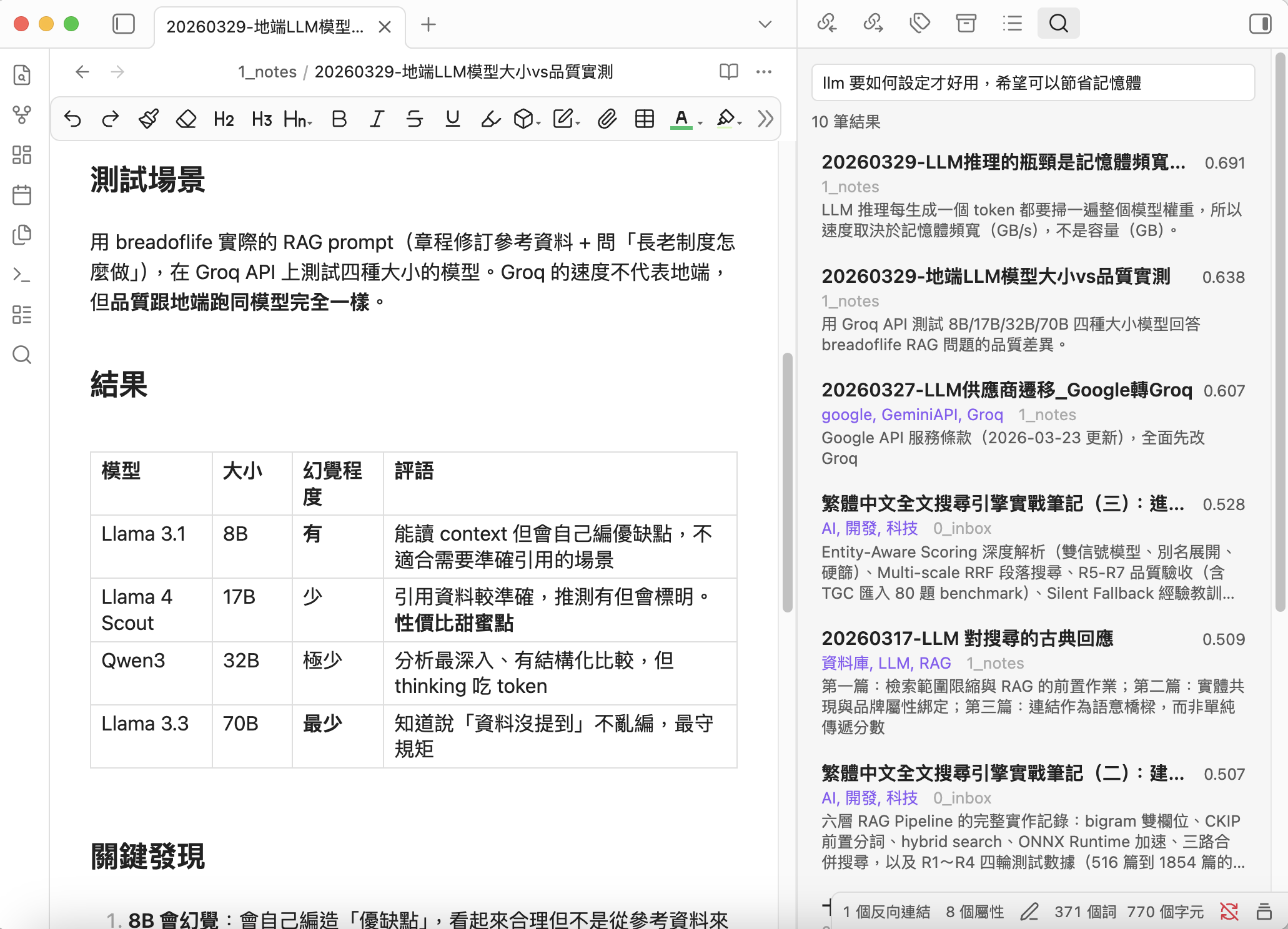
Discover, not organize — Other tools build AI wikis or auto-summaries. Vault Search finds the notes you should be looking at. The Discover tab shows related notes you haven't connected yet — especially Cold (isolated) notes hiding in your vault.
Hot/Cold intelligence — Notes with links or recent activity are Hot. Orphan notes are Cold. Discover surfaces Cold notes that are semantically related to your current thinking — your blind spots become visible.
MOC generation — One click turns search or discover results into a Map of Content note with wikilinks and previews. You decide the structure; AI just gathers the pieces.
Truly local, truly private — All embedding, indexing, search, and discovery happen on your machine. Zero data leaves your computer. This isn't a toggle; it's the architecture.
Simple and fast — Sidebar panel with Search and Discover tabs. Cmd/Ctrl+P for instant modal search. Right-click results for Obsidian's native file menu. Drag results to Canvas for visual mapping.
Optimized for Chinese — Built with qwen3-embedding:0.6b, which excels at Traditional Chinese + English semantic understanding. Combined with synonym expansion, even different phrasings of the same concept will match.
LLM-powered descriptions — A local LLM generates frontmatter descriptions for your notes, giving the embedding model a high-quality summary to work with. This dramatically improves search and Discover relevance for long notes.
Runs on 8GB laptops — Minimal memory and CPU footprint. Recommended models work on a MacBook M2 with 8GB RAM. Incremental indexing + debounce means near-zero overhead in daily use.
Flexible and compatible — Works with Ollama, LM Studio, llama.cpp, vLLM, or any OpenAI-compatible server. Choose the models that work best for your language and hardware.
"AI helps you see. You decide what it means."
Features
Search
- Semantic Search — Find notes by meaning, not just keywords
- Sidebar Panel — Persistent results with Search and Discover tabs
- Quick Modal — Cmd/Ctrl+P for fast note jumping
- Find Similar — Discover related notes instantly (zero API calls)
- Smart Indexing — Incremental updates, auto-indexes on file changes
- Hot/Cold Tiers — Hot = linked/recent, Cold = isolated/orphan
- Chunking — Optional overlapping chunks for long documents
Discover (v0.3.0)
- Active Discovery — Open a note, sidebar auto-shows related notes with Cold notes highlighted
- Global Discover — Find Cold notes most related to your Hot (active) notes
- MOC Generation — Export search or discover results as a Map of Content note
- Cold Search Scope — Dedicated "Cold only" search mode for intentional exploration
- Tier Badges — Visual markers distinguish Hot and Cold results at a glance
- Canvas Integration — Drag any result directly onto Canvas for visual mapping
- Context Menu — Right-click results for Obsidian's native file menu (Bookmark, etc.)
Description Generator
- LLM Descriptions — Local LLM generates frontmatter descriptions
- Synonym Expansion — Define synonyms to improve recall
- Bilingual UI — English & Traditional Chinese (auto-detected)
Requirements
- Ollama installed and running
- An embedding model (e.g.,
ollama pull qwen3-embedding:0.6b) - An LLM model for description generation (e.g.,
ollama pull qwen3:1.7b) (optional) - Obsidian desktop
Installation
BRAT (recommended while pending community review)
- Install BRAT plugin
- Add this repository:
notoriouslab/vault-search - Enable "Vault Search" in Community plugins
Manual
- Download
main.js,manifest.json,styles.cssfrom the latest release - Copy to
.obsidian/plugins/vault-search/in your vault - Enable in Settings → Community plugins
Note: If your vault is tracked by Git, add
.obsidian/plugins/*/data.jsonto.gitignoreto avoid accidentally committing API keys or personal settings.
Quick Start
- Settings → Vault Search → Select your embedding model
- Click Rebuild to index your vault
- Cmd/Ctrl+P → "Semantic search" or click the compass icon
- Switch to the Discover tab to see related notes for the current file
Recommended Workflow
1. Generate descriptions  →  2. Rebuild index  →  3. Search & Discover
   (LLM summarizes notes)    (embed with descriptions)   (find and rediscover)
Why this order? The indexer uses frontmatter description preferentially for embedding. Descriptions first → better search and Discover quality.
- Minimal setup: Skip step 1, just Rebuild and search.
- Best quality: Generate descriptions (preview) → review → Apply → Rebuild index.
Discover Workflow
The Discover tab has two modes:
- Current note — Shows notes related to whatever you're reading. Cold notes are highlighted — these are your blind spots.
- Global — Shows Cold notes most related to your entire Hot pool. Great for finding forgotten gems after importing lots of files.
Click Generate MOC to export results as a linked note.
Settings
Search & Index
| Setting | Default | Description |
|---|---|---|
| Server URL | http://localhost:11434 | Ollama or OpenAI-compatible server |
| API format | Ollama | Ollama or OpenAI-compatible |
| API Key | — | Optional, for authenticated servers |
| Embedding model | qwen3-embedding:0.6b | Model for vector embeddings |
| Top results | 10 | Max results in search and Discover |
| Min score | 0.5 | Similarity threshold (0–1). Lower = more results |
| Max embed chars | 2000 | Content truncation. Notes with descriptions use description instead |
| Hot days | 90 | Notes created within N days are Hot |
| Search scope | Hot only | Hot / All / Cold |
| Chunking mode | Off | Off / Smart / All |
| Chunk size | 1000 | Characters per chunk |
| Chunk overlap | 200 | Overlapping characters |
| Exclude patterns | _templates/ .trash/ 3_wiki/ | Folders to skip |
| Synonyms | — | keyword = syn1, syn2 per line |
| Auto-index | On | Re-embed on file change. Keeps Discover fresh |
Description Generator
| Setting | Default | Description |
|---|---|---|
| LLM model | qwen3:1.7b | Recommended: fast, good quality |
| Min description length | 30 | Shorter descriptions get rewritten. Good descriptions improve search and Discover |
Commands
All commands are prefixed with Vault Search: in the Command Palette (Cmd/Ctrl+P).
| Command | Description |
|---|---|
| Semantic search (modal) | Quick search with keyboard navigation |
| Open search panel | Sidebar with Search and Discover tabs |
| Find similar notes | Related notes for current file |
| Discover related Cold notes | Global discover — find hidden gems |
| Rebuild index | Full re-index |
| Update index | Incremental update |
| Generate descriptions (preview) | LLM generates descriptions → report |
| Apply descriptions | Write previewed descriptions to frontmatter |
How It Works
┌─────────────┐     ┌──────────┐     ┌──────────────┐
│  Your Notes │────▶│  Ollama  │────▶│ Vector Index │
│  (.md)      │     │ Embed API│     │ (index.json) │
└─────────────┘     └──────────┘     └──────┬───────┘
                                            │
┌─────────────┐     ┌──────────┐            │
│  Your Query │────▶│  Ollama  │──── cosine similarity
│             │     │ Embed API│            │
└─────────────┘     └──────────┘     ┌──────▼───────┐
                                     │   Results    │
                                     │ (ranked)     │
                                     └──────┬───────┘
                                            │
                               ┌────────────▼────────────┐
                               │   Discover (no Ollama)  │
                               │   Pure vector math on   │
                               │   existing embeddings   │
                               └─────────────────────────┘
- Index — Note content (or description) → embedding model → vector stored in
index.json - Search — Query (+ synonym expansion) → same model → cosine similarity → ranked results
- Discover — No API calls. Compares existing embeddings to surface related Cold notes
- Hot/Cold — Linked/recent = Hot. Orphan = Cold. Discover highlights Cold notes in your blind spot
- MOC — Export results as a Map of Content note with wikilinks and previews
- Descriptions — Local LLM summarizes notes → stored in frontmatter → used for better embeddings
Recommended Models
| Model | Size | Use | Notes |
|---|---|---|---|
qwen3-embedding:0.6b | 639MB | Embedding | Best for Chinese + English |
nomic-embed-text | 274MB | Embedding | Lighter, English-focused |
qwen3:1.7b | 1.4GB | LLM | Good quality, handles 2000+ chars |
gemma3:1b | 815MB | LLM | Lighter, but unstable > 500 chars input |
For 8GB RAM machines, use
qwen3-embedding:0.6b+qwen3:1.7b. Both fit comfortably.
Development
git clone https://github.com/notoriouslab/vault-search.git
cd vault-search
npm install
npm run dev    # watch mode
npm run build  # production build
License
How to Install
- Download the template file from GitHub
- Move it anywhere in your vault
- Open it in Obsidian — done!
Stats
Stars
69
Forks
13
License
MIT
Last updated 3d ago
Categories