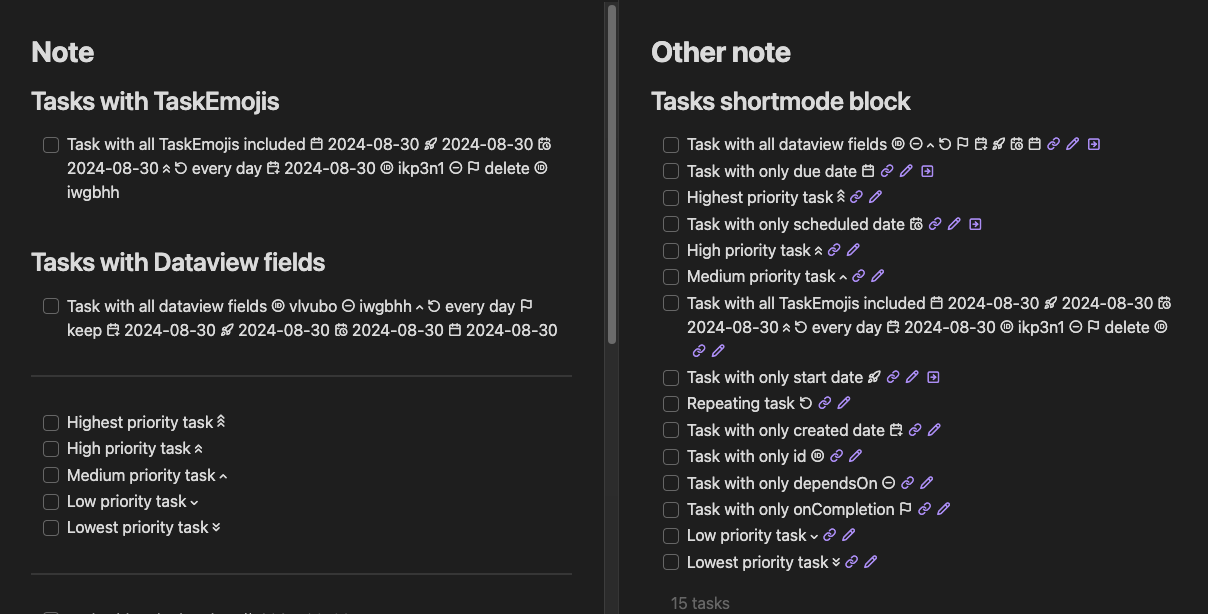
Tasks Custom Icons
Replace emojis used in Obsidian Tasks with monotone SVGs (obsidian css snippet generator)
Obsidian Tasks Custom Icons
This project was created by Phil Ricketts - @replete - and moved to obsidian-tasks-group in May 2024.
Many thanks Phil for all the work on this.
This repository contains a commandline tool (for developers/designers) to easily create CSS snippets that when added to Obsidian will replace the emojis used by the Obsidian Tasks with monochrome icons matching the text colour.
As a Tasks end-user, you can simply install one of the generated CSS snippets below to your obsidian vault to replace the Tasks Emoji Format emojis (in Live Preview or Reading modes) with monochrome icons.
Lucide-based Icon set
Download Lucide CSS Snippet (Icons modified from https://lucide.dev)
Lucide-based Icon set 2
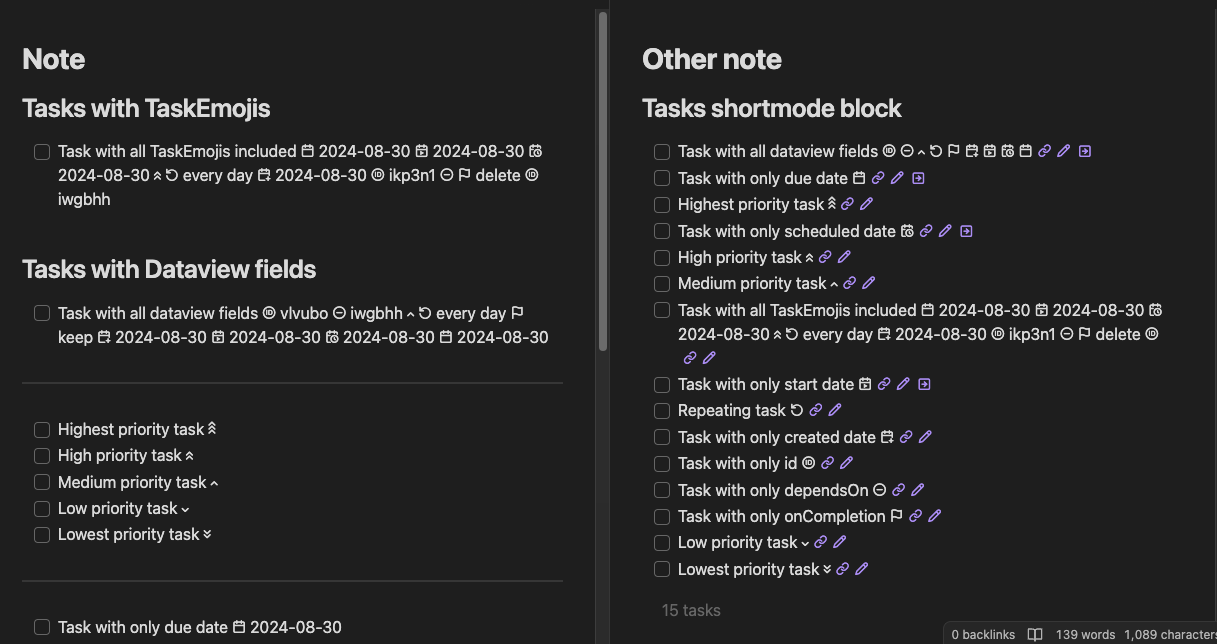
Download Lucide2 CSS Snippet (Icons modified from https://lucide.dev)
Incomplete icon sets
These icon sets are incomplete and are not recommended for use. They are included here for reference.
- EmojiTwo-based Icon set
- Date and recurring icons modified from https://github.com/EmojiTwo/emojitwo/tree/master/svg_bw
- NotoEmoji-based Icon set
- Icons extracted from Google's Noto Emoji variable TTF font
Creating a custom icon set
Prerequisites: Node.JS must be installed. I cannot provide support if this is unfamiliar, but it is fairly straightforward:
- Clone/fork/download this repository
- From a terminal, run
npm installfrom the cloned/forked/downloaded directory - Duplicate the
TaskMonoEmojis-notoemojifolder, renaming it to your new icon set name, e.g.TaskMonoEmojis-fancyicons. Folder naming format:{font name}-{icon set name}. The font name determines the CSS @font-face font name (e.g.TasksMonoEmojis) and the 'icon set name' (e.g.fancyicons) - merely a descriptive folder name. - Replace/edit the duplicated SVG files in your new folder
- Run
npm run build, to generate{folder name}.css(embedded woff2 font, license comment, and obsidian CSS snippet){folder name}.html(quick demonstration of the font in action), and{folder name}.woff2(separate woff2 file, not needed for snippets) files within each folder. This tool will generate fonts for each of the 'icon set' folders in the directory each time it is run.- Dev Tip: In your new 'icon set' folder, create a text file named
copysnippetpath.txtcontaining an absolute path to another folder – e.g '/Users/username/MyVault/.obsidian/snippets/'. This will cause an extra copy of{folder name}.cssto be written each time you runnpm run build. If you specify your Obsidian snippet folder and enable it within obsidian, Obsidian will reload the snippet whenever it changes. - Each SVG must be named with the format
u{unicode hex number}-{name}, as this is used to assign the glyphs during creation of the webfont. The name (after the hyphen) is only used for the generated HTML file. - Because of how this works, this tool can be used to generate webfonts for other scenarios than an Obsidian plugin, you'd just need to adjust the
ImplementationCSSvariable string template in index.js according to your needs.
- Dev Tip: In your new 'icon set' folder, create a text file named
- Adjust SVG icons as desired
- Replace
LICENSE.TXTas appropriate, if you take icons from somewhere rather than creating your own artwork, the license should be honored and reproduced here
Unicode reference
The unicode reference for the emojis used in the Task Emoji Format is as follows:
| Emoji | Unicode |
|---|---|
| 🆔 | U+1F194 |
| 🏁 | U+1F3C1 |
| 📅 | U+1F4C5 |
| 📍 | U+1F4CD |
| 🔁 | U+1F501 |
| 🔗 | U+1F517 |
| 🔺 | U+1F53A |
| 🔼 | U+1F53C |
| 🔽 | U+1F53D |
| 🛫 | U+1F6EB |
| ⏩ | U+23E9 |
| ⏫ | U+23EB |
| ⏬ | U+23EC |
| ⏰ | U+23F0 |
| ⏳ | U+23F3 |
| ⛔ | U+26D4 |
| ✅ | U+2705 |
| ❌ | U+274C |
| ➕ | U+2795 |
| 📝 | U+1F4DD |
CSS Snippet details
This tool generates CSS snippets usable by Obsidian for the purpose of replacing the Task Emojis Format emojis for task lines in obsidian notes. It currently uses the following rules for styling, which only applies the monochrome fonts to task lines in the normal editor, and task dataview. This works for Live Preview and Reading mode, though the rule could easily be adapted to also apply to source mode view.
/*! License info */
@font-face {
	font-family: 'TasksMonoEmojis';
	src: url('data:@file/octet-stream;base64,DO_NOT_USE_THIS_CSS_EXAMPLE') format('woff2');
	unicode-range: U+1F194, U+1F3C1, U+1F4C5, U+1F4CD, U+1F4DD, U+1F501, U+1F517, U+1F53A, U+1F53C, U+1F53D, U+1F6EB, U+23E9, U+23EB, U+23EC, U+23F0, U+23F3, U+26D4, U+2705, U+274C, U+2795;
	/* 🆔, 🏁, 📅, 📍, 📝, 🔁, 🔗, 🔺, 🔼, 🔽, 🛫, ⏩, ⏫, ⏬, ⏰, ⏳, ⛔, ✅, ❌, ➕ */
	/*! Generator: obsidian-tasks-custom-icons v1.0.6 https://github.com/obsidian-tasks-group/obsidian-tasks-custom-icons */
}
span.tasks-list-text,
.cm-line:has(.task-list-label) [class^=cm-list-],
span.task-extras,
.tasks-postpone,
.tasks-backlink,
.tasks-edit::after {
	font-family: 'TasksMonoEmojis', var(--font-text);
}
span.task-extras {
	display: inline-flex;
	align-items: flex-start;
	margin-left: 0.33em;
}
Please open an issue in github if you discover any issues.
How to Install
- Download the repository ZIP below
- Unzip it and find the CSS snippet file
- Move the CSS file into your vault's
.obsidian/snippets/folder - Open Obsidian → Settings → Appearance → CSS Snippets → Enable it
Stats
Stars
84
Forks
11
Last updated 24mo ago
Categories