SNIPPET
mehdieidiIslands
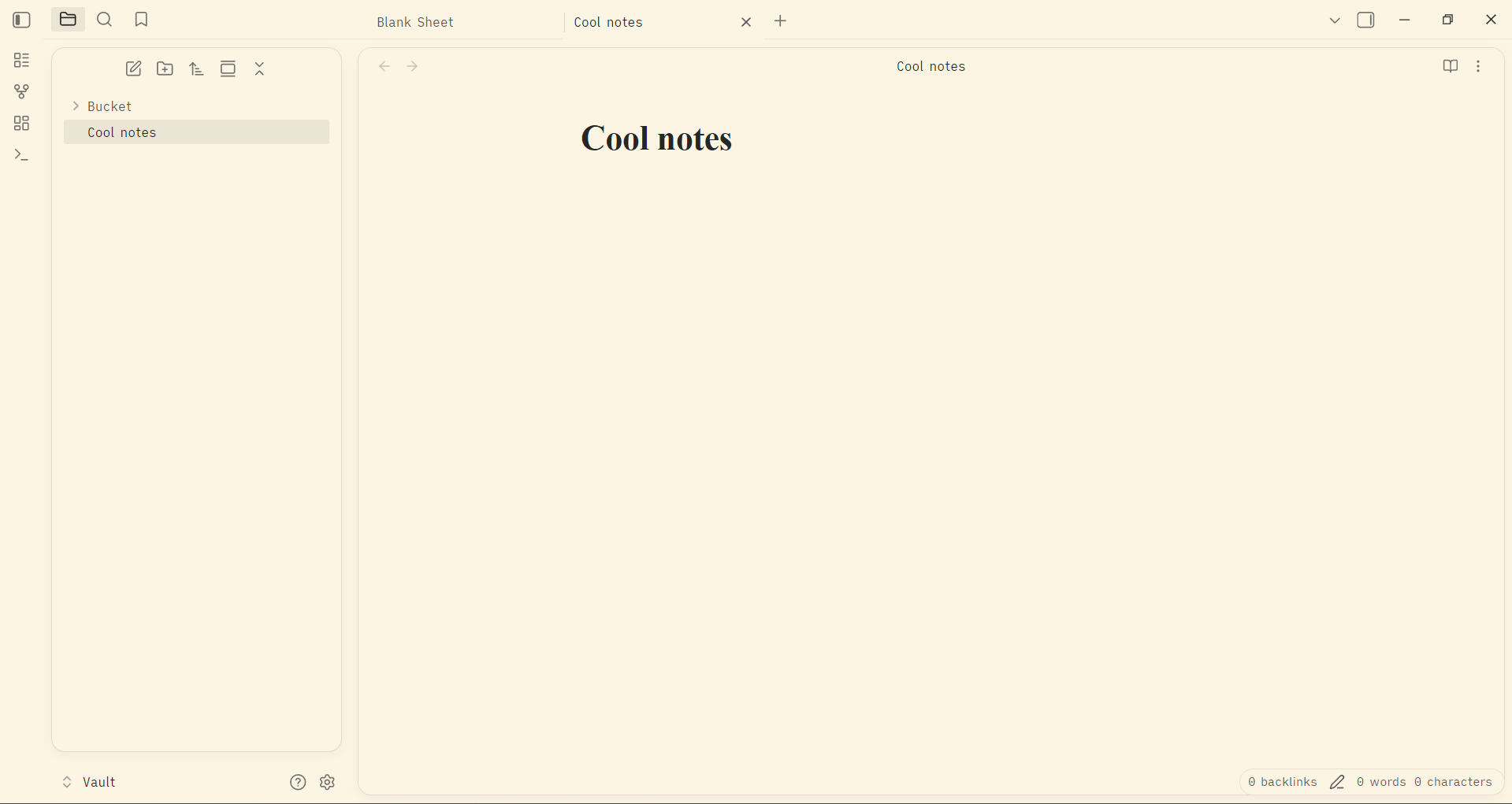
A CSS snippet for Obsidian that transforms the workspace into "island-style" interface inspired by IntelliJ.
🏝️ Obsidian Islands UI
A lightweight CSS snippet for Obsidian that transforms the standard workspace into "island-style" interface inspired by IntelliJ.
🚀 Installation
- Download the CSS: Copy the code from
islands.cssin this repository. - Open Obsidian Snippets Folder:
- Go to
Settings>Appearance. - Scroll down to CSS snippets.
- Click the folder icon to open the snippets folder.
- Go to
- Create the file: Create a new file named
islands.cssand paste the code inside. - Activate: Go back to Obsidian and toggle the switch next to
islandsto enable it.
🎨 Recommended Settings
To get the look seen in the screenshot, I recommend using a light theme like Typewriter or the default Obsidian theme with a custom background color.
How to Install
- Download the repository ZIP below
- Unzip it and find the CSS snippet file
- Move the CSS file into your vault's
.obsidian/snippets/folder - Open Obsidian → Settings → Appearance → CSS Snippets → Enable it
Stats
Stars
1
Forks
0
License
MIT
Last updated 6mo ago
Categories