Obsidian Stat Block CSS
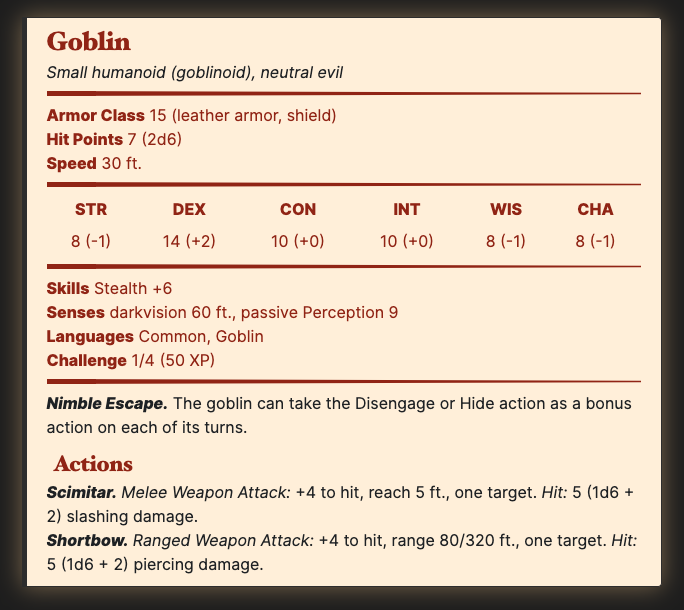
This is a CSS snippet for Obsidian to style stat blocks for Dungeons and Dragons.
---
cssclasses: stat-block
---
> ## Goblin
>*Small humanoid (goblinoid), neutral evil*
>___
> - **Armor Class** 15 (leather armor, shield)
> - **Hit Points** 7 (2d6)
> - **Speed** 30 ft.
>___
>|STR|DEX|CON|INT|WIS|CHA|
>|:---:|:---:|:---:|:---:|:---:|:---:|
>|8 (-1)|14 (+2)|10 (+0)|10 (+0)|8 (-1)|8 (-1)|
>___
> - **Skills** Stealth +6
> - **Senses** darkvision 60 ft., passive Perception 9
> - **Languages** Common, Goblin
> - **Challenge** 1/4 (50 XP)
>___
> ***Nimble Escape.*** The goblin can take the Disengage or Hide action as a bonus action on each of its turns.
> ### Actions
> ***Scimitar.*** _Melee Weapon Attack:_ +4 to hit, reach 5 ft., one target. _Hit:_ 5 (1d6 + 2) slashing damage.
>
> ***Shortbow.*** _Ranged Weapon Attack:_ +4 to hit, range 80/320 ft., one target. _Hit:_ 5 (1d6 + 2) piercing damage.
Becomes:
Install
- In Obsidian, open Preferences, Appearance, then open the folder for CSS Snippets.
- Download
stat-block.cssto that folder. - Enable
stat-block.cssin CSS Snippets in Obsidian.
Usage
The CSS is designed to work with the stat blocks from Tetra-cube's DND 5e Statblock Generator. Use that page to create your stat block,then press the "View Markdown" button to get the markdown for Obsidian.
Be sure to tag the page with a stat block with:
---
cssclasses: stat-block
---
If you want to use a stat block on a page with more information, you may want to transclude the note into your main note:
![[Goblin]]
How to Install
- Download the repository ZIP below
- Unzip it and find the CSS snippet file
- Move the CSS file into your vault's
.obsidian/snippets/folder - Open Obsidian → Settings → Appearance → CSS Snippets → Enable it
Stats
Stars
7
Forks
0
License
MPL-2.0
Last updated 68mo ago
Categories