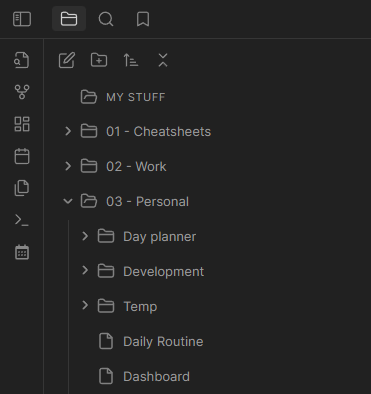
Explorer With Icons
Add icons to your Obsidian file explorer with CSS.
[!NOTE] Tested in Windows and Android but should work fine in macOS, Linux, and iOS.
Preview
This screenshot was taken with the Minimal theme applied.
How to install and enable
- Open your vault root folder in your OS file explorer
- Open the
.obsidianfolder and create a new folder calledsnippets - Download and paste the
explorer-with-icons.cssof this repository inside of thesnippetsfolder - In Obsidian, open the settings in the appearance section, scroll down to the end and enable the snippet
[!NOTE] The icon color is hardcoded in the SVG. If you want it in a different color, you can modify the
strokeproperty for each SVG.
Special thanks to
Lucide Icons for their awesome work.
How to Install
- Download the repository ZIP below
- Unzip it and find the CSS snippet file
- Move the CSS file into your vault's
.obsidian/snippets/folder - Open Obsidian → Settings → Appearance → CSS Snippets → Enable it
Stats
Stars
1
Forks
0
License
GPL-3.0
Last updated 35mo ago
Categories
Tags
obsidianobsidianmdsnippet