DASHBOARDSean-Shmulevich
Tasks Dashboard
Tasks Dashboard
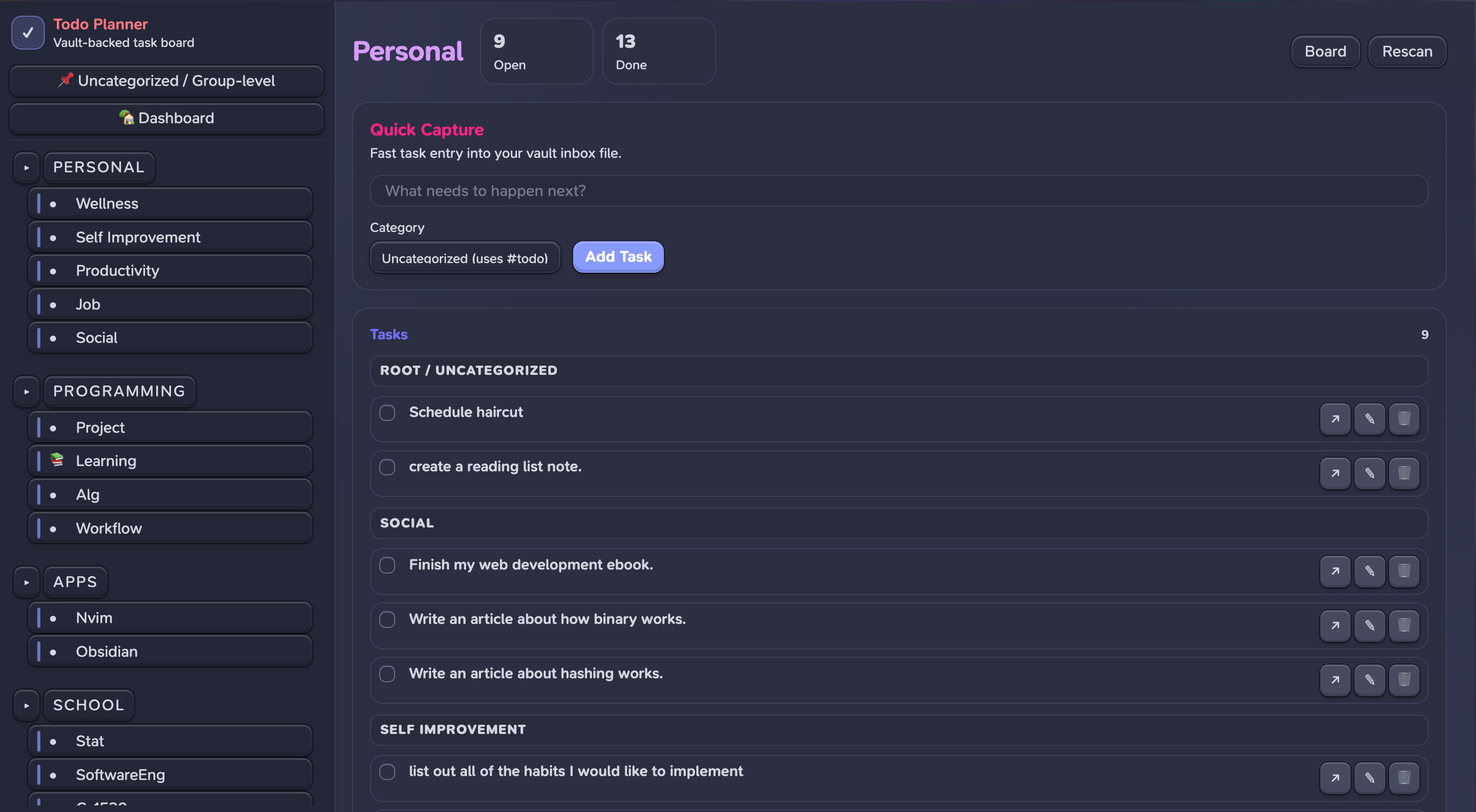
An Obsidian plugin that turns your vault's #todo tags into a visual task planner with a Discord-style sidebar, category grouping, and two-way sync.

How It Works
Tasks Dashboard scans your vault for #todo tags and renders them in an interactive UI. Completing a task in the UI checks it off in the source .md file. Adding a task writes it to your vault. No external database — your vault is the source of truth.
Tag Convention
- [ ] #todo/personal/social/blog Write an article about hashing
- [x] #todo/school/CS1622-Compilers Read chapters 4.1-4.2 ✅ 2024-10-13
- [ ] #todo/programming Get my compiler on git
- #todo/personal/job Schedule mentor calls
Structure: #todo/<group>/<category>/<subtag>
| Tag | Group | Category | Subtag |
|---|---|---|---|
#todo/school/CS1550-OS/project | School | CS1550 OS | project |
#todo/personal/social/blog | Personal | Social | blog |
#todo/programming | Programming | (root-level) | — |
#todo | (ungrouped) | — | — |
Both checkbox (- [ ]) and plain list (- #todo/...) formats are supported.
Features
- Discord-style sidebar — groups and categories with collapsible sections
- Two-way vault sync — check off tasks, add new ones, changes write back to
.mdfiles - Group views — click a group to see tasks organized by category (e.g., Apps → Obsidian, Nvim, Root)
- Category views — click a category to see tasks with subtag sections
- Subtag grouping —
#todo/personal/social/blogand#todo/personal/social/ebookrender as subsections within Social - Quick Capture — add tasks from any view; locked to the current category with optional subtag input
- Dashboard — all incomplete tasks across the vault, grouped by recency (This Week / This Month / All)
- Finished Tasks — collapsible section per view
- Drag reorder — reorder tasks within views, persisted across sessions
- Open in Obsidian — jump to the source file and line for any task
- Responsive — works in narrow panes with collapsible sidebar
- Obsidian theme integration — uses native CSS variables, adapts to light/dark themes
Installation
From source (recommended for now)
git clone https://github.com/Sean-Shmulevich/obsidian-tasks-dashboard.git
cd obsidian-tasks-dashboard
npm install
npm run build
Symlink into your vault:
ln -s /path/to/obsidian-tasks-dashboard /path/to/vault/.obsidian/plugins/tasks-dashboard
In Obsidian: Settings → Community Plugins → enable Tasks Dashboard.
Usage
- Click the ✅ ribbon icon or Cmd/Ctrl+P → "Open Tasks Dashboard"
- Opens as a tab in the main editor area
- Click groups/categories in the sidebar to filter
- Check off tasks — updates the source file
- Use Quick Capture to add tasks to your vault inbox
Settings
- Tag prefix — default
#todo, customize if you use a different convention - Inbox file — where Quick Capture writes new tasks (default
Todo Inbox.md) - Archived groups — groups to collapse by default
- Show completed — toggle finished task visibility
Tech Stack
- Obsidian Plugin API + Svelte 5 (runes)
- esbuild + esbuild-svelte
- TypeScript
- CSS custom properties (Obsidian theme variables)
Project Structure
├── main.ts              # Plugin entry point
├── TodoView.ts          # ItemView — mounts Svelte app
├── vault-scanner.ts     # Scans vault for #todo tags
├── vault-writer.ts      # Writes changes back to vault files
├── state.svelte.ts      # Reactive state (Svelte 5 runes)
├── settings.ts          # Plugin settings tab
├── types.ts             # Task, Category, CategoryGroup types
├── components/
│   ├── App.svelte       # Root layout (sidebar + content)
│   ├── Sidebar.svelte   # Discord-style navigation
│   ├── TaskBoard.svelte # Dashboard + category/group views
│   ├── TaskCard.svelte  # Individual task with actions
│   └── QuickCapture.svelte
├── styles.css           # Obsidian-themed styles
├── manifest.json
└── esbuild.config.mjs
License
MIT
How to Install
- Download the dashboard markdown file from GitHub
- Drop it into your vault (anywhere)
- Install the Homepage plugin and point it at the file
- Enable any listed CSS snippets for the intended look
Stats
Stars
2
Forks
0
License
MIT
Last updated 1mo ago
Categories