Snippets - Possibly useful for others
Templater
These require Templater plugin.
Bible Quotes
In addition to Templater plugin, you need python to run these scripts.
I have a few templater snippets that basically just add a specific bible callout (see callout-snippets folder) and add the verse range into your note. There is a range and it asks for start chapter and verse and end chapter and verse. If the end is the same as the beginning (chapter and/or verse) just hit enter to the question, and it works fine.
For the choose version: you can pick any version that is available in BibleGateway. However, the command it uses assumes that your vault is in Windows and you are calling WSL with zsh and that your script is in folder that zsh has environment variable $PYCODE for. If you have configured python some other way, you might need to change this. You will only need to modify the command in the getBibleQuote.js. That is the only script that calls python.
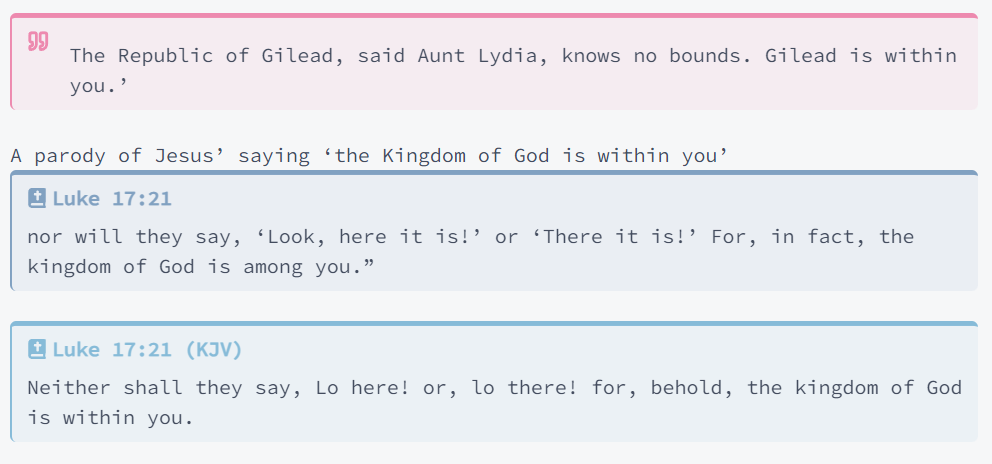
This is how it looks like with my custom callouts (of course you can modify them as you like):
How to Install
- Download the repository ZIP below
- Unzip it and find the CSS snippet file
- Move the CSS file into your vault's
.obsidian/snippets/folder - Open Obsidian → Settings → Appearance → CSS Snippets → Enable it
Stats
Stars
1
Forks
0
Last updated 10mo ago
Categories
Tags