
Princey Obsidian Snippets
This is the repository for storing and sharing CSS snippets for Obsidian
Princey-Obsidian-Snippets
This is my repository for storing and sharing CSS snippets for Obsidian. As of June 25th, it's a bit out of date, sorry about that! I'm working on lots of big changes for the File Browser snippet in particular, so expect an update to that in the near future. Thanks for your patience!
Princey File Browser Colors:
This snippet adds folder and file icons next to your items in the file browser, and creates a color pattern effect. Supports Make.md Spaces!
Supported file types with unique icons are:
- Markdown files: .md
- Canvas files: .canvas
- Excalidraw plugin files: .excalidraw.md
- Obsidian Dashboard table files: .table
- MAKE.md context files: .context
- Archive files: .zip, .7z
- Image files: .svg, .bmp, .jpeg, .jpg, .png, .gif
- Video files: .webm, .mp4, .ogv, .mov, .mkv
- Audio files: .mp3, .wav, .m4a, .ogg, .3gp, .flac
- .txt and .pdf
- Microsoft Office files:
- Word: .docx, .doc, .rtf
- PowerPoint: .pptx, .ppt,
- Excel: .xlsx, .xlsm, .xlsb, .xltx, .xltm
- .JSON files
Includes Style Settings options for customizing the colors.
Princey Auto Card Link Settings
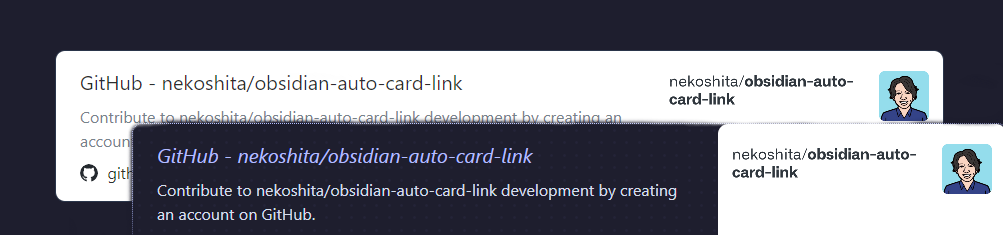
I really liked this plugin, but by default it made white cards, which bothered me as a dark theme user. This snippet adds style settings support for changing almost everything about the link card! I've made the default settings in such a way that it should look handsome on a wide variety of themes by default, but it's easy to change it to suit your aesthetic preferences, now.
To-do:
- Add comments and documentation to all snippets that don't already have them for the sake of clarity.
- Update snippets to most recent versions, making sure to remove features I may have accidentally added that aren't relevant to other users.
How to Install
- Download the repository ZIP below
- Unzip it and find the CSS snippet file
- Move the CSS file into your vault's
.obsidian/snippets/folder - Open Obsidian → Settings → Appearance → CSS Snippets → Enable it
Stats
Stars
9
Forks
0
Last updated 40mo ago
Categories