SNIPPET
3ut3Rainbow Folder Obsidian
This is CSS snippets used in Obsidian ( note-taking-app) which is quite popular due to
🌈 Rainbow Folder CSS Snippet for Obsidian
🖌️ About
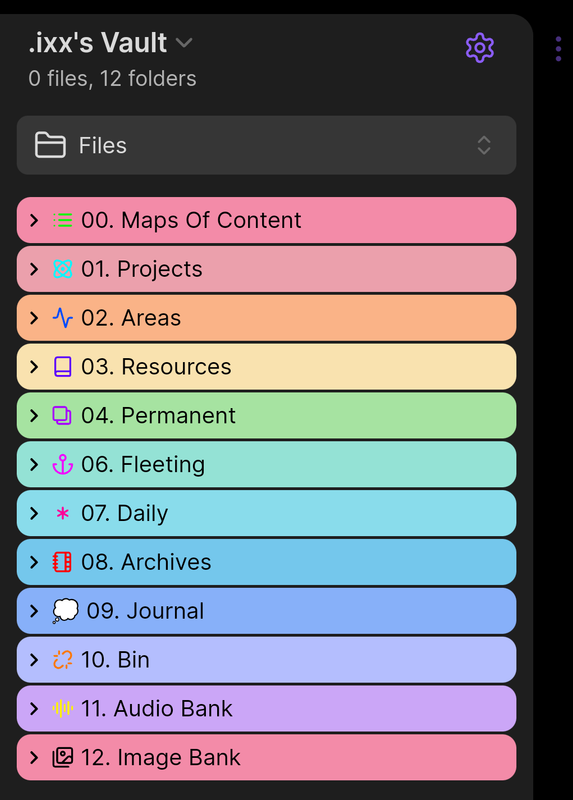
The Rainbow Folder CSS snippet enhances your Obsidian experience by assigning vibrant rainbow colors to folders and their subfolders. This snippet ensures a consistent, colorful structure throughout your vault, making navigation easier and visually appealing.
🎨 Features
- Rainbow-colored folders for a unique, colorful Obsidian workspace.
- Subfolders inherit the same colors as their parent folders for a cohesive look.
- Lightweight and easy to integrate into your Obsidian themes.
🌟 Preview
Here’s a sneak peek of the Rainbow Folder in action:
🚀 How to Use
- Download the snippet from this repository.
- Copy the CSS file to your Obsidian vault’s snippets folder (
.obsidian/snippets). - Open Obsidian, go to Settings → Appearance → Snippets, and enable the Rainbow Folder snippet.
- Enjoy your colorful folder experience!
🛠️ Customization
Want to tweak the colors? Open the CSS file in any text editor and modify the color values. Save the file and reload snippets in Obsidian to apply the changes.
📢 Stay Connected
- Telegram:

- Instagram:

- Email: ✉️ yangxinhai308@gmail.com
💡 Created By
.ixx
Feel free to reach out for feedback, suggestions, or collaborations!
How to Install
- Download the repository ZIP below
- Unzip it and find the CSS snippet file
- Move the CSS file into your vault's
.obsidian/snippets/folder - Open Obsidian → Settings → Appearance → CSS Snippets → Enable it
Stats
Stars
2
Forks
0
Last updated 22mo ago
Categories