obsidian-template
Tickets, projects and a repo ledger inside an Obsidian vault — plain Markdown, operated by coding agents (Claude Code / Codex), Windows ⇄ WSL ready.
⟨ TICKET VAULT ⟩
Tickets, projects and a repo ledger — living entirely inside an Obsidian vault, operated by coding agents.
Plain Markdown. Zero servers. Your git history is the audit log.




Why
- Tickets are files. One note per ticket, YAML frontmatter (
id,status,priority,due, …). Grep them, diff them, script them:rg "status: doing" tickets/is your standup. - Agents are workers, not autocomplete.
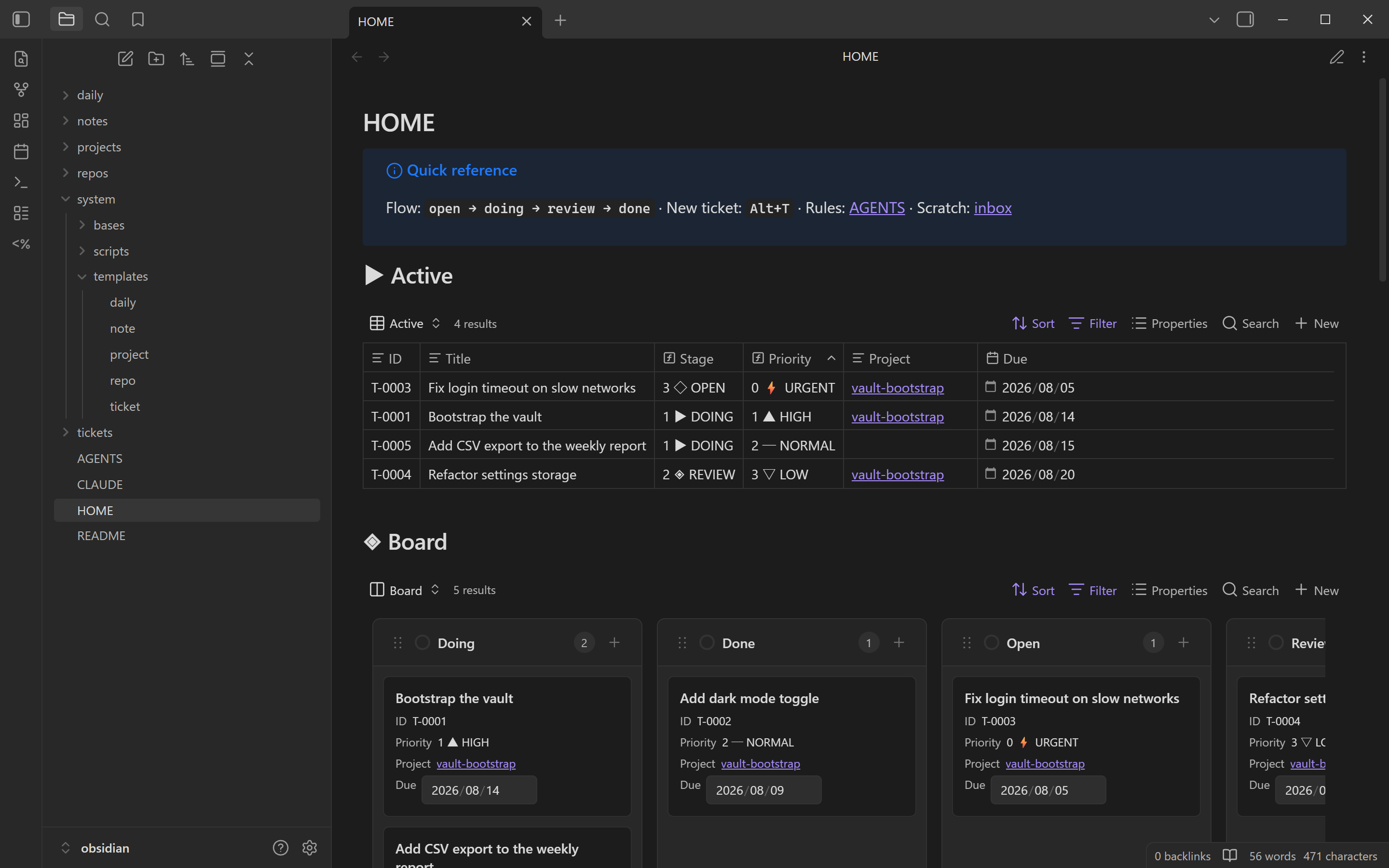
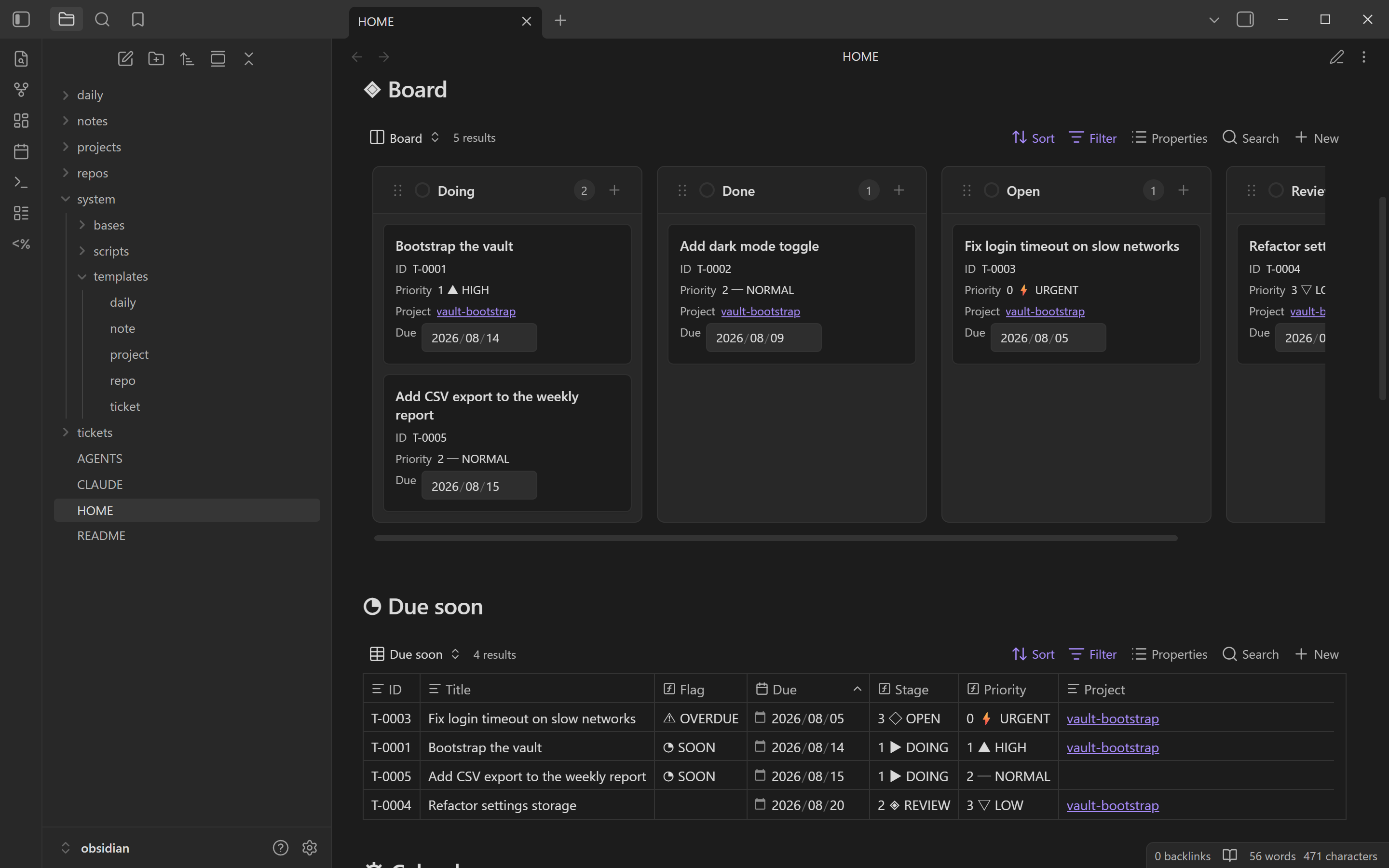
AGENTS.mdteaches Claude Code, Codex — anything that reads the file — the schema, the ID rule, the status flow and how to resolve repo paths. Say "take T-0042 and ship it" and the agent files the branch, logs the work, flips the status. - Views without lock-in. Tables, kanban Board and Calendar are Obsidian Bases reading the same frontmatter — delete every view and your data is still just Markdown.
- Windows ⇄ WSL native. The repo ledger stores both
path_windowsandpath_wslper repository; agents pick the right one for their platform. - Nothing to pay, nothing to sync-lock. Local-first, free, and the vault template itself is MIT with zero third-party code distributed.
See it work
you  › Take T-0042, implement it, and move it to review.

agent› Reading tickets/T-0042-fix-flux-capacitor.md
       Repo path via repos/my-repo.md → C:/Users/me/repos/my-repo
       Branch T-0042-fix-flux-capacitor · 3 files changed · tests green
       T-0042 → review — logged: "my-repo#12 awaiting review"
Every move lands in the ticket's ## Log, timestamped. Branches are named
T-NNNN-<slug>, so any branch in any repo resolves back to its ticket.
Quick start
-
Get the vault — click Use this template on GitHub (or clone):
git clone <this-repo> my-vault && cd my-vault -
Install the plugins (one command, needs any recent Node.js):
node system/scripts/install_plugins.jsNo plugin code is distributed with this repository — the script downloads the official release builds, pinned to versions tested with this vault. All settings are already committed, so there is nothing to configure.
Plugin (installed) License Powers Templater2.24.3AGPL-3.0 one-command ticket creation with auto-numbered IDs Calendar Bases0.2.8MIT Calendar view — tickets on their duedate, drag to rescheduleKanban Bases View0.10.2MIT Board view — drag cards between status columns Templater is deliberately pinned: 2.25.0 fails to load on Obsidian 1.13.x — tracked in ticket
T-0002. (Bases calendar & kanban are on Obsidian's official roadmap; these plugins are the bridge until then, sharing the same.basefiles.) -
Open the folder as a vault in Obsidian 1.13+ (
Open folder as vault) and enable community plugins when Obsidian asks (the trust dialog, or Settings → Community plugins → turn off Restricted mode).Open
HOME.md— that is your dashboard; pin it. -
Register your repositories: create one note per repo in
repos/fromsystem/templates/repo.mdand fillpath_windows/path_wsl. -
Create your first ticket: press
Alt+Tand enter a title — ID, filename and branch are auto-assigned.Alt+Ncreates a plain note innotes/,Alt+Dopens today's daily note.
Daily use
| Action | How |
|---|---|
| New ticket | Alt+T → prompts for title, auto-assigns ID (Alt+N plain note, Alt+D daily note) |
| Change status | Edit the status property (or ask Claude Code) |
| Sanity check | node system/scripts/check_vault.js after hand-editing frontmatter (agents run it automatically) |
| Board | HOME.md → Board (kanban — drag a card to change status) |
| Backlog | HOME.md → Active (sorted urgent → low) |
| Due dates | HOME.md → Due soon & Calendar |
| Weekly review | HOME.md → Done (7d) |
| Per-project view | Each project note embeds its own tickets |
| Per-repo view | Each repo note embeds its tickets |
Working with agents
Launch from the vault root, giving the agent access to the repos the ticket touches — with Claude Code:
claude --add-dir C:/Users/me/repos/my-repo        # Windows
claude --add-dir ~/repos/my-repo                  # WSL
(with Codex, add the repo path to the session's workspace/sandbox roots).
Then, for example: "Take T-0042, implement it, and move it to review."
AGENTS.md teaches the agent the schema, the ID numbering rule, the status
transitions, branch naming (T-NNNN-<slug>), and how to resolve repo paths
per platform via the repos/ ledger.
The manual is battle-tested down-market: in our robustness audit, agents on small/cheap models (Claude Haiku class) followed the schema, numbered IDs correctly and repaired a deliberately corrupted vault from lint output alone.
Claude Code skills ship with the vault: /ticket (create a ticket) and
/weekly-review (summarize the week) live in .claude/skills/ and work
as-is when you launch from the vault root. Running Claude Code somewhere
else — say inside a WSL code repo while the vault sits on the Windows side —
copy (or symlink) them into your user scope and point them at the vault:
mkdir -p ~/.claude/skills
cp -r /mnt/c/Users/me/vaults/my-vault/.claude/skills/* ~/.claude/skills/
export TICKET_VAULT=/mnt/c/Users/me/vaults/my-vault   # add to ~/.bashrc
(A symlink instead of cp keeps the skills in sync with vault updates.)
Windows ⇄ WSL
The vault is environment-agnostic by design:
- Line endings are forced to LF via
.gitattributes. - Repo notes carry both
path_windowsandpath_wsl; agents and humans pick the one matching the current platform. - Clone the vault to whichever filesystem you launch Obsidian from. If you
run Claude Code from WSL against a Windows-side vault, it is reachable
under
/mnt/c/...(expect slower file IO across the boundary). - Recommended topology (agents in WSL, GUI on Windows): vault on the
Windows filesystem + Obsidian as a native Windows app + code repos on WSL
ext4 (
path_wsl). Vault operations are a handful of small reads/writes — measured fine across/mnt/c— while the heavy IO (builds, tests, git on code) stays on ext4. Bulk content scans of the vault are the one slow case, which is why ID numbering works on filenames alone.
Structure
├── HOME.md           # dashboard (embedded Bases views)
├── AGENTS.md         # agent operating manual: schema, rules, workflows
├── CLAUDE.md         # thin pointer that imports AGENTS.md for Claude Code
├── tickets/          # 1 ticket = 1 note  (T-0001-slug.md)
├── projects/         # 1 project = 1 note
├── repos/            # repository ledger (paths per environment)
├── notes/            # freeform human notes (committed, travels with vault)
├── daily/            # daily notes (YYYY-MM/YYYY-MM-DD.md, template-applied)
├── system/           # infrastructure (rarely opened by humans)
│   ├── bases/        #   Bases views: tickets, projects, repos
│   ├── templates/    #   Templater templates (ticket / project / repo / note / daily)
│   ├── scripts/      #   next_ticket_id.js (ID numbering), check_vault.js (schema lint),
│   │                 #   install_plugins.js (fetches the pinned plugin builds)
│   └── docs/         #   README screenshots
├── local/            # git-ignored private scratch space (this machine only)
└── .obsidian/        # committed config: property types, plugin settings
.obsidian/workspace.json (machine state) is git-ignored; the rest of the
config is committed so a fresh clone looks and behaves identically.
The vault manages itself with its own system — browse tickets/ and you will
find the real, closed tickets for building and hardening this template.
Roadmap
- Phase 2: repo-ledger driven multi-repo routines, weekly review as a recurring task (Tasks plugin), branch-name conventions in CI.
- Phase 3: custom plugin — one-key status transitions, dashboard with throughput charts. Custom styling (themes/snippets) handled separately.
License
MIT — see LICENSE. No third-party plugin code is distributed
with this repository; the setup script downloads the pinned community-plugin
builds (versions, licenses and sources in the table above) from their
official releases.
How to Install
- Download the ZIP or clone the repository
- Open the folder as a vault in Obsidian (File → Open Vault)
- Obsidian will prompt you to install required plugins
Stats
Stars
0
Forks
0
License
MIT
Last updated 2mo ago
Categories
Tags