Gantengx Vault Example
Obsidian Vault Example
This is the example vault from my PKM blog series: a curated subset of my real Obsidian vault so you can download it and explore the system in practice.

Getting started
Clone or download the repo, then open the folder as a vault in Obsidian (File → Open folder as vault).
Where to begin
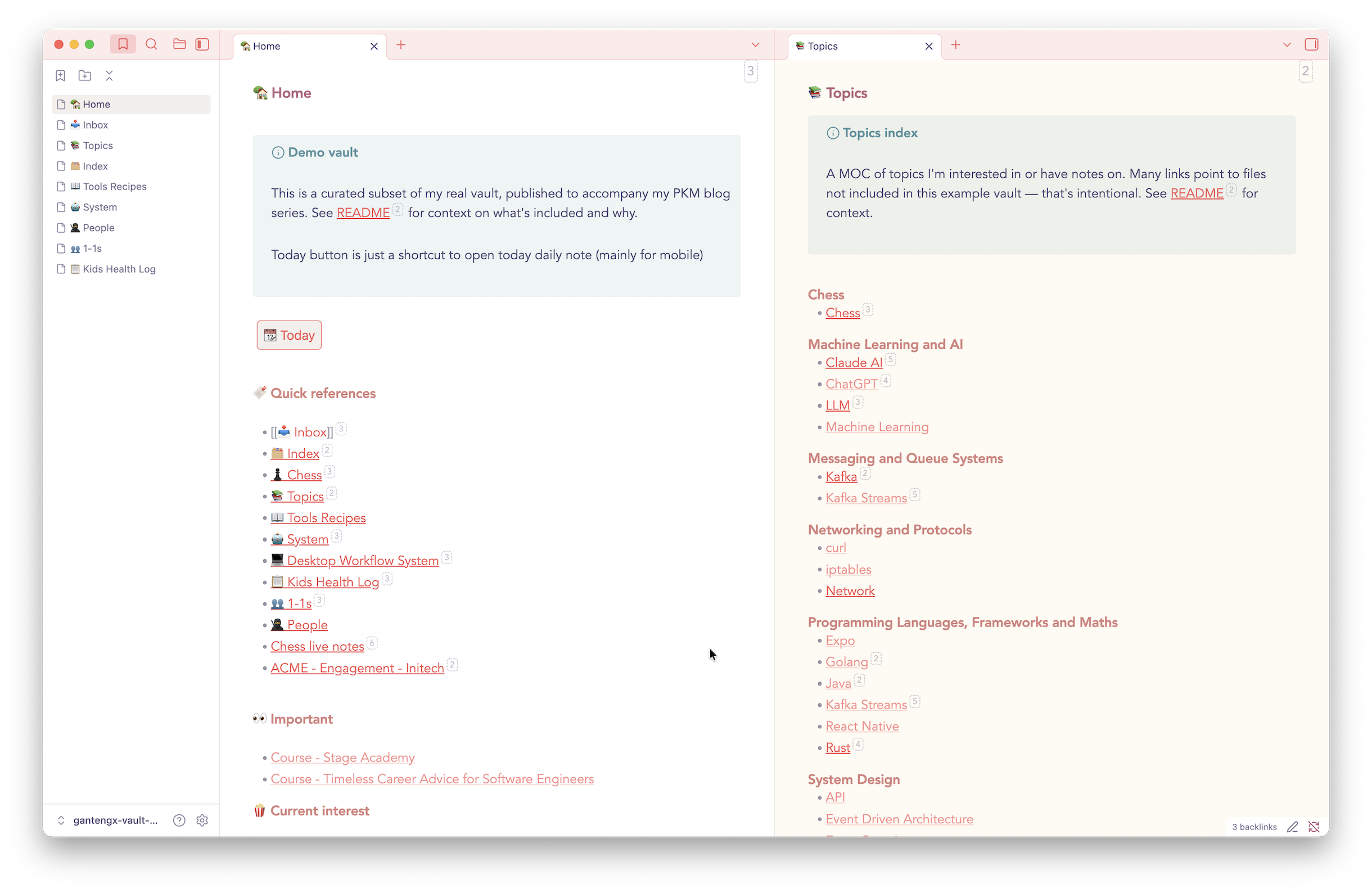
🏡 Home.md shows what the vault's home note looks like day-to-day: quick references, current interests, an embedded section from the Kids Health Log. The Today button is a mobile shortcut to open the daily note.
🤖 System.md is the best entry point. It describes the full system: note types, file naming conventions, flat structure, inbox, MOCs. This is the personal version which is written for myself, not for publication.
Post - The PKM Setup I Settled On After Many Iterations.md is the published version of that same content. Comparing the two is a live example of one of the core principles: write notes for yourself first, rewrite to publish. The metadata block at the top of the post (Date, Published, Subtitle, SEO Description, Tags) is a personal workflow reference. The fields I fill in as part of my publishing process and not used for querying in Obsidian.
https://github.com/user-attachments/assets/603a9c96-0e90-4db1-88ca-4589c38d779c
What this vault demonstrates
System and navigation
- Flat file structure: everything lives at root level. No folders except
Daily Notes/,Templates/, andAttachments/. Naming conventions do the work that folders would otherwise do. The file explorer is never used, the quick switcher is the primary navigation similar to Roam Research. Type a prefix and the right files appear instantly. The flat structure only works because of this. - Prefix-based note types:
Log -,Book -,Course -,Draft -,Post -,Prompt -,ACME -, etc. Type a prefix in the quick switcher and the right files surface immediately. - MOC notes as navigation hubs:
Kafka.md,Rust.md,♟️ Chess.md,ACME.mdare all maps of content: they don't contain knowledge directly, they link to it. - Emoji prefix for root index files:
🏡 Home,📥 Inbox,🤖 System,📚 Topics. The emoji makes them visually distinct and sorts them together.
Note patterns worth exploring
Evergreen notes: Chess psychology.md, Ownership concept.md, 4 buckets note capturing system.md. Atomic notes on a single concept, written to last. Titles are descriptive enough to be unambiguous without opening the file.
Linked note clusters: NTP.md → NTP drift.md → NTP root dispersion.md shows how a topic gets broken into linked atomic notes rather than one large file. Same pattern in the Chess cluster (♟️ Chess.md linking to strategy, psychology, study plan notes).
Person as MOC: Manager 1.md is a person note: a snapshot of context about someone. It links to Log - 1-1 - Manager 1.md, which is a single growing file capturing all 1-1 meetings with that person chronologically. The person note stays current; the log preserves history.
Company-prefixed notes: ACME.md is a company MOC linking to engagement notes, references, and admin notes. ACME - Engagement - Initech.md shows the 4-bucket format (Facts, Procedural, Conceptual, Questions) applied to a client engagement, with an embedded log. ACME - Work Logs.md shows a living document capturing multiple engagements in one place.
https://github.com/user-attachments/assets/1a192f74-ba55-4279-8387-bd4112c5f409
Health log: Log - Health - 2026-01-03 - Child 1 - Fever.md demonstrates the naming convention for date-based logs. The 📋 Kids Health Log.md is the MOC that aggregates them.
LLM context storage: LLM Preferences.md shows storing a personal context prompt directly in the vault. Available to paste into any LLM session without re-explaining yourself every time.
Redirect note: 44 Ideas.md contains a single line pointing to 💡 Ideas.md. This demonstrates the redirect pattern: when a note gets renamed or a project is promoted, leave a stub so existing links don't break. Preferred over tags or properties to keep things simple.
Theme
The vault uses the Minimal theme. .obsidian/snippets/minimal-snippet.css adds a few personal tweaks on top, the most useful being dimming of any editor pane that isn't in focus. With multiple tabs or panes open it makes it immediately obvious where the cursor is.
Claude Code integration
CLAUDE.md shows how Claude Code is configured as a vault assistant. It defines the vault structure, note taxonomy, file naming conventions, and behavioural rules so Claude understands the context without needing to be re-briefed.
Note: Claude Code sends file contents to the API when reading them. If your vault contains sensitive or confidential files (e.g. company-prefixed notes), exclude them using the permissions.deny setting in .claude/settings.json. See the Claude Code documentation for details. Alternatively, keep sensitive files in a separate vault and don't use Claude Code on that vault.
Templates
All 8 templates are in /Templates. They demonstrate the minimal template philosophy: most notes have no template at all. The ones that do (project notes, health log entries, 1-1s, posts) have only what's strictly necessary.
Daily notes
Daily Notes/ contains date-named files that are intentionally empty. Empty = processed. Non-empty = unprocessed inbox items that show up in 📥 Inbox.md. The inbox is not a read-later list as it must be drained. 📥 Inbox.md uses Bases (Obsidian's native querying feature) to surface these replacing Dataview, which I dropped to reduce third-party plugin overhead.
https://github.com/user-attachments/assets/07c05602-678e-44d9-9573-8692ddde81ed
On broken links
Many links here point to files that don't exist in this vault. That's intentional as this is a subset of a much larger vault. The broken links give a realistic sense of how the system scales in practice. The working clusters (NTP, Kafka, Rust, Chess, ACME) show how notes actually connect.
The series
How to Install
- Download the ZIP or clone the repository
- Open the folder as a vault in Obsidian (File → Open Vault)
- Obsidian will prompt you to install required plugins
Stats
Stars
14
Forks
0
License
MIT
Last updated 1mo ago