SNIPPET
ptournetHtml Tabs
Obsidian plugin allowing the creation and rendering of Tabs and tab panels in your notes.
54 Stars
GitHubCSSAny theme
# Obsidian HTML-Tabs
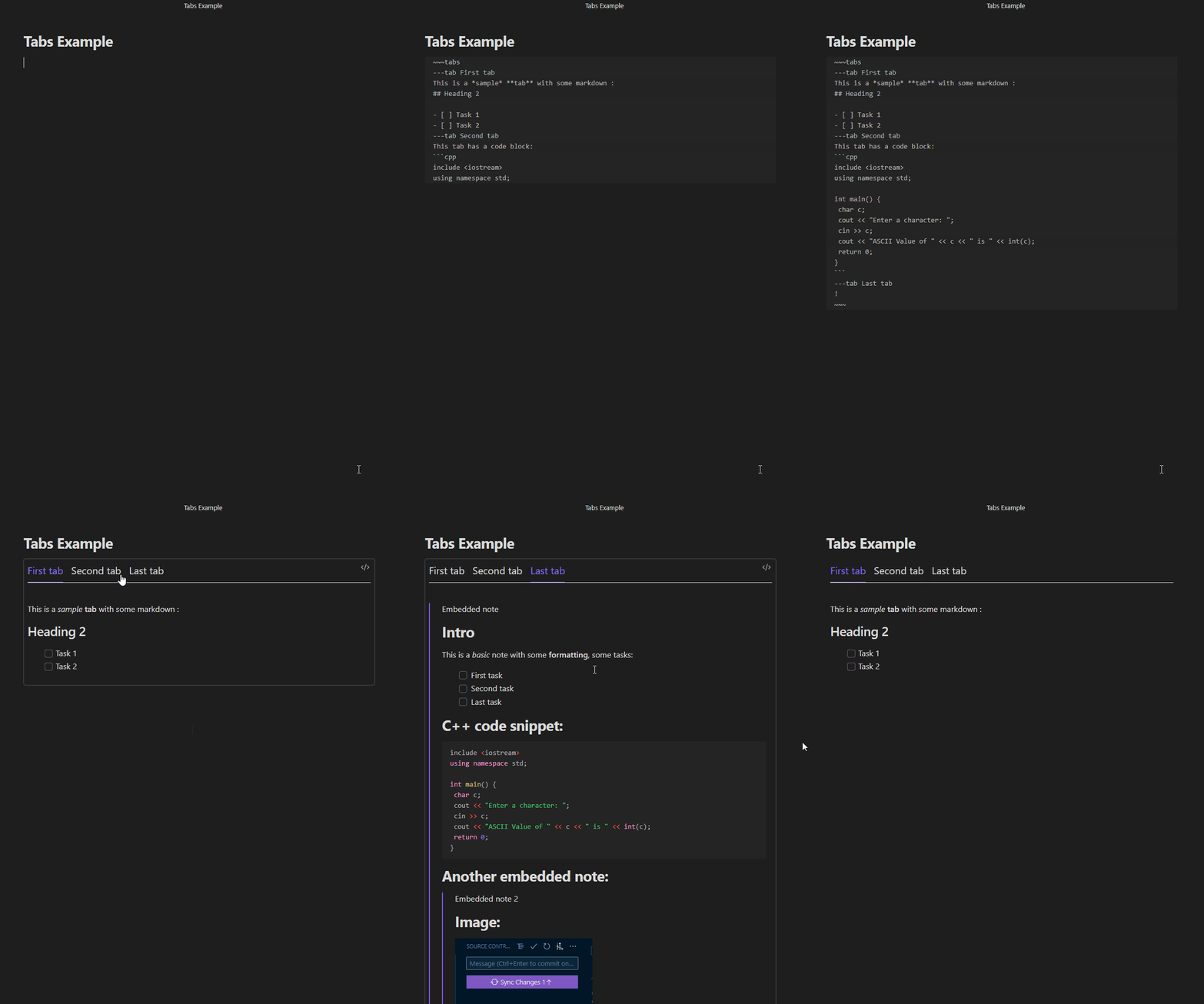
This plugin allows you to easily embed tab controls in your notes.
## Example

## Installation
### Download from Github
This is the only way to install the plugin pending its validation to appear on the list of official community plugins:
1. Go to https://github.com/ptournet/obsidian-html-tabs/releases
2. Download the latest release.
3. Extract and put the three files (`main.js`, `style.css`, `manifest.json`) to folder `{{obsidian_vault}}/.obsidian/plugins/html-tabs`
4. In `Settings > Community plugins`, activate **HTML Tabs**
### Install from Plugin Store
Follow the steps below to install **HTML Tabs**:
1. Open `Settings > Community plugins`
2. Click `Browse` in the Community plugins section
3. Search for `HTML Tabs`
4. Clink `Install` and then `Enable`
## Usage
The definition of a tab control containing 3 tabs has the following structure:
```markdown
~~~tabs
---tab <label-of-first-tab>
<content-of-first-tab>
---tab <label-of-second-tab>
<content-of-second-tab>
---tab <label-of-third-tab>
<content-of-third-tab>
~~~
```
or:
~~~markdown
```tabs
---tab <label-of-first-tab>
<content-of-first-tab>
---tab <label-of-second-tab>
<content-of-second-tab>
---tab <label-of-third-tab>
<content-of-third-tab>
```
~~~
The `<label>` of a tab is in plain text (no markdown allowed), while its `<content>` can use the full Obsidian Markdown syntax. It's particularly possible to embed antother note (with the syntax `![[Note-to-embed]]`) or have a fenced code block.
In this case, you have to be careful not to use the same characters as the ones for defining your tabs: if you used
```
~~~tabs
~~~
```
the code blocks in your tabs should be defined as:
~~~
```<lang>
```
~~~
but if you're used to defining you code blocks as:
```
~~~<lang>
~~~
```
then you should define your tabs as:
~~~
```tabs
```
~~~
## Customization
For the time being, if you want to change the way your tabs look, you have to use a `CSS Snippet`.
For that, you'll first need to create a `html-tabs.css` file in your `snippets` directory. If you don't know where it lives on your hard drive, you can locate it at the bottom of the `Appearance` page in your Obsidian `Settings`.
You can then ovveride the `html-tab*` classes defined in the `styles.css` file in the plugin directory.
## Contributing
You are welcome to contribute to this plugin via bug reports, bug fixes, documentation, or general improvements. For a major feature, please make an issue about your idea / reach out to me so I can decide if and how to best implement it.
## Pricing
This plugin is provided to everyone for free, however if you would like to say thanks or help support continued development, feel free to send a little my way through one of the following methods:
[](https://github.com/sponsors/ptournet)
[](https://paypal.me/ptournet)
## Credits
Thanks to `gapmiss/obsidian-alpinejs` which helped me integrating Alpine.js to get the tab switching working.
## Limitations
As of now, there is no interaction between Obsidian and the content of the tabs. For instance, if there is a task in a tab and you check it, its status won't persist if you switch to another tab and come back... And this task won't be found by a query (datatview or tasks plugin). A heading on a tab won't show in the note Outline either.
## Todo
- [x] First version of README
- [x] Validate on Android
- [x] Create a test-vault and modify *dev* script
- [x] Releasing v1.0.0
- [x] Markdown rendering of label
- [ ] Updating Obsidian cache
- [x] for Links (in order to have backlinks working)
- [ ] for Headings (in order to have the note Outline working)
- [ ] for Lists (in order to have Tasks woring)
- [ ] for Tags
- [ ] for Embeds
- [ ] for Sections
- [ ] Create first Settings
- [ ] Integrate labels in note outline
- [ ] Ability to open note on a specific label/tab
- [ ] Improve standard editing experience (place cursor in the right place in the right tab)
- [ ] Improve embedded editing experience (if tab content is in another note, allow editing that note instead)
- [ ] Buttons to easily create/edit tabs
- [ ] More visual configuration (for people who don't master CSS)
How to Install
- Download the CSS file below
- Move it to your vault's
.obsidian/snippets/folder - Open Obsidian → Settings → Appearance → CSS Snippets → Enable it
Stats
Stars
54
Forks
3
License
MIT
Last updated 28mo ago
Categories
Tags
obsidiantabstabs-component