lattice
An Obsidian vault template that looks like something on day one. 13 folders, 11 templates, a graph configured to read as a map — and a generator that fills it with 400 interlinked notes so you can see the structure work.
lattice
An Obsidian vault template that looks like something on day one.
Thirteen folders that each have one job, eleven note templates that tell you what goes in them, a graph configured to read as a map instead of fog — and a generator that fills the whole thing with four hundred interlinked notes so you can actually see whether the structure works.
git clone https://github.com/openwarehq/lattice
cd lattice
./install.sh ~/Documents/MyVault

# optional, and the reason the graph looks like anything:
python3 seed/generate.py --vault ~/Documents/MyVault
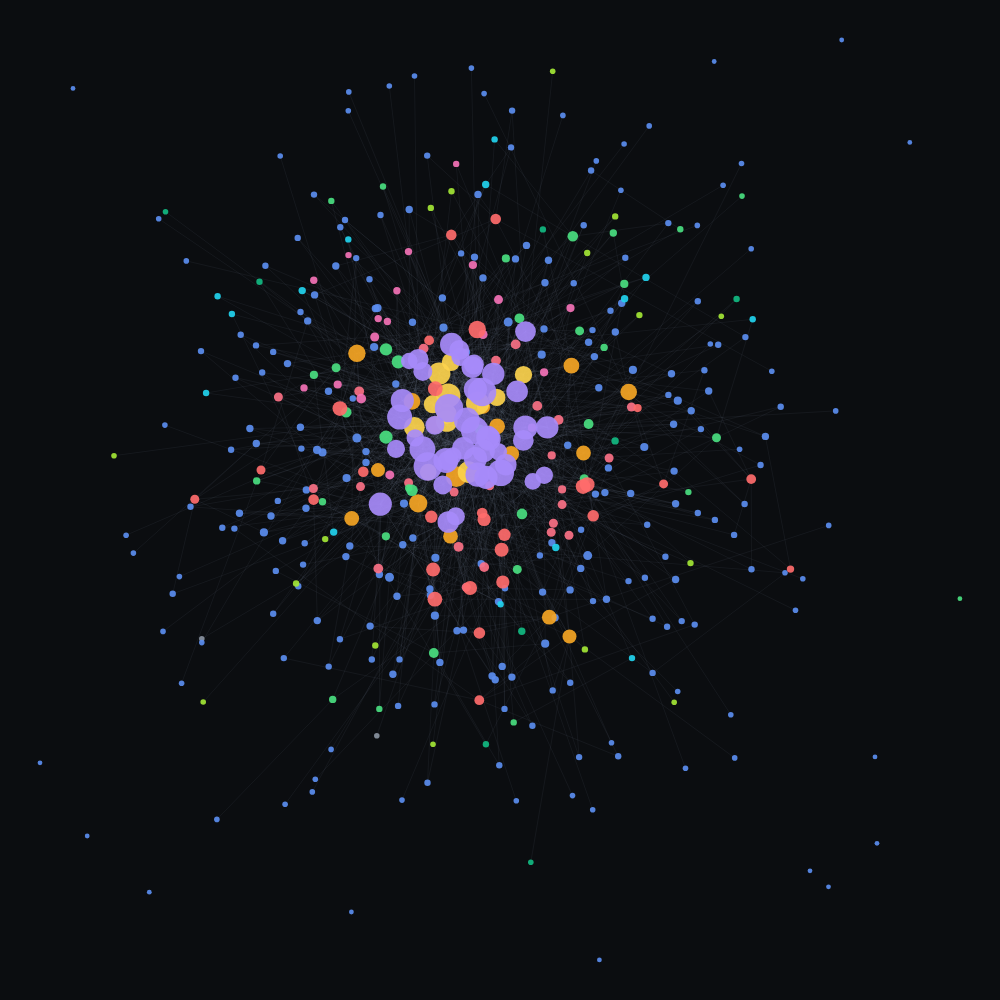
449 notes, 1,262 links, coloured by folder. The generator built this in about a second.
What this doesn't do
Read this part first.
- The demo content is fiction, and you should delete it. Every person,
company, project and source in the generator is invented — the sources
especially, because attaching a fabricated summary to a real author's name
would be putting words in their mouth. It exists so you can evaluate the
structure and film the graph, not so you can keep it.
generate.py --wiperemoves it. - A template cannot give you a good vault. It can give you somewhere obvious to put things and stop you inventing a fourth folder for the same idea. The part that matters — one idea per note, and a reason on every link — is a habit, and no folder structure installs it.
- No community plugins. Core only: no Dataview, no Templater, nothing to
break on an Obsidian update, nothing to learn before you can write a note. The
cost is that the templates are static —
{{date}}and{{title}}and nothing smarter. - The timeline animation needs macOS. Backdating a file's creation time
needs
SetFile, which comes with Xcode command line tools. Without it the notes still generate, they just all share today's birthday and the graph's time slider does nothing.os.utimecannot do this — it only moves mtime. - Thirteen folders is more than most people need. It is a starting taxonomy,
not a law. If
08 Questionsis empty after a month, delete it — an unused folder is worse than no folder, because it makes you hesitate every time you file something.
Why the graph looks like that
Three things, and only the first is about having lots of notes.
Colour is folder. Thirteen colour groups, one per folder, so the eye groups before it reads a single label. This is the whole difference between Obsidian's default graph — one grey mush at any real size — and a map. It is four lines of config that almost nobody sets.
Size is backlinks. Constellation notes link out to ten or more concepts each, so those nodes grow large and the graph gets a centre to hold onto. A graph of uniformly-sized dots reads as noise no matter how many there are.
Labels are off until you zoom. textFadeMultiplier: -2.2. At four hundred
nodes, labels on is a word cloud; the shape is the information.
The forces are tuned for this size too — high repel, long link distance — because the default settings collapse a few hundred notes into a hairball.
The taxonomy
00 Inbox | anything not yet placed | empty weekly |
01 Daily | what happened | link out or it is a diary |
02 People | one per person | what they care about, not their title |
03 Projects | has an end | no finish line means it is an Area |
04 Areas | has no end | a standard you hold |
05 Concepts | one idea each | the connective tissue |
06 Sources | books, papers, talks | an index to concepts, not a container |
07 Decisions | what you chose and why | the why is the entire note |
08 Questions | open loops | worth keeping unanswered |
09 Skills | deliberate practice | evidence, not courses |
10 Constellations | hubs that tie concepts into a path | these are the big nodes |
11 Experiments | things you tried | prediction written before the result |
12 Archive | done or dead | why it died is worth more than the work |
Numbered so the sidebar stops reshuffling every time you add something.
Each has a template in _templates/, and each template carries its own
instructions in a blockquote — the Decision template says "you will remember
what you decided and not what you decided against, and that is the half that
would have saved you", because a heading called Why gets left blank.
The generator
python3 seed/generate.py --vault ~/Documents/MyVault           # fill it
python3 seed/generate.py --vault ~/Documents/MyVault --wipe    # start over
python3 seed/generate.py --vault ~/Documents/MyVault --months 40 --daily-rate 0.4
Deterministic — same seed, same vault, so a screenshot is reproducible. Every wikilink it writes resolves to a note that exists: 0 broken links out of 1,307.
(The templates do contain empty [[ ]] placeholders, deliberately — they are
prompts for you to fill in. _templates is filtered out of the graph so they
never show up as stray nodes.)
--daily-rate defaults to 0.28 and is the one number worth knowing. Daily notes
are all one colour, so letting them run to seventy percent of the vault turns the
graph monochrome — which is the exact thing the taxonomy exists to prevent.
Filming it
The three shots, in order of how well they land:
- The graph, zoomed out, with the timeline dragged — Filters → the slider at the bottom. Two years of notes appearing in ten seconds.
- Groups panel open on the right, thirteen colours listed.
- Click a Constellation and watch the local graph fan out — hubs are where the structure is legible.
Dark mode, ⌘G for the graph, and hide the sidebar with ⌘⌥Z if you want it
clean.
MIT. Obsidian is a separate program you install yourself; lattice only writes markdown into a folder it happens to open.
How to Install
- Download the ZIP or clone the repository
- Open the folder as a vault in Obsidian (File → Open Vault)
- Obsidian will prompt you to install required plugins
Stats
Stars
1
Forks
0
License
NOASSERTION
Last updated 2mo ago
Categories
Tags