winx-vault
Gamified Obsidian vault with a magical-girl aesthetic — RPG leveling, XP tracking, life area radar, habits, pomodoro & mood dashboard powered by Dataview JS.
✨ Winx Vault — Obsidian RPG Dashboard
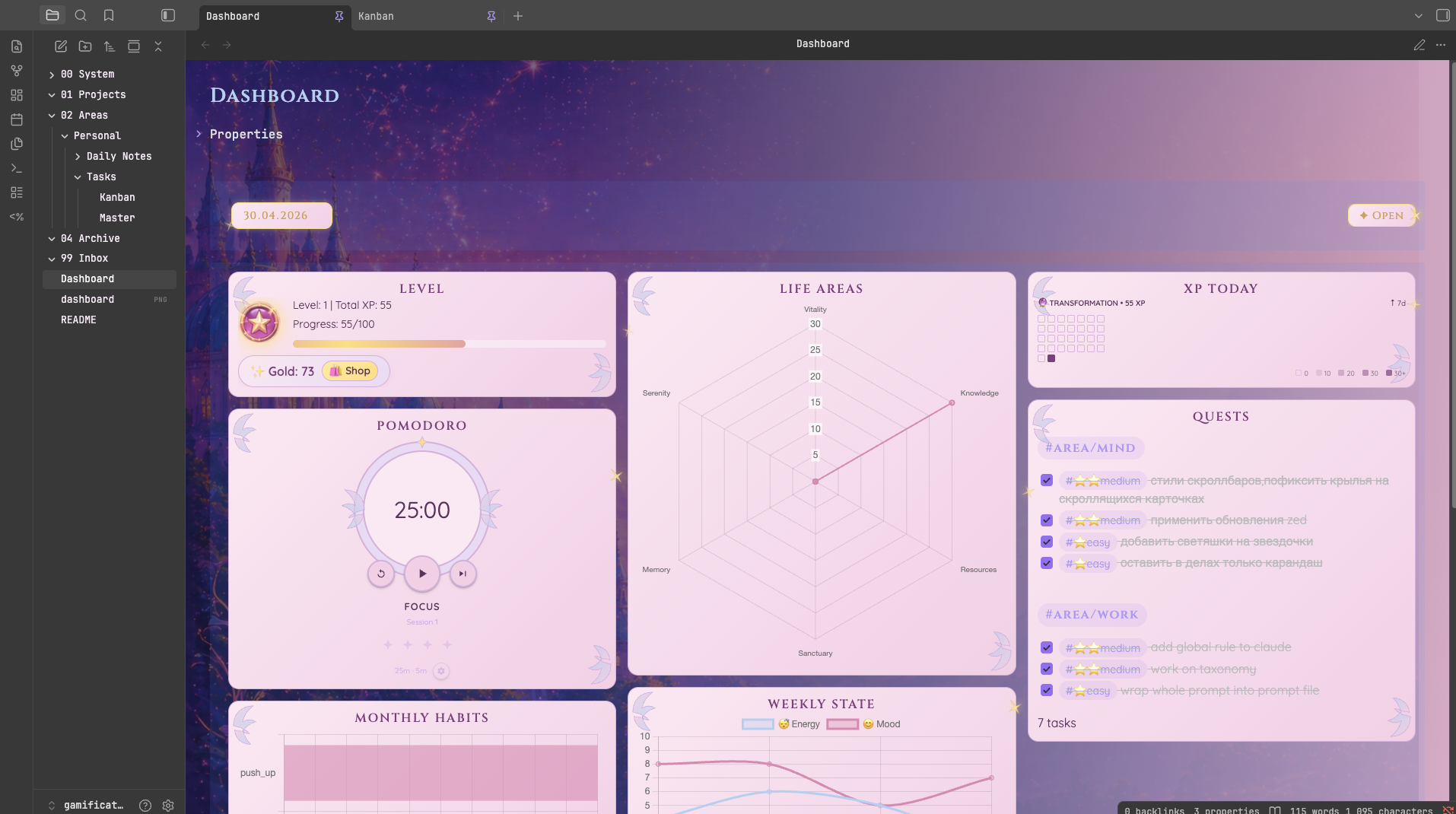
A gamified personal productivity system built in Obsidian with a magical-girl aesthetic. Track tasks, habits, energy, and life balance through an RPG-style dashboard.
🗂 Vault Structure
├── 📁 00 System
│   ├── 📁 Assets - Sounds for pomodoro and shop
│   ├── 📁 Data
│   │   ├── Shop.md
│   │   └── Celestial Market.md
│   ├── 📁 Scripts
│   │   ├── 📁 QuickAdd
│   │   │   ├── NewTask.js           — Task creation macro (difficulty + area pickers)
│   │   │   └── NewMarketItem.js     — Add an item to the Celestial Market
│   │   └── 📁 dvWidgets
│   │       ├── config.js              — Central config (areas, difficulties, XP values, levels)
│   │       ├── levelToday.js          — Level & XP progress card
│   │       ├── xpToday.js             — XP earned today + streak heatmap
│   │       ├── habits.js              — Monthly habits bar chart
│   │       ├── lifeAreas.js           — Radar chart of life area scores
│   │       ├── weeklyState.js         — Energy & mood line chart
│   │       ├── helpers.js             — Shared AudioEngine, Wallet, PurchaseLog
│   │       ├── wallet.js              — Gold balance widget
│   │       ├── shop.js                — Shop view with buy buttons
│   │       ├── pomodoro.js            — Pomodoro timer
│   │       ├── celestialMarket.js     — Celestial Market shopping list widget
│   │       └── dailyNote.js           — Date selector widget
│   └── 📁 Templates
│       ├── Daily Note.md — Templater template for new daily notes
│       ├── game.md — Templater template for new game
│       ├── recipe.md — Templater template for new recipe
│       ├── task.md — Templater template for new task
│       ├── read item.md — Templater template for new read item (book, article, etc)
│       └── watch item.md — Templater template for new watch item (cartoon, movie, etc)
├── 📁 01 Projects
├── 📁 02 Areas
│   └── 📁 Personal
│       ├── 📁 Daily Notes — Daily journal entries (mood, energy, habits, XP log)
│       └── 📁 Tasks
│           └── Kanban.md — Kanban board view of tasks
├── 📁 03 Resources
│   ├── 📁 Collections — Card-view lists (Obsidian Bases) with example entries
│   │   ├── 📁 Readlist — Books & fanfics to read
│   │   ├── 📁 Gamelist — Games to play
│   │   ├── 📁 Watchlist — Movies, series & cartoons
│   │   └── 📁 Recipes — Recipe cards
│   └── 📁 Media — Attachments (images, fonts)
├── 📁 04 Archive
├── 📁 99 Inbox
└── Dashboard.md
⚙️ Required Plugins
Obsidian version: 1.12.7
| Plugin | Version | Purpose |
|---|---|---|
| Dataview | 0.5.68 | Powers all JS widgets |
| Templater | 2.19.3 | Daily note template |
| Tasks | 7.23.1 | Task tracking & completion dates |
| QuickAdd | 2.12.0 | NewTask macro for fast task creation |
| Charts | 3.9.0 | Radar, bar & line charts in widgets |
| Meta Bind | 1.4.8 | INPUT[slider] and INPUT[date] inline inputs |
🎮 XP & Leveling System
Tasks are tagged with a difficulty and a life area. Completing a task awards XP.
Difficulties
| Tag | XP | Gold |
|---|---|---|
#⭐easy | 5 | 2 |
#⭐⭐medium | 10 | 5 |
#⭐⭐⭐hard | 20 | 10 |
#⭐⭐⭐⭐epic | 50 | 25 |
Level Formula
Level n costs 100 + (n-1) × 25 XP. Levels are named:
| Name | Total XP threshold |
|---|---|
| VOID | 0 |
| SPARK | 10 |
| GLOW | 20 |
| AURA | 30 |
| TRANSFORMATION | ∞ |
Habit Bonus
Complete a habit 30+ times in a month → +100 XP bonus per qualifying habit.
🌐 Life Areas (Radar Chart)
| Emoji | Tag | Radar Name |
|---|---|---|
| 🏃 Body | #area/body | Vitality |
| 💼 Work | #area/work | Craft |
| 🧠 Mind | #area/mind | Knowledge |
| 💰 Wealth | #area/wealth | Resources |
| 🏡 Base | #area/base | Sanctuary |
| 🌄 Occasions | #area/occasions | Memory |
| 🌙 Rest | #area/rest | Serenity |
🛍 Shop
Completing tasks earns gold alongside XP. Spend it on real-world rewards defined in Shop.md.
How it works
- Earn — completing any tagged task adds gold (see Difficulties table).
- Browse — open
Shop.mdto see your balance and available items. Affordable items show ✅, unaffordable show ❌. - Buy — click an affordable item. The purchase is logged to
Purchases.mdand the balance updates immediately.
Adding items
Edit Shop.md and add a list entry:
- name:: Cozy Coffee cost:: 20
Caching
Earned and spent totals are computed once and cached in memory. The cache is invalidated automatically when task or purchase files change, so widget re-renders are fast.
🌌 Celestial Market
A themed shopping list, rendered as a dashboard card. Items live in 00 System/Data/Celestial Market.md as regular checkbox tasks tagged with a category; the widget groups pending items by category and shows how many are left. Checking an item off in the file clears it from the card.
Categories
| Group | Tag |
|---|---|
| 🌿 Harvest | #food |
| 🌸 Bloom | #care |
| 🐾 Familiar | #pet |
| 🏰 Sanctuary | #home |
| ✨ Vitality | #health |
Untagged items land in a ✦ Other group.
Adding items
Use the QuickAdd New Market Item macro (pick a category, type the name), or edit Celestial Market.md directly:
- [ ] Fresh bread #food
📝 Daily Note
Each daily note tracks:
- Energy & Mood (1–10 sliders)
- XP Log — freeform notes on what you did/learned
- Habits — checkbox tasks tagged
#habit/<area>/<name>
Create via Templater from 00 System/Templates/Daily Note.md (the Daily Notes core plugin is preconfigured to use it), or just click ✦ Open on the dashboard — if the selected day has no note yet, it's created from the template automatically.
✅ Creating a Task
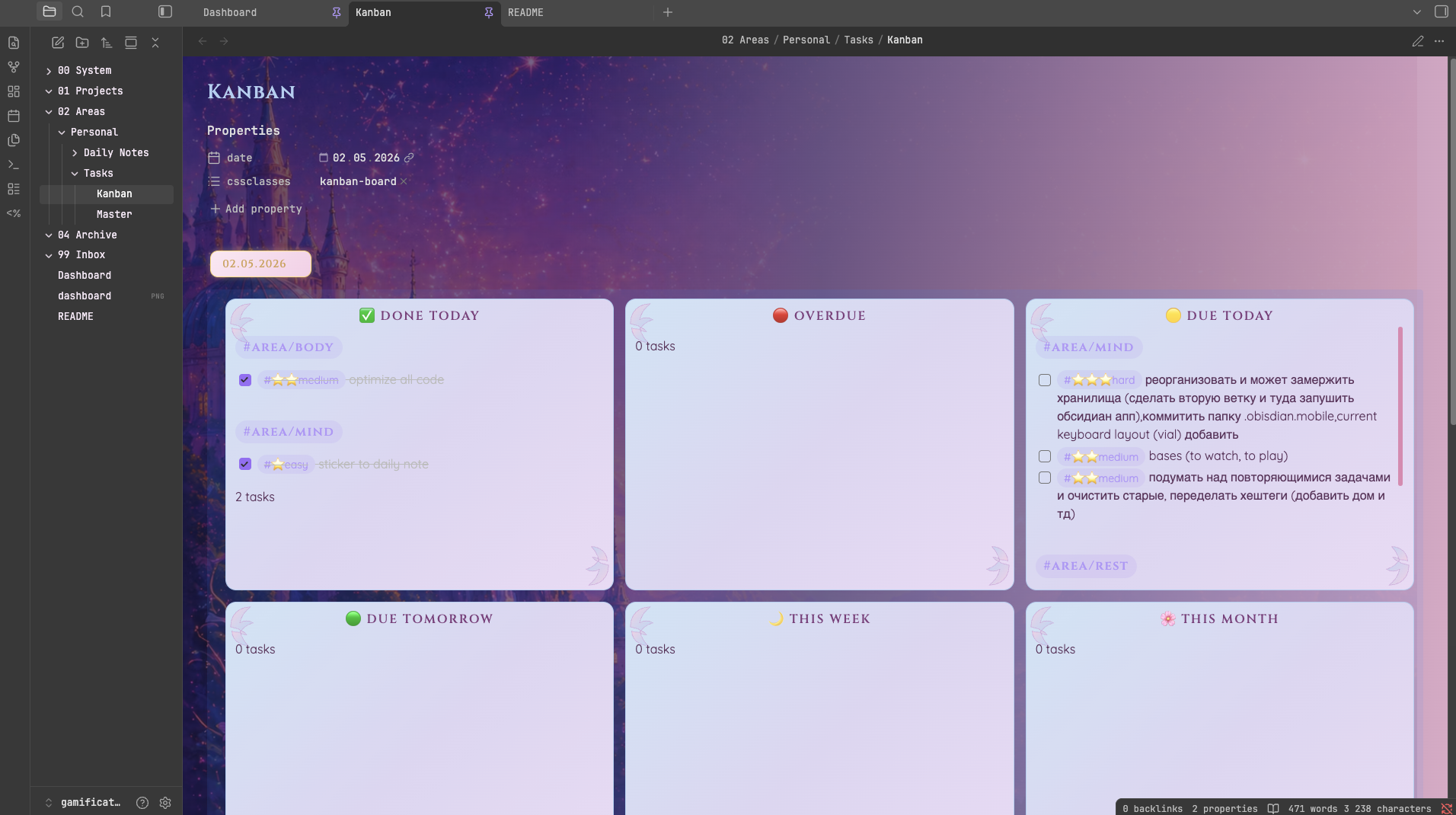
Use the QuickAdd NewTask macro:
- Choose difficulty (Easy / Medium / Hard / Epic)
- Choose life area
- Fill in task details in the Tasks modal
- Task is prepended to
Tasks/Master.md
Other QuickAdd choices
| Choice | Template | Creates note in |
|---|---|---|
| Work task | task.md | 01 Projects |
| Read item | read item.md | 03 Resources/Collections/Readlist |
| Watch item | watch item.md | 03 Resources/Collections/Watchlist |
| Game | game.md | 03 Resources/Collections/Gamelist |
| Recipe | recipe.md | 03 Resources/Collections/Recipes |
⚠️ Work task targets the generic
01 Projectsfolder. Point it at your own project folder instead (Settings → QuickAdd → Work task → folder). If you sync this vault's QuickAdd config into another vault, remember the sync overwrites that folder setting — re-pick your project folder afterwards.
🖥 Dashboard Widgets
| Widget | Description |
|---|---|
| Level | Current level, total XP, progress to next level |
| Pomodoro | 25/5 min focus timer, session counter |
| Monthly Habits | Bar chart of habit completions this month |
| Life Areas | Radar chart — XP earned per area this month |
| Weekly State | Line chart of energy & mood over the past week |
| XP Today | XP earned today, current level name, streak heatmap |
| Quests | Tasks due today, grouped by life area tag |
| Wallet | Current gold balance, shown under Level card |
| Celestial Market | Pending shopping items grouped by category |
| Shop | (in Shop.md) Browse rewards, click to buy with gold |
How to Install
- Download the dashboard markdown file from GitHub
- Drop it into your vault (anywhere)
- Install the Homepage plugin and point it at the file
- Enable any listed CSS snippets for the intended look
Stats
Stars
2
Forks
0
Last updated 1mo ago
Categories
Tags