loey_space
🧠 Automated Personal Knowledge Management & Second Brain vault architecture for Obsidian featuring HomePulse Dashboard, 2-way habit sync, MOC navigation, and Google Gemini AI enrichment.
updated: 2026-08-29
🧠 loey_space — Personal Knowledge Management & Second Brain Architecture




A modular, automated, and secure Personal Knowledge Management (PKM) system built inside Obsidian. Engineered around the PARA/MOC methodology, real-time 2-way habit tracking, automated multi-domain AI enrichment, and a unified
#0C0D13ultra-dark command center interface.
📚 Jump To
- ⚡ Quickstart
- 🖼️ Screenshots
- 🚀 Hero Features
- 🤖 AI Assistant & "Hey Loey"
- 📖 Documentation
- 🛠️ Installation & Setup
- 🧯 Troubleshooting
- 🤝 Contributing
Full technical specifications and operational manuals live inside the vault (see 📖 Documentation).
⚡ Quickstart
[!IMPORTANT] Critical Pre-Setup Rules:
homepulseandkanban-status-syncare bundled custom builds in.obsidian/plugins/. Do not install or update them from the Community Store — keep Auto-update plugins: OFF.- Secrets live only in
.env, which is git-ignored. Copy.env.example, never commit real keys, and read the Vault Security Policy.
Five minutes from clone to a working dashboard:
- Clone and open —
git clone https://github.com/lowqualityloey/loey_space.git, then in Obsidian choose Open folder as vault. - Leave Restricted Mode — Settings → Community plugins → Turn on community plugins. Nothing loads until you do.
- Turn auto-updates off — Settings → Community plugins → Auto-update plugins: OFF. Two plugins here are local custom builds and an update replaces them.
- Add an API key (optional) —
cp .env.example .env, then paste a key from Google AI Studio intoGEMINI_API_KEY. Everything except AI enrichment works without one. - Start today —
Ctrl + P→ HomePulse: Open Dashboard View, thenCtrl + P→ QuickAdd: Create Daily Note.
That's it. Habit tracking, task dashboards and the MOC queries all come alive as soon as a daily note exists.
🖼️ Screenshots
⚡ HomePulse Command Center
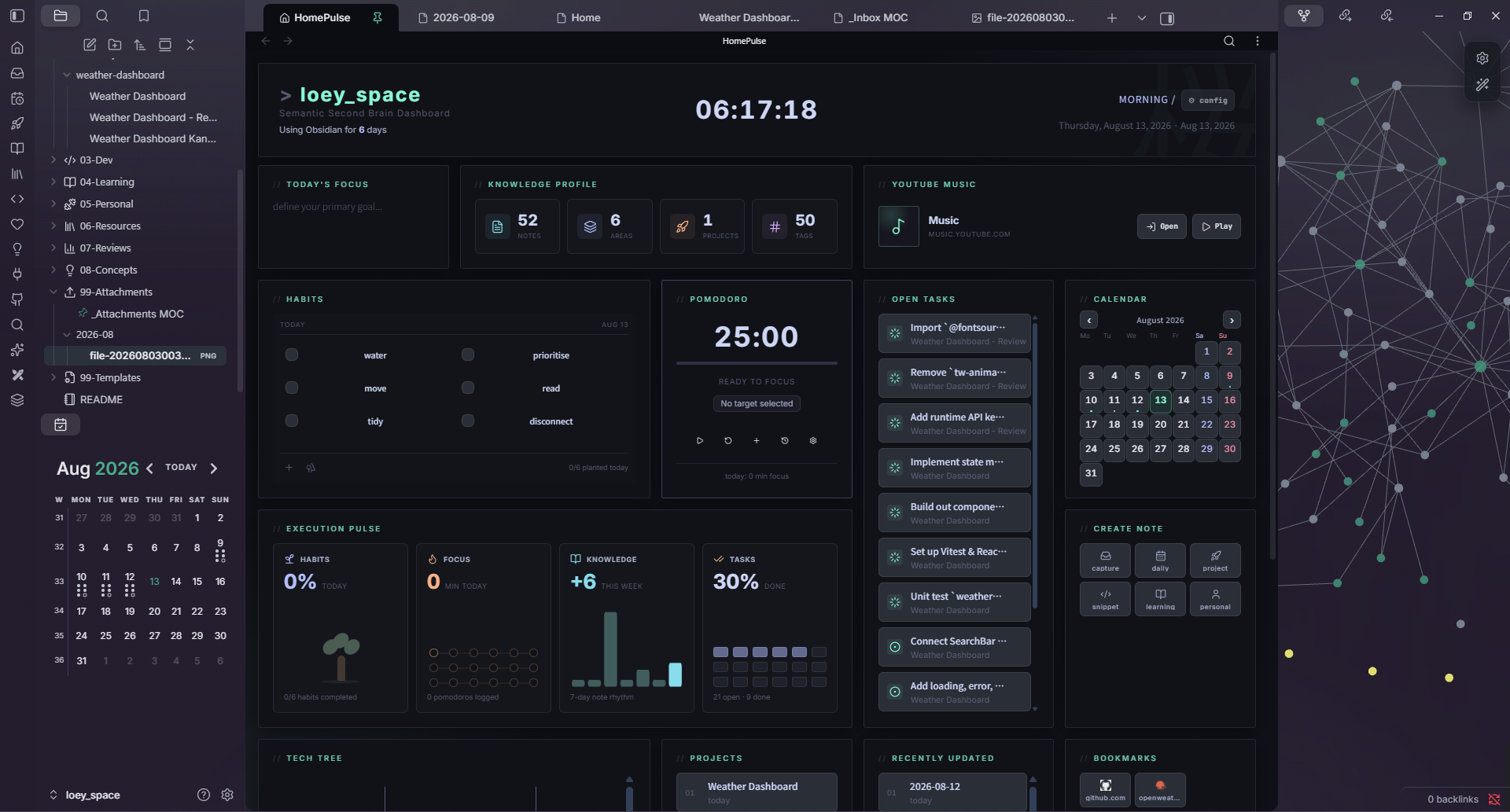
The custom HomePulse plugin: habits sync two ways with today's daily note, open tasks aggregate from daily notes and project kanbans, and Execution Pulse tracks focus minutes, note rhythm and completion ratios live.
📅 Daily Note
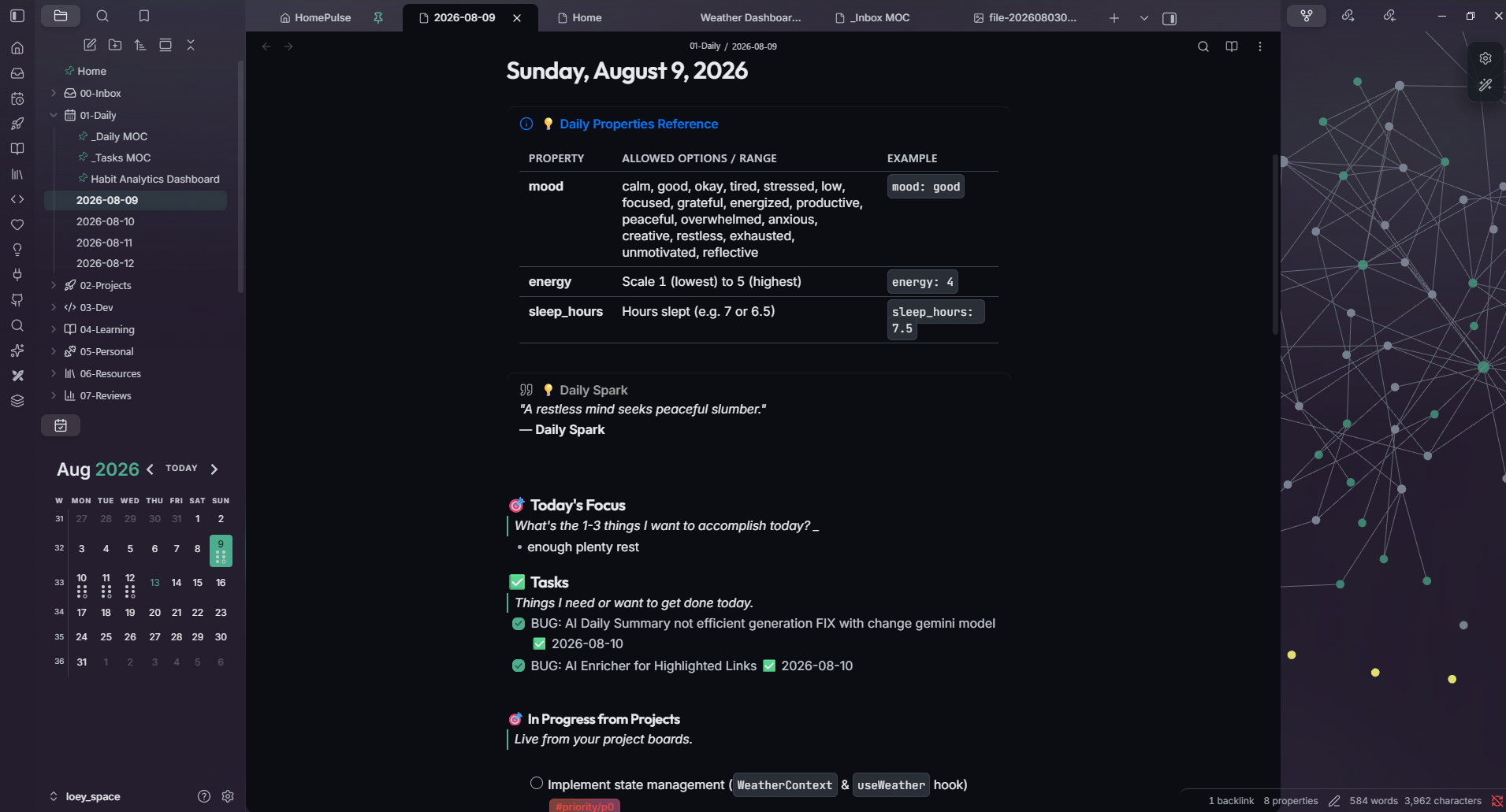
One note per day carrying mood / energy / sleep_hours, habits, a timestamped log, and an AI Daily Summary generated from what was actually logged. Unfinished tasks roll forward automatically; the previous day marks its copies [>] so nothing is counted twice.
🚀 Project Kanban
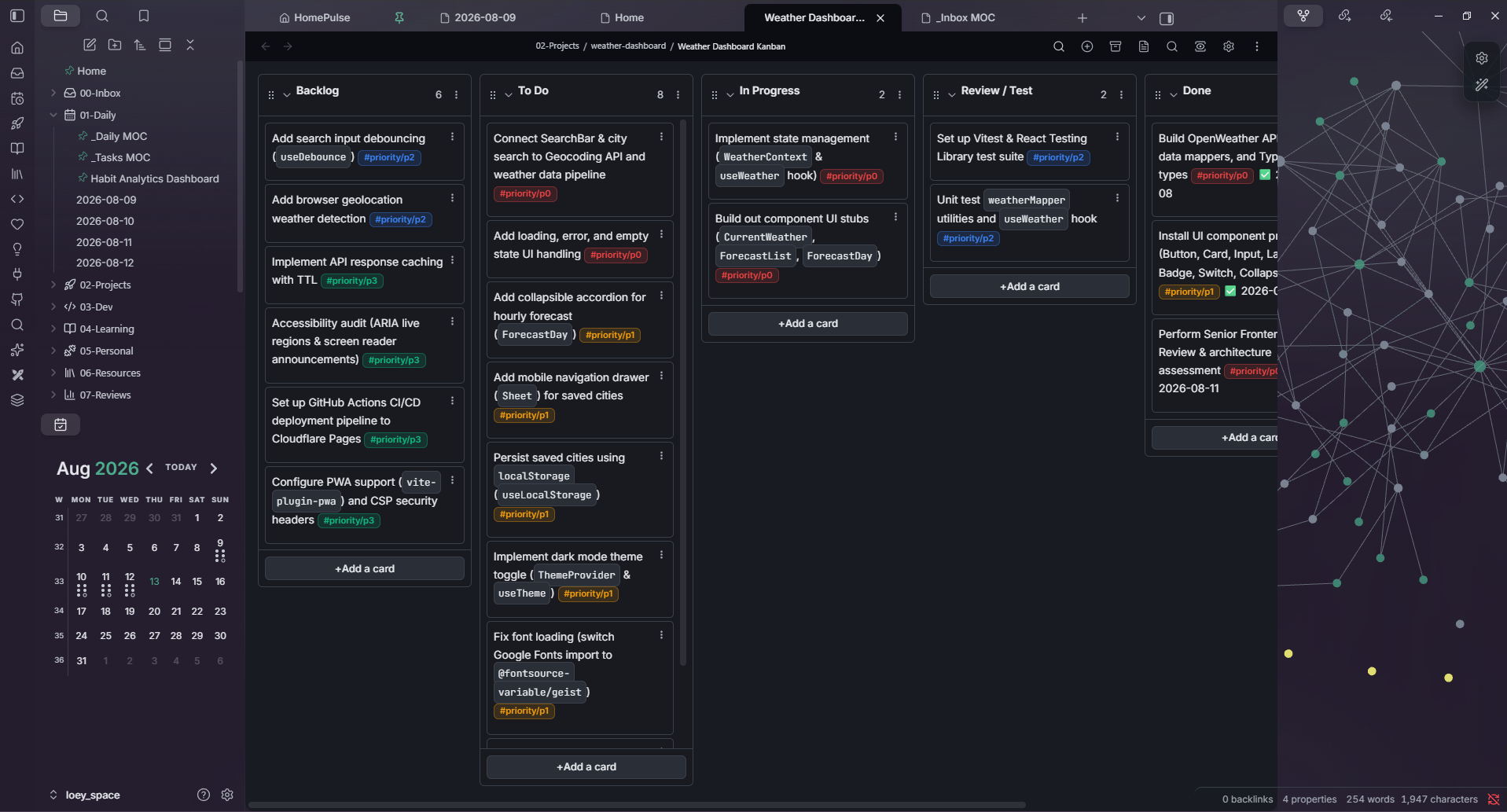
Each project gets a board. Card checkboxes follow their lane automatically — To Do is [ ], In Progress is [/], Done is [x] with a completion date — and ticking a card anywhere moves it to Done. Backlog and Archive stay out of the task dashboards.
🚀 Hero Features
- 🧠 AI Chief of Staff – Trigger
"hey loey"for instant pulse checks, morning setups, inbox token triage, and weekly retrospectives (AGENTS.md). - ⚡ HomePulse Command Center – Real-time 2-way habit sync with today's daily note, live execution pulse analytics, and dynamic tech tree visualization.
- 🔄 Bi-Directional GitHub Sync – Keep Obsidian Kanban boards in lockstep with GitHub Projects v2 and convert cards to GitHub issues/branches in one click.
- 🧹 Zero-Friction Inbox Triage – Route captures instantly with inline tokens (
#do,#concept,#dev,#learn,#ref,#personal,#project,#bin). - 📊 Automated Habit Analytics – 30-day rolling metrics, streak tracking, day-of-week heatmap patterns, and personalized improvement insights.
- 🔒 Security-First Architecture – Local Git pre-commit hooks and
.envcredential isolation prevent accidental secret exposure.
🤖 AI Assistant & "Hey Loey" Dispatcher
loey_space features a built-in AI Assistant & Chief of Staff powered by AGENTS.md.
Prefix any prompt with "hey loey" in your AI interface to trigger fast, context-aware workflows:
| Trigger | Action & Workflow |
|---|---|
hey loey status (or hey loey) | Pulse Check: Counts inbox items, checks daily note/habits, and lists active project tasks |
hey loey morning | Morning Kick-off: Preps today's note with an inspirational quote, surfaces in-flight tasks, and prompts for intentions & vitals |
hey loey evening | Evening Wind-down: Auto-syncs GitHub, reconciles morning focus, logs reflections & habits, and generates AI summary |
hey loey sweep | Inbox Triage: Analyzes quick-capture-dump.md, tags tokens, and runs triage sweep |
hey loey distill | Concept Extraction: Distills raw notes/dev logs into atomic concepts in 08-Concepts/ (90d review) |
hey loey weekly | Weekly Review: Aggregates 7-day habits and project progress into 07-Reviews/YYYY-[W]WW.md |
hey loey health | Vault Audit: Validates frontmatter, detects broken wikilinks, and verifies secret exclusion |
hey loey remind | Proactive Reminders: Sets one-shot timers or recurring cron reminders for routines and task reviews |
🛠️ Specialized Vault Skills (.agents/skills/)
vault-concept-distiller: Synthesizes articles/snippets into atomic08-Concepts/notes with 90-day review cycles.kanban-project-planner: Decomposes project goals into priority-tagged cards (#priority/p0-p3) and syncs with GitHub Projects v2.vault-hygiene-auditor: Validates frontmatter tags, scans for dead links, and audits Git secret exclusion.habit-trend-analyzer: Correlates multi-day mood/energy/sleep metrics and generates weekly retrospective rollups.dev-snippet-indexer: Formats reusable technical patterns into03-Dev/with language syntax tags and MOC links.
⚙️ Supported Agents & Recommended Models
The Loey Space AI Assistant is tool-agnostic and works natively with any modern AI coding or agentic interface:
| Environment | Supported Tools | Setup / How It Runs |
|---|---|---|
| Agentic Coding Assistants (Recommended) | Google Antigravity, Kiro, Cursor, Windsurf, Claude Code | Zero setup. Opening the vault automatically loads AGENTS.md and all 5 skills in .agents/skills/. |
| In-Obsidian Native AI | QuickAdd Macros (Ctrl+Shift+A, 🧹 Triage Sweep, 📊 Weekly AI) | Runs directly inside Obsidian using GEMINI_API_KEY from .env via 06-Resources/scripts/. |
| In-Obsidian Chat Plugins (Optional) | Obsidian Copilot, Smart Connections, BMO Chatbot | Point the plugin to AGENTS.md as custom system instructions. |
🧠 Recommended Models:
- ⚡ Daily Routines & Triage (
status,morning,evening,sweep):gemini-2.5-flash/gemini-2.5-flash-lite,gpt-4o-mini, orclaude-3-5-haiku(fast, sub-second latency, near-zero cost).
- 💡 Deep Knowledge Distillation & Project Planning (
distill,kanban-project-planner):gemini-2.5-proorclaude-3-7-sonnet(deep reasoning for Zettelkasten concept linking and code architecture).
⚡ HomePulse Command Center
The heart of loey_space is HomePulse (.obsidian/plugins/homepulse), a high-performance native dashboard plugin built upon and extended from jukkau/HomePulse:
- 🔄 2-Way Real-Time Habit Sync: Toggling habit checkboxes inside the Habits widget instantly updates
- [ ]/- [x]in today's active daily note (01-Daily/YYYY-MM-DD.md) and99-Templates/Daily.md. - ⚡ Execution Pulse: Live productivity analytics tracking daily habit completion percentage, focus/pomodoro minutes, 7-day note creation rhythm, and task completion ratios.
- 📊 Knowledge Profile: Real-time vault metric counter displaying total Notes, Areas, Projects, and Tags.
- 🎯 Today's Focus: Editable focus widget that live-syncs with your daily note's Focus section (supports multiple focus items).
- 🛠️ System Quick Actions: 1-click execution shortcuts for timestamped daily note generation, quick capture, new projects, and dev snippets.
- 📌 Open Tasks Widget: Live active task feed with Lucide status icons — In Progress tasks sorted to top, Backlog/Archive excluded.
- 🌳 Tech Tree: Dynamic capability map auto-generated from your vault's projects, concepts, and resources.
- 📅 Activity History: GitHub-style contribution heatmap showing your vault activity over the year.
🗂️ Vault Directory Architecture
loey_space/
├── Home.md                      # Central Command Dashboard (Navigation, Active Tasks, Projects, Inbox)
├── AGENTS.md                    # AI Agent Persona, 'Hey Loey' Dispatcher & Routine Rules
├── 00-Inbox/                    # Quick capture dump & triage
│   ├── _Inbox MOC.md            # Unprocessed notes dashboard
│   └── _Triage MOC.md           # Stale notes & overdue reviews
├── 01-Daily/                    # Daily logs, habits, energy/sleep tracking, AI reflections
│   ├── _Daily MOC.md            # Daily notes navigation & monthly overview
│   └── _Tasks MOC.md            # Task command center, in-progress, completion history & analytics
├── 02-Projects/                 # Active development projects & build specifications
│   ├── _Projects MOC.md         # Project dashboard with progress bars
│   └── <project-name>/          # [GIT-IGNORED] Individual project notes & Kanban boards
├── 03-Dev/                      # Code snippets, technical patterns, debugging notes
├── 04-Learning/                 # Courses, tutorials, & study notes
├── 05-Personal/                 # Personal goals, life & fitness logs
├── 06-Resources/                # Technical documentation, API specs, & system scripts
│   ├── APIs/                    # API specs & integration documentation
│   ├── Articles/                # Clipped web articles, blogs & media
│   ├── clipper-templates/       # Obsidian Web Clipper JSON presets (articles, dev, snippets, AI)
│   ├── Guides/                  # System manuals, security policies & workflow guides
│   └── scripts/                 # Automation (ai-enrich-action, triage-sweep, sync-github-kanban, weekly-ai-summary)
├── 07-Reviews/                  # Weekly & Monthly retrospectives (AI-generated)
│   ├── _Reviews MOC.md          # Reviews & retrospectives navigation
│   └── Habit Analytics Dashboard.md  # 30-day habit metrics, streaks, trends
├── 08-Concepts/                 # Evergreen technical & domain concepts (90-day review cycle)
├── 99-Attachments/              # Monthly subfolders (YYYY-MM/) for screenshots and media
├── 99-Templates/                # Master Templater & QuickAdd note blueprints
│   ├── Daily.md                 # Daily note template (habits, tasks, reflections)
│   ├── Mobile Capture.md        # Mobile quick capture template
│   ├── Mobile Task.md           # Mobile task capture template
│   └── Mobile Idea.md           # Mobile idea capture template
├── .obsidian/                   # Vault configuration, custom plugins, snippets & themes
│   ├── plugins/homepulse/       # Custom HomePulse dashboard plugin
│   ├── plugins/kanban-status-sync/  # Syncs kanban card checkboxes to their lane
│   └── snippets/                # CSS snippets (dashboard-cards, fonts, project-tasks, homepulse-mobile)
├── .githooks/                   # Git pre-commit secret leak guard
├── .secrets/                    # [GIT-IGNORED] Private human-readable sensitive notes
└── .env                         # [GIT-IGNORED] Real API keys and machine credentials
📖 Documentation
Full operational guides and architecture specifications live inside the vault (searchable, linkable, and enrichable in Obsidian):
AGENTS.md— Master AI Agent persona, "Hey Loey" command dispatcher, and daily/weekly routines.CONTRIBUTING.md— Open/closed scope, plain Node test mocking, and PR guidelines.Second Brain Guide.md— Folder architecture, QuickAdd flows, AI enricher contract, triage tokens, and task rules.Mobile Workflow Guide.md— Mobile toolbar configuration and capture-fast / triage-later loop.Vault Security Policy.md— Secret management and Git safety rules.Tagging & Properties.md— Standard YAML properties, frontmatter schema, and tag taxonomy.QuickAdd Inbox Optimization Guide.md— Capture blueprints and automated inbox processing.Weekly AI Summary Guide.md— Weekly AI review generation and data requirements.TypeScript Migration Feasibility Assessment.md— Architecture and build pipeline for TypeScript automation scripts.
(All guides are located in 06-Resources/Guides/ or the vault root).
🛠️ Installation & Setup Guide
Step 1: Clone or Open Vault in Obsidian
- Download or clone this repository to your local computer:
git clone https://github.com/lowqualityloey/loey_space.git - Open Obsidian, click Open folder as vault, and select the
loey_spacedirectory.
Step 2: Environment Credentials Setup (.env)
Copy the example file and fill in your API keys:
cp .env.example .env
Then edit .env with your real credentials:
# Required for AI enrichment (daily summaries, concept analysis, dev note analysis)
GEMINI_API_KEY=your_google_gemini_api_key_here

# Optional - Weather API integration
VITE_OPENWEATHER_API_KEY=your_openweather_api_key_here

# Optional - OpenAI fallback
OPENAI_API_KEY=sk-your_openai_api_key_here
[!IMPORTANT] Getting a Gemini API Key (required for AI features):
- Go to Google AI Studio
- Click Create API Key
- Copy the key and paste it into your
.envfileThe
.envfile is listed in.gitignoreand will never be pushed to version control.
[!WARNING] If
.envis missing orGEMINI_API_KEYis not set:
- AI Daily Summary (
Ctrl+Shift+A) will show an error notice- Weekly AI Summary generation will fail
- Concept, Dev, and Learning note enrichment will not work
- All other vault features (tasks, habits, navigation, dataview queries) work normally without an API key
Step 3: Enable Core Community Plugins
Go to Obsidian Settings -> Community Plugins and ensure the following plugins are enabled:
- HomePulse — Dashboard command center & 2-way habit synchronization.
- QuickAdd — Automation macros & 1-click note generation blueprints.
- Templater — Dynamic date calculation & variable expansion.
- Dataview — Real-time indexer queries for MOCs & task tracking.
- Kanban — Visual board view for project workflows.
- Kanban Status Sync — Keeps card checkboxes in step with their lane (bundled in this vault, not from the store).
- Calendar — Visual daily note navigator.
- Activity History — Contribution heatmap for the dashboard.
[!IMPORTANT] Pre-Configured HomePulse Plugin: This vault comes pre-configured with an enhanced build of the HomePulse plugin located in
.obsidian/plugins/homepulse/(featuring 2-way real-time habit file sync, dynamic Tech Tree scanner, deferred dashboard refresh, and QuickAdd daily note macro integration). Do not re-install or auto-update HomePulse from the Obsidian Community Store, as doing so will overwrite these custom integrations with standard plugin code. Disable automatic plugin updates in Obsidian (Settings -> Community plugins -> Auto-update plugins: OFF).
Step 4: Launch HomePulse Dashboard
- Click the HomePulse icon on the ribbon action bar or press
Ctrl + Pand execute HomePulse: Open Dashboard View.
Step 5: (Optional) 2-Way GitHub Project Sync Setup
If you want to synchronize your Obsidian Kanban boards bi-directionally with GitHub Projects v2:
-
Install & Authenticate GitHub CLI (
gh):# Windows: winget install GitHub.cli | macOS: brew install gh gh auth login gh auth refresh -s project(The
projectscope is required to read/write GitHub Projects v2 boards). -
Create a GitHub Project:
- Go to GitHub $\rightarrow$ Projects $\rightarrow$ New Project (Board layout).
- Note your Project Number from the URL (e.g.
github.com/users/<owner>/projects/<number>). - Ensure columns match:
Backlog,To Do,In Progress,Review / Test,Done.
-
Add Frontmatter to your Project Kanban Note:
--- kanban-plugin: board github_project_number: 1 github_owner: your-github-username --- -
Run 2-Way Sync:
- Open your Kanban board and press
Ctrl + P$\rightarrow$QuickAdd: Sync GitHub Project Kanban(or click the GitHub 🐙 ribbon icon). - Remote web edits pull into Obsidian, and local markdown cards push to GitHub draft items automatically.
- Open your Kanban board and press
💡 Daily Workflows & Keyboard Shortcuts
One-Click Note Creation & Automation: Use Ctrl + P → QuickAdd for instant note creation (Daily, Concept, Dev, Project). Press Ctrl + Shift + A on any active note to trigger multi-domain AI enrichment. Append triage tokens (#do, #concept, #dev, #learn, #ref, #personal, #project, #bin) in quick-capture-dump.md and run 🧹 Triage Sweep to file your entire inbox in one pass. Generate 7-day retrospectives with 📊 Weekly AI Summary.
📘 For the complete keyboard shortcut catalog, mobile toolbar commands, and Web Clipper presets, see the Second Brain Guide and Mobile Workflow Guide.
📱 Mobile Workflow
Designed for capture fast, triage later. All mobile commands land in inbox with 📱 marker.
Mobile Commands (add to Obsidian Mobile toolbar)
| Command | What it does |
|---|---|
📱 Mobile Capture | Appends thought to inbox with timestamp |
📱 Mobile Task | Appends as checkbox to inbox |
📱 Mobile Idea | Creates structured idea note in inbox |
📱 Mobile Add to Daily | Adds task directly to today's daily note |
Setup
- Install Obsidian Mobile and sync the vault
- Go to Settings -> Mobile -> Manage toolbar
- Add the
📱QuickAdd commands - Capture in < 10 seconds, batch-process on desktop
See 06-Resources/Guides/Mobile Workflow Guide.md for full setup instructions.
📊 Habit Analytics
The Habit Analytics Dashboard (07-Reviews/Habit Analytics Dashboard.md) provides:
- Overall Completion Rate — 30-day rolling percentage with per-habit progress bars
- Daily Heatmap — Last 14 days showing which habits were completed each day
- Day-of-Week Patterns — Which days you're most/least consistent
- Streak Analysis — Current and longest streaks for each habit
- Trend Analysis — 7-day moving average with trend indicators
- Improvement Recommendations — Identifies habits below 70% and suggests fixes
All data is automatically pulled from daily notes — no manual tracking required.
📋 Task System Rules & Conventions
Source of Truth & Visual Boards: Tasks live directly inside daily notes (01-Daily) and project kanbans (02-Projects). _Tasks MOC.md dynamically aggregates active to-dos with status indicators ([ ] To Do, [/] In Progress, [x] Done). Unfinished tasks roll forward ([>]) without double-counting, while Backlog and Archive remain filtered from active dashboards.
📘 For the complete task lifecycle specification, habit isolation rules, lane-driven status markers, tick-anywhere mechanics, and GitHub Project sync conventions, see the Second Brain Guide and
01-Daily/_Tasks MOC.md.
🎨 Styling & Aesthetics
- Ultra-Dark Palette: Designed around a high-contrast
#0C0D13background, sleek card containers, and glassmorphic borders (.obsidian/snippets/dashboard-cards.css). - Mobile HomePulse:
homepulse-mobile.cssoverrides the dashboard's fixed 5-column grid and 132px row height on phones, so cards go full width and grow to fit. Execution Pulse and Knowledge Profile drop to 2×2, the calendar's weekday labels centre over their columns, and tap targets are raised to 32px. - Typography System: Custom Google Fonts hierarchy (
.obsidian/snippets/fonts.css):- Body / UI:
Inter,Plus Jakarta Sans,Outfit - Code / Monospace:
JetBrains Mono
- Body / UI:
🔒 Security & Git Safety
- No Hardcoded API Keys: All machine credentials and API tokens strictly reside in
.env(git-ignored). - Private Notes Directory: The
.secrets/directory is strictly excluded from Git tracking for storing sensitive personal documents. - Runtime API Validation: Scripts automatically validate
.envconfiguration on execution and notify if required keys are missing. - Vault Security Policy: Read the official Vault Security Policy for complete guidelines.
🪝 Enabling the pre-commit guard
A commit-blocking hook ships in .githooks/pre-commit, but Git does not use it until you point at it. Run this once per clone:
git config core.hooksPath .githooks
On a fresh clone, also mark it executable so it survives on other machines:
git update-index --chmod=+x .githooks/pre-commit
It refuses a commit when the staged changes include:
| Check | Blocks |
|---|---|
| Paths | .env, .env.*, .secrets/, 00-Private/, *_secret*, *_private* |
| Content | Google/Gemini (AIza…), OpenAI (sk-…), GitHub tokens, AWS key IDs, PEM private keys, and *_API_KEY= with a real-looking value |
| Advisory | Warns if sensitive files are already tracked from earlier commits |
Placeholders such as your_google_gemini_api_key_here are allowed, so .env.example and the docs quoting it still commit cleanly. Only added lines are scanned, and any match is redacted in the output rather than echoed back. Deliberate override: git commit --no-verify.
[!WARNING] The hook is a local guard, not a net. It cannot help a machine that hasn't run the
core.hooksPathcommand, and it runs before the push — so also switch on GitHub secret scanning + push protection (repo Settings → Code security). That blocks server-side, and unlike a CI workflow it acts before the commit becomes public.If a key ever does reach a public commit, rotate it. Rewriting history does not un-leak it.
🧯 Troubleshooting
| Symptom | Cause and fix |
|---|---|
⚠️ GEMINI_API_KEY missing in .env! | No key configured. Run cp .env.example .env and paste a key from Google AI Studio. |
| AI summary reads flat, with a notice about quota | Gemini refused with HTTP 429 and the offline fallback wrote the text. The notice names which limit: a per-minute limit clears in about a minute; a daily limit does not, and resets at midnight Pacific. Re-run Ctrl + Shift + A afterwards to replace it. |
| A bundled plugin or CSS change has no effect | Obsidian loads plugins, snippets and hooks at startup. Run Ctrl + P → Reload app without saving. |
🧹 Triage Sweep missing from the palette | Register it once: Settings → QuickAdd → Manage Macros → new macro → Add User Script → triage-sweep.js, then add it as a Macro choice. |
| Sweep says "no daily note for <date>" | #do files into today's note, which must already exist. Run QuickAdd: Create Daily Note first. |
| HomePulse lost its custom behaviour | It was updated from the Community Store. Restore .obsidian/plugins/homepulse/ from Git history and set Auto-update plugins: OFF. |
| Habit toggles don't reach the daily note | Sync needs today's note at 01-Daily/YYYY-MM-DD.md with a ## 🔁 Habits section, and Dataview enabled. |
| Dashboard cramped or overlapping on mobile | Enable the homepulse-mobile snippet: Settings → Appearance → CSS snippets. |
🔧 System & Vault Maintenance
🔄 Operational Rhythm
| Interval | Target Hub | Key Actions |
|---|---|---|
| ☀️ Daily (5 min) | Home.md & 01-Daily/ | Check HomePulse dashboard $\rightarrow$ evening habit logging $\rightarrow$ Ctrl+Shift+A AI enrichment |
| 🗓️ Weekly (15 min) | _Triage MOC & 07-Reviews/ | Run 🧹 Triage Sweep $\rightarrow$ clear neglected inbox ($>7$d) $\rightarrow$ generate Weekly AI Summary |
| 🌙 Monthly (30 min) | 07-Reviews/ & 02-Projects/ | Review Habit Analytics trends $\rightarrow$ archive completed boards $\rightarrow$ review stale notes ($>30$d) |
| 💡 Quarterly (45 min) | 08-Concepts/ | Review evergreen concepts past their 90-day review cycle via _Triage MOC |
(See comprehensive operational specs in Second Brain Guide)
⚙️ Technical Maintenance & CLI Tooling
- TypeScript & Bundling Engine — User scripts are authored in TypeScript under
06-Resources/scripts/src/(modularized undersrc/lib/) and bundled into single-file CommonJS vianpm run build(esbuild) for seamless Obsidian QuickAdd & Node CLI compatibility. - Automated CLI Commands:
npm run typecheck— Strict TypeScript typecheck across all scripts.npm run build— Bundles all 12 user scripts in under 50ms.npm test— Runs automated Node test suite (45 unit tests).npm run audit-links— Scans vault for broken wikilinks, fuzzy fix suggestions, and orphan notes.npm run distill -- <file>— Distills atomic evergreen concepts into08-Concepts/.npm run log-github— Syncs today's GitHub activity into a collapsible table callout (> [!NOTE]-) sorted AM $\rightarrow$ PM with non-breaking timestamps.npm run start-task -- <proj> <title>— Converts a Kanban card to a GitHub Issue and creates a Git branch.npm run sync-kanban— Multi-project 2-way sync with GitHub Projects v2.npm run validate-templates— Validates all 19 vault templates against schema rules.
- Updating plugins — safe for store plugins (Dataview, Templater, QuickAdd, Kanban, Calendar, Activity History). Never for
homepulseorkanban-status-sync, which are local builds with no store equivalent. - Restyling the dashboard — HomePulse's own
styles.cssis regenerated on rebuild, so put overrides in.obsidian/snippets/instead. That's whathomepulse-mobile.cssanddashboard-cards.cssdo.
🤝 Contributing
The system is open to contributions; the journal isn't. PRs are welcome for the Kanban Status Sync plugin, the automation scripts, CSS snippets, the pre-commit hook, templates and docs. The numbered content folders are personal notes and are closed to PRs — though issues are welcome about anything.
See CONTRIBUTING.md for the full scope, plus how to test any script under plain Node by mocking app.vault — no Obsidian install and no risk to real notes.
🙏 Credits & Acknowledgements
- HomePulse by @jukkau — The foundational dashboard plugin architecture powering the real-time command center interface in this vault.
- Obsidian Kanban by @mgmeyers — Visual markdown Kanban boards and card management.
- Dataview by @blacksmithgu & QuickAdd by @chhoumann — Core query and automation engines.
📋 Full Feature Reference
| Feature | Description |
|---|---|
| Loey Space AI Assistant | Conversational Second Brain Chief of Staff & Digital Librarian triggered via "hey loey" (AGENTS.md) |
| HomePulse Dashboard | Custom native plugin with real-time widgets — habits, tasks, pomodoro, focus, projects, tech tree, activity heatmap, all in one view |
| 2-Way Habit Sync | Toggle habits in the dashboard and they instantly update in today's daily note (and vice versa) |
| Multi-Domain AI Enrichment | One shortcut (Ctrl+Shift+A) analyzes any note — generates summaries for daily notes, explanations for concepts, code breakdowns for dev notes, study quizzes & concept extraction for learning notes |
| Automatic Concept Distiller | Extracts atomic evergreen mental models and principles from articles or dev notes into 08-Concepts/ with 90-day review cycles (QuickAdd / npm run distill) |
| Kanban Issue & Branch Generator | Converts Kanban cards into real GitHub Issues, switches git branch, and moves cards to In Progress (QuickAdd / npm run start-task) |
| Vault Link & Graph Auditor | Vault-wide scanner for broken wikilinks, fuzzy match fix suggestions, and orphan note discovery (npm run audit-links) |
| Weekly AI Summaries | Automated 7-day analysis of mood, energy, tasks, and habits with actionable recommendations |
| Habit Analytics Dashboard | 30-day rolling metrics, streak tracking, day-of-week patterns, and improvement recommendations |
| Smart Task Management | Tasks live in daily notes and project kanbans, aggregated in real-time via _Tasks MOC.md with status indicators ([ ], [/], [x]) |
| Project Kanban Integration | Each project gets a visual kanban board; tasks from To Do/In Progress/Review flow into the central task hub (Backlog excluded) |
| Multi-Project GitHub Sync | 2-way sync between Obsidian Kanbans and GitHub Projects v2 (github_project_number) via QuickAdd picker & CLI (npm run sync-kanban) |
| Kanban Status Sync | Drag a card between lanes and its checkbox follows automatically — To Do [ ], In Progress [/], Done [x] with a completion date |
| Mobile Quick Capture | 4 mobile-optimized commands for instant capture on the go — process later on desktop |
| Inbox Auto-Classification | Quick captures tagged with type/area/priority suggestions based on content analysis |
| Token Triage Sweep | Tag a capture line #do / #dev / #concept / #learn / #ref / #personal / #project / #bin, then file the whole inbox in one pass — swept lines are logged, never silently deleted |
| Dynamic Tech Tree | Auto-generated capability map scanning projects, concepts, and resources across the vault |
| Execution Pulse | Live productivity analytics — habit %, focus minutes, note rhythm, task completion ratios |
| PARA/MOC Architecture | Clean folder separation with Maps of Content for navigation — scales without friction |
| Ultra-Dark Command Center | Glassmorphic #0C0D13 theme with JetBrains Mono, Inter, and custom CSS snippets |
📄 License
This project is licensed under the MIT License - see the LICENSE file for complete details.
How to Install
- Download the ZIP or clone the repository
- Open the folder as a vault in Obsidian (File → Open Vault)
- Obsidian will prompt you to install required plugins
Stats
Stars
0
Forks
0
License
MIT
Last updated 1mo ago