obsidian-agent-vault-template
A ready-to-use Obsidian vault for running an AI agent (Claude, Codex, etc.) as a personal OS: skills, grounding notes, and a self-improving feedback loop. Clone and open as a vault.
Obsidian Agent Vault Template
A ready-to-use Obsidian vault that keeps the context around your AI skills—not just isolated prompts. It puts reusable skills beside the notes, meetings, decisions, and feedback they depend on, so Claude, Codex, or whatever comes next can work from the same source of truth.
Based on the working vault of Louis-François Bouchard (Towards AI / What's AI), genericized so anyone can clone it and start.
This repository accompanies the O'Reilly talk Agent-Agnostic Skills (Setup) That Travel With Your Notes. View the course slides.
What this is
This is not one giant skill and it is not a new agent framework. It is the portable, file-based layer that comes with your skills:
- Knowledge: the notes and decisions that ground an agent's work.
- Capabilities: small, focused skills that explain how to do recurring jobs.
- Routing: an index that tells the agent what to load instead of dumping the entire vault into every prompt.
- Memory: feedback files that preserve corrections and turn repeated lessons into better defaults.
- Shared state: plain Markdown that can sync across devices and be versioned or reviewed with Git.
The goal is to make the harness swappable. Important context should not disappear because you changed models, tools, projects, laptops, or teammates.
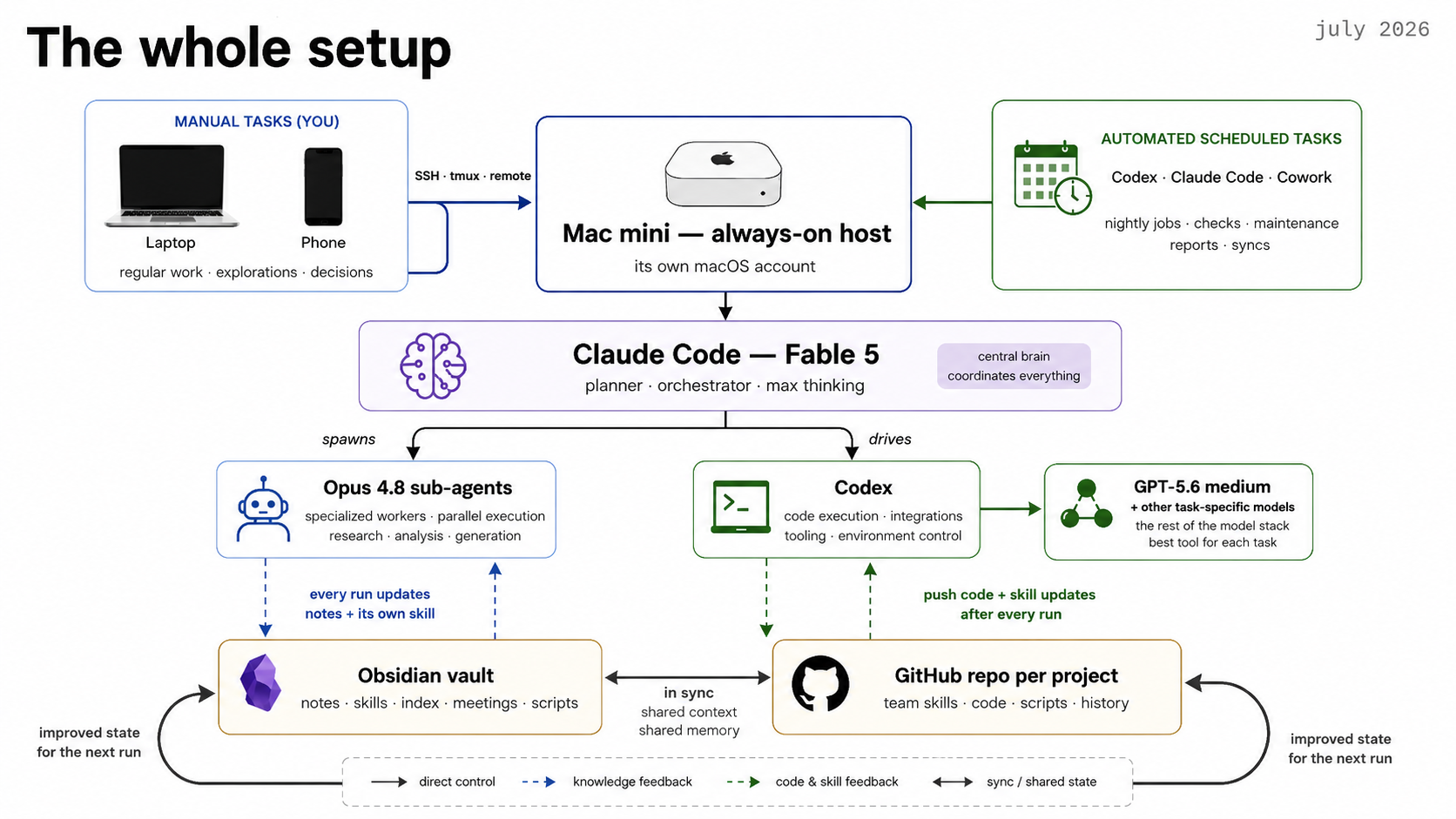
The setup in context
The full setup shown in the course, July 2026. The specific models, Mac mini, remote access, and schedulers are one example deployment—not requirements for using this template.
At its simplest, you only need the vault and an agent that can read files. A more complete setup can add:
- Obsidian Sync or another file sync so the same knowledge is available from a phone, laptop, Windows machine, or always-on host.
- A GitHub repo per project for team skills, code, scripts, review history, and rollback. Personal experiments can graduate from the vault into a shared repo when they become reliable.
- Scheduled runs for recurring knowledge work such as research, analytics, meeting recaps, reports, and maintenance.
- An isolated always-on account or machine when automations must keep running after your laptop closes. Give it access only to the work resources it needs.
The durable loop is the same at every scale: read the index and relevant state → do the work → write the result and feedback back → start the next run from an improved state.
Get it
git clone https://github.com/louisfb01/obsidian-agent-vault-template.git
Or click Code → Download ZIP above. Then in Obsidian: Open folder as vault → pick this folder. That's the whole install — a vault is just a folder of markdown files, so there is nothing to run and you can read every file as plain text first.
The Templates core plugin comes pre-configured (pointed at Templates/), so
one-click note scaffolds work immediately — Command palette → Insert template.
What's inside
START-HERE.md      ← open this first in Obsidian
AGENT-RULES.md     ← the agent reads this first: how to behave + self-improve
Skills/            ← the "AI-OS": one folder per skill
  Skills Index.md  ← the map: which skill to load, layered hierarchy
  example-voice/   ← a worked example — copy it to make your own skill
    SKILL.md       ← what the skill does (source of truth)
    FEEDBACK.md    ← the skill's self-improvement log  ← the key idea
working-dir/       ← agent scratch: one folder per task
Areas/             ← your real notes (Personal, Professional, add your own)
Templates/         ← one-click note scaffolds (Templates plugin)
_archive/          ← stale notes, kept not deleted
The idea
- Skills are capabilities. Each
SKILL.mdtells the agent how to do one job.Skills Index.mdmaps them, layered grounding → voice → research → output, so a task combines only the context and capability it needs. - Notes are grounding.
Areas/holds your real notes. Skills read facts from here and write finished work back—they never invent what is not written. - The feedback loop is the point. Every skill has a
FEEDBACK.md. After each run the agent logs what worked and what you corrected. When a correction repeats, it gets promoted intoSKILL.mdas a new default. The vault becomes more reliable over time. SeeAGENT-RULES.md§2 and the live example inSkills/example-voice/FEEDBACK.md. - Code stays external. The vault holds notes and skills, not project code. Code lives in its own Git repo, where teammates can review both the code and the shared skills that produced it. Never commit secrets.
Setup (2 minutes)
- Open folder as vault in Obsidian.
- Rename the
Areas/folders to match your life; drop in your notes. - Copy
Skills/example-voice/to make your first real skill; add its block toSkills Index.md. - Point your agent at the vault: "Read AGENT-RULES.md first."
License
MIT — see LICENSE. Reuse and adapt freely.
How to Install
- Download the ZIP or clone the repository
- Open the folder as a vault in Obsidian (File → Open Vault)
- Obsidian will prompt you to install required plugins
Stats
Stars
40
Forks
11
License
MIT
Last updated 2mo ago