obsidian-vaults-dashboard
Obsidian Vaults Overview Dashboard
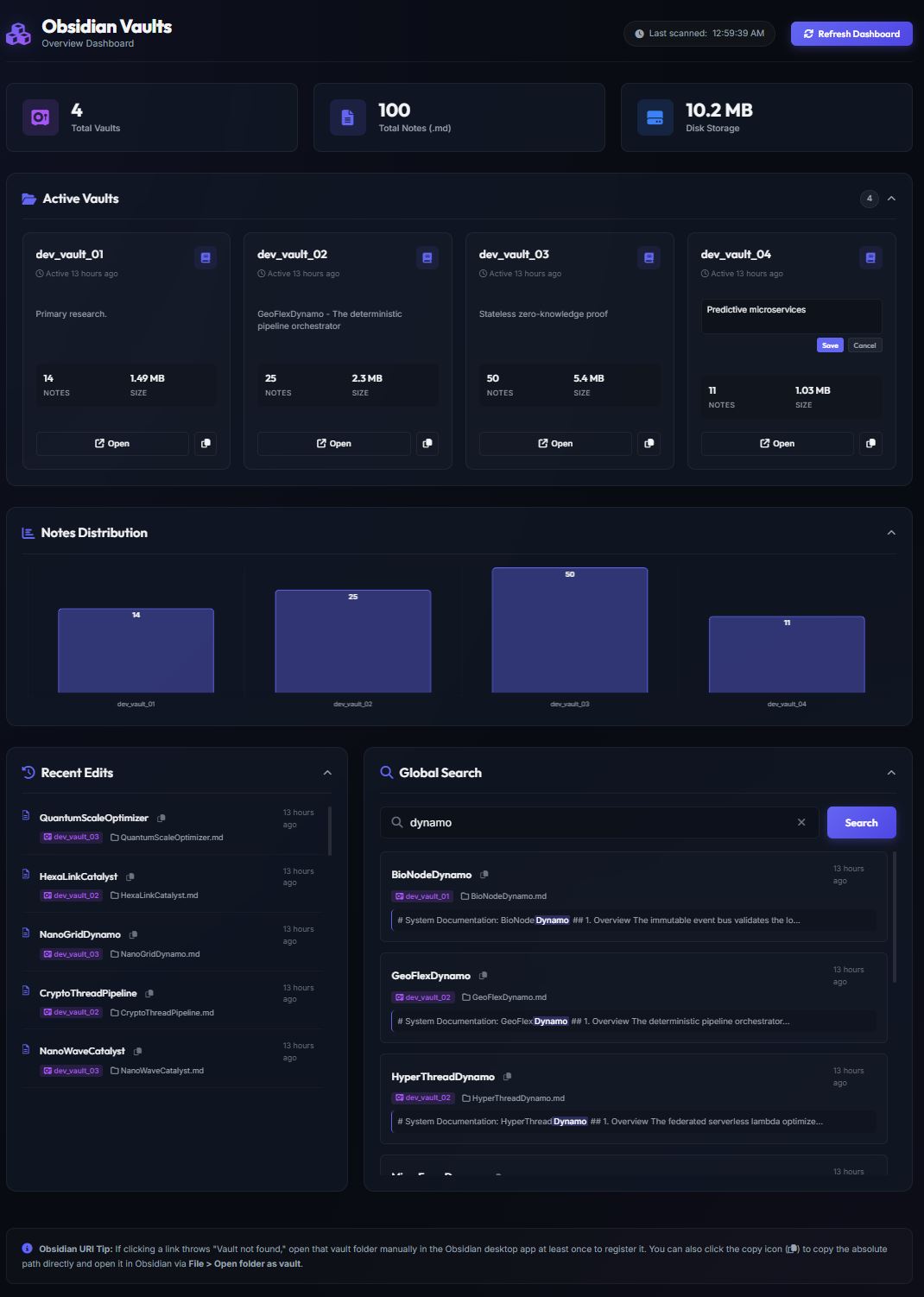
A premium, local, self-contained web dashboard to oversee, monitor, and search across multiple Obsidian vaults from a single interface.
[!IMPORTANT] The server dynamically resolves your workspace configuration using
config.local.jsonto identify theVaultsDir(which points to1019-subject). It then scans the subdirectories inside that directory (skipping folders starting with.or_and any folders matching paths in your ignore settings).Example folder structure 01_Obsidian_Vaults/ ├── config.local.json ├── 1019-subject/ │ ├── 03-system-ingestion/ │ ├── 11-personal/ │ │ ├── 11-01-pkm/ │ │ └── 11-02-career-and-jobs/ │ └── 12-gaming/ │ ├── 12-01-games-battletech/ │ └── 12-02-games-world-of-greyhawk/ └── 2029-automation/ └── 23_utility_apps/ └── dashboard/
This dashboard is designed to run locally on your machine and treats all your Obsidian vault directories as 100% read-only, ensuring no notes, configurations, or files are ever modified or corrupted.
📸 Click to view dashboard previews
✨ Features
- 📊 Unified Vault Statistics: Displays total vault counts, note counts (
.md), media files (and total disk storage usage across all active vaults in a central location..png,.jpg,.pdf, etc.), - 📝 Local Vault Descriptions: Add, edit, and save custom descriptions directly on each vault card. To respect the strict read-only nature of your vaults, descriptions are stored in a local, git-ignored configuration file (
vault-descriptions.json), keeping your descriptions strictly private to your machine. - 📈 Notes Distribution Chart: Interactive bar chart displaying notes count across all vaults using a logarithmic scale to elegantly balance visual disparities (e.g. tracking a vault with 700 notes next to one with 5 notes).
- 🔗 Click-to-Open Obsidian URIs: Click on a chart bar or card to launch that vault inside the Obsidian app immediately using path-based URIs (
obsidian://open?path=...), bypassing pre-registration errors. - 📋 Path Copy Fallbacks: Includes one-click copy buttons next to all vaults and notes to copy absolute paths instantly to your clipboard.
- 🔍 Global Cross-Vault Search: A powerful search bar to query terms across all markdown notes in all vaults simultaneously, displaying matching titles, locations, and snippets with query term highlights.
- ⏳ Recent Edits Timeline: Displays a chronological feed of the most recently modified files across all vaults.
- 📁 Folding Collapsible Cards: Collapse sections (Active Vaults, Chart, Recent Edits, Global Search) by clicking their headers to optimize dashboard space.
- 🎨 Premium UI: Dark-mode glassmorphic interface built using harmonized HSL color variables, Outfit/Inter typography, responsive grid alignments, and subtle animations.
🛠️ Tech Stack
- Backend: Node.js (Express) to scan vault folders, cache statistics in memory, index markdown file paths, and serve API endpoints.
- Frontend: Single-page application using modern HTML5 semantic markup, custom Vanilla CSS, and JavaScript.
- Libraries: Chart.js (via CDN) for data visualization.
🚀 Getting Started
1. Prerequisites
- Make sure you have Node.js installed (v18+ recommended).
- Tested Environments: Windows 10/11 (PowerShell 7).
2. Installation & Setup
The dashboard is pre-integrated into your workspace at 2029-automation/23_utility_apps/dashboard/.
To install dependencies, open your terminal inside the dashboard folder and run:
cd 2029-automation/23_utility_apps/dashboard/
npm install
3. Run the Server
Start the local server:
npm start
The server will scan your configured vaults directory (skipping folders starting with . or _ and ignoring any paths defined in your ignore filters) and start hosting the API.
4. Open the Dashboard
Open your browser and navigate to: http://localhost:3000
⚙️ Running in the Background on Startup
If you want the dashboard to always run automatically in the background when your computer boots up, refer to the platform-specific guides in the startup directory.
🗺️ Roadmap & Changelog
🚀 Released
- v0.2.1 — Documentation & Asset Cleanup
- 🧹 Deleted unused
assets/folder-structure.jpgasset. - 📝 Fixed formatting of callouts and notes in
README.md. - 📁 Added detailed folder structure guide and installation steps.
- ⚙️ Added local
dev_notes/folder to.gitignore.
- 🧹 Deleted unused
- v0.2.0 — Editable Local Vault Descriptions
- ✨ Implemented editable description cards utilizing a local, git-ignored
vault-descriptions.jsonstorage model to protect vault privacy. - 📝 Documented local vault customization features in the master layout.
- ✨ Implemented editable description cards utilizing a local, git-ignored
- v0.1.0 — Initial Development Baseline
- 📊 Built core dashboard rendering multi-vault tracking statistics.
- 📈 Implemented logarithmic scale charts via Chart.js for balanced note distribution views.
- 🔗 Integrated path-based Obsidian URIs (
obsidian://open?path=...) for instant, error-free vault switching. - 🔍 Added global cross-vault markdown query search engine.
⏳ Upcoming Features
- Add Automated Release Pipeline: Implement automated version tagging and release generation using GitHub Actions workflows.
- Add Media File Count: Add media file count to the dashboard.
- Add Folder Blacklist Filter: Add a configuration option to manually exclude specific folder paths from cross-vault scanning.
- Add File Extension Exclusions: Implement rules to filter out system meta-files (e.g.,
.DS_Store) from media totals. - Add Mobile-Responsive Optimization: Refine glassmorphic CSS grids to adapt fluidly across mobile and tablet viewports.
- Add Obsidian Plugin Integration: Long-term exploration into compiling this into a native Obsidian community plugin wrapper.
How to Install
- Download the dashboard markdown file from GitHub
- Drop it into your vault (anywhere)
- Install the Homepage plugin and point it at the file
- Enable any listed CSS snippets for the intended look
Stats
Stars
2
Forks
0
Last updated 3mo ago
Categories