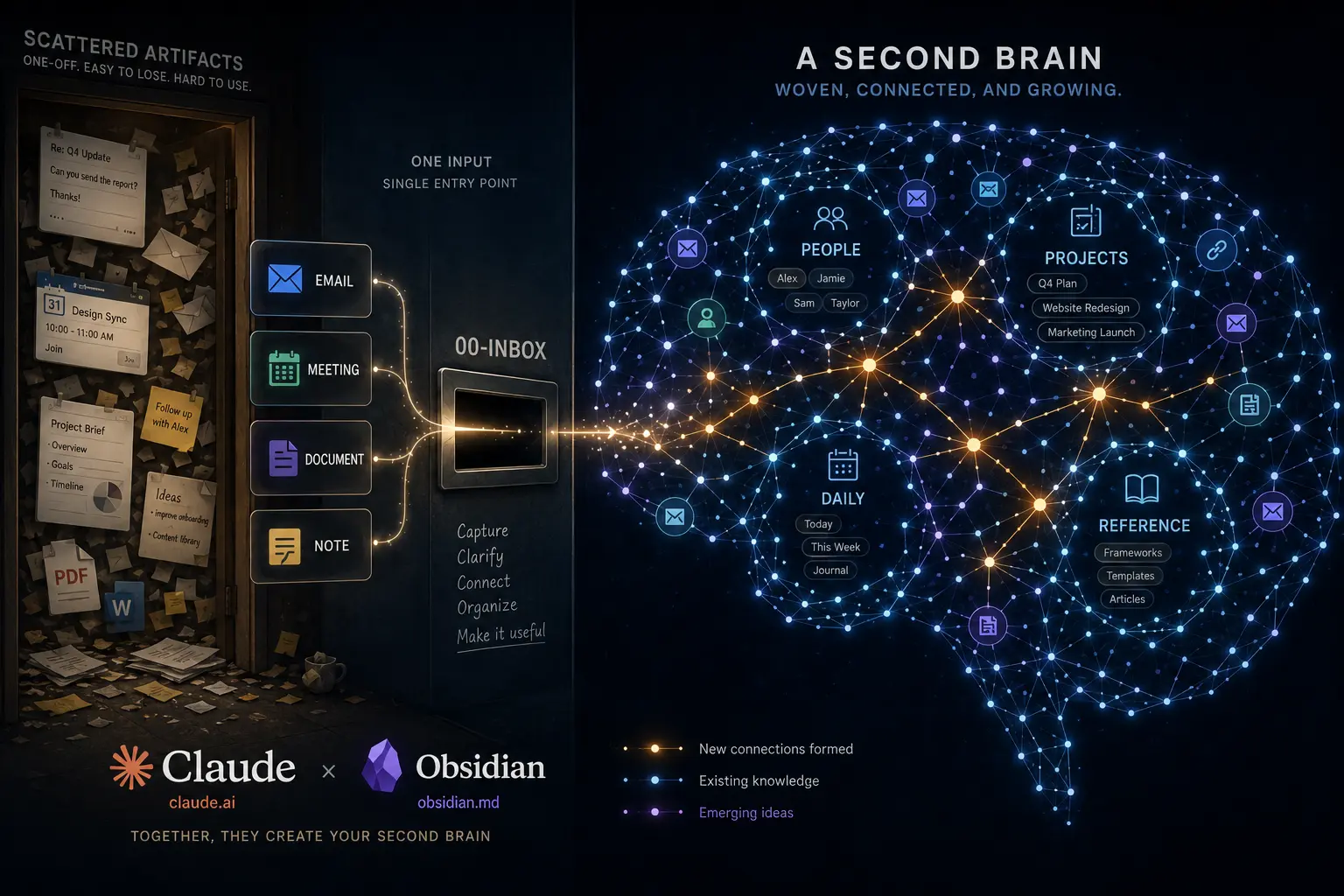
claude-obsidian-vault
Claude Code + Obsidian vault that turns captured emails, meeting transcripts, and documents into a connected second brain: auto-classified, entity-linked notes, daily AI briefings, and periodic reviews. Sanitized, fork-ready template.
Claude + Obsidian Vault = Second Brain




An Obsidian vault wired to Claude Code skills that write and file your work notes for you. Drop emails, meeting transcripts, and documents into a folder (00-Inbox/); the system classifies them, resolves people and projects to wikilinks, writes structured interaction notes, and generates a daily briefing. It also handles weekly/monthly reviews, 1on1 prep, and project status.
It ships with a product-management preset (products, markets, segments, OKRs, steering-committee meetings) that you can turn off during setup, leaving a general working-notes vault for anyone who runs projects and meetings.
This repository is a sanitized, generic copy of a real working system. All names, companies, emails, and data are fictional examples (the persona "Sam Rivera" at "Acme Corp"). Nothing here is anyone's real data. Make it yours by running /w-setup (see below).
For the why and how behind it, read the writeup: Claude + Obsidian as a second brain.
Contents
- What it does
- How it works
- Skills
- Requirements
- Getting started
- Your data
- Example content
- Configuration
- What you can drop into the inbox
- Expect to tune it
- Repository layout
- FAQ
- License
What it does
- Email ingestion: parses captured emails, cleans signatures/footers/disclaimers, scores relevance (high/medium/low), consolidates threads, and writes interaction notes.
- Meeting transcripts: turns transcripts (from any recorder, or Plaud) into concise meeting notes with attendees, decisions, and action items.
- Document processing: converts PDF/DOCX/PPTX/XLSX/HTML into reference notes (PDF, HTML, images, and text work with zero extra installs; see Requirements).
- Daily briefings: an AI-generated scan layer over the day's ingestion, linking to source notes.
- Periodic reviews: weekly, monthly, or custom-window reviews of activity, decisions, and open actions.
- Entity registry: a single source of truth (
_db/entity-registry.json) that resolves people, projects, products, and markets to wikilinks, with an optional VIP-tier system that boosts relevance for your management chain and key stakeholders.
The full architecture, data flows, and per-script reference live in .claude/SYSTEM.md.
How it works
One file makes the trip from inbox to a linked note in five steps:
00-Inbox/         you drop emails, transcripts, docs, or notes
    |
    v
classify          detect the type by content (email / transcript / document / note)
    |
    v
resolve entities  match names and emails to [[wikilinks]] via _db/entity-registry.json
    |
    v
write notes       structured interaction notes in 05-Interactions/, reference docs in 08-Reference/
    |
    v
daily briefing    an AI scan layer in 01-Daily/ that links back to every source note
Python scripts in _scripts/ do the deterministic work (classification, entity resolution, note writing, index building). Claude does the judgment work (summarizing, scoring relevance, extracting actions, writing the briefing). /w-daily is the single entry point that runs the whole chain.
Skills
Every user-invocable skill is a Claude Code slash command. Run them from Claude Code with the vault folder open.
| Command | What it does |
|---|---|
/w-setup | One-time (re-runnable) wizard: interviews you, then writes your identity, org, VIP roster, projects, and integrations into every config surface. |
/w-daily | The master command. Ingests the inbox, creates the daily note, and writes the AI briefing. |
/w-review [period] | Weekly, monthly, or custom-window review (weekly, monthly 2026-02, last 30 days, project:Name last 2 weeks). |
/w-1on1 [person] | Preps a 1on1: last meeting notes, open items, talking points, into a pre-populated meeting note. |
/w-prep [person/topic] | Conversation prep (forward) or a "what I did on X" recap (retro). |
/w-project-status [name] | Recent activity, decisions, blockers, and OKR linkage for one project or product. |
/w-task-audit | Action-item hygiene: fixes missing tags, strips noise tasks, reports task health. |
Requirements
- Obsidian with these community plugins: Dataview, Templater, Tasks, Calendar, Periodic Notes, QuickAdd, Omnisearch, Linter, Icon Folder, Homepage, Obsidian Git. The enabled list ships in
.obsidian/community-plugins.json, but neither the plugin code nor its settings are committed (both live under the gitignored.obsidian/plugins/), so you install and configure them yourself. Also enable the core Bases plugin (Settings → Core plugins) for the_bases/views; it is recent, so update Obsidian if you don't see it. See docs/plugins.md for what each plugin does, which are essential, and the few settings to reapply. None of them are needed for Claude to run; they are for the Obsidian reading and authoring experience. - Claude Code, signed in to an Anthropic account. The
/w-*skills are Claude sessions and use your plan/quota like any other Claude session (see Your data on cost). - Python 3.10+ for the
_scripts/pipeline. The core pipeline is standard library only, no third-party packages required. - Document conversion (optional, degrades gracefully): PDF, HTML, images, and text process with zero installs (Claude reads them natively).
pip install markitdownadds DOCX/PPTX/XLSX; adefuddleinstall gives cleaner HTML. Runpython _scripts/check-environment.pyto see what's installed and what each tool adds. - Codex users on Windows:
.agents/skills/is a set of symlinks into.claude/skills/, so one definition serves both tools. Git for Windows only checks symlinks out as symlinks whencore.symlinksis on, which needs Developer Mode or an elevated install; otherwise they land as small text files and Codex finds no skills, silently.python _scripts/check-environment.pyreports this. Claude Code is unaffected either way. - Optional sources: a Plaud device (or any recorder that drops transcript files into
00-Inbox/), and Windows + Power Automate + OneDrive for automated email capture (_scripts/Pull-Emails.ps1). If you don't use these, the related steps simply no-op on every run, nothing to configure.
Getting started
- Clone this repo and open the folder as a vault in Obsidian.
- Install the community plugins (see docs/plugins.md) and reapply their vault-specific settings, then reload Obsidian. Until you do, Dataview and Bases blocks render empty or as raw code; that's expected and resolves once the plugins are on.
- Open the folder in Claude Code (it reads
CLAUDE.mdand.claude/).CLAUDE.mdis the operating manual the agent reads on every session;/w-setupfills in the parts that are about you. - Run
/w-setupin Claude Code. It interviews you and configures everything (your identity, org, VIP roster, projects, the PM preset on/off, and any integrations). - Drop a file into
00-Inbox/and run/w-daily(or copy a ready-made sample from_examples/inbox-samples/first, see Example content).
The vault root is auto-detected by the scripts (they resolve it from their own location in _scripts/), so there are no absolute paths to edit.
Your data
This is your working notes, so it's worth being clear about where they go.
- It's plain Markdown on your disk. No database, no hosted service. Stop using this tomorrow and you keep every note. Sync the vault however you sync files: Obsidian Sync, iCloud, Syncthing, Dropbox, or the Obsidian Git plugin.
- The skills send note content to Anthropic. The
/w-*commands run in Claude Code, which means the inbox files and notes they process go to Anthropic like any Claude session. Before that,classify-inbox.py --sanitize-piireplaces email addresses and phone numbers in email bodies with tokens ([EMAIL-xxxx],[PHONE-xxxx]); the mapping stays local in_db/sanitize-mappings.json. It does not tokenize headers (needed to resolve who's who) or transcripts, so treat it as reducing exposure, not removing it. - Git is configured to keep your content local. The repo tracks structure, skills, templates, and
entity-registry.json. The.gitignorekeeps the rest out:00-Inbox/,_attachments/, the runtime_db/*.jsonand logs (which hold real emails, phone numbers, and subjects), and.env. If you push this vault to a remote, your captured content does not go with it. Read.gitignorebefore pointing it at a public remote anyway. - Ingestion consumes the inbox. Once a note exists, processed emails and converted documents are deleted from
00-Inbox/; transcripts move to_attachments/. The note is a structured summary, so don't drop your only copy of something irreplaceable. (Emails pulled from OneDrive keep their originals in aProcessed/subfolder.) - Running it costs Claude usage. A
/w-dailyover a busy inbox is many model calls, not a free local script. It draws on your Claude Code plan or quota.
Example content
To show what each skill and script produces, the vault ships seeded with a small, connected example dataset built around the fictional persona (Sam Rivera, a PM at Acme Corp launching a product called Orion). It is one coherent week of work: a people roster, an org (products, markets, a segment, a team, a department, a partner), projects and a workstream, a quarterly OKR, meetings (1on1, steerco, sync), emails (a HIGH note, a condensed MEDIUM note, a consolidated thread), an async thread, a reference doc, a daily note with its AI briefing, and weekly + monthly reviews, all cross-linked the way the real system links them.
Every seeded file is marked with an Obsidian callout at the top so you can always tell demo content from your own:
[!example] Example (output of <skill/script>). Fictional demo data. Replace or delete.
Raw input samples (the files you would drop into the inbox) live in _examples/inbox-samples/ with their own README; copy them in and run /w-daily to watch the pipeline run end to end.
Find every example file:
grep -rln '\[!example\]' . --exclude-dir=.git
Start clean instead (removes the seeded demo content, keeps templates, scripts, skills, and config):
grep -rln '\[!example\]' 01-Daily 03-Projects 04-People 05-Interactions 07-Areas 08-Reference | xargs rm -f
rm -rf _examples
This also removes the example owner and manager notes; the fastest way to repopulate them around your details is to run /w-setup, which rebuilds _db/entity-registry.json and the owner/manager/project notes.
The shell snippets in this README assume a Unix shell (macOS, Linux, WSL, or git-bash). On plain Windows PowerShell, search the vault for [!example] in Obsidian instead, or just ask Claude to find and delete the example files.
Configuration
The fastest path is /w-setup (Claude Code): it interviews you and writes every config surface in one pass, so you never hand-edit Python or JSON. To configure by hand instead, the surfaces are:
| What | Where | Change |
|---|---|---|
| Your identity (slug, name, company, emails, timezone) | _scripts/utils.py → the OWNER CONFIG block | Single source of truth; every script imports from here. |
| Your identity, role, manager (for Claude's context) | CLAUDE.md → ## About me | Free-text block Claude reads. |
| People and VIP roster | _db/entity-registry.json | Add your people; set vip to boss-chain, stakeholder, or team. |
| VIP tier definitions | .claude/rules/vip.md | Document who is in each tier and how relevance boosts apply. |
| Email domain → company map | _scripts/utils.py → company_from_domain() | Map your org's domains to company names. |
| Example content (people, org, projects, interactions, reviews) | files marked with an [!example] callout, see Example content | Replace, or bulk-delete to start clean. |
| Obsidian bookmark | .obsidian/bookmarks.json | Points at the example owner note; repoint or clear. |
| Plaud API credentials | copy _scripts/.env.example → _scripts/.env | Only if you use Plaud. Never commit .env. |
| Email capture folders | _scripts/Pull-Emails.ps1 | Only if you use the Windows/OneDrive email pull. |
To find any remaining placeholders:
grep -rIn "Sam-Rivera\|Sam Rivera\|Acme\|sam.rivera" . --exclude-dir=.git
(The .claude/ skill docs use "Sam" as a teaching example on purpose; those are fine to leave.)
What you can drop into the inbox
Anything: copy-pasted notes, downloaded files, saved emails, transcripts, PDFs, Office documents. The classifier routes by content, not by folder:
- Emails (
.txt/.eml/.msg) → interaction notes - Transcripts (structured header or timestamped speaker lines) → meeting notes
- Documents (PDF/DOCX/PPTX/XLSX/HTML) → reference notes
- Markdown notes → merged into the daily note or routed as meeting notes
- Anything else → a reference note (the catch-all)
You don't need to pre-create subfolders. For an unusual file type or custom routing, just ask Claude to extend the detection rules in .claude/skills/w-daily/references/ingestion.md.
Expect to tune it
This is one person's opinionated setup, shared as a starting point. On a different machine or workflow, some skills may run slowly or surface errors the first few times, especially the larger ones tuned to a specific cadence. That is expected. After your first couple of /w-daily runs, ask Claude in plain language to fix, simplify, remove, or adapt any skill or script to how you actually work. The system is meant to be reshaped, not used as-is.
The w- prefix on every skill is a personal namespace: it keeps your own skills grouped and easy to invoke, and avoids collisions with other Claude Code plugins. Rename it if you prefer (rename the folders under .claude/skills/ and update the references).
Repository layout
00-Inbox/         Queue for emails, docs, transcripts, manual notes
01-Daily/         Daily notes + weekly/monthly reviews
03-Projects/      Projects and workstreams
04-People/        Person notes (example roster; one is a stub)
05-Interactions/  Email and meeting notes (year subfolders)
07-Areas/         Organization, OKRs, and the Dashboard cockpit (home note + operational Bases)
08-Reference/     Converted documents
09-Archive/       Completed work
_attachments/     Raw transcripts and source files
_examples/        Seeded demo dataset + inbox input samples
_templates/       Obsidian/Templater note templates
_bases/           Reusable Bases views embedded into entity notes (person/project/product/market/OKR)
_scripts/         Python + PowerShell automation pipeline
_db/              Entity registry, logs, indexes
.claude/          Claude Code skills, rules, and SYSTEM.md
assets/           README image(s)
docs/             Extra documentation (plugin setup)
FAQ
Do I need Windows, OneDrive, or a Plaud device? No. Those drive the optional automated capture. Without them, you drop files into 00-Inbox/ by hand and everything else works the same.
Will it send my notes to a cloud? The skills process them through Anthropic, like any Claude session; PII in email bodies is tokenized first. See Your data for what is and isn't covered.
Does it cost money to run? It uses your Claude Code plan or quota. A daily run over a full inbox is many model calls. See Your data.
What if I stop using it? It's plain Markdown in folders. Keep the vault, drop the skills, lose nothing.
License
Released under the MIT License.
How to Install
- Download the ZIP or clone the repository
- Open the folder as a vault in Obsidian (File → Open Vault)
- Obsidian will prompt you to install required plugins
Stats
Stars
2
Forks
0
License
MIT
Last updated 1mo ago