Hireloom
Personal fork of career-ops (Hireloom) — Obsidian/Dataview pipeline dashboard + sales-engineering portal tuning. Forked from santifer/career-ops.
Hireloom
heir + loom · a quiet career atelier
English | Español | Português (Brasil) | 한국어 | 日本語 | Русский

Companies use AI to filter candidates. Hireloom gives candidates AI to choose companies.
Heritage-grade UX, oxblood palette, set-in-lead serif wordmark — and the ruthless senior-level
evaluation engine underneath. The atelier weaves; you decide.


-6B7280?style=flat&logo=openai&logoColor=white)


740+ job listings evaluated · 100+ personalized CVs · 1 dream role landed

What Is This
Hireloom turns any AI coding CLI into a full career atelier. Instead of manually tracking applications in a spreadsheet, you get an AI-powered pipeline that:
- Evaluates offers with a structured A-F scoring system (10 weighted dimensions)
- Generates tailored PDFs -- ATS-optimized CVs customized per job description
- Scans portals automatically (Greenhouse, Ashby, Lever, company pages)
- Processes in batch -- evaluate 10+ offers in parallel with sub-agents
- Tracks everything in a single source of truth with integrity checks
Important: This is NOT a spray-and-pray tool. Hireloom is a filter -- it helps you find the few offers worth your time out of hundreds. The system strongly recommends against applying to anything scoring below 4.0/5. Your time is valuable, and so is the recruiter's. Always review before submitting.
Hireloom is agentic: Claude Code navigates career pages with Playwright, evaluates fit by reasoning about your CV vs the job description (not keyword matching), and adapts your resume per listing.
Heads up: the first evaluations won't be great. The system doesn't know you yet. Feed it context -- your CV, your career story, your proof points, your preferences, what you're good at, what you want to avoid. The more you nurture it, the better it gets. Think of it as onboarding a new recruiter: the first week they need to learn about you, then they become invaluable.
Built by someone who used it to evaluate 740+ job offers, generate 100+ tailored CVs, and land a Head of Applied AI role. Read the full case study.
Features
| Feature | Description |
|---|---|
| Auto-Pipeline | Paste a URL, get a full evaluation + PDF + tracker entry |
| 6-Block Evaluation | Role summary, CV match, level strategy, comp research, personalization, interview prep (STAR+R) |
| Interview Story Bank | Accumulates STAR+Reflection stories across evaluations -- 5-10 master stories that answer any behavioral question |
| Negotiation Scripts | Salary negotiation frameworks, geographic discount pushback, competing offer leverage |
| ATS PDF Generation | Keyword-injected CVs with Space Grotesk + DM Sans design |
| Portal Scanner | 45+ companies pre-configured (Anthropic, OpenAI, ElevenLabs, Retool, n8n...) + custom queries across Ashby, Greenhouse, Lever, Wellfound |
| Batch Processing | Parallel evaluation with claude -p workers |
| Dashboard TUI | Terminal UI to browse, filter, and sort your pipeline |
| Human-in-the-Loop | AI evaluates and recommends, you decide and act. The system never submits an application -- you always have the final call |
| Pipeline Integrity | Automated merge, dedup, status normalization, health checks |
Install in 60 seconds
Pick the path that matches your machine — both end on the same 6-step onboarding wizard at http://localhost:4747: drop your resume → AI confirms basics → pick target roles + comp → flag deal-breakers → narrative → ship.
macOS / Linux / WSL
git clone https://github.com/santifer/career-ops.git
cd career-ops
bash install.sh                  # interactive: docker | local | doctor
Or skip the prompt:
bash install.sh --docker         # Docker Compose, isolates Chromium + deps
bash install.sh --local          # native Node 20+ install
bash install.sh --update         # pull + apply system updates (data untouched)
bash install.sh --doctor         # diagnose without installing
Windows (PowerShell)
git clone https://github.com/santifer/career-ops.git
cd career-ops
.\install.ps1                    # interactive
# or: .\install.ps1 -Mode docker
Make targets (macOS / Linux)
make            # show all targets
make install    # interactive
make docker     # docker compose up -d
make docker-prod # adds the hardened production overlay
make local      # npm install + tests + start
make logs       # tail the docker logs
make backup     # snapshot user data to ./backups/<timestamp>/
make doctor     # environment diagnostic
One-line bootstrap
curl -fsSL https://raw.githubusercontent.com/santifer/career-ops/main/install.sh | bash
What happens on first launch: Open the URL the installer prints, click ⊕ Profile (or press
⌘ ,), drop your resume in. The wizard reads it, asks the few things it can't infer (target roles, comp, deal-breakers, narrative), then renders your tailored CV PDF and arms the pipeline. ~2 min, end-to-end.
Auto-start on boot (optional)
- Linux —
sudo cp packaging/career-ops.service /etc/systemd/system/ && sudo systemctl enable --now career-ops - macOS —
cp packaging/io.santifer.career-ops.plist ~/Library/LaunchAgents/ && launchctl load -w ~/Library/LaunchAgents/io.santifer.career-ops.plist(edit the user/path placeholders first) - Docker — already restarts unless stopped (
restart: unless-stopped)
See docs/SETUP.md for the full setup guide and customization options.
Manual install (if you want to skip the script)
git clone https://github.com/santifer/career-ops.git
cd career-ops
cp .env.example .env             # add ANTHROPIC_API_KEY, optional GMAIL_*
npm install
npx playwright install chromium  # required for PDF generation
npm test                         # 116 unit tests, ~150ms
npm start                        # http://localhost:4747
The system is designed to be customized by Claude itself. Modes, archetypes, scoring weights, negotiation scripts — just ask Claude to change them. It reads the same files it uses, so it knows exactly what to edit.
Usage
Career-ops is a single slash command with multiple modes:
/career-ops                → Show all available commands
/career-ops {paste a JD}   → Full auto-pipeline (evaluate + PDF + tracker)
/career-ops scan           → Scan portals for new offers
/career-ops pdf            → Generate ATS-optimized CV
/career-ops batch          → Batch evaluate multiple offers
/career-ops tracker        → View application status
/career-ops apply          → Fill application forms with AI
/career-ops pipeline       → Process pending URLs
/career-ops contacto       → LinkedIn outreach message
/career-ops deep           → Deep company research
/career-ops training       → Evaluate a course/cert
/career-ops project        → Evaluate a portfolio project
Or just paste a job URL or description directly -- career-ops auto-detects it and runs the full pipeline.
How It Works
You paste a job URL or description
        │
        ▼
┌──────────────────┐
│  Archetype       │  Classifies: LLMOps / Agentic / PM / SA / FDE / Transformation
│  Detection       │
└────────┬─────────┘
         │
┌────────▼─────────┐
│  A-F Evaluation  │  Match, gaps, comp research, STAR stories
│  (reads cv.md)   │
└────────┬─────────┘
         │
    ┌────┼────┐
    ▼    ▼    ▼
 Report  PDF  Tracker
  .md   .pdf   .tsv
Pre-configured Portals
The scanner comes with 45+ companies ready to scan and 19 search queries across major job boards. Copy templates/portals.example.yml to portals.yml and add your own:
AI Labs: Anthropic, OpenAI, Mistral, Cohere, LangChain, Pinecone Voice AI: ElevenLabs, PolyAI, Parloa, Hume AI, Deepgram, Vapi, Bland AI AI Platforms: Retool, Airtable, Vercel, Temporal, Glean, Arize AI Contact Center: Ada, LivePerson, Sierra, Decagon, Talkdesk, Genesys Enterprise: Salesforce, Twilio, Gong, Dialpad LLMOps: Langfuse, Weights & Biases, Lindy, Cognigy, Speechmatics Automation: n8n, Zapier, Make.com European: Factorial, Attio, Tinybird, Clarity AI, Travelperk
Job boards searched: Ashby, Greenhouse, Lever, Wellfound, Workable, RemoteFront
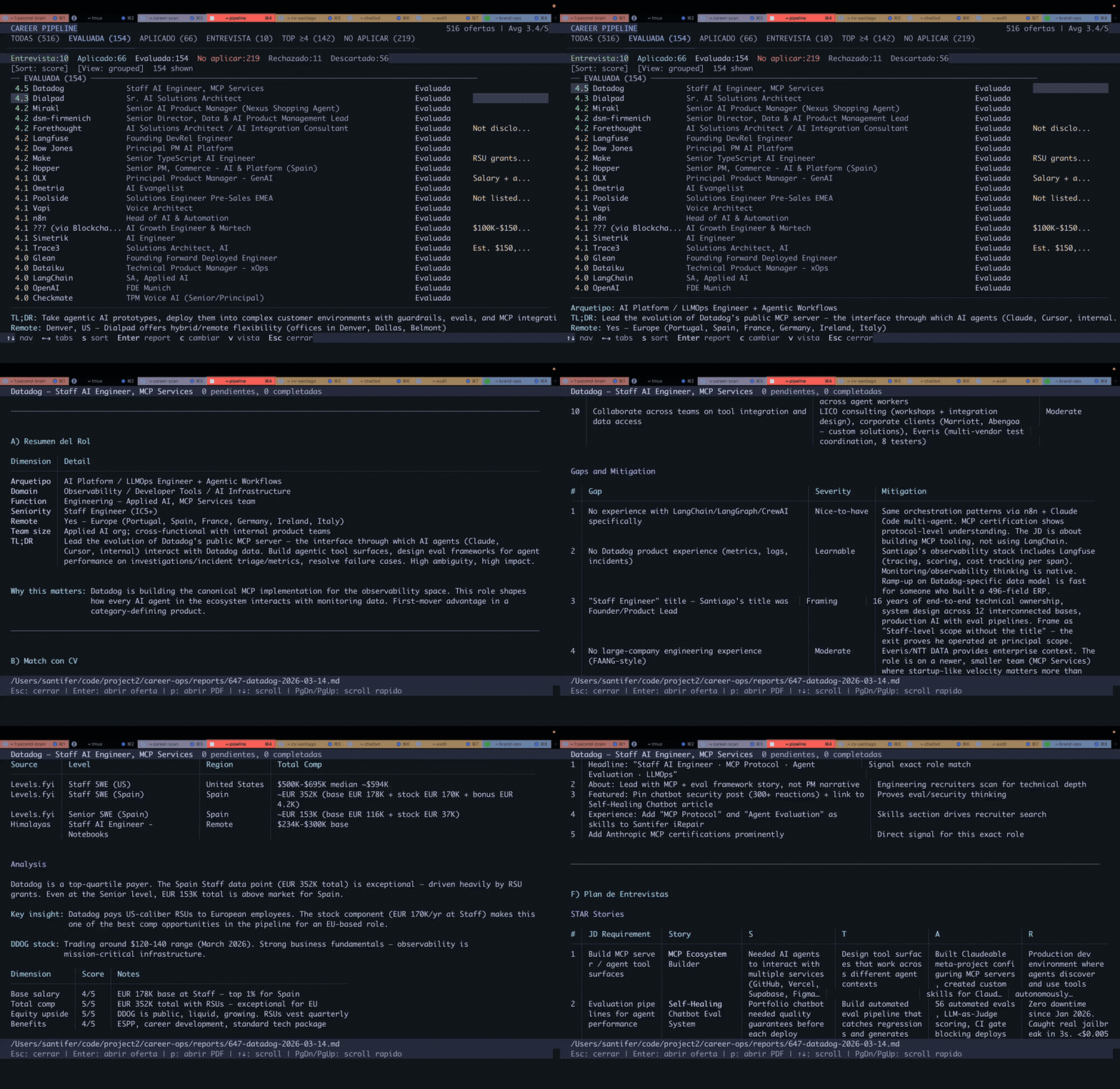
Dashboard TUI
The built-in terminal dashboard lets you browse your pipeline visually:
cd dashboard
go build -o career-dashboard .
./career-dashboard --path ..
Features: 6 filter tabs, 4 sort modes, grouped/flat view, lazy-loaded previews, inline status changes.
Project Structure
career-ops/
├── CLAUDE.md                    # Agent instructions
├── cv.md                        # Your CV (create this)
├── article-digest.md            # Your proof points (optional)
├── config/
│   └── profile.example.yml      # Template for your profile
├── modes/                       # 14 skill modes
│   ├── _shared.md               # Shared context (customize this)
│   ├── oferta.md                # Single evaluation
│   ├── pdf.md                   # PDF generation
│   ├── scan.md                  # Portal scanner
│   ├── batch.md                 # Batch processing
│   └── ...
├── templates/
│   ├── cv-template.html         # ATS-optimized CV template
│   ├── portals.example.yml      # Scanner config template
│   └── states.yml               # Canonical statuses
├── batch/
│   ├── batch-prompt.md          # Self-contained worker prompt
│   └── batch-runner.sh          # Orchestrator script
├── dashboard/                   # Go TUI pipeline viewer
├── data/                        # Your tracking data (gitignored)
├── reports/                     # Evaluation reports (gitignored)
├── output/                      # Generated PDFs (gitignored)
├── fonts/                       # Space Grotesk + DM Sans
├── docs/                        # Setup, customization, architecture
└── examples/                    # Sample CV, report, proof points
Tech Stack

- Agent: Claude Code with custom skills and modes
- PDF: Playwright/Puppeteer + HTML template
- Scanner: Playwright + Greenhouse API + WebSearch
- Dashboard: Go + Bubble Tea + Lipgloss (Catppuccin Mocha theme)
- Data: Markdown tables + YAML config + TSV batch files
Also Open Source
- cv-santiago -- The portfolio website (santifer.io) with AI chatbot, LLMOps dashboard, and case studies. If you need a portfolio to showcase alongside your job search, fork it and make it yours.
About the Author
I'm Santiago -- Head of Applied AI, former founder (built and sold a business that still runs with my name on it). I built career-ops to manage my own job search. It worked: I used it to land my current role.
My portfolio and other open source projects → santifer.io
☕ Buy me a coffee if career-ops helped your job search.
Star History
Disclaimer
career-ops is a local, open-source tool — NOT a hosted service. By using this software, you acknowledge:
- You control your data. Your CV, contact info, and personal data stay on your machine and are sent directly to the AI provider you choose (Anthropic, OpenAI, etc.). We do not collect, store, or have access to any of your data.
- You control the AI. The default prompts instruct the AI not to auto-submit applications, but AI models can behave unpredictably. If you modify the prompts or use different models, you do so at your own risk. Always review AI-generated content for accuracy before submitting.
- You comply with third-party ToS. You must use this tool in accordance with the Terms of Service of the career portals you interact with (Greenhouse, Lever, Workday, LinkedIn, etc.). Do not use this tool to spam employers or overwhelm ATS systems.
- No guarantees. Evaluations are recommendations, not truth. AI models may hallucinate skills or experience. The authors are not liable for employment outcomes, rejected applications, account restrictions, or any other consequences.
See LEGAL_DISCLAIMER.md for full details. This software is provided under the MIT License "as is", without warranty of any kind.
Contributors
Got hired using career-ops? Share your story!
License
MIT — © Santiago Fernández de Valderrama. See LICENSE.
This Fork
This is a personal fork maintained by Maxime Fevet (LinkedIn · @Garenfordemacia). It is not a re-authoring of the project — all credit for the original engine goes to the author above. This fork adds an Obsidian + Dataview dashboard integration and retunes the portal scanner for sales-engineering / enterprise account-executive roles. See CONTRIBUTORS.md.
Let's Connect






How to Install
- Download the dashboard markdown file from GitHub
- Drop it into your vault (anywhere)
- Install the Homepage plugin and point it at the file
- Enable any listed CSS snippets for the intended look
Stats
Stars
0
Forks
0
License
MIT
Last updated 1mo ago
Categories