
student_life_manager
Student OS — The ultimate all-in-one life manager for students. A premium, obsidian-styled dashboard for tracking academics, finances, and residency status with real-time cloud sync and intelligent automation. 🎓🛡️💸
🎓 Student OS
Your studies, money, work and student life — in one place.
📱 Available now for Android



⬇️ Download Student OS v1.0.0 • Report a Bug • Request a Feature
Android users can already try Student OS. Download the latest APK from the GitHub Releases page and install it on your device.
Student OS is an open-source Flutter productivity app designed to help students — especially international students — manage university, finances, student jobs, important documents, st[...]
Instead of switching between multiple apps, spreadsheets, calendars and notes, Student OS brings the important parts of student life together.
📱 Built with Flutter • 🔥 Powered by Firebase • 🌍 Designed for modern student life
✨ Why Student OS?
Student life is more than assignments and exams.
Students often need to manage:
- 🎓 University deadlines
- 📚 Study sessions
- 💰 Monthly expenses
- 💼 Student jobs
- 📄 Important documents
- 🏠 Administrative tasks
- 🛂 Residence permit deadlines
- 🩺 Health-insurance tasks
- 🌍 Life in a new city
Student OS turns these scattered responsibilities into one organized workspace.
📸 Preview
Screenshots and demo video coming with the public release.
| Dashboard | Academics | Finance |
|---|---|---|
 | 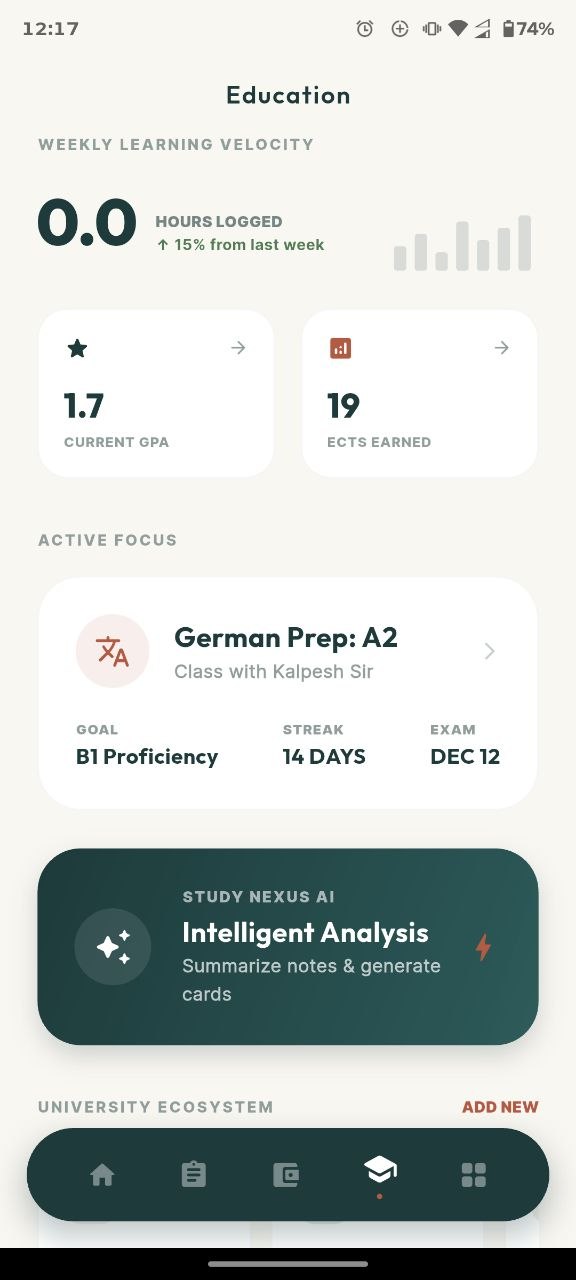 |  |
| Residency | Focus Mode | Job Tracker |
|---|---|---|
| Add screenshot | Add screenshot |
🚀 Core Features
🎓 Academic Management
Stay on top of university without juggling multiple tools.
- 📚 Track courses and academic progress
- 🎯 Monitor weekly study goals
- ⏱️ Focus timer for distraction-free study sessions
- 📊 Study analytics and progress visualization
- 🧮 Built-in scientific calculator
- 📝 Study-session history
- 🎓 Track ECTS progress
🛂 Residency & Student Administration
Designed with international student life in mind.
Residence Permit Tracker
Track important residence information and automatically calculate the remaining days before expiry.
Student Administration Checklist
Manage important tasks such as:
- Anmeldung
- Health insurance
- Residence-related tasks
- University administration
- Other student bureaucracy
Document Management
Keep important student-related documents organized and accessible from one place.
💰 Student Finance
Understand your finances without maintaining another spreadsheet.
- 💳 Account balance overview
- 📊 Budget summaries
- 💸 Expense monitoring
- 📅 Monthly financial overview
- 🏠 Student-life expense tracking
Student OS is designed to make financial information easy to understand at a glance.
💼 Student Job Tracker
University and work often happen at the same time.
Student OS helps you manage:
- Job applications
- Student employment information
- Working hours
- Job-related progress
This makes it easier to manage your study + work life together.
🧘 Focus Mode
A clean study timer designed for focused work.
Use it for:
- Pomodoro sessions
- Deep work
- Exam preparation
- Coding sessions
- Assignment work
Study sessions can contribute to your overall study analytics.
🌤️ Smart Dashboard
Your dashboard gives you a quick overview of your day.
Features include:
- 📍 Location-aware experience
- 🌤️ Current weather
- 👋 Time-based personalized greeting
- ⚡ Quick-access shortcuts
- 📚 Academic information
- 💰 Finance overview
- 🛂 Important reminders
The goal is simple:
Open one screen and understand what matters today.
🎨 UI & Design
Student OS uses a modern interface inspired by productivity dashboards and premium mobile applications.
Design principles
- 🌑 Obsidian-style dark interface
- ☀️ Light theme support
- 🪟 Subtle glassmorphism
- ✨ Smooth animations
- 📱 Mobile-first responsive layouts
- 🤏 Haptic feedback
- 🔤 Outfit & Inter typography
- 🎯 Clear information hierarchy
The design focuses on making complex student information feel simple.
🏗️ Architecture
Student OS follows a modular Flutter architecture.
                    Student OS
                         │
                ┌────────┴────────┐
                │                 │
           Flutter UI        Notifications
                │
          State Management
            (Provider)
                │
          Application Logic
                │
       ┌────────┼─────────┐
       │        │         │
     Auth    Database    APIs
       │        │         │
       └──── Firebase ────┘
                │
        Auth / Firestore
The architecture separates UI, application logic and external services to keep the project maintainable as new modules are added.
🛠️ Tech Stack
| Technology | Purpose |
|---|---|
| Flutter | Cross-platform mobile application |
| Dart | Application language |
| Provider | State management |
| Firebase Authentication | User authentication |
| Cloud Firestore | Cloud data persistence |
| Local Storage | Local caching and preferences |
| flutter_animate | UI animations |
| Geolocator | Location services |
| Weatherstack API | Weather information |
| Flutter Notifications | Important reminders |
🔄 Application Flow
User
 ↓
Student OS Dashboard
 ↓
──────────────────────────────
│ Academics                  │
│ Finance                    │
│ Student Jobs               │
│ Residency                  │
│ Documents                  │
│ Focus Sessions             │
──────────────────────────────
 ↓
Local State / Provider
 ↓
Firebase Services
 ↓
Cloud Firestore
👥 Who Is Student OS For?
Student OS is useful for:
🎓 University Students
Manage academics, finances and productivity in one application.
🌍 International Students
Keep track of administrative tasks, documents and residence-related deadlines alongside university life.
💼 Working Students
Manage work responsibilities without losing track of academic goals.
📚 Students Preparing for Exams
Use Focus Mode and analytics to understand study progress.
🧠 Product Philosophy
Student OS is based on a simple idea:
Students should spend less time managing student life and more time living it.
The goal is not to add another productivity app to your phone.
The goal is to reduce the number of tools required to manage:
Study
+
Money
+
Work
+
Documents
+
Administration
into:
One Student OS
🚀 Getting Started
Prerequisites
Make sure you have:
- Flutter SDK
- Dart SDK
- Android Studio or VS Code
- Firebase project
- Android emulator or physical device
1. Clone the repository
git clone https://github.com/dj2313/student_life_manager.git
cd student_life_manager
2. Install dependencies
flutter pub get
3. Configure environment variables
Create a .env file in the project root.
WEATHER_API_KEY=your_weatherstack_api_key
Never commit your production API keys.
4. Configure Firebase
Create a Firebase project and configure the required platforms.
Enable the Firebase services required by the application, including:
- Authentication
- Cloud Firestore
Add the generated Firebase configuration files according to the official FlutterFire setup process.
5. Run Student OS
flutter run
📦 Release
Android
🚧 Google Play release in development
A production Android release is planned after testing and production-readiness improvements.
🗺️ Roadmap
✅ Current
- Academic dashboard
- Study tracking
- Focus timer
- Finance management
- Job tracking
- Residence permit tracking
- Student administration checklist
- Firebase authentication
- Firestore synchronization
- Weather integration
- Dark/light themes
🚧 Next
- Production Google Play release
- Improved offline-first experience
- Crash reporting and analytics
- Better notification management
- Improved document management
- Automated testing
- Accessibility improvements
- Performance optimization
🔮 Future
- Student document intelligence
- Deadline extraction from documents
- Calendar integrations
- Smart administrative reminders
- Multi-language support
- Shared student/roommate features
🔐 Privacy
Student OS handles information that may be personal to students, so privacy is an important part of the project's development.
The production version is being designed around principles such as:
- Minimal data collection
- Clear permission requests
- Secure authentication
- User-controlled information
- Account and data deletion
- Transparent privacy documentation
Security and privacy claims will only be made for features that are implemented and verified.
🧪 Development Status
Student OS is currently under active development.
The repository represents the ongoing development version of the application and may contain features that are still being improved before the public production release.
Feedback, issues and contributions are welcome.
🤝 Contributing
Student OS is open source, and contributions are welcome.
You can help by:
- 🐛 Reporting bugs
- 💡 Suggesting features
- 🎨 Improving UI/UX
- 🧪 Adding tests
- 📚 Improving documentation
- 🌍 Improving international-student features
To contribute:
- Fork the repository
- Create a new branch
- Make your changes
- Submit a pull request
⭐ Support the Project
If Student OS is useful or interesting to you:
Star ⭐ the repository to support the project and help more students and developers discover it.
You can also:
- Share it with another student
- Open an issue
- Suggest a feature
- Contribute code
- Test upcoming releases
🦉 Brand Story
The Owl & Book represents knowledge, learning and thoughtful decision-making.
The Rising Arrow represents continuous academic, financial and personal growth.
Together, they represent the idea behind Student OS:
Learn. Organize. Grow.
🔎 Project Topics
flutter • dart • firebase • android • student-productivity • student-life • international-students • study-planner • student-finance • productivity-app • [...]
👨💻 Built by Dhruv Trivedi
Student OS is built as an open-source product exploring modern Flutter development, Firebase architecture, mobile product design and real-world student productivity problems.
If you're interested in the project, feel free to ⭐ star the repository, open an issue or contribute.
⭐ If Student OS helps you or gives you an idea, consider starring the repository.
How to Install
- Download the dashboard markdown file from GitHub
- Drop it into your vault (anywhere)
- Install the Homepage plugin and point it at the file
- Enable any listed CSS snippets for the intended look
Stats
Stars
0
Forks
0
Last updated 2mo ago
Categories
Tags