
To Hugo
Process Obsidian notes to publish them with Hugo. Supports transformation of Obsidian wiki links into Hugo shortcodes for internal linking.

Obsidian Vault to Hugo Content
Lightweight, extensible, zero-dependency CLI written in Python to help us publish obsidian notes with hugo.
It only takes two arguments: The obsidian vault directory (--obsidian-vault-dir) and the hugo content directory (--hugo-content-dir).
python -m obsidian_to_hugo --obsidian-vault-dir=<path> --hugo-content-dir=<path>
It takes care of the following steps:
- Clears hugo content directory (directory will be deleted and recreated)
- Copies obsidian vault contents into hugo content directory (
.obsidiangets removed immediately after copying) - Replaces obsidian wiki links (
[[wikilink]]) with hugo shortcode links ([wikilink]({{< ref "wikilink" >}})) - Replaces obsidian marks (
==important==) with HTML marks (<mark>important</mark>) - Want to do more? You can write and register custom filters to dynamically include/exclude content from processing and processors to do whatever you want with the file contents.
Replacement examples
| Obsidian | Hugo |
|---|---|
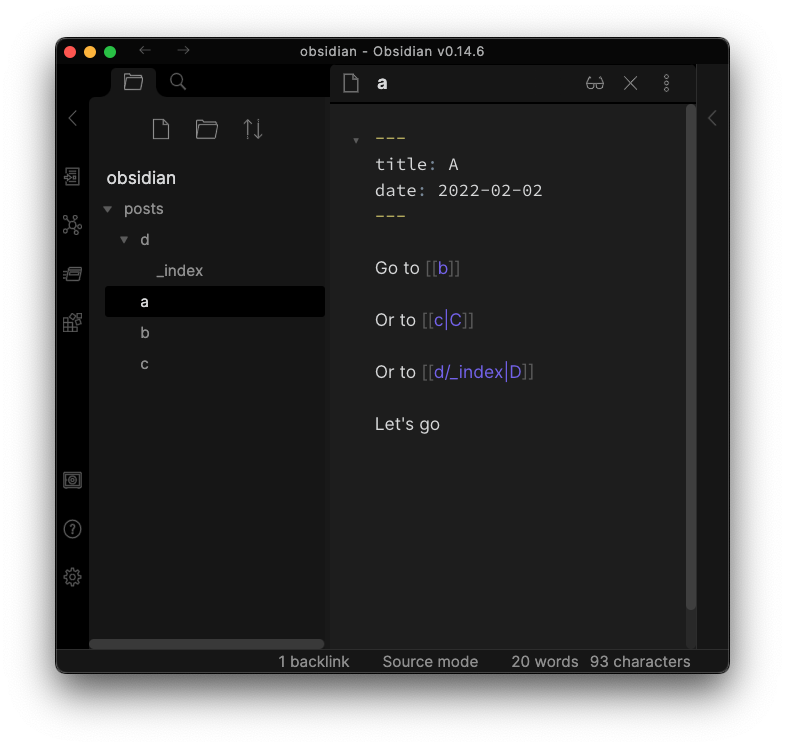 | 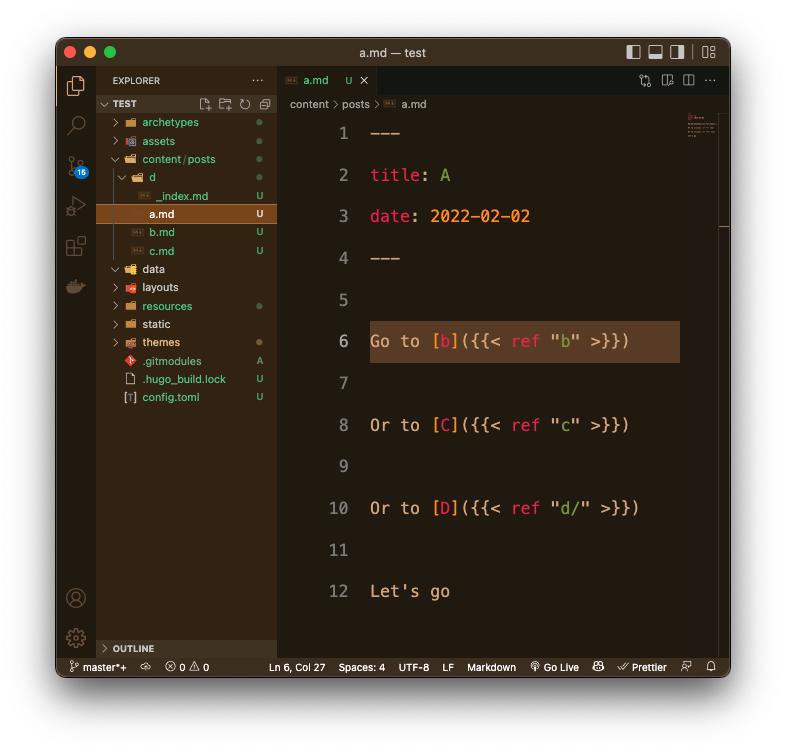 |
[[/some/wiki/link]] | [/some/wiki/link]({{< ref "/some/wiki/link" >}}) |
[[/some/wiki/link|Some text]] | [Some text]({{< ref "/some/wiki/link" >}}) |
[[/some/wiki/link/_index]] | [/some/wiki/link/]({{< ref "/some/wiki/link/" >}}) |
[[/some/wiki/link#Some Heading|Some Heading Link]] | [Some Heading Link]({{< ref "/some/wiki/link#some-heading" >}}) |
==foo bar=== | <mark>foo bar</mark> |
Note For now, there is no way to escape obsidian wiki links. Every link will be replaced with a hugo link. The only way to get around this is changing the wiki link to don't match the exact sytax, for example by adding an invisible space (Obsidian will highlight the invisible character as a red dot).
However, this still is really really not best practice, so if anyone wants to implement real escaping, please do so.
Installation
pip install obsidian-to-hugo
Usage
usage: __main__.py [-h] [--version] [--hugo-content-dir HUGO_CONTENT_DIR]
                   [--obsidian-vault-dir OBSIDIAN_VAULT_DIR]

options:
  -h, --help            show this help message and exit
  --version, -v         Show the version and exit.
  --hugo-content-dir HUGO_CONTENT_DIR
                        Directory of your Hugo content directory, the obsidian notes
                        should be processed into.
  --obsidian-vault-dir OBSIDIAN_VAULT_DIR
                        Directory of the Obsidian vault, the notes should be processed
                        from.
Python API
from obsidian_to_hugo import ObsidianToHugo

obsidian_to_hugo = ObsidianToHugo(
    obsidian_vault_dir="path/to/obsidian/vault",
    hugo_content_dir="path/to/hugo/content",
)

obsidian_to_hugo.run()
Filters
You can pass an optional filters argument to the ObsidianToHugo
constructor. This argument should be a list of functions.
The function will be invoked for each file from the obsidian vault that is copied into the hugo content directory.
Inside the function, you have access to the file path and the file contents.
When the function returns False, the file will be skipped and not copied
into the hugo content directory.
from obsidian_to_hugo import ObsidianToHugo

def filter_file(file_contents: str, file_path: str) -> bool:
    # do something with the file path and contents
    if your_condition:
        return True # copy file
    else:
        return False # skip file

obsidian_to_hugo = ObsidianToHugo(
    obsidian_vault_dir="path/to/obsidian/vault",
    hugo_content_dir="path/to/hugo/content",
    filters=[filter_file],
)

obsidian_to_hugo.run()
Processors
You can pass an optional processors argument to the ObsidianToHugo
constructor. This argument should be a list of functions.
The function will be invoked for each file from the obsidian vault that is copied into the hugo content directory. It will be passed the file contents as string, and should return the processed version of the file contents.
Custom processors are invoked after the default processing of the file contents.
from obsidian_to_hugo import ObsidianToHugo

def process_file(file_contents: str) -> str:
    # do something with the file contents
    return file_contents

obsidian_to_hugo = ObsidianToHugo(
    obsidian_vault_dir="path/to/obsidian/vault",
    hugo_content_dir="path/to/hugo/content",
    processors=[process_file],
)

obsidian_to_hugo.run()
How to Install
- Download the ZIP or clone the repository
- Open the folder as a vault in Obsidian (File → Open Vault)
- Obsidian will prompt you to install required plugins
Stats
Stars
430
Forks
32
License
MIT
Last updated 43mo ago
Categories
Tags
Updates
View allweb-repl: load py-script only once
43mo ago
add web-repl
43mo ago
Merge branch 'main' of https://github.com/devidw/obsidian-to-hugo
43mo ago
add calver updater script
43mo ago
fix wikilink inside markdown table (#17)
43mo ago