Zotero Annotations
Import PDF annotation notes and metadata from Zotero to Obsidian.
[DEPRECATED]This Plugin is not actively developed, for official plugins please check the end of this document. I would recomend using mgmeyers/obsidian-zotero-integration
Requirements
- Zotero
v6.xwith Better BibTeX plugin installed.- Export BetterBibTeX JSON file from Zotero to Obsidian vault(Also, In BetterBibTeX settings select
On Changeoption in the Automatic Export tab)
- Export BetterBibTeX JSON file from Zotero to Obsidian vault(Also, In BetterBibTeX settings select
- Obsidian
Installation
The plugin is not available in the community plugin section in Obsidian. So you have to install it manually.
Manual Installation
- Download the latest release from here and unzip it.
- Copy the
obsidian-zotero-annotationsfolder to your vault's.obsidian/pluginsfolder. - Reload Obsidian.
You can also use the BRAT plugin to install the latest release.
Features
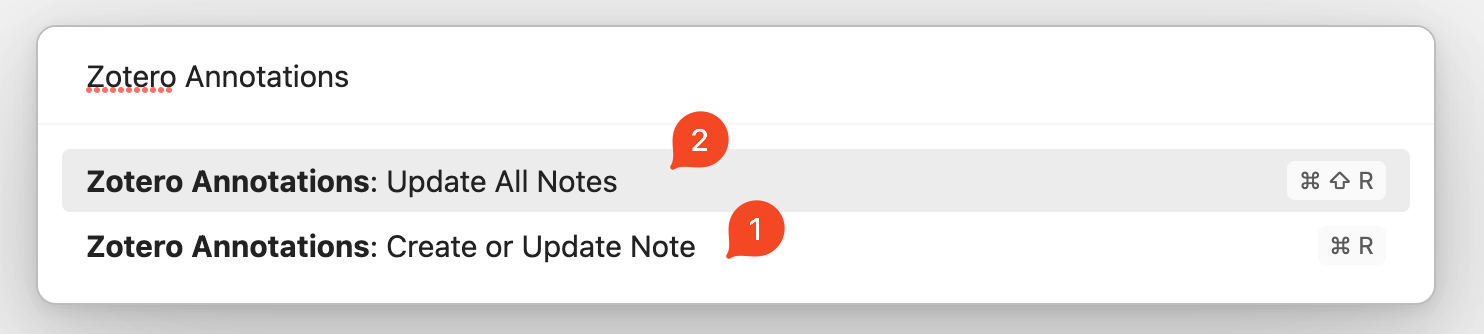
The plugin provides two commands:

- The
Create or Update Notewill create a note in Obsidian with the metadata and annotations from Zotero. If there are no annotations file associated with a reference in Zotero this command will simply import the metadata. - The
Update All Notesby default will update all the notes according to the new annotations created in Zotero. If set toCreate when missingoption in settings it will import and update all the references with annotation available in Zotero.
NOTE: By default, Hotkeys are not set.
Following is an example of the command Create or Update Note:
 If you wish to change the default style, you can make a custom CSS(Obsidian settings-> Appearance -> CSS Snippets)
CSS Snippet for changing the modal view
.zaTitle {
    /* my title style goes here */
}
.zaAuthors {
    /* my authors style goes here */
}
.zaCitekey {
    /* my citekey style goes here */
}
Upcoming Features
- Command to insert reference ID and other metadata in a markdown note (can be used for Reference Map plugin)
- Command to cherry pick annotations from Zotero and insert it to current note
Settings
By default, annotations are created with a plain template. You can provide a custom template by providing the path to the template using the Template File option in the settings.
Expand to see the custom template(check the templates directory for more)
---
CiteKey: {{citationKey}}
Type: {{itemType}}
Title: '{{title}}'
Author: '{{author}}'
Publisher: '{{publisher}}'
Journal: '{{publicationTitle}}'
Year: {{year}}
DOI: {{DOI}}
tags: reference
---

# {{title}}

## Metadata

>[!info] Info
>- **Title**: {{title}}
>- **Author**: {{author}}
>- **Year**: {{year}}

>[!abstract] Abstract
> {{abstractNote}}

> [!example] Files and Links
>- **Ref**: [[@{{citationKey}}]]
>- **DOI**: {{DOI}}
>- **Url**: {{url}}
>- **Uri**: {{uri}}
>- **Eprint**: {{eprint}}
>- **File**: {{file}}
>- **Local Library**: [Zotero]({{localLibraryLink}})

> [!tip] Zotero Tags
>- **Keywords**: {{keywordsAll}}

## Notes

## Comments
{{UserNotes}}

## Annotations
{{PDFNotes}}
This template will produce the following note:

And annotations will look like this but they can be customized:

Related or Similar Plugins
This work is inspired by the plugins mentioned in this section. I used all of them and didn't like some of the features. Or some functions that I wanted were not available. So I decided to borrow some of their code and make my own plugin. Thanks to the authors. Please try these plugins. They are great.
How to Install
- Download the template file from GitHub
- Move it anywhere in your vault
- Open it in Obsidian — done!
Stats
Stars
32
Forks
0
License
MIT
Last updated 38mo ago
Categories
Tags