research-os-vault-template
Obsidian vault template for scientific knowledge work, designed to be personalized with an AI assistant
Research OS Vault Template
An Obsidian vault template for scientific and technical knowledge work, designed to be set up with an AI assistant.
What This Is
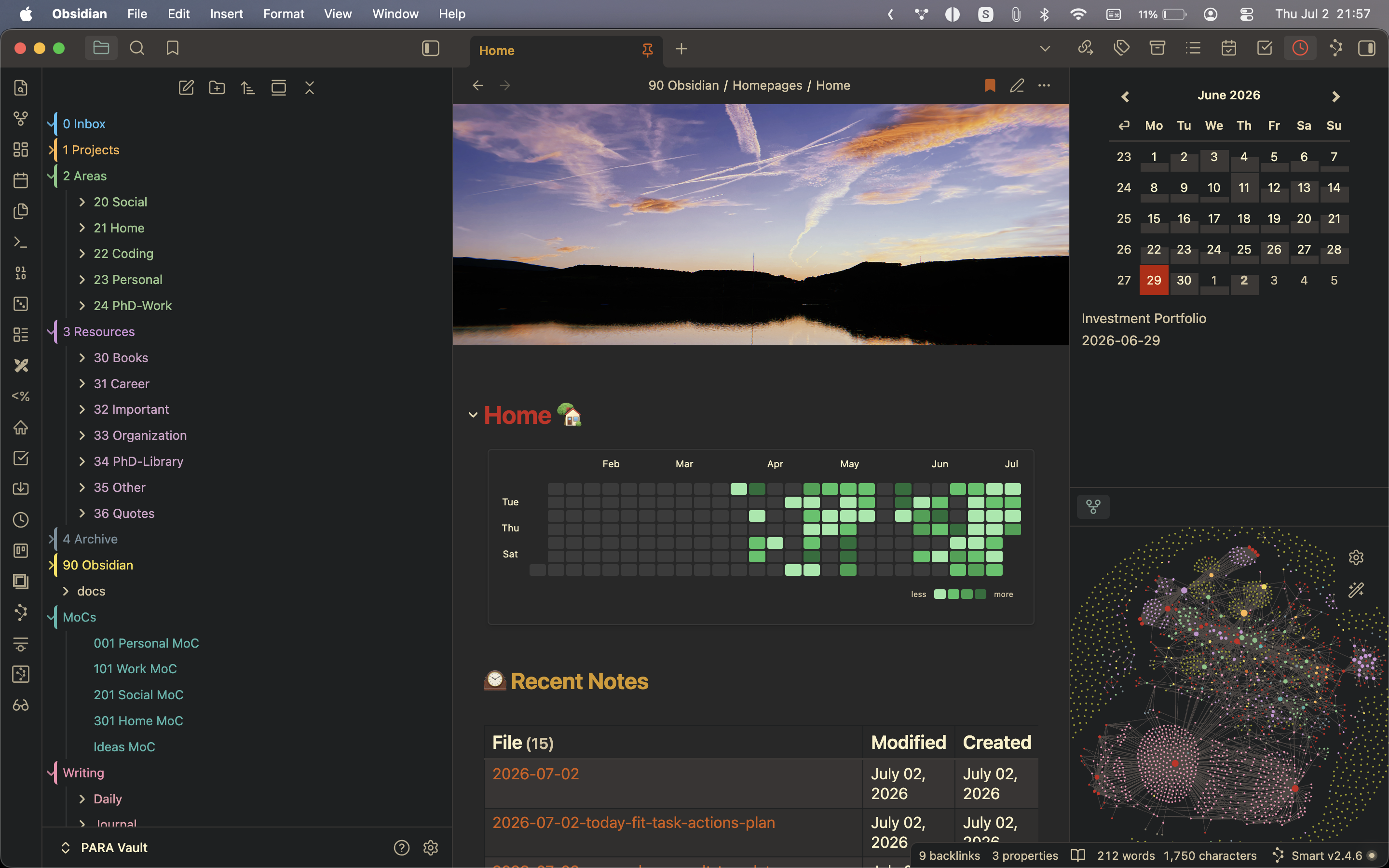
Research OS is a ready-to-open Obsidian vault for researchers, engineers, students, analysts, and technical makers. It combines a PARA structure with an AI-readable operating layer, so your assistant can quickly understand your projects, research context, literature workflow, daily notes, and personal knowledge system.
The vault is intentionally generic. It does not contain personal history. You download it, open it in Obsidian, then ask an AI assistant to interview you and fill in the main context files.
What You Get
- PARA folders for Inbox, Projects, Areas, Resources, and Archive.
- Research-focused dashboards for work, literature, people, home, personal development, and ideas.
- Daily notes with focus, capture, task mirrors, research notes, reflection, and agent session logs.
- AI briefing files for Claude, Codex, ChatGPT, or another assistant.
- Prompt templates for vault maintenance, literature review, project kickoff, weekly review, and daily reflection.
- Obsidian plugin configuration, bundled themes, homepage layout, graph/sidebar setup, and folder color styling.
- A scientific/research bias without being locked to academia or a specific field.
Quick Start
- Download this repository as a ZIP from GitHub.
- Unzip it somewhere you want to keep Obsidian vaults.
- Open Obsidian.
- Choose Open folder as vault.
- Select the unzipped
Research OS Vault Templatefolder. - Install or enable the recommended community plugins from
90 Obsidian/Claude/Setup.md. - Open
CLAUDE.md. - Ask an AI assistant to help you personalize the vault using the onboarding prompt below.
AI Setup Prompt
Paste this into Claude, Codex, ChatGPT, or your preferred assistant after giving it access to this vault:
I just downloaded the Research OS Obsidian vault template.

Please help me set it up for my own life and work.

Start by reading:
- CLAUDE.md
- AGENTS.md
- 90 Obsidian/Claude/Instructions.md
- 90 Obsidian/Claude/Work-Research-context.md
- 90 Obsidian/Claude/Personal-context.md
- 90 Obsidian/Claude/Home-context.md
- 90 Obsidian/Claude/Literature-System.md
- 3 Resources/33 Organization/Task-System.md

Then interview me one question at a time. Ask only what you need to personalize the vault.

Use my answers to update the main context files, dashboards, and example notes. Keep the structure generic and clean. Explain how the system works as you go, especially:
- what belongs in Inbox, Projects, Areas, Resources, Archive, MoCs, and Writing;
- how daily notes and agent session logs work;
- how research/work notes and literature notes should connect;
- what should go in a task manager instead of Obsidian.

Do not invent personal details. If you are unsure, ask me.
Files To Personalize First
CLAUDE.md- master AI briefing and vault map.AGENTS.md- Codex-style operating rules.90 Obsidian/Claude/Work-Research-context.md- your research domain, methods, projects, collaborators, and tools.90 Obsidian/Claude/Literature-System.md- your reference manager and paper workflow.90 Obsidian/Claude/Personal-context.md- routines, goals, side projects, preferences, and boundaries.MoCs/101 Work Research MoC.md- your work and research dashboard.
How The System Works
Use Obsidian for context, notes, decisions, sources, links, drafts, and durable memory. Use a task manager for concrete actions, deadlines, reminders, recurring tasks, and completion state.
The important pattern is:
0 Inbox/captures raw material.1 Projects/holds active finite work.2 Areas/holds ongoing responsibilities.3 Resources/holds reference material.4 Archive/holds inactive or completed material.90 Obsidian/holds templates, prompts, attachments, setup, and AI context.MoCs/holds dashboards and maps of content.Writing/holds daily notes, journals, reflections, and topic writing.
Privacy And Safety
This template intentionally contains no personal notes, credentials, API keys, embeddings, private attachments, or runtime workspace history. Some plugin settings include blank token fields so users can configure integrations themselves.
Before publishing your own modified version, search for private names, email addresses, API keys, addresses, financial notes, and copied attachments.
License
MIT License. Use it, adapt it, and make it your own.
How to Install
- Download the ZIP or clone the repository
- Open the folder as a vault in Obsidian (File → Open Vault)
- Obsidian will prompt you to install required plugins
Stats
Stars
0
Forks
0
License
MIT
Last updated 3mo ago
Categories
Tags