Nemukai
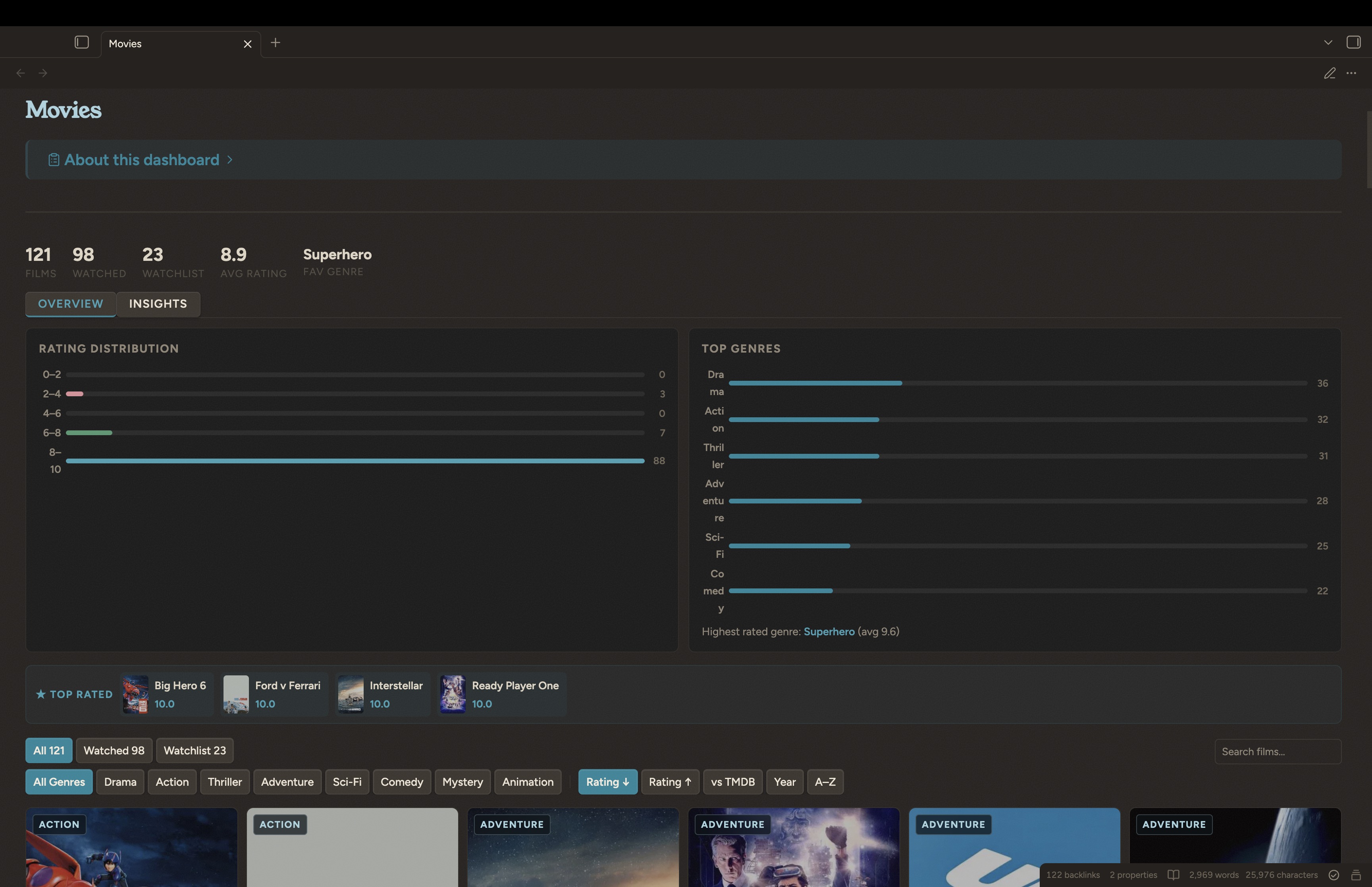
Warm, layered Obsidian CSS snippets — movies dashboard, wishlist gallery, custom callouts. Built on Minimal.
Nemukai — Obsidian theme + CSS snippets
Warm, layered, alive. A coral reef-inspired design system for Obsidian.
v0.2 — monolith split into per-feature snippets, plus an optional custom theme. See CHANGELOG.md.
What's included
| Piece | Description |
|---|---|
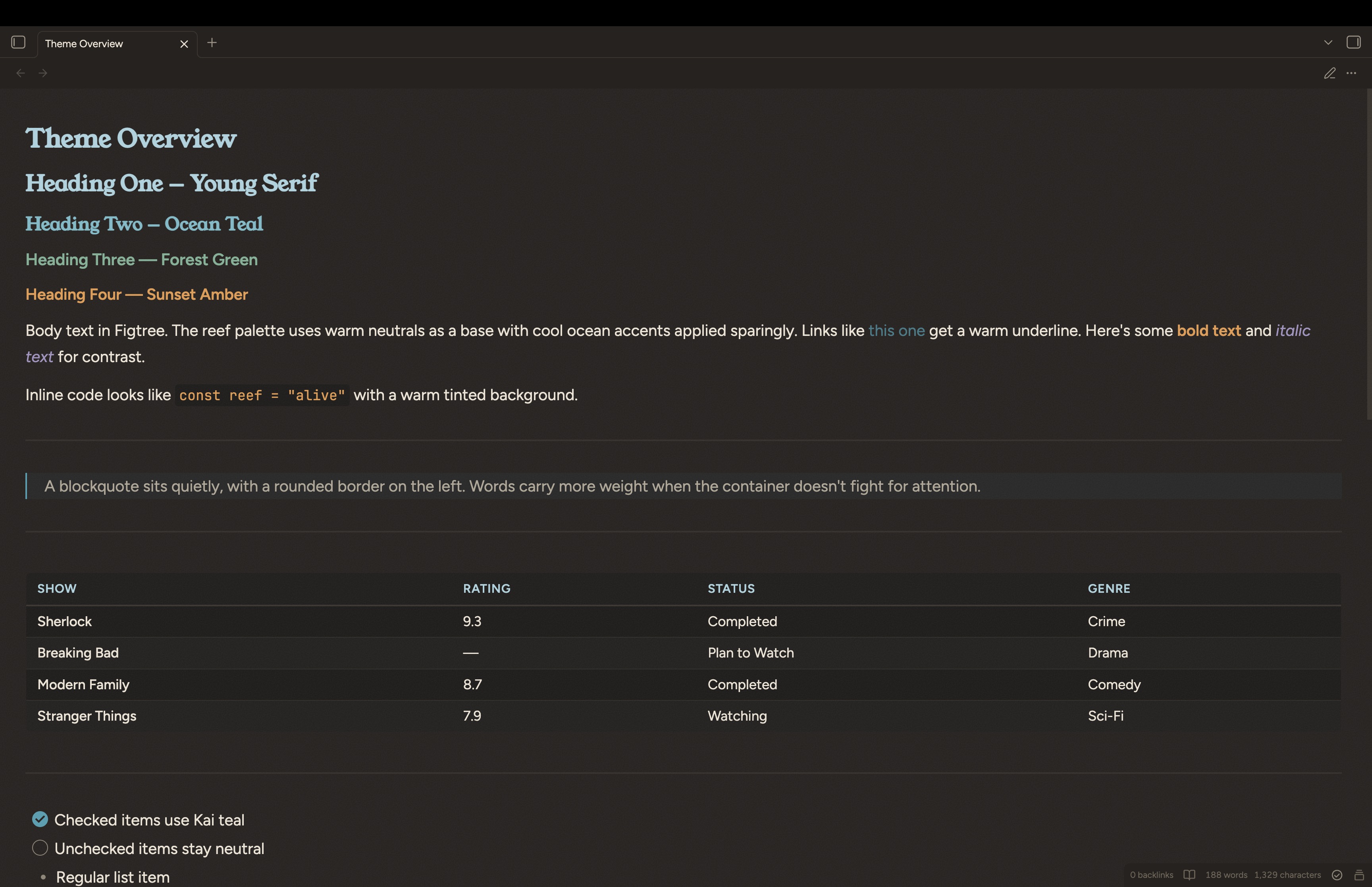
| Nemukai theme (optional) | Full custom theme — tokens, typography, tables, callouts, links, sidebar. Replaces Minimal / any other theme. |
| Tokens snippet | Standalone design tokens + Style Settings controls. Use this if you want to keep your existing theme. |
| Custom callouts | 10 domain callouts (project, ship, wip, blocker, decision, idea, koe, nemukai, metric, log) with hairline borders and uppercase labels. |
| Media gallery | 6-per-row poster grid used by Movies, Shows, Games. Cards, filters, sorts, search, spotlight, tabs. |
| Media editor | Rating editor modal + Insights panel blocks used on media pages. |
| Media connections | Taste DNA / tag correlation dashboard (Movies "Connections" tab). |
| Wishlist gallery | 4-per-row product grid with category filters, price stats, acquisition tracking. |
Each feature snippet is independent — install only what you need.
Quick start
Prerequisites
- Obsidian (v1.4+)
- Dataview — required for media and wishlist galleries (enable DataviewJS in its settings)
- Style Settings — required for in-app customization (accent color, font set, grid size)
Fonts
Install these free fonts from Google Fonts:
- Default (Archive): Young Serif · Figtree · JetBrains Mono
- Optional (Coastal): Instrument Serif · Plus Jakarta Sans
- Optional (Studio): Cormorant Garamond · Outfit
Install — pick one path
Path A — Use the Nemukai theme (recommended, full look)
Copy the theme folder:
<your-vault>/.obsidian/themes/Nemukai/
├── manifest.json
└── theme.css
Then: Settings → Appearance → Themes → Manage → Nemukai.
The theme already defines all --nk-* tokens and the Style Settings block, so you do not need nemukai-tokens.css.
Path B — Keep your own theme, add Nemukai features
Copy snippets/nemukai-tokens.css into your vault's snippets folder and enable it:
<your-vault>/.obsidian/snippets/nemukai-tokens.css
Settings → Appearance → CSS Snippets → reload → toggle on.
This loads only the design tokens — your current theme's colors, fonts, and layout stay untouched. Feature snippets below will pick up the tokens.
Install the feature snippets
Copy the snippets you want into <your-vault>/.obsidian/snippets/ and enable each:
| File | What it styles |
|---|---|
nemukai-callouts-custom.css | Domain callouts (project, ship, wip, ...) |
nemukai-media-gallery.css | Movies / Shows / Games poster gallery |
nemukai-media-editor.css | Rating editor modal + Insights blocks |
nemukai-media-connections.css | Movies "Connections" tab dashboard |
nemukai-wishlist.css | Wishlist product grid |
All feature snippets depend on --nk-* tokens — install the Nemukai theme or nemukai-tokens.css first.
Customize via Style Settings
Open Settings → Style Settings → Nemukai. Four knobs:
- Primary accent — any hex color. Default Kai teal
#1F869A. - Font set — Archive / Coastal / Studio.
- Media gallery columns — 4, 5, or 6 posters per row.
- Texture grain opacity (theme only) — 0 to 0.2.
Set up features
- Movies & Shows Dashboard — poster grid, 5-metric ratings, TMDB alignment
- Wishlist Gallery — product cards with category filters
- Custom Callouts — hairline-styled callout types
Repo structure
obsidian-nemukai/
├── README.md                             <-- you are here
├── CHANGELOG.md                          <-- version history
├── LICENSE                               <-- MIT
├── theme/
│   └── Nemukai/
│       ├── manifest.json
│       └── theme.css                     <-- full custom theme (Path A)
├── snippets/
│   ├── nemukai-tokens.css                <-- tokens-only (Path B)
│   ├── nemukai-callouts-custom.css       <-- domain callouts
│   ├── nemukai-media-gallery.css         <-- movies/shows/games grid
│   ├── nemukai-media-editor.css          <-- rating modal + insights
│   ├── nemukai-media-connections.css     <-- connections dashboard
│   └── nemukai-wishlist.css              <-- wishlist grid
├── movies-list/
│   ├── README.md
│   ├── Shows.md
│   └── examples/
├── wishlist/
│   ├── README.md
│   ├── Wishlist.md
│   └── examples/
├── callouts/
│   └── README.md
├── docs/
│   ├── design-tokens.md                  <-- full color/typography reference
│   └── philosophy.md                     <-- design principles
└── screenshots/
Design
The visual language is Reef — warm neutrals with ocean-cool accents.
- Hairlines over fills — 0.5px borders, transparent surfaces
- Serif for display, sans for body — three curated font pairs
- Warm base, cool accents — paper-like backgrounds, teal / green / coral highlights
- Restraint over decoration — every visual element earns its place
All design tokens (--nk-*) are defined in one place: theme/Nemukai/theme.css (or snippets/nemukai-tokens.css on Path B). Feature snippets only consume tokens — they never define their own colors.
Read more in docs/philosophy.md. Full color reference in docs/design-tokens.md.
Customization
Accent color, font set, gallery size
Use Style Settings → Nemukai. No file editing needed.
Deeper changes
Edit the :root block in theme/Nemukai/theme.css (or snippets/nemukai-tokens.css). All feature snippets reference var(--nk-*) — change a token once, it propagates everywhere.
Adding a custom callout type
See snippets/nemukai-callouts-custom.css — add your type to each selector group, define --cal-accent, and add the ::before content label.
Wishlist currency
Defaults to INR. See wishlist/README.md.
Credits & influences
- Japanese minimalism — restraint, natural materials, quiet confidence
- Coral reef ecosystems — the color language and naming convention
- Minimal by @kepano — the foundation of v0.1
License
MIT — use it, modify it, share it.
How to Install
- Download the repository ZIP below
- Unzip it and find the CSS snippet file
- Move the CSS file into your vault's
.obsidian/snippets/folder - Open Obsidian → Settings → Appearance → CSS Snippets → Enable it
Stats
Stars
5
Forks
0
License
MIT
Last updated 6mo ago