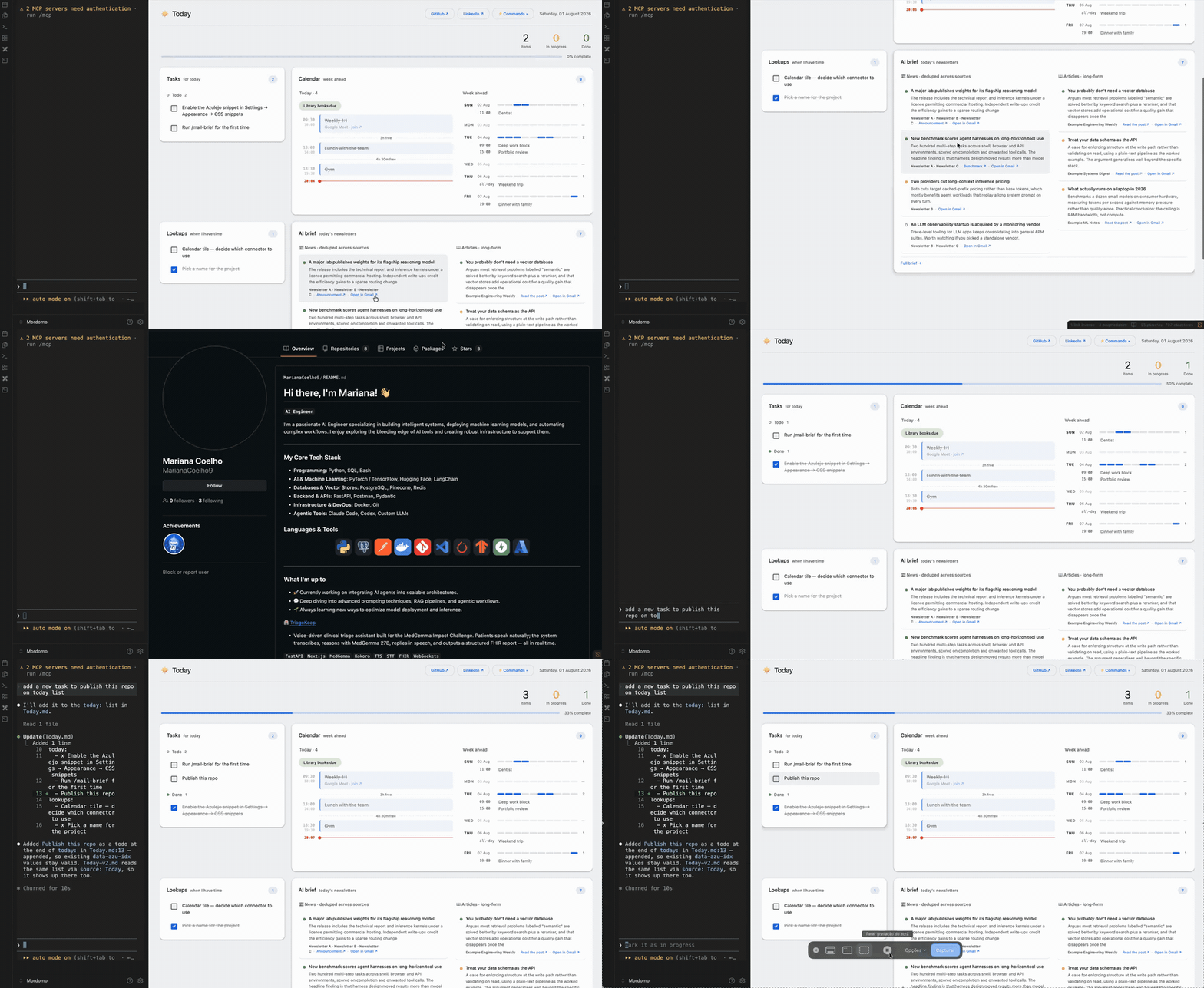
Mordomo
An Obsidian vault where Claude Code writes both the data and the dashboard that renders it. Agent as the write path, Dataview as the read path.
Mordomo
A personal operating system built on an Obsidian vault and a coding agent.
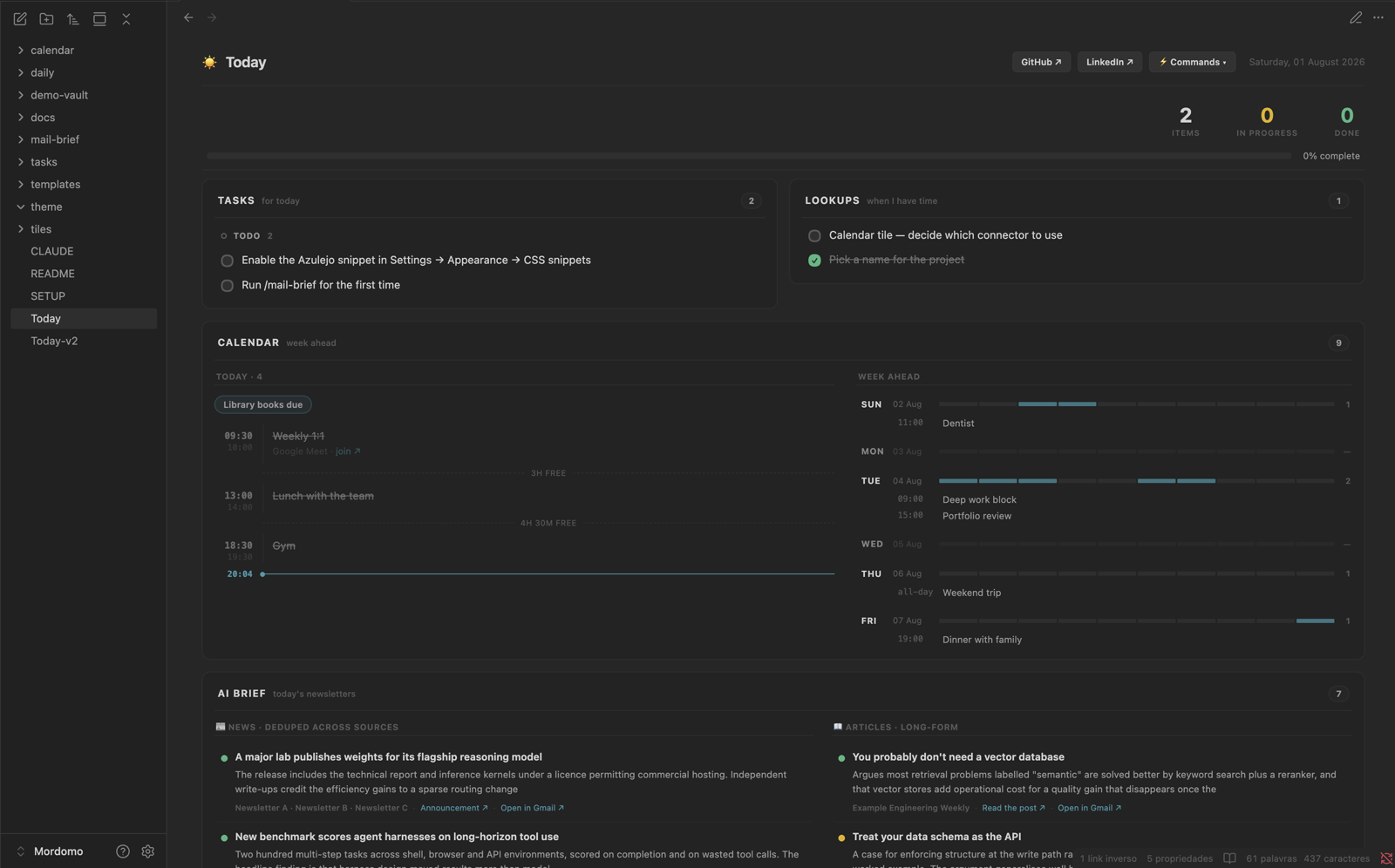
Mordomo is the page I open first every morning — tasks, calendar, a digest of what landed overnight — and the agent that maintains it. The unusual part isn't the dashboard. It's that the same agent that writes my data also writes the dashboard.
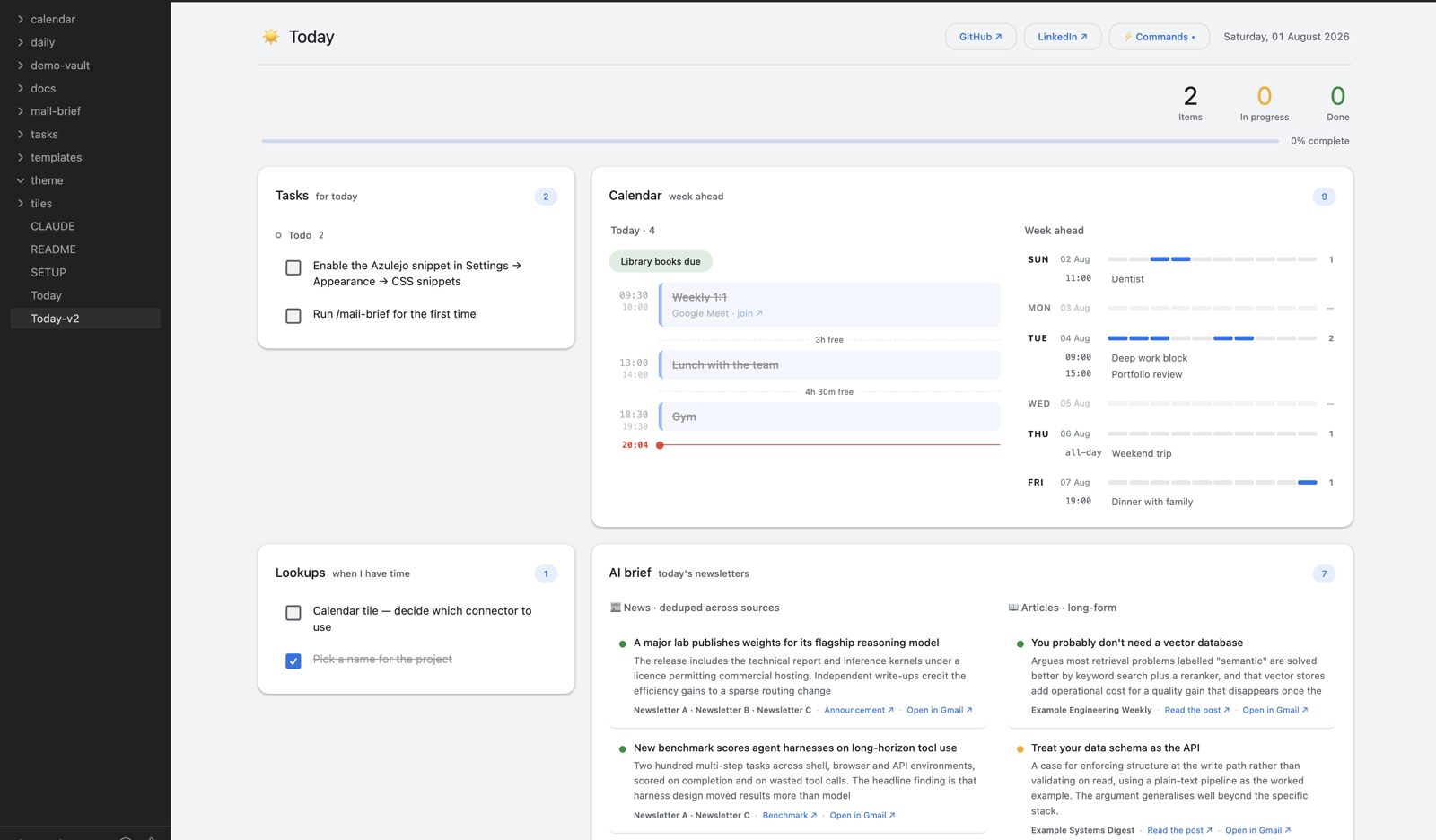
The same page, restyled. Today-v2.md runs the same loader, the same four tiles
and the same data — a different stylesheet and a different grid:
40 seconds of it working
Recorded at 2× — full-quality MP4. All content comes from the included demo
vault (./demo-vault/seed.sh); no real calendar, inbox or tasks appear anywhere in this repo.
The idea
Agent as the write path. Dataview as the read path.
The agent is the only thing that mutates state. Nothing else writes, so the data contract is guaranteed, so the read layer can stay dumb, fast, and declarative — plain markdown rendered by Dataview. No database, no sync service, no API. Files.
Most Obsidian AI projects stop there. Mordomo has a second write path, and that's the actual thesis:
| Plane | What the agent writes | You say | You get |
|---|---|---|---|
| Data | Notes, frontmatter, snapshots | "add a task due Friday" | A new note |
| Control | Skills, tiles, CSS — the app itself | "add a tile for my week ahead" | A new tile |
Using the software and modifying the software are the same action, through the same interface. There is no settings screen, no plugin to fork, no config schema to learn. You ask, and the app is different.
That idea isn't new — Emacs, HyperCard and Smalltalk all tried to collapse the gap between using a tool and reshaping it. All of them hit the same wall: you had to learn Lisp, or HyperTalk, or the object browser first. Natural language removes the wall. Mordomo is what that looks like when the runtime is a folder of markdown files.
Two halves, two names
- Mordomo — Portuguese for the household steward: the one who runs the house, keeps the books, and has what you need ready before you ask. The agent. The write path.
- Azulejo — the Portuguese ceramic tile: individually painted, individually replaceable, composed into panels far larger than any one piece. The dashboard. The read path.
The dashboard is a panel of azulejos. The mordomo paints new ones.
How it works
you ─── terminal (inside Obsidian) ─── Claude Code ───┐
                                                      │ writes
                          ┌───────────────────────────┘
                          ▼
              markdown + frontmatter          ← state
              tiles/ + theme/azulejo.css      ← the interface
                          │
                          │ rendered by Dataview
                          ▼
                     Today.md  ← what you actually look at
The terminal runs inside Obsidian, so the loop is closed on one screen: you ask, the agent edits the vault, Obsidian live-reloads, you see the result.
Modules
| Tile | What it shows | Data from |
|---|---|---|
| Tasks | Today's work as a three-state board — todo / in progress / done, click to cycle | Today.md frontmatter |
| Lookups | Things to read or investigate when there's time | Today.md frontmatter |
| Calendar | Today as a schedule rail with a live "now" line and free-time gaps; the week as busy bars | /calendar → Google Calendar |
| AI brief | Overnight newsletters, deduped across sources into news + long-form | /mail-brief → Gmail |
| Finance | Watchlist with sparklines | not built |
| Command | Does |
|---|---|
/good-morning | The whole morning: archives yesterday, carries open loops forward, refreshes both snapshots, prints a brief |
/calendar | Snapshots the week ahead |
/mail-brief | Compiles today's newsletter digest |
External data arrives through MCP connectors and is snapshotted into the vault — dashboards never call an API at render time. Slower to refresh, instant to open, and it works offline.
Two skins, one dashboard
Today.md and Today-v2.md run the same loader, the same four tiles
and the same data. The entire difference is frontmatter:
source: Today          # read and write the other note's lists — nothing diverges
cssclasses: [azu-material]
One is dark, dense and Linear-ish in two columns; the other is a light Google Workspace layout with elevated cards and a narrow left rail. Tick a task on either page and both update, because there's one list shown twice.
That's the architecture's strongest claim made checkable: presentation is genuinely separable from data, and a new look costs a stylesheet rather than a fork.
Requirements
- Obsidian with Dataview and a terminal plugin
- Claude Code and an Anthropic subscription
- Desktop only — a DataviewJS dashboard and an embedded terminal don't make sense on a phone
Setup
Full walkthrough in SETUP.md — Obsidian, the two plugins, the connectors, and the three files you edit to make it yours.
The short version:
git clone https://github.com/MarianaCoelho9/Mordomo.git
# open the folder as a vault in Obsidian
# install Dataview + Terminal, enable the `azulejo` CSS snippet
./demo-vault/seed.sh     # see it working before connecting anything
This is a reference, not a product
It's one person's vault, shaped around one person's mornings. The tiles I need are almost certainly not the tiles you need.
Clone it, get it running, then delete what you don't want and ask the agent for what you do —
Today.md renders whatever its tiles: list names, so adding a view is a request, not a pull
request. A personal operating system someone else designed isn't personal.
Scope
This is a personal tool, built in the open because the architecture is worth sharing — not a product. There's no test suite, no provider abstraction, and no plugin API, on purpose. When something breaks, the recovery story is asking the agent to fix it, and for one user on one machine that's enough.
A module earns its place only if it's something I check or decide on daily.
Credits
The Obsidian format skills (obsidian-cli, obsidian-markdown, obsidian-bases, json-canvas)
are vendored from kepano/obsidian-skills under the MIT
licence, unmodified. See .claude/skills/ATTRIBUTION.md.
Licence
How to Install
- Download the dashboard markdown file from GitHub
- Drop it into your vault (anywhere)
- Install the Homepage plugin and point it at the file
- Enable any listed CSS snippets for the intended look
Stats
Stars
0
Forks
0
License
Apache-2.0
Last updated 2mo ago
Categories