obsidian-llm-wiki-vault-template
An LLM-maintained Obsidian vault template: PARA x Zettelkasten, an AI wiki layer (Claude Code skills), and Datacore dashboards.
Obsidian LLM-Wiki Vault
An Obsidian vault template that pairs PARA and Zettelkasten with an AI layer: a wiki that Claude Code helps maintain, plus Datacore dashboards that stay up to date on their own.


A template: it ships with the structure, note templates, dashboards, tagging system, and AI workflows — but no personal notes and no third-party content. Click Use this template (or clone it), open it in Obsidian, and fill it with your own work.
What's different
Most "PARA vaults" are just a folder layout. What sets this one apart is the AI layer — the knowledge base doesn't only sit there, an LLM helps look after it.
- LLM Wiki — a
raw → wiki → schemasetup run by a few Claude Code skills (ingest/query/lint). You drop sources in; the agent reads them, writes interlinked wiki pages, and keeps them cross-referenced, deduplicated, and current. Based on Karpathy's "LLM Wiki" pattern. - Tagging — three frontmatter fields per note:
tags(from a controlled vocabulary),keywords(free), andsummary. Written in one pass over the note, and only filled in — never overwriting what you wrote by hand. - Datacore dashboards — the Homepage, the Maps of Content, and each area/project page are queried live from your notes, so there's no list to maintain by hand.
- PARA × Zettelkasten — things to do (PARA) and things to think about (ZETA) live as two separate systems.
- Templates for every note type: projects, areas, literature, permanent, fleeting, meetings, and daily/weekly/monthly journals.
- Note toolbar and page tasks — a per-folder toolbar at the top of every note, plus whole notes that act as to-dos, collected in the Mail Box. See SYSTEM/DOCS/interface.md.
Structure
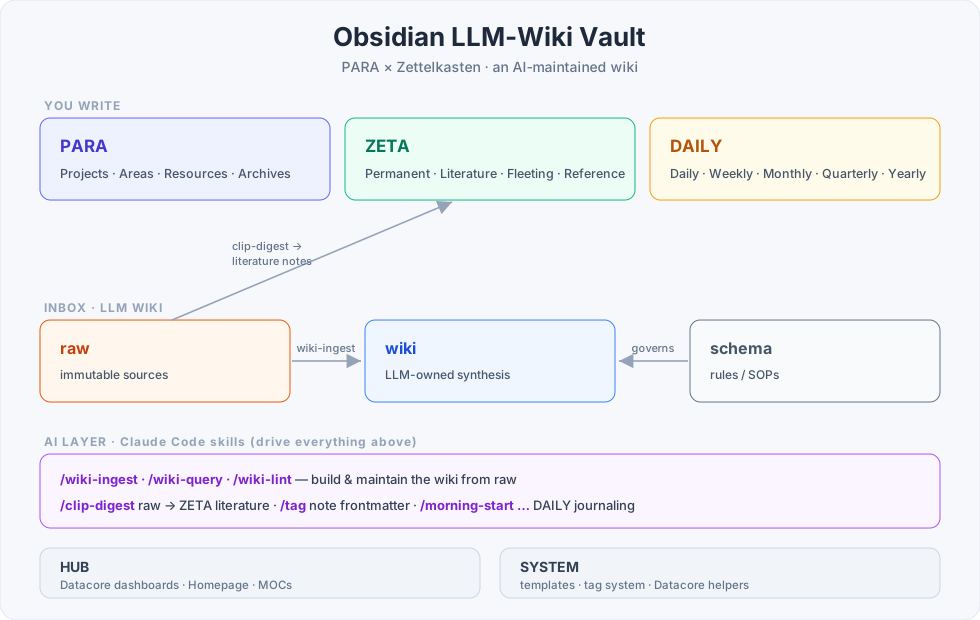
PARA/      Things to do: Projects · Areas · Resources · Archives · Workstation
ZETA/      Things to think about (Zettelkasten): Permanent · Literature · Fleeting · Reference
INBOX/     LLM Wiki: raw (immutable sources) · wiki (LLM-owned) · schema (rules)
DAILY/     Journals: Daily · Weekly · Monthly · Quarterly · Yearly
HUB/       Navigation: Homepage · Map of Content · MOCs · dashboards
SYSTEM/    Templates · tag system · scripts · docs (English + 中文)
.claude/   Claude Code skills (the AI layer)
For why PARA and ZETA are kept apart, see SYSTEM/DOCS/structure.md.
The AI layer
Everything below runs through Claude Code:
| System | What it does | Skills | Rules (SSOT) |
|---|---|---|---|
| LLM Wiki | Turns the sources in INBOX/raw into an interlinked synthesis in INBOX/wiki | /wiki-ingest · /wiki-query · /wiki-lint | INBOX/schema/wiki-schema.md |
| Tagging | Writes tags / keywords / summary into a note's frontmatter | /tag · /tag-lint | SYSTEM/TAGS/tag-spec.md |
| Clip digest | Turns a web clipping into a literature note in ZETA/LITERATURE | /clip-digest | — |
| Journaling | Walks you through planning and reviewing your daily / weekly / monthly notes | /morning-start · /daily-review · /weekly-start · /weekly-review · /monthly-start · /monthly-review | — |
| Red team | Argues against your current idea using your own vault history (reviews, decisions, archived projects, positions); read-only, never agreeable | /vault-challenge | — |
| Docs | Checks these docs against what the vault actually is — registry / cluster wiring / path references / EN↔zh parity | /doc-lint | — |
A write-guard hook (.claude/hooks/validate-vault-write.py, wired in .claude/settings.json) validates every file Claude writes: wiki pages need a wiki_* type and a ## Sources section; PARA/ZETA notes need the three tagging fields. Warning-only — it never reverts a write, it just tells the agent what to fix.
Full walkthrough: SYSTEM/DOCS/llm-wiki.md.
Getting started
- Click Use this template (or
git clone), then open the folder as a vault in Obsidian. - Trust the vault when asked — the dashboards run Datacore JSX.
- Install the community plugins the dashboards depend on (see Plugins). They're preconfigured but not bundled.
- Open
HUB/Homepage.md— that's your starting point. - Optional: to use the AI layer, open the vault in Claude Code and try
/wiki-ingest,/tag, or/clip-digest.
More detail: SYSTEM/DOCS/getting-started.md.
Plugins
Core dependencies (already configured under .obsidian/; install them from Community Plugins):
- Datacore (required — every dashboard runs on it), Dataview, Templater, Meta Bind, a periodic-notes plugin (e.g. Journals), plus a few quality-of-life plugins. The full list is in
.obsidian/community-plugins.json.
The plugin code under
.obsidian/plugins/belongs to each plugin's author and follows its own license; this repo's MIT license covers only the original template content.
Notes on the design
- PARA vs ZETA. Keep work and skills (PARA) apart from ideas and concepts (ZETA). By default you link within each system; cross-links are something you make deliberately.
- Why let an LLM maintain the wiki. The tiring part of a knowledge base isn't the reading or thinking — it's the bookkeeping: updating cross-references, keeping summaries current, flagging contradictions. An LLM does that for next to nothing, which is the only reason the wiki actually stays current. See SYSTEM/DOCS/llm-wiki.md.
- Dashboards instead of hand-written indexes. Notes carry a
typeand tags; Datacore turns that into live views, so you never maintain a list yourself.
Credits
- Started from dusk-obsidian-vault by DuskWasHere (MIT), then heavily restructured and extended.
- The LLM Wiki layer follows Andrej Karpathy's "LLM Wiki" gist.
License
MIT — covers the original template content (structure, templates, scripts, docs). Third-party plugins, themes, and fonts stay under their own licenses.
How to Install
- Download the ZIP or clone the repository
- Open the folder as a vault in Obsidian (File → Open Vault)
- Obsidian will prompt you to install required plugins
Stats
Stars
1
Forks
0
License
NOASSERTION
Last updated 3mo ago