15 Stars
GitHubCSSAny theme
<div id="top"></div>
<div align="center">
<img src="https://svg-rewriter.sachinraja.workers.dev/?url=https%3A%2F%2Fcdn.jsdelivr.net%2Fnpm%2F%40mdi%2Fsvg%406.7.96%2Fsvg%2Ftheme-light-dark.svg&fill=%23312E81&width=200px&height=200px" style="width:200px;"/>
<h3 align="center">Monokai Obsidian Theme</h3>
<p align="center">
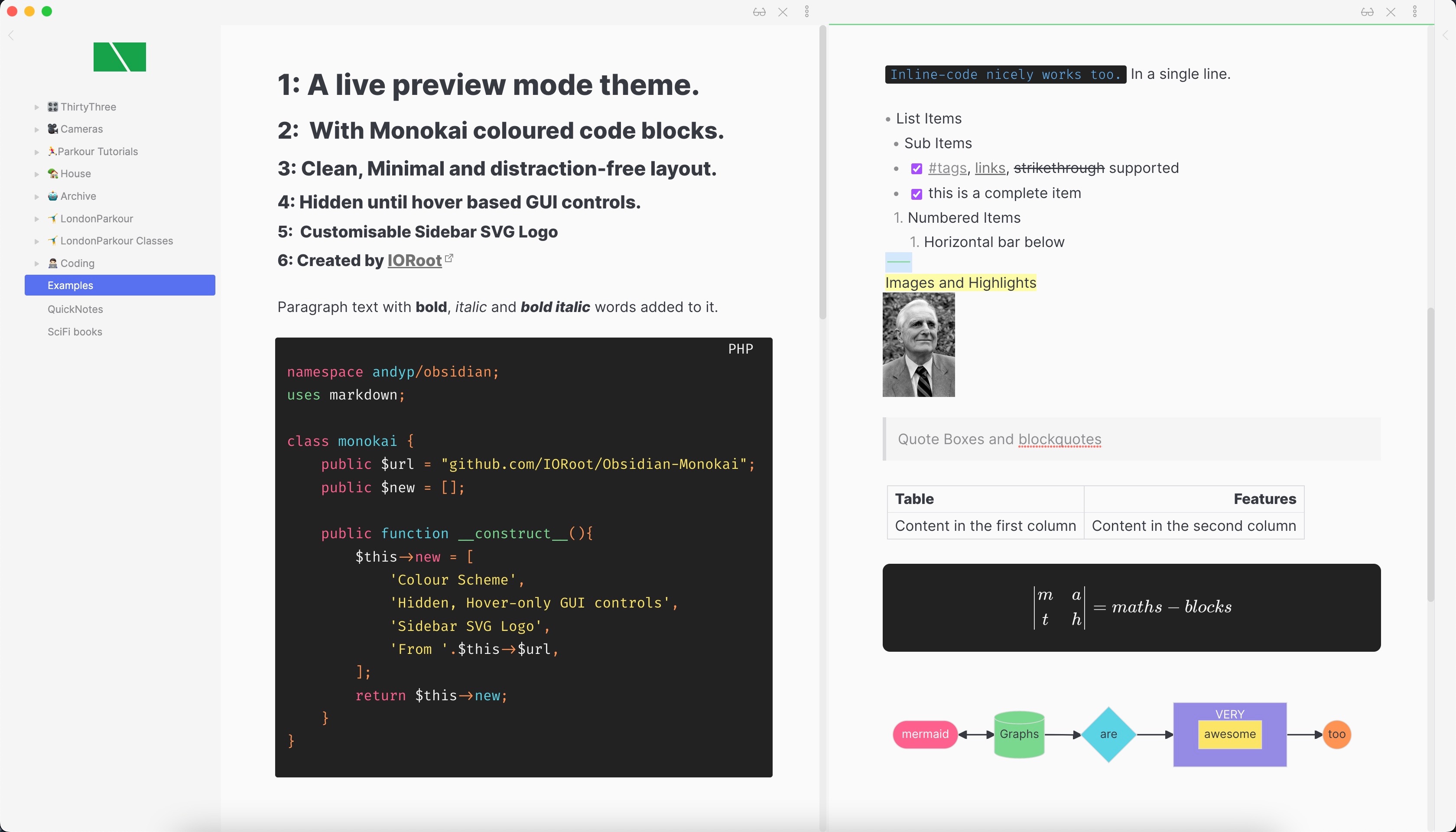
A very minimal theme (with a customisable logo) that hides the GUI away until you hover over it.
</p>
</div>
## 1. <a name='TableofContents'></a>Table of Contents
* 1. [Table of Contents](#TableofContents)
* 2. [About The Project](#AboutTheProject)
* 2.1. [The changes](#Thechanges)
* 2.2. [Code Colour Scheme](#CodeColourScheme)
* 2.3. [Customise the logo](#Customisethelogo)
* 2.4. [Built With](#BuiltWith)
* 3. [Usage](#Usage)
* 3.1. [Steps:](#Steps:)
* 4. [Contributing](#Contributing)
* 5. [License](#License)
* 6. [Contact](#Contact)
* 7. [Changelog](#Changelog)
## 2. <a name='AboutTheProject'></a>About The Project

This is an Obsidian Monokai theme. Built just because I wanted my obsidian instance to be cleaner.
### 2.1. <a name='Thechanges'></a>The changes
1. Code-block colour palette (Monokai Pro)
1. Custom sidebar SVG Logo.
1. Hide the sidebar dock and action icons until you hover over the workspace ribbon.
1. Hide the sidebar top icons until you hover over the sidebar.
1. Place file-explorer icons at the bottom of sidebar and hide until hover.
1. Hide any Tabs.
1. Highlighted text has border-radius.
1. Seamless colour of Sidebar resizer handle to sidebar colour.
1. Hide title bar (frameless mode)
1. Hide status bar
1. Hide vault name
### 2.2. <a name='CodeColourScheme'></a>Code Colour Scheme
```css
--gray-1: #5C6370;
--gray-2: #abb2bf;
--red: #fc618d;
--orange: #fd9353;
--green: #7bd88f;
--aqua: #5ad4e6;
--purple: #948ae3;
--blue: #61afef;
--yellow: #fce566;
--white: #f4f4f4;
--grey-1: #737373;
--grey-2: #A3A3A3;
```
### 2.3. <a name='Customisethelogo'></a>Customise the logo
You can embed your own SVG logo into this themes CSS file.
<p align="right">(<a href="#top">back to top</a>)</p>
### 2.4. <a name='BuiltWith'></a>Built With
This project was built with the following frameworks, technologies and software.
* [Obsidian](https://obsidian.md/)
<p align="right">(<a href="#top">back to top</a>)</p>
## 3. <a name='Usage'></a>Usage
### 3.1. <a name='Steps:'></a>Steps:
1. Open up the `monokai.css` file for this theme.
1. At the VERY bottom is the `CUSTOM SVG ICON` CSS rule.
1. You can see the `background-image: url("data:image/svg+xml;base64,[DATA]` rule.
1. You can replace this with your own SVG logo. A good tool to use is https://svgencode.com that will give you the ready-to-go CSS rule with base64 encoding straight away.
1. Save the file and potentially restart obsidian.
<p align="right">(<a href="#top">back to top</a>)</p>
## 4. <a name='Contributing'></a>Contributing
Contributions are what make the open source community such an amazing place to learn, inspire, and create. Any contributions you make are **greatly appreciated**.
If you have a suggestion that would make this better, please fork the repo and create a pull request. You can also simply open an issue.
Don't forget to give the project a star! Thanks again!
1. Fork the Project
2. Create your Feature Branch (`git checkout -b feature/AmazingFeature`)
3. Commit your Changes (`git commit -m 'Add some AmazingFeature'`)
4. Push to the Branch (`git push origin feature/AmazingFeature`)
5. Open a Pull Request
<p align="right">(<a href="#top">back to top</a>)</p>
## 5. <a name='License'></a>License
Distributed under the MIT License.
MIT License
Copyright (c) 2022 Andy Pearson
Permission is hereby granted, free of charge, to any person obtaining a copy
of this software and associated documentation files (the "Software"), to deal
in the Software without restriction, including without limitation the rights
to use, copy, modify, merge, publish, distribute, sublicense, and/or sell
copies of the Software, and to permit persons to whom the Software is
furnished to do so, subject to the following conditions:
The above copyright notice and this permission notice shall be included in all
copies or substantial portions of the Software.
THE SOFTWARE IS PROVIDED "AS IS", WITHOUT WARRANTY OF ANY KIND, EXPRESS OR
IMPLIED, INCLUDING BUT NOT LIMITED TO THE WARRANTIES OF MERCHANTABILITY,
FITNESS FOR A PARTICULAR PURPOSE AND NONINFRINGEMENT. IN NO EVENT SHALL THE
AUTHORS OR COPYRIGHT HOLDERS BE LIABLE FOR ANY CLAIM, DAMAGES OR OTHER
LIABILITY, WHETHER IN AN ACTION OF CONTRACT, TORT OR OTHERWISE, ARISING FROM,
OUT OF OR IN CONNECTION WITH THE SOFTWARE OR THE USE OR OTHER DEALINGS IN THE
SOFTWARE.
<p align="right">(<a href="#top">back to top</a>)</p>
## 6. <a name='Contact'></a>Contact
Project Link: [https://github.com/IORoot/...](https://github.com/IORoot/...)
<p align="right">(<a href="#top">back to top</a>)</p>
## 7. <a name='Changelog'></a>Changelog
v1.0.0 - First version.
How to Install
- Download the CSS file below
- Move it to your vault's
.obsidian/snippets/folder - Open Obsidian → Settings → Appearance → CSS Snippets → Enable it
Stats
Stars
15
Forks
2
License
MIT
Last updated 34mo ago
Categories
Tags
monokai-themeobsidian