jarvis-agentic-os
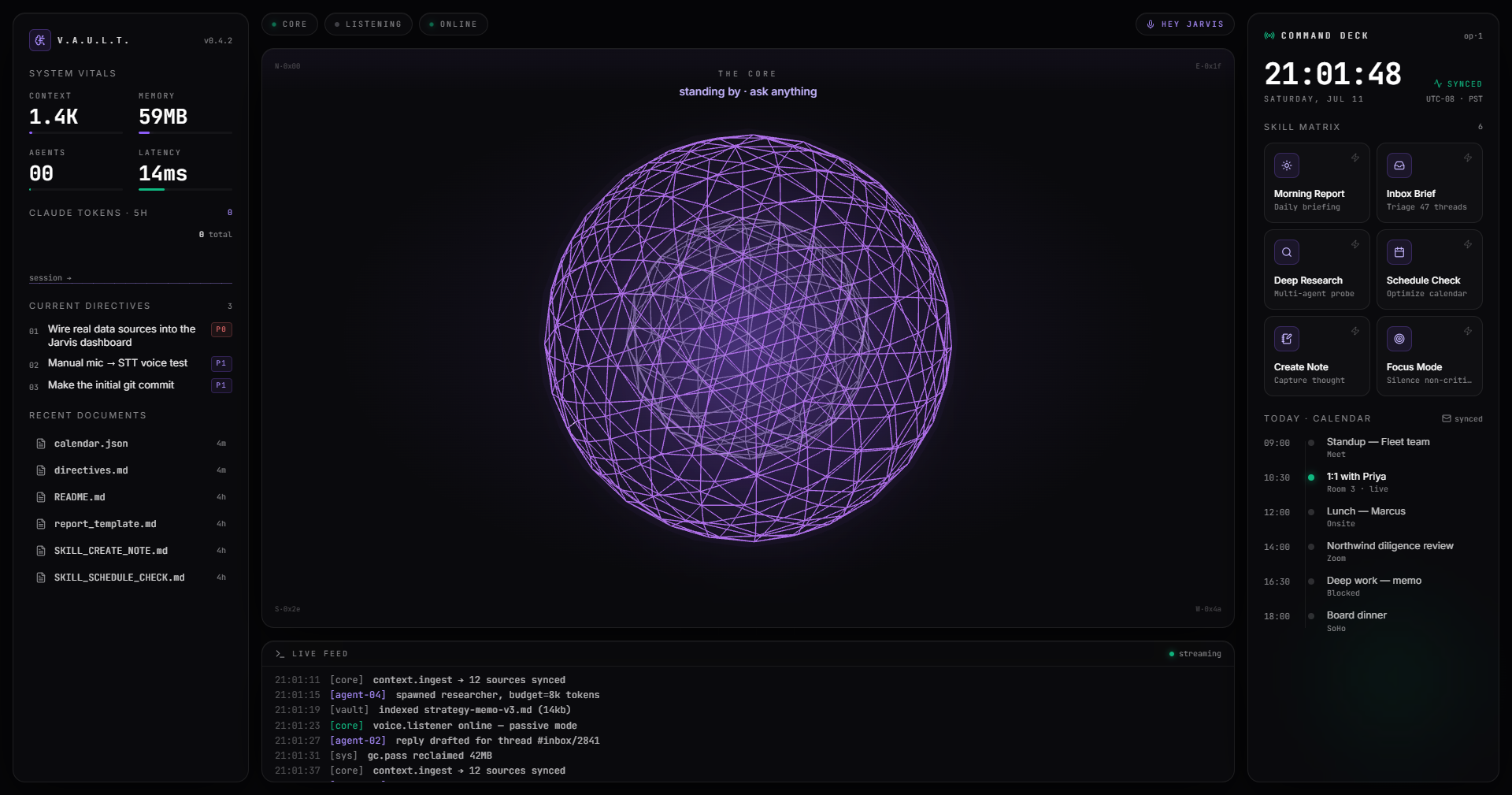
Local-first agentic OS dashboard: voice + 3D UI layer over Claude Code, with local Whisper/Kokoro speech, a 3-tier intent router, and an Obsidian vault.
Jarvis — Local-First Agentic OS Dashboard
A terminal-inspired graphical + vocal layer over Claude Code and local automation. Everything binds to loopback by default. It is intentionally powerful: agents can execute tools in the selected project, so do not expose the orchestrator port without adding authentication and a restrictive origin policy.
Voice in (local Whisper STT) → 3-tier intent router → headless claude -p skill
execution over the Obsidian vault → voice out (local Kokoro TTS), with an
audio-reactive 3D core and live system telemetry — all streamed to the UI over
WebSockets.
Windows edition. For Linux, use jarvis-agentic-os-linux.
Services
| Service | Port | Runtime | Folder |
|---|---|---|---|
| Frontend UI | 5173 | React 19 + Vite | frontend/ |
| Orchestrator | 3030 | Node.js + Express | orchestrator/ |
| STT Engine | 8000 | Python + FastAPI | ml/stt_service.py |
| TTS Engine | 8001 | Python + FastAPI | ml/tts_service.py |
| Data Vault | fs | Obsidian markdown | vault/Jarvis_Vault/ |
This machine
- No NVIDIA GPU / CUDA (Intel Arc). ML services are configured for CPU
(
faster-whisper→device="cpu",compute_type="int8"; Kokoro CPU ONNX). Flip theJARVIS_DEVICEenv var tocudaif you move to an NVIDIA box.
Quick start (Windows)
One command
Install Node.js 20+ and your preferred agent CLIs, then double-click start.bat (or run it from Command Prompt). It installs the two Node workspaces when needed and opens Jarvis at http://localhost:5173.
On first launch, choose the existing folder that holds your projects. Jarvis stores that local choice in an ignored .env file and can create one shared .jarvis-brain for every project.
Run services separately
# 1. ML microservices
cd ml && python -m venv .venv && .venv\Scripts\activate && pip install -r requirements.txt
python stt_service.py   # :8000
python tts_service.py   # :8001

# 2. Orchestrator
cd orchestrator && npm install && npm run dev   # :3030

# 3. Frontend
cd frontend && npm install && npm run dev        # :5173
Choose the right edition
| Your computer | Repository | Start command |
|---|---|---|
| Windows | This repository | start.bat |
| Linux | jarvis-agentic-os-linux | ./start.sh |
Both editions have the same local-first Jarvis UI, shared Brain, mission workflow, CLI integrations, and first-run project-folder setup. Clone the edition matching the machine that will run the local CLIs.
Build order
See the master spec. Current status: scaffold complete, service logic stubbed.
- Repo structure + manifests for all four services
- Python FastAPI STT/TTS with hot-loaded models (round-trip verified)
- Node orchestrator: WS hub + 3-tier router (Tier 1 verified) + skill wrapper + run_skill
- Obsidian vault structure + Skill SOP files
- React shell: grid, Zustand store, glass panels (ported from Lovable)
- 3D audio-reactive core sphere (renders in-browser)
- Framer Motion + Live Terminal Feed (wired to real WS logs, mock fallback)
- End-to-end wiring: - Skill Matrix → orchestrator run_skill → claude -p → skill_state/terminal to UI (verified) - Voice out: skill completion → 🔊 summary → TTS (:8001) → audio playback (verified: POST 200) - Voice in: HEY JARVIS mic → MediaRecorder → STT (:8000) → router (wired; mic needs a manual permission grant, so not covered by headless automation)
Running the app (dev)
- ML:
ml/.venv/Scripts/python ml/stt_service.pyand... tts_service.py - Orchestrator:
npm --prefix orchestrator run dev(:3030) - Frontend:
npm --prefix frontend run dev(:5173)
Frontend UI is ported from the Lovable "Jarvis Command Center" project (editor: lovable.dev/projects/3f18d5dc-8e90-43c6-b91b-e633695575ff).
Multi-CLI chat + shared Brain
The All Chats tab runs your real agent CLIs and shares one memory across them.
- CLIs (auto-detected): Claude Code, 9Router-via-Claude, OpenCode, Gemini, Codex (Antigravity shown
disabled until installed). Pick a CLI → model → effort, type a task, and it spawns
the real CLI headlessly in the selected project folder and streams the output.
- Effort maps to a native flag where supported (
claude --effort,codex -c model_reasoning_effort=); otherwise it's injected as a prompt hint.
- Effort maps to a native flag where supported (
- The Brain lives at
C:\Users\Pradhuman\projects\.jarvis-brain\:BRAIN.md— main brain (shared by every CLI and folder)folders/<name>/BRAIN.md— per-folder sub-brainchats.jsonl(global) +folders/<name>/chats.jsonl— every exchange, all CLIs- Before each run the main brain + the folder sub-brain + recent conversation are prepended to the prompt, so all CLIs share context.
- Choosing a folder in the top bar ("Working in …") jumps to that sub-brain's
All Chats view. Override the root with
JARVIS_PROJECTS_ROOT.
Note: these CLIs run as autonomous agents (e.g.
gemini --approval-mode yolo,codex exec) with real file/system access in the chosen folder.
Live data sources (no mock)
The orchestrator broadcasts a state_update every 3s (and on connect). Panels bind
to it, falling back to demo values only when the socket is offline.
| Panel | Real source |
|---|---|
| Vitals · CONTEXT | total vault content size (≈ tokens = bytes/4) |
| Vitals · MEMORY | orchestrator process RSS |
| Vitals · AGENTS | skills currently executing |
| Vitals · LATENCY | measured event-loop lag |
| Claude Tokens | cumulative tokens processed by skill runs this session (est.) |
| Current Directives | vault/99_System/directives.md (format: - [P0] <title>) |
| Recent Documents | most-recently-modified files in the vault |
| Today · Calendar | vault/99_System/calendar.json (edit to change events) |
| Live Feed | real claude -p stdout streamed over WebSocket |
Note: token counts are estimated from real I/O byte counts (bytes/4), not the provider's exact usage meter. Calendar/directives are local files (no Google OAuth).
Recommended multi-agent workflow
Every completed exchange is written to the shared Brain and injected into every future agent run for that project. Use the same active folder for a task, and assign roles deliberately: Claude for architecture/review, Codex for implementation and tests, Gemini for large-context exploration, and Perplexity through its API provider for web research. 9Router is separate from Claude Pro: select 9Router · Claude, set ROUTER9_API_KEY in the orchestrator environment, and use its local dashboard key; the normal Claude tile continues to use your Claude Pro authentication. 9Router documents its local OpenAI-compatible endpoint as http://127.0.0.1:20128/v1.
How to Install
- Download the dashboard markdown file from GitHub
- Drop it into your vault (anywhere)
- Install the Homepage plugin and point it at the file
- Enable any listed CSS snippets for the intended look
Stats
Stars
0
Forks
0
Last updated 1mo ago
Categories