Vscode Dataview Preview
VSCode Dataview Preview


Render Obsidian Dataview queries directly within VSCode's built-in Markdown preview.
This extension brings the power of dynamic data querying to your Markdown workspace in VSCode. It indexes your Markdown files (frontmatter, tags, lists, tasks) and allows you to query them using the Dataview Query Language (DQL).
Screenshots
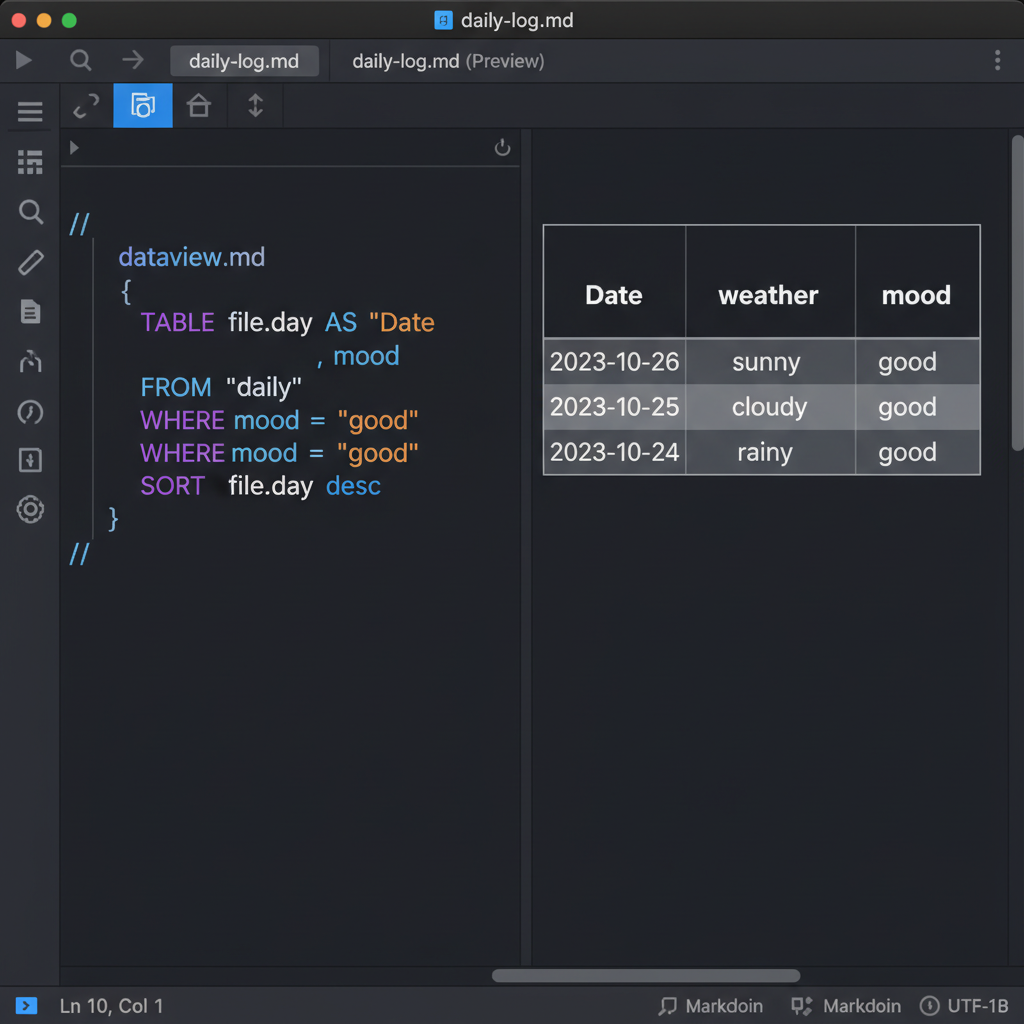
Example: Querying daily notes with weather and mood data
Features
- Dataview Query Language (DQL) Support:
TABLE: Create tables with columns from file properties.LIST: List files or properties.FROM: Filter by folder or tags.WHERE: Filter results based on fields.SORT: Sort results by any field.FLATTEN: Unroll lists (e.g., tasks) into individual rows.AS: Rename columns (e.g.,file.day AS "Date").
- Seamless Integration: Works directly in VSCode's standard Markdown preview.
- Live Updates: Preview updates automatically when you save files or switch editors.
- Clickable Links: File links in tables and lists open directly in the VSCode editor.
Installation
Option 1: Install from Marketplace (Recommended)
You can install the extension directly from the VS Code Marketplace:
- Open VS Code
- Go to the Extensions view (
Cmd+Shift+XorCtrl+Shift+X) - Search for
Dataview Preview - Click Install
Alternatively, you can install it via the command line:
code --install-extension yahsan2.vscode-dataview-preview
Option 2: Install from VSIX (Manual)
- Download the latest
.vsixfile from the Releases page - Open VS Code
- Open the Command Palette (
Cmd+Shift+PorCtrl+Shift+P) - Type "Extensions: Install from VSIX..." and select it
- Navigate to the downloaded
.vsixfile and select it
Option 3: Install from Source (For Development)
-
Clone this repository:
git clone https://github.com/yahsan2/vscode-dataview-preview.git cd vscode-dataview-preview -
Install dependencies:
npm install -
Compile the extension:
npm run compile -
Open the project in VS Code:
code . -
Press
F5to launch a new VS Code window with the extension loaded
Verify Installation
After installation, open any Markdown file with a dataview code block. The preview should automatically render the query results.
Usage
Simply add a dataview code block to your Markdown file:
TABLE file.day AS "Date", weather, mood
FROM "daily"
WHERE mood = "good"
SORT file.day desc
Supported Fields
file.name: File namefile.path: Absolute file pathfile.link: Clickable link to the filefile.day: Date extracted from frontmatter (date) or filename (yyyy-mm-dd)file.ctime: Creation timefile.mtime: Modification timefile.tags: List of tagsfile.lists: List items in the file (useful withFLATTEN)- Any YAML frontmatter property
Demos
Check out the Demo Gallery for practical use cases:
Development
- Install dependencies:
npm install - Compile the extension:
npm run compile - Run in debug mode:
Press
F5in VSCode.
License
MIT
How to Install
- Download the template file from GitHub
- Move it anywhere in your vault (or your sidebar notes)
- Open it in Obsidian — done!
Stats
Stars
5
Forks
2
License
MIT
Last updated 10mo ago
Categories