Obsidian Foodiary (Bases) 🥪 🍎 🪵
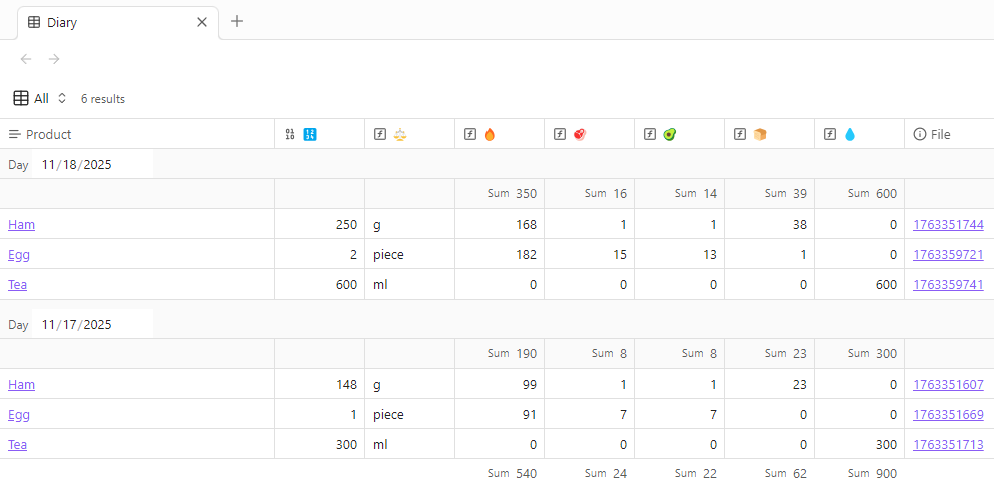
This repo contains an example Obsidian vault that automatically calculates calories, protein, fat, carbs, and water — both for each individual meal and for the whole day. No more crunching numbers by hand.
Everything is built on plain Obsidian Bases, with a bit of automation from the Templater plugin.
🚀 Getting started
1. Install Templater
Enable community plugins in your vault and install Templater.
2. Configure Templater
[!tip] The repo already includes a Templater settings file, so you'll probably be good to go out of the box.
Set the following options:
Template folder location— choose theTemplatesfolderTrigger Templater on new file creation— enableFolder templates— set up for two folders:Products:Templates/Product.mdRecords:Templates/Record.md
3. Create product cards
Product cards are individual notes where you store nutrition info for each food item.
Product properties (created automatically by Templater when you make a new file):
calories— calories per unitprotein— protein contentfat— fat contentcarbs— carbohydrateswater— water contentunit— unit of measurement (g,ml,piece)unit_size— the size of the unit the nutrition is given for (for example,100for grams or1for per piece/serving)
If the product is measured in pieces, it's convenient to specify unit_size as 1 (see example). If it's measured in grams (see example), then use 100.
[!tip] In this example vault, product cards live in the Products folder, but you can keep them anywhere you like.
4. Log your meals
Each meal is a separate note in the Records folder. The easiest way to create them is by pressing New right in the base view.
Meal note properties (also created automatically by Templater):
day— date of the meal (auto-filled with today's date)product— link to the product cardquantity— how much you ate (in the same units as in the product card; e.g. 2 pieces or 150 grams)timestamp— time / timestamp (used for sorting, auto-filled)
[!tip] I use the Meld Calc plugin to quickly calculate net food weight (for example, subtracting the weight of a plate from the total).
👀 How to view your data
The Diary.base file has three configured views:
- All — all records for all time, grouped by day, with total calories/macros/water per day
- Today — only today's entries
- Yesterday — entries from yesterday
Open the base, switch views as needed, and you'll see your daily stats at a glance.
🛠️ How to customize it
Let's say you want to track fiber as well.
1. Add a property to product cards
Add a new property to existing product cards and to the product template:
---
calories:
protein:
fat:
carbs:
fiber:
water:
unit: g
unit_size: 100
aliases:
---
2. Add a formula to the base
Formula text:
(
    link(product).asFile().properties.fiber
    /
    link(product).asFile().properties.unit_size
    *
    quantity
).round()
3. Add a column to the view
Add a column to the first base view using the formula you created in the previous step.
To see the sum for the new column, click its bottom area and select the Sum function.
[!note] This is a custom summing function I wrote myself, because the standard one apparently can't be applied to columns whose values are generated by formulas.
That's it — now just add a column to all relevant base views, and everything will work. Easy as pie — just don't forget to log it.
How to Install
- Download the ZIP or clone the repository
- Open the folder as a vault in Obsidian (File → Open Vault)
- Obsidian will prompt you to install required plugins
Stats
Stars
1
Forks
0
License
Unlicense
Last updated 7mo ago
Categories
Tags