NOTE
tegardpLife In Weeks
Visualize your life in weeks inside Obsidian. Dynamic, auto-updating grid powered by Dataviewjs.
Obsidian Life in Weeks
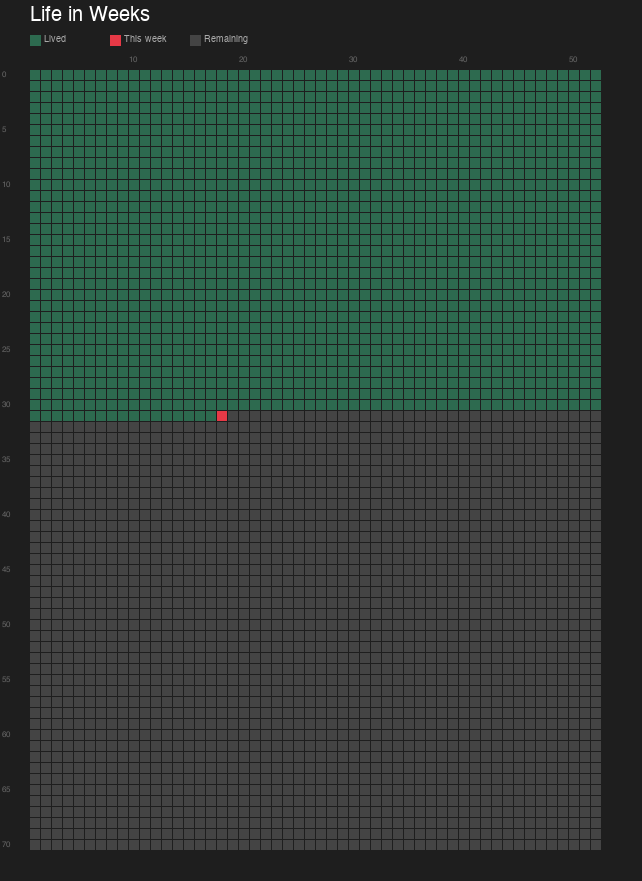
A dynamic "life in weeks" grid for Obsidian. Visualize your entire life as a grid of weeks — each cell is one week. Lived weeks are colored green, the current week is red, and future weeks are gray. The grid updates automatically every time you open the note.
Inspired by Tim Urban's "Your Life in Weeks".
Features
- Auto-updating — colors update every time you open the note
- Configurable birth date — set
birthin frontmatter - Configurable max age — set
maxAgein frontmatter (default: 70) - Print-friendly — colors are preserved when printing (Cmd+P / Ctrl+P)
- Lightweight — pure CSS + Dataviewjs, no extra plugins needed beyond Dataview
Installation
1. Install Dataview plugin
- Open Obsidian → Settings → Community Plugins → Browse
- Search for Dataview and install it
- Enable JavaScript Queries in Settings → Dataview
2. Add the CSS snippet
- Copy
life-grid.cssto your vault's.obsidian/snippets/folder- If the
snippetsfolder doesn't exist, create it
- If the
- Go to Settings → Appearance → CSS Snippets
- Click the refresh button, then toggle life-grid on
3. Add the note
- Copy
Life in Weeks.mdto your vault (anywhere you like) - Open the note and switch to Reading View
4. Configure
Edit the frontmatter at the top of the note:
birth: 1995-01-01   # Your birth date (YYYY-MM-DD)
maxAge: 70           # Maximum age to display (default: 70)
Printing
To print and pin on your wall:
- Open the note in Reading View
- Press
Cmd+P(Mac) orCtrl+P(Windows/Linux) - Select your printer or "Save as PDF"
- Colors will be preserved automatically
Legend
| Color | Meaning |
|---|---|
| 🟩 Green | Weeks you've already lived |
| 🔴 Red | Current week |
| ⬜ Gray | Weeks remaining |
Files
| File | Description |
|---|---|
Life in Weeks.md | The Obsidian note (copy to your vault) |
life-grid.css | CSS snippet (copy to .obsidian/snippets/) |
Requirements
- Obsidian v1.0+
- Dataview plugin with JavaScript queries enabled
License
MIT — use it, share it, modify it freely.
How to Install
- Download the template file from GitHub
- Move it anywhere in your vault (or your sidebar notes)
- Open it in Obsidian — done!
Stats
Stars
1
Forks
0
Last updated 6mo ago
Categories