Swarmvault
Inspired by Karpathy's LLM Wiki. Local-first LLM knowledge base compiler (Claude Code, Codex, OpenCode, OpenClaw). Turn raw research into a persistent markdown wiki, knowledge graph, and search index that compound over time.
SwarmVault
Languages: English | 简体中文 | 日本語


A local-first knowledge compiler for AI agents. Turn books, articles, notes, transcripts, mail exports, calendars, datasets, slide decks, screenshots, URLs, and code into a persistent knowledge vault. Instead of losing work inside chat history, you get a markdown wiki, a knowledge graph, local search, dashboards, and reviewable artifacts that stay on disk.
Documentation on the website is currently English-first. If wording drifts between translations, README.md is the canonical source.
Discord: https://discord.gg/sbEavS8cPV
Most "chat with your docs" tools answer a question and throw away the work. SwarmVault treats the vault itself as the product. Every operation writes durable artifacts you can inspect, diff, and keep improving.
SwarmVault is inspired by Andrej Karpathy's LLM Wiki gist. The core pattern is the same: keep a durable wiki between you and raw sources. SwarmVault turns that pattern into a local toolchain with graph, search, review, automation, and optional model-backed synthesis.
Install
SwarmVault requires Node >=24.
npm install -g @swarmvaultai/cli
Verify the install:
swarmvault --version
Update to the latest published release:
npm install -g @swarmvaultai/cli@latest
The global CLI already includes the graph viewer workflow and MCP server flow. End users do not need to install @swarmvaultai/viewer separately.
Quickstart
my-vault/
├── swarmvault.schema.md       user-editable vault instructions
├── raw/                       immutable source files and localized assets
├── wiki/                      compiled wiki: sources, concepts, entities, code, outputs, graph
├── state/                     graph.json, search.sqlite, embeddings, sessions, approvals
├── .obsidian/                 optional Obsidian workspace config
└── agent/                     generated agent-facing helpers
swarmvault init --obsidian --profile personal-research
swarmvault source add https://github.com/karpathy/micrograd
swarmvault source add https://example.com/docs/getting-started
swarmvault ingest ./meeting.srt --guide
swarmvault source session transcript-or-session-id
swarmvault ingest ./src --repo-root .
swarmvault add https://arxiv.org/abs/2401.12345
swarmvault compile
swarmvault query "What is the auth flow?"
swarmvault graph serve
swarmvault graph push neo4j --dry-run
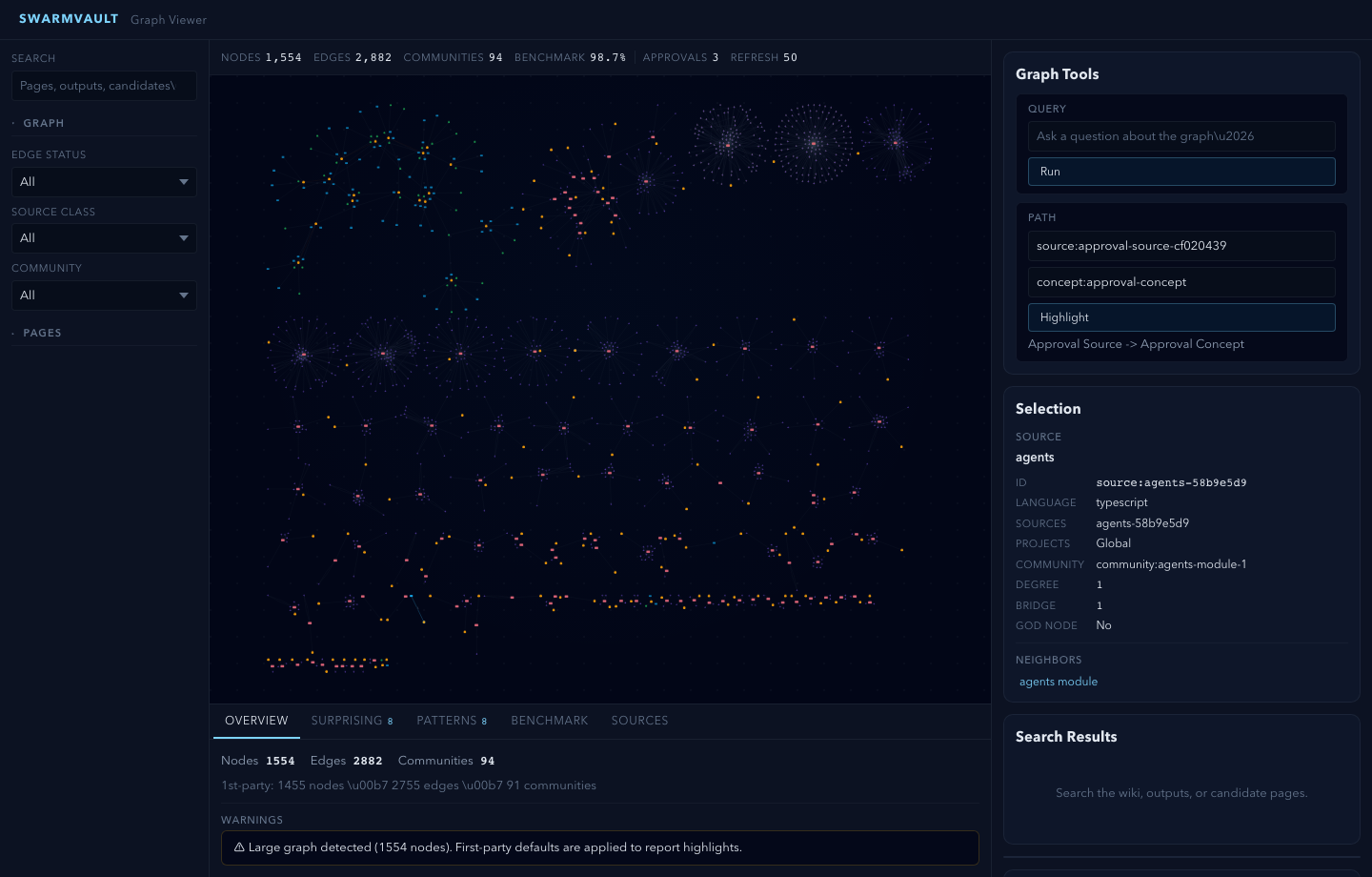
For very large graphs, swarmvault graph serve and swarmvault graph export --html automatically start in overview mode. Add --full when you want the entire canvas rendered anyway.
swarmvault init --profile accepts default, personal-research, or a comma-separated preset list such as reader,timeline. For custom vault behavior, edit the profile block in swarmvault.config.json and keep swarmvault.schema.md as the human-written intent layer.
Optional: Add a Model Provider
You do not need API keys or an external model provider to start using SwarmVault. The built-in heuristic provider supports local/offline vault setup, ingest, compile, graph/report/search workflows, and lightweight query or lint defaults.
Add a model provider when you want richer synthesis quality or extra capabilities such as semantic embeddings, vision, or native image generation:
{
  "providers": {
    "primary": {
      "type": "openai",
      "model": "gpt-4o",
      "apiKeyEnv": "OPENAI_API_KEY"
    }
  },
  "tasks": {
    "compileProvider": "primary",
    "queryProvider": "primary",
    "embeddingProvider": "primary"
  }
}
See the provider docs for optional backends, task routing, and capability-specific configuration examples.
Recommended: local LLM via Ollama + Gemma
If you want a fully local setup with sharp concept, entity, and claim extraction, pair the free Ollama runtime with Google's Gemma model. No API keys required.
ollama pull gemma4
{
  "providers": {
    "llm": {
      "type": "ollama",
      "model": "gemma4",
      "baseUrl": "http://localhost:11434/v1"
    }
  },
  "tasks": {
    "compileProvider": "llm",
    "queryProvider": "llm",
    "lintProvider": "llm"
  }
}
When you run compile/query with only the heuristic provider, SwarmVault surfaces a one-time notice pointing you here. Set SWARMVAULT_NO_NOTICES=1 to silence it. Any other supported provider (OpenAI, Anthropic, Gemini, OpenRouter, Groq, Together, xAI, Cerebras, openai-compatible, custom) works too.
For local semantic graph query without API keys, use an embedding-capable local backend such as Ollama instead of heuristic:
{
  "providers": {
    "local": {
      "type": "heuristic",
      "model": "heuristic-v1"
    },
    "ollama-embeddings": {
      "type": "ollama",
      "model": "nomic-embed-text",
      "baseUrl": "http://localhost:11434/v1"
    }
  },
  "tasks": {
    "compileProvider": "local",
    "queryProvider": "local",
    "embeddingProvider": "ollama-embeddings"
  }
}
Point It At Recurring Sources
The fastest way to make SwarmVault useful is the managed-source flow:
swarmvault source add ./exports/customer-call.srt --guide
swarmvault source add https://github.com/karpathy/micrograd
swarmvault source add https://example.com/docs/getting-started
swarmvault source list
swarmvault source session file-customer-call-srt-12345678
swarmvault source reload --all
source add registers the source, syncs it into the vault, compiles once, and writes a source-scoped brief under wiki/outputs/source-briefs/. Add --guide when you want a resumable guided session under wiki/outputs/source-sessions/, a staged source review and source guide, plus approval-bundled canonical page edits when profile.guidedSessionMode is canonical_review. Profiles using insights_only keep the guided synthesis in wiki/insights/ instead. It now works for recurring local files as well as directories, public repos, and docs hubs. Use ingest for deliberate one-off files or URLs, and use add for research/article normalization.
Agent and MCP Setup
Set up your coding agent so it knows about the vault:
swarmvault install --agent claude --hook    # Claude Code + graph-first hook
swarmvault install --agent codex            # Codex
swarmvault install --agent cursor           # Cursor
swarmvault install --agent copilot --hook   # GitHub Copilot CLI + hook
swarmvault install --agent gemini --hook    # Gemini CLI + hook
Or expose the vault directly over MCP:
swarmvault mcp
Using OpenClaw or ClawHub? Install the packaged skill with:
clawhub install swarmvault
That installs the published SKILL.md plus a ClawHub README, examples, references, troubleshooting notes, and validation prompts. Keep the CLI itself updated with npm install -g @swarmvaultai/cli@latest.
Works With Any Mix Of Input Types
| Input | Extensions / Sources | Extraction |
|---|---|---|
.pdf | Local text extraction | |
| Word documents | .docx .docm .dotx .dotm | Local extraction with metadata (includes macro-enabled and template variants) |
| Rich Text | .rtf | Local RTF text extraction via parser-backed walk |
| OpenDocument | .odt .odp .ods | Local text / slide / sheet extraction |
| EPUB books | .epub | Local chapter-split HTML-to-markdown extraction |
| Datasets | .csv .tsv | Local tabular summary with bounded preview |
| Spreadsheets | .xlsx .xlsm .xlsb .xls .xltx .xltm | Local workbook and sheet preview extraction (modern, macro-enabled, binary, and legacy formats) |
| Slide decks | .pptx .pptm .potx .potm | Local slide and speaker-note extraction (includes macro-enabled and template variants) |
| Jupyter notebooks | .ipynb | Local cell + output extraction |
| BibTeX libraries | .bib | Parser-backed citation entry extraction |
| Org-mode | .org | AST-backed headline, list, and block extraction |
| AsciiDoc | .adoc .asciidoc | Asciidoctor-backed section and metadata extraction |
| Transcripts | .srt .vtt | Local timestamped transcript extraction |
| Chat exports | Slack export .zip, extracted Slack export directories | Local channel/day conversation extraction |
.eml .mbox | Local message extraction and mailbox expansion | |
| Calendar | .ics | Local VEVENT expansion |
| HTML | .html, URLs | Readability + Turndown to markdown (URL ingest) |
| Images | .png .jpg .jpeg .gif .webp .bmp .tif .tiff .svg .ico .heic .heif .avif .jxl | Vision provider (when configured) |
| Research | arXiv, DOI, articles, X/Twitter | Normalized markdown via swarmvault add |
| Text docs | .md .mdx .txt .rst .rest | Direct ingest with lightweight .rst heading normalization |
| Config / data | .json .jsonc .json5 .toml .yaml .yml .xml .ini .conf .cfg .properties .env | Structured preview with key/value schema hints |
| Developer manifests | package.json tsconfig.json Cargo.toml pyproject.toml go.mod go.sum Dockerfile Makefile LICENSE .gitignore .editorconfig .npmrc (and similar) | Content-sniffed text ingest — no plaintext dev files are silently dropped |
| Code | .js .mjs .cjs .jsx .ts .mts .cts .tsx .sh .bash .zsh .py .go .rs .java .kt .kts .scala .sc .dart .lua .zig .cs .c .cc .cpp .cxx .h .hh .hpp .hxx .php .rb .ps1 .psm1 .psd1 .ex .exs .ml .mli .m .mm .res .resi .sol .vue .css .html .htm, plus extensionless scripts with #!/usr/bin/env node|python|ruby|bash|zsh shebangs | AST via tree-sitter + module resolution |
| Browser clips | inbox bundles | Asset-rewritten markdown via inbox import |
| Managed sources | local directories, public GitHub repo roots, docs hubs | Registry-backed sync via swarmvault source add |
What You Get
Knowledge graph with provenance - every edge traces back to a specific source and claim. Nodes carry freshness, confidence, and community membership.
God nodes and communities - highest-connectivity bridge nodes identified automatically. Graph report pages surface surprising connections with plain-English explanations.
Contradiction detection - conflicting claims across sources are detected automatically and surfaced in the graph report. Use lint --conflicts for a focused contradiction audit.
Semantic auto-tagging - broad domain tags are extracted alongside concepts during analysis and appear in page frontmatter, graph nodes, and search.
Schema-guided compilation - each vault carries swarmvault.schema.md so the compiler follows domain-specific naming rules, categories, and grounding requirements.
Save-first queries - answers write to wiki/outputs/ by default, so useful work compounds instead of disappearing. Supports markdown, report, slides, chart, and image output formats.
Reviewable changes - compile --approve stages changes into approval bundles. New concepts and entities land in wiki/candidates/ first. Nothing mutates silently.
Configurable profiles - compose vault behavior with profile.presets, profile.dashboardPack, profile.guidedSessionMode, and profile.dataviewBlocks in swarmvault.config.json instead of waiting for hardcoded product modes. personal-research is just a starter alias.
Guided sessions - ingest --guide, source add --guide, source reload --guide, source guide <id>, and source session <id> create resumable source sessions under wiki/outputs/source-sessions/, stage source reviews and source guides, and route approval-bundled updates either to canonical source/concept/entity pages or to wiki/insights/, depending on the configured guided-session mode.
Knowledge dashboards - wiki/dashboards/ gives you recent sources, a reading log, a timeline, source sessions, source guides, a research map, contradictions, and open questions. The pages work as plain markdown first, and profile.dataviewBlocks can append Dataview blocks when you want a more Obsidian-native view.
Optional model providers - OpenAI, Anthropic, Gemini, Ollama, OpenRouter, Groq, Together, xAI, Cerebras, generic OpenAI-compatible, custom adapters, or the built-in heuristic for offline/local use.
9 agent integrations - install rules for Codex, Claude Code, Cursor, Goose, Pi, Gemini CLI, OpenCode, Aider, and GitHub Copilot CLI. Optional graph-first hooks bias agents toward the wiki before broad search.
MCP server - swarmvault mcp exposes the vault to any compatible agent client over stdio.
Automation - watch mode, git hooks, recurring schedules, and inbox import keep the vault current without manual intervention.
Managed sources - swarmvault source add|list|reload|review|guide|session|delete turns recurring files, directories, public GitHub repos, and docs hubs into named synced sources with registry state under state/sources.json, source briefs under wiki/outputs/source-briefs/, resumable session anchors under wiki/outputs/source-sessions/, and guided integration artifacts under wiki/outputs/source-guides/.
External graph sinks - export to HTML, SVG, GraphML, and Cypher, or push the live graph directly into Neo4j over Bolt/Aura with shared-database-safe vaultId namespacing.
Large-repo hardening - long repo ingests and compile passes emit bounded progress on big batches, parser compatibility failures stay local to the affected sources with explicit diagnostics, and graph reports roll up tiny fragmented communities for readability.
Every edge is tagged extracted, inferred, or ambiguous - you always know what was found vs guessed.
Platform Support
| Agent | Install command |
|---|---|
| Codex | swarmvault install --agent codex |
| Claude Code | swarmvault install --agent claude |
| Cursor | swarmvault install --agent cursor |
| Goose | swarmvault install --agent goose |
| Pi | swarmvault install --agent pi |
| Gemini CLI | swarmvault install --agent gemini |
| OpenCode | swarmvault install --agent opencode |
| Aider | swarmvault install --agent aider |
| GitHub Copilot CLI | swarmvault install --agent copilot |
Claude Code, OpenCode, Gemini CLI, and Copilot also support --hook for graph-first context injection.
Worked Examples
| Example | Focus | Source |
|---|---|---|
| code-repo | Repo ingest, module pages, graph reports, benchmarks | worked/code-repo/ |
| capture | Research-aware add capture with normalized metadata | worked/capture/ |
| mixed-corpus | Compile, review, save-first output loops | worked/mixed-corpus/ |
Each folder has real input files and actual output so you can run it yourself and verify. See the examples guide for step-by-step walkthroughs.
Providers
Providers are optional. SwarmVault routes by capability, not brand. Built-in provider types:
heuristic openai anthropic gemini ollama openrouter groq together xai cerebras openai-compatible custom
See the provider docs for configuration examples.
Packages
| Package | Purpose |
|---|---|
@swarmvaultai/cli | Global CLI (swarmvault and vault commands) |
@swarmvaultai/engine | Runtime library for ingest, compile, query, lint, watch, MCP |
@swarmvaultai/viewer | Graph viewer (included in CLI, no separate install needed) |
Need Help?
- Docs: https://www.swarmvault.ai/docs
- Providers: https://www.swarmvault.ai/docs/providers
- Troubleshooting: https://www.swarmvault.ai/docs/getting-started/troubleshooting
- npm package: https://www.npmjs.com/package/@swarmvaultai/cli
- GitHub issues: https://github.com/swarmclawai/swarmvault/issues
Development
pnpm install
pnpm lint
pnpm test
pnpm build
See CONTRIBUTING.md for PR guidelines, and docs/live-testing.md for the published-package validation workflow.
Links
- Website: https://www.swarmvault.ai
- Docs: https://www.swarmvault.ai/docs
- npm: https://www.npmjs.com/package/@swarmvaultai/cli
- GitHub: https://github.com/swarmclawai/swarmvault
License
MIT
How to Install
- Download the ZIP or clone the repository
- Open the folder as a vault in Obsidian (File → Open Vault)
- Obsidian will prompt you to install required plugins
Stats
Stars
63
Forks
5
License
MIT
Last updated 3d ago
Categories
Tags