
Obsidian Notes Setup
This is an operational vault that demonstrates how I use Obsidian to manage meetings and tasks. This document attempts to provide guidance on interesting files to review.
To get a real feel for it, I'd suggest downloading the vault and opening in Obsidian. If you've taken that path, open up [[2022-04-10 10-30 Meeting 2]] and [[TASKS - Triage|triage]] to get a feel for things!
Daily Notes
These are generated from [[daily notes]]. The sections are:
- Section for notes
- List of any notes created or referencing today
- Any tasks due or completed today
- Embedded [[Current Goals]]
- A morbid hand-wave guess of how many more days I have on this planet
- Chart of happiness, weight, body fat, etc.
- A daily mantra
- A random quote
Meeting Notes
I use this script which leverages my calendar and [[meeting|the meeting template]] to create one note per meeting. The two important things to note are frontmatter and the Dataview script.
Frontmatter
---
topic: "a string or a [[link]]"
attendees:
  - "[[links to people]]"
---
Content
Generated - Contextual Tasks
The contextual-taskview view pulls in tasks based on matching attendees and topics, like this:
 Explicit tasks, as seen above, mean that the task directly references one of the attendees of the meeting.
Implicit tasks simply mean that there is an overlap between the attendees of the current meeting and the attendees of the meeting where the task was created.
Input
Most of my notes are bullets or tasks. Obsidian treats each bullet as a block, which makes these easy to reference and filter. Dataview additionally enables annotating tasks with inline values like [key:: value]. The keys I use are:
- ask/share/talk/tell
- [ask:: [[Megan Smith]]] about something useful to know
- done/due
- something that's [due:: 2022-04-10] and [done:: 2022-04-10]
Grooming Notes
My automation creates a file for each meeting, but I may have schedule changes or the conversation may be more organic. The script above also removes any empty notes from previous days.
Task Management
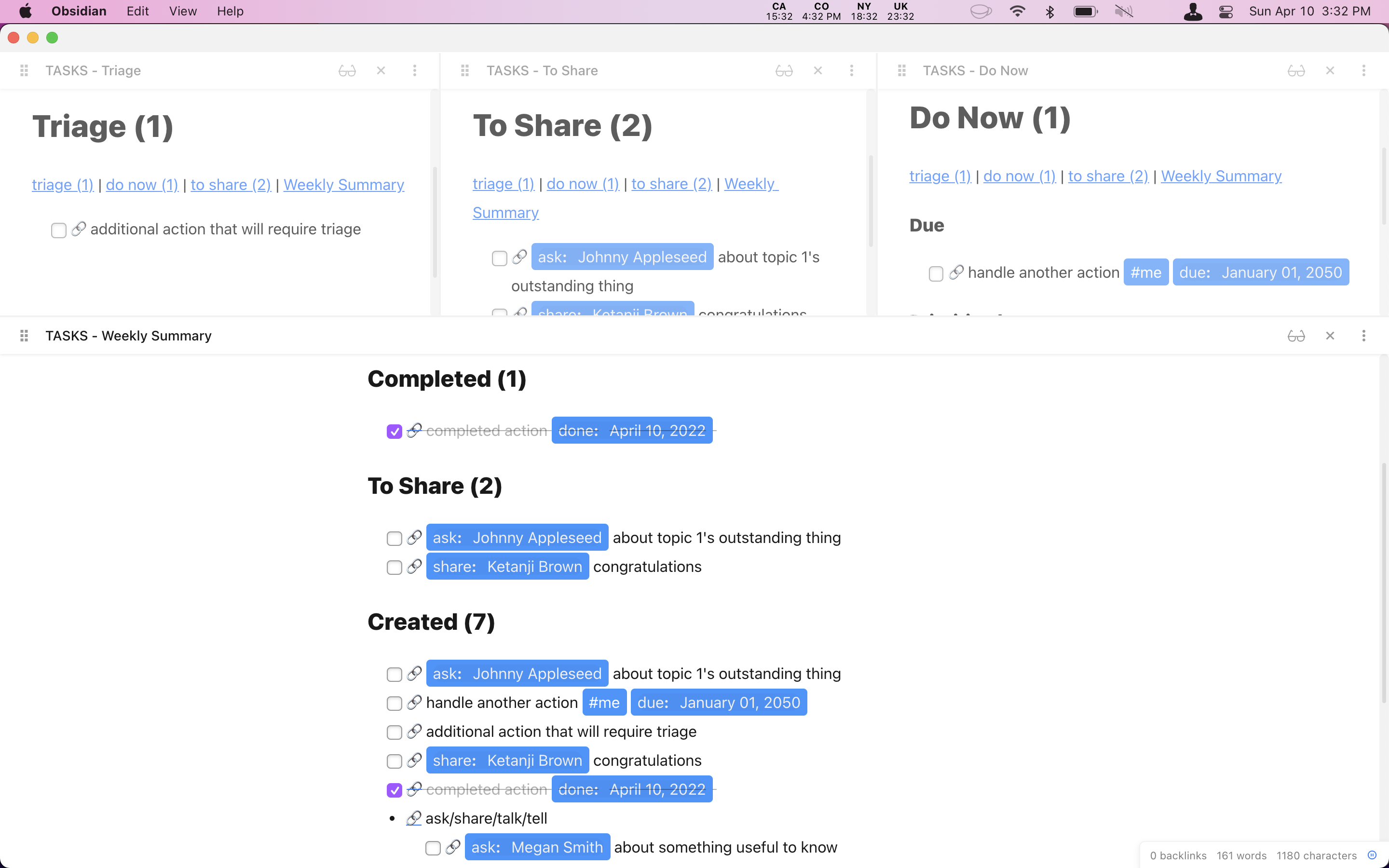
While the contextual tasks above are valuable for discussions, it's useful to have global views into tasks. The [[TASKS]] pages, based on taskview.js, provide high-level views into categorized tasks, like this:
Styling
.obsidian/snippets/style.css helps California Coast match my personal preferences.
Plugins
I call out Dataview specifically below, but it may be worth taking a look at the .obsidian/community-plugins.json file to see others I depend on to build this experience.
Dataview
Dataview is an incredibly powerful tool that enables both SQL-like querying of your notes and tasks, as well as writing arbitrary JavaScript that can be included in your notes. I leverage dataview for both the [[meeting]] template and well as the [[TASKS]] pages.
Other Tools
- [[Record Types]] - list any page that is a "record home". I annotate notes with record types like
movie,book,quoteand create homes that list them - [[tool - move notes]] - use dataview to generate commands that can be copied
- [[People Missing Homes]] - identify pages referenced as
authorin frontmatter that do not exist yet - shared/scripts/randomNote.js - templater script to grab a random note from the
quotesdirectory
How to Install
- Download the repository ZIP below
- Unzip it and find the CSS snippet file
- Move the CSS file into your vault's
.obsidian/snippets/folder - Open Obsidian → Settings → Appearance → CSS Snippets → Enable it
Stats
Stars
10
Forks
1
License
CC0-1.0
Last updated 28mo ago
Categories