Saint Red Paper
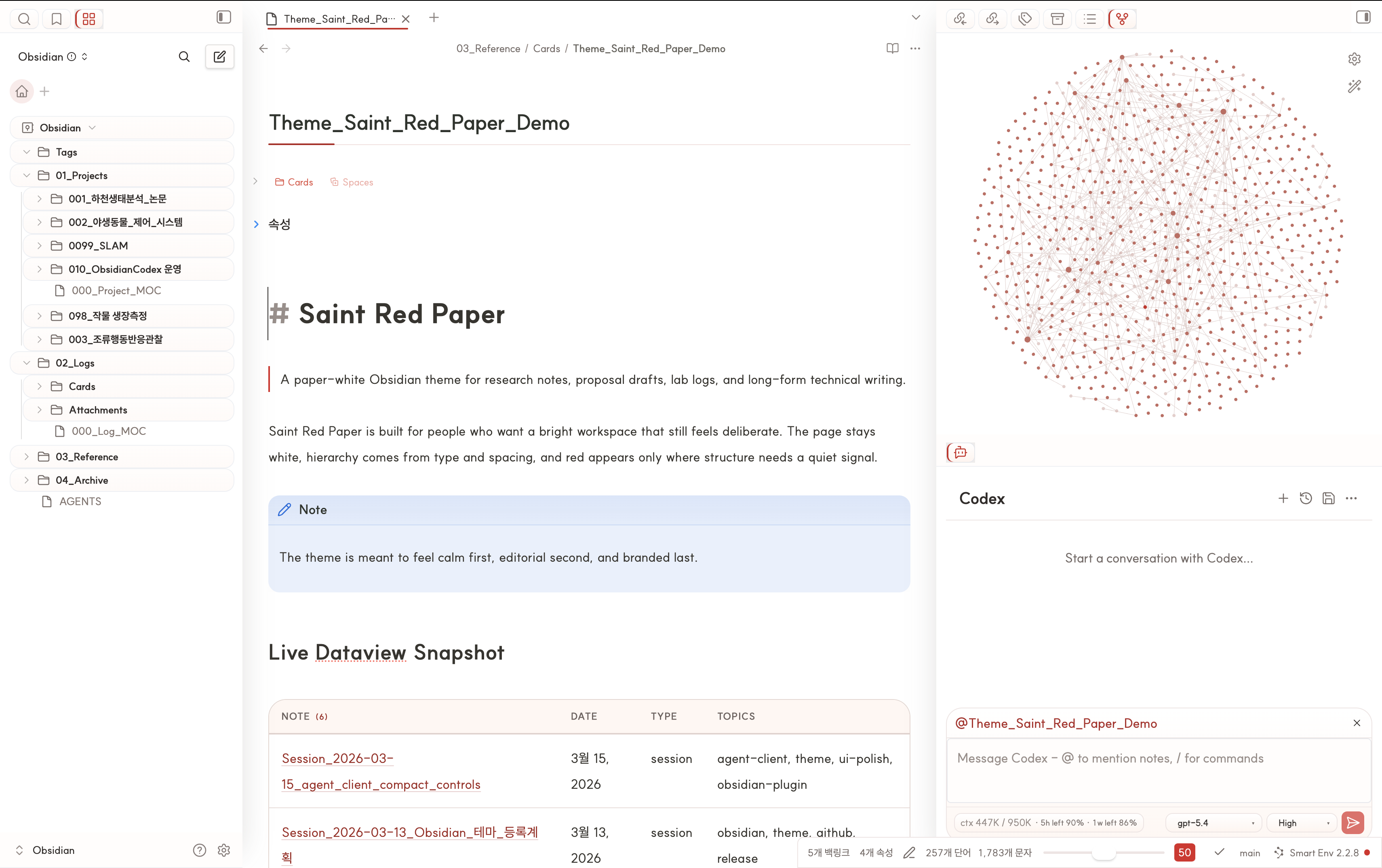
A paper-white Obsidian theme for research notes, lab logs, and long-form writing.
Saint Red Paper
Saint Red Paper is a light-first Obsidian theme for research notes, lab logs, and long-form technical writing. It keeps light mode as the primary visual identity, but now also includes a matching dark mode so the same note structures remain usable when the workspace switches to dark.
Community Theme PR · Star on GitHub · Issues


If Saint Red Paper fits your workflow, please star the repo.


Saint Red Paper is currently submitted to the official Obsidian community theme list. Feedback, bug reports, and workspace screenshots are always welcome in Issues.
Community Theme Metadata
If you want to submit Saint Red Paper to the official Obsidian community theme list, the current ready-to-paste metadata is:
{
  "name": "Saint Red Paper",
  "author": "saintkim",
  "repo": "saint0721/saint-red-paper",
  "screenshot": "assets/main-light.png",
  "modes": ["dark", "light"]
}
Notes:
modesis declared as["dark", "light"], but Saint Red Paper is still intentionally positioned as a light-first theme.publishis omitted for now because Obsidian Publish support has not been explicitly validated yet.- The screenshot field above now points to the main light workspace capture kept in this repository.
What It Changes
- Keeps the main canvas close to white paper instead of tinting the whole workspace
- Tunes headings, spacing, blockquotes, callouts, and inline code for reading-heavy notes
- Gives sidebars, root tabs, links, tags, and notices a restrained red-paper language
- Adds a paper-like treatment for Dataview result tables so they feel closer to notes than widgets
- Extends the same visual language into a matching dark mode instead of leaving dark as a token-only fallback
- Adds a compact optional styling layer for
Agent Clientcontrols when that plugin is installed - Fits well with
make.md'sNavigatorpanel if you want the workspace captures to feel closer to the author's setup - Includes built-in
Style Settingshooks for width, rules, sidebar accents, links, tags, and table density - Still behaves predictably even if
Style Settingsis not installed - Ships as a compact theme package with
theme.cssandmanifest.json
Quick Install
Requires Obsidian 1.1.9 or later.
Manual
- Copy this folder into your vault's
.obsidian/themes/Saint Red Paper/directory. - Open
Settings -> Appearance -> Themes. - Select
Saint Red Paper.
Git clone
git clone https://github.com/saint0721/saint-red-paper.git "Saint Red Paper"
Then move or symlink the folder into .obsidian/themes/Saint Red Paper/.
Optional plugin
The theme works without extra plugins, but these companion plugins are recommended if you want a setup close to the light and dark workspace captures above:
Style Settingsfor adjusting exposed theme variables from the UIDataviewif you want result tables like the ones shown in the demo capturesAgent Clientif you want the matching chat workflow shown in the workspace capturesmake.mdif you want theNavigatorpanel shown in the author's workspace layout
Optional plugin-specific styling
Saint Red Paper can also style some third-party plugin surfaces if they already exist in the user's vault. In practice, Agent Client is the main companion plugin currently styled by the theme, and the screenshots intentionally show that integration because it fits the research-note workflow the theme is built around. Some workspace captures may also reflect layout influence from make.md, especially its Navigator view, even though the theme does not bundle that plugin.
Important:
- The theme does not bundle
Agent Clientor any other plugin functionality. - Users still need to install those plugins separately.
- If you want the workspace screenshots to look closer to the author's vault, install the companion plugins separately, including
make.mdforNavigator. - What the theme can provide is visual integration, not plugin features.
Best Fit
Saint Red Paper is designed for:
- research notes
- lab notebooks
- proposal drafts
- long-form technical writing
- clean light-mode daily knowledge work
It is a weaker fit for dashboard-heavy, card-heavy, or heavily gamified workspace styles.
Recommended setup
- Font:
SUIT - Interface mode: Light
- Accent color:
#cd2623if you want the OS-level accent to sit close to the theme palette - Snippets: Disable older overlapping table/sidebar snippets once this theme is enabled
Exposed Style Settings controls
- Note width
- Paragraph width
- Inline title rule width
- H1 rule width
- Sidebar active accent
- Sidebar active background
- Sidebar edge shadow opacity
- Link color
- Link hover color
- Tag shape
- Table vertical padding
- Table outer border color
Before You Publish
If you plan to share the theme publicly, verify:
- Reading View and Live Preview both look correct
- Dataview tables do not reintroduce conflicting backgrounds
- No legacy snippets are still overriding table or sidebar styles
Style Settingscontrols remain optional rather than required- The current Obsidian version still respects the selectors used in
theme.css - Optional plugin-specific styling degrades safely when the target plugin is not installed
Included Files
theme.css: Theme sourcemanifest.json: Obsidian theme manifestassets/main-light.png: Main live light workspace captureassets/main-dark.png: Main live dark workspace captureCHANGELOG.md: Release notes
Links
- Homepage: https://github.com/saint0721/saint-red-paper
- Issues: https://github.com/saint0721/saint-red-paper/issues
For release history, see CHANGELOG.md.
How to Install
- Download the dashboard markdown file from GitHub
- Drop it into your vault (anywhere)
- Install the Homepage plugin and point it at the file
- Enable any listed CSS snippets for the intended look
Stats
Stars
2
Forks
0
License
MIT
Last updated 1mo ago