obsidian-lateral-movement-template
A minimal Obsidian vault template for tracking lateral movement during multi host engagements (internal pentests, CTF networks, OSEP style labs and exams).
Obsidian Lateral Movement Template
A minimal Obsidian vault template for tracking lateral movement during multi host engagements (internal pentests, CTF networks, OSEP style labs and exams).
The workflow is explained in detail in the writeup at https://pr0f94.github.io/website/ (Writing → Mapping Lateral Movement with Obsidian's Graph View).
How to use
- Install Obsidian.
- Copy the
Engagement/folder somewhere on disk and rename it to your engagement name. - In Obsidian, choose "Open folder as vault" and point it at the renamed folder.
- Enable the Graph plugin and the Local Graph plugin in
Settings → Core plugins. - Optional: install the Dataview community plugin if you want to query the inline fields.
- Rename
domain/10.10.10.X/to your first target's IP. Duplicate it per host. - For every pivot, add a
technique::[[destination]]line in the source note.
Conventions
- One note per host, named after the IP:
10.10.10.20.md. - One note per identity on a host:
user@10.10.10.20.md. - Tags:
#attackerfor your box,#engagement(or per project),#pwnedonce an identity is fully compromised. - Inline fields encode the technique used for each pivot, e.g.
ssh_key::[[bob@10.10.10.30]].
Suggested Graph view groups
Add these in Settings → Graph view → Groups:
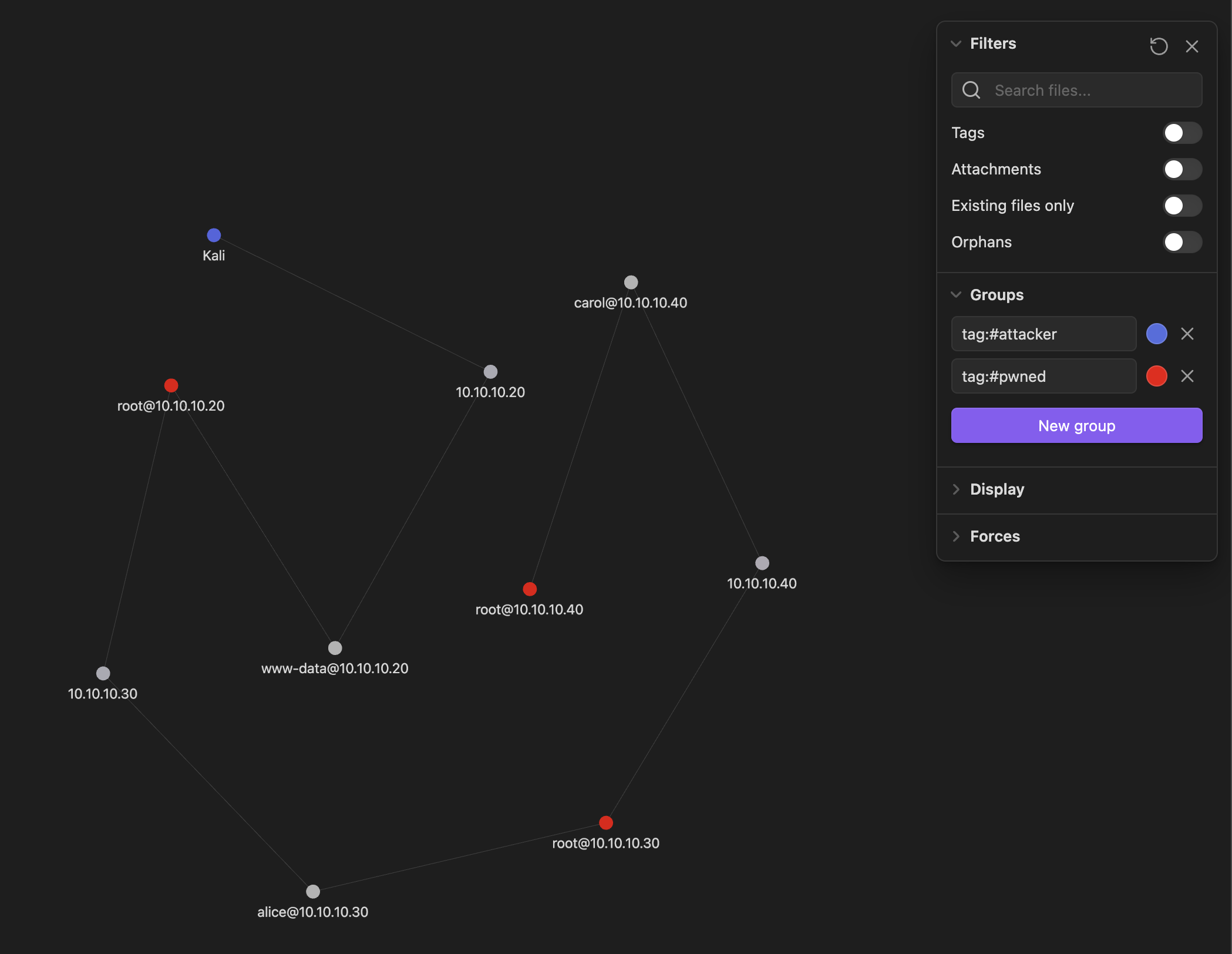
tag:#attacker→ bright bluetag:#pwned→ bright redpath:domain/10.10.10.20→ one colour per host cluster
Layout
The template ships with a fully linked three host example so that the Graph plugin shows something useful the moment you open the vault. Every node has exactly one outgoing edge so the example reads as a clean chain. Delete the example notes and add your own once you have orientated yourself.
Engagement/
├── Kali.md
├── Credentials, Flags, Hosts.md
├── Screenshots/
└── domain/
    ├── 10.10.10.20/   (web server)
    │   ├── 10.10.10.20.md
    │   ├── www-data@10.10.10.20.md
    │   └── root@10.10.10.20.md
    ├── 10.10.10.30/   (database server)
    │   ├── 10.10.10.30.md
    │   ├── alice@10.10.10.30.md
    │   └── root@10.10.10.30.md
    └── 10.10.10.40/   (jump host)
        ├── 10.10.10.40.md
        ├── carol@10.10.10.40.md
        └── root@10.10.10.40.md
The example chain is linear:
Kali
  └─ initial_foothold ──▶ 10.10.10.20
       └─ webshell ──▶ www-data@10.10.10.20
            └─ sudo_binary ──▶ root@10.10.10.20
                 └─ reused_password ──▶ 10.10.10.30
                      └─ ssh_login ──▶ alice@10.10.10.30
                           └─ sudo_binary ──▶ root@10.10.10.30
                                └─ ssh_key ──▶ 10.10.10.40
                                     └─ ssh_login ──▶ carol@10.10.10.40
                                          └─ kernel_exploit ──▶ root@10.10.10.40
In a real engagement the graph will branch (multiple identities per host, alternate paths to the same target). The clean chain is just there as a starting point.
How to Install
- Download the ZIP or clone the repository
- Open the folder as a vault in Obsidian (File → Open Vault)
- Obsidian will prompt you to install required plugins
Stats
Stars
3
Forks
1
Last updated 3mo ago
Tags