NOTEDASHBOARD
novel-byteatelier-lab
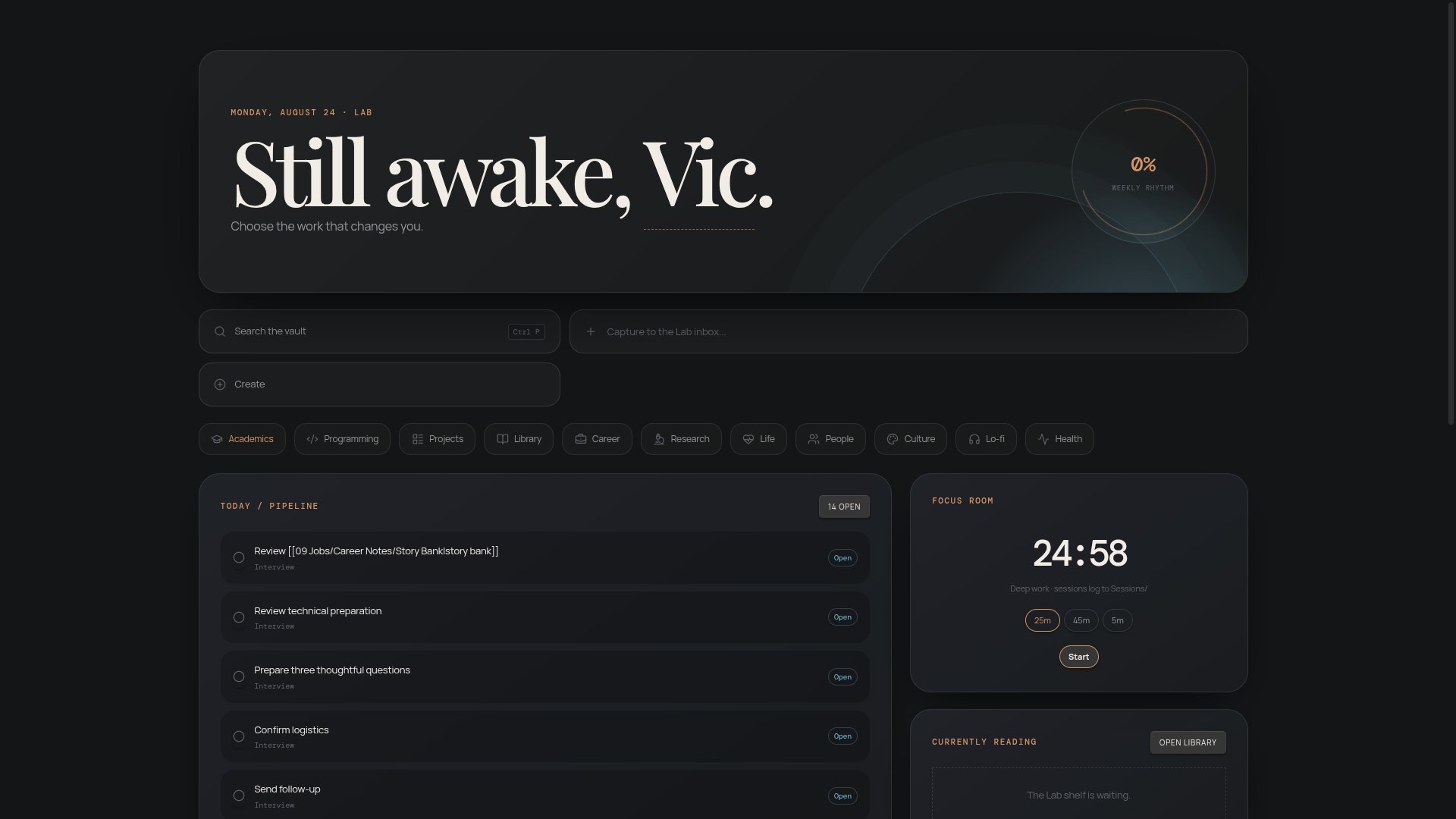
A cinematic, dashboard-first Obsidian vault — glass bento dashboards, Open Library reading tracker, career pipeline, and a three.js lo-fi workspace. MIT.
Atelier Lab
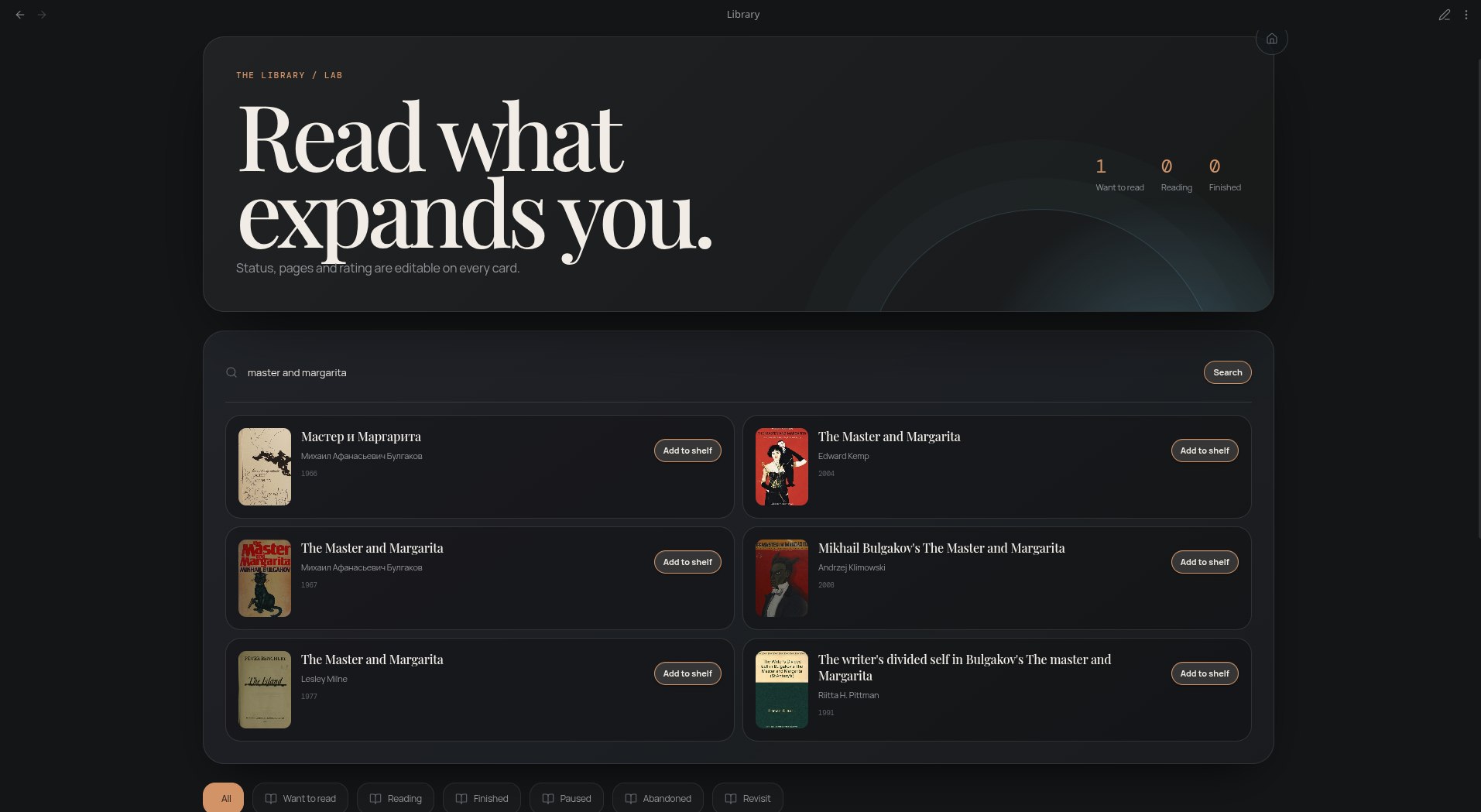
A cinematic, dashboard-first Obsidian vault for students and builders — glass bento panels, a live reading tracker with Open Library search, a career pipeline, and a full-screen lo-fi workspace with rain, focus timer, and music.
Highlights
- Command-center Home — editable greeting + daily focus, task pipeline with real checkboxes, project cards, weekly rhythm
- 9 domain studios — Academics, Programming, Projects, Library, Jobs, Research, Life, People, Culture
- Library — search Open Library by title/author/ISBN, one-click import with cover art, page-level progress, ratings, statuses
- Career studio — application funnel with inline stage changes, interview room
- Lo-fi workspace — three.js rain & dust over an original pixel-city night scene, persisted focus timer, session logging, local-audio playlist
- Universal capture —
Ctrl/Cmd+Shift+Spacefrom anywhere; typed Create menu with tags + related-note linking - Auto-skeletons — new notes in domain folders get metadata applied automatically (empty-body, zero intrusion)
- Vault Health — unknown statuses, malformed progress, orphan notes
Setup (5 minutes)
git clonethis repo, then open the folder as an Obsidian vault- Trust the vault → enable community plugins → install the suggested list (all free)
- Settings → Dataview → enable JavaScript Queries → reload
- Confirm both snippets (atelier, lofi-scene) are on under Appearance → CSS snippets
- Open Home. Delete anything tagged
#demowhenever you're ready.
Requires desktop Obsidian ≥ 1.5. Internet needed once (plugin install) and for Open Library search; everything else works offline.
Required plugins
| Plugin | Why |
|---|---|
| Dataview | Powers every dashboard — enable JavaScript Queries in its settings |
| Templater | Auto-applies metadata to new notes in domain folders |
| Tasks | Task pipelines across dashboards |
| Homepage | Opens Home on startup |
| Periodic Notes + Calendar | Daily/weekly/monthly journaling |
| Style Settings | Snippet toggles |
| Atelier Tools | Bundled — quick capture (Ctrl/Cmd+Shift+Space) + typed note creation |
Folder map
| Folder | Purpose |
|---|---|
00 dashboards | Home + one command center per life area |
_core/ | Shared dashboard runtime (helpers.js) + vendored three.js |
_templates/ | Rich templates (explicit creation) + light/ auto-skeletons |
| Domain folders | Books, Projects, Courses, Concepts, People… |
Sessions/ | Auto-logged Lo-fi focus sessions |
Customize
| What | Where |
|---|---|
| Your name / daily focus | Click them on Home |
| Accent color | Settings → Appearance → accent (#c8895b default) |
| Reading goal | Library → "Set goal" |
| Focus music | Drop .mp3/.ogg files anywhere; select on the Lo-fi page |
Docs: novel-byte.github.io/atelier-lab
Credits
Built with Dataview, Tasks, Templater, Homepage — and vendored three.js. Layout inspiration from the Obsidian dashboard community.
How to Install
- Download the dashboard markdown file from GitHub
- Drop it into your vault (anywhere)
- Install the Homepage plugin and point it at the file
- Enable any listed CSS snippets for the intended look
Stats
Stars
36
Forks
3
License
MIT
Last updated 1mo ago