Sidebar Task Hub
Sidebar Task Hub
An Obsidian plugin that collects every checkbox task from your vault into a right-sidebar panel — grouped by folder, file, and heading, with three view modes, subtask support, and full interactivity.
Views
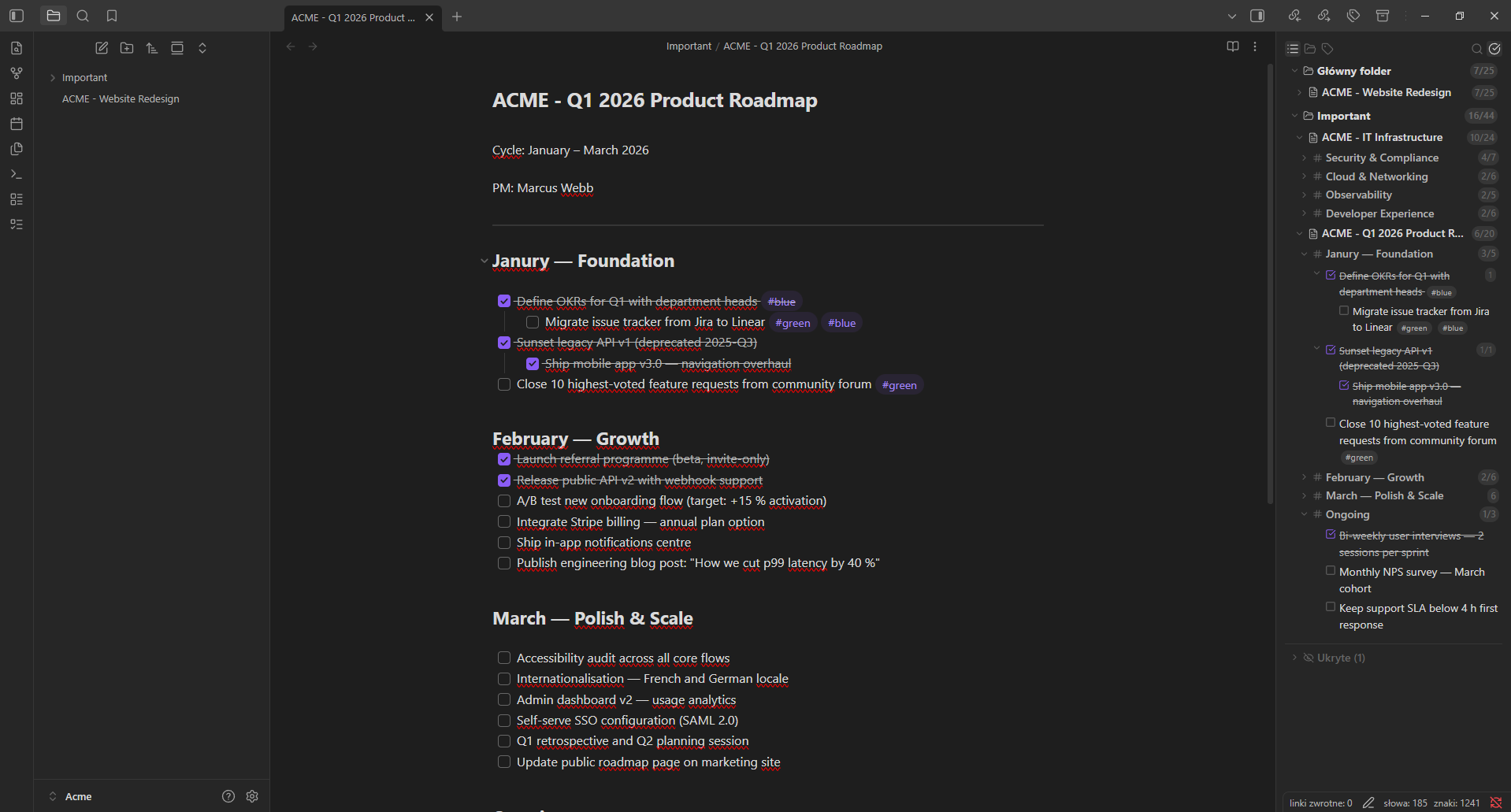
List view
The default view groups tasks by folder → file → heading with collapsible sections at every level. Subtasks are nested under their parent with a chevron toggle.
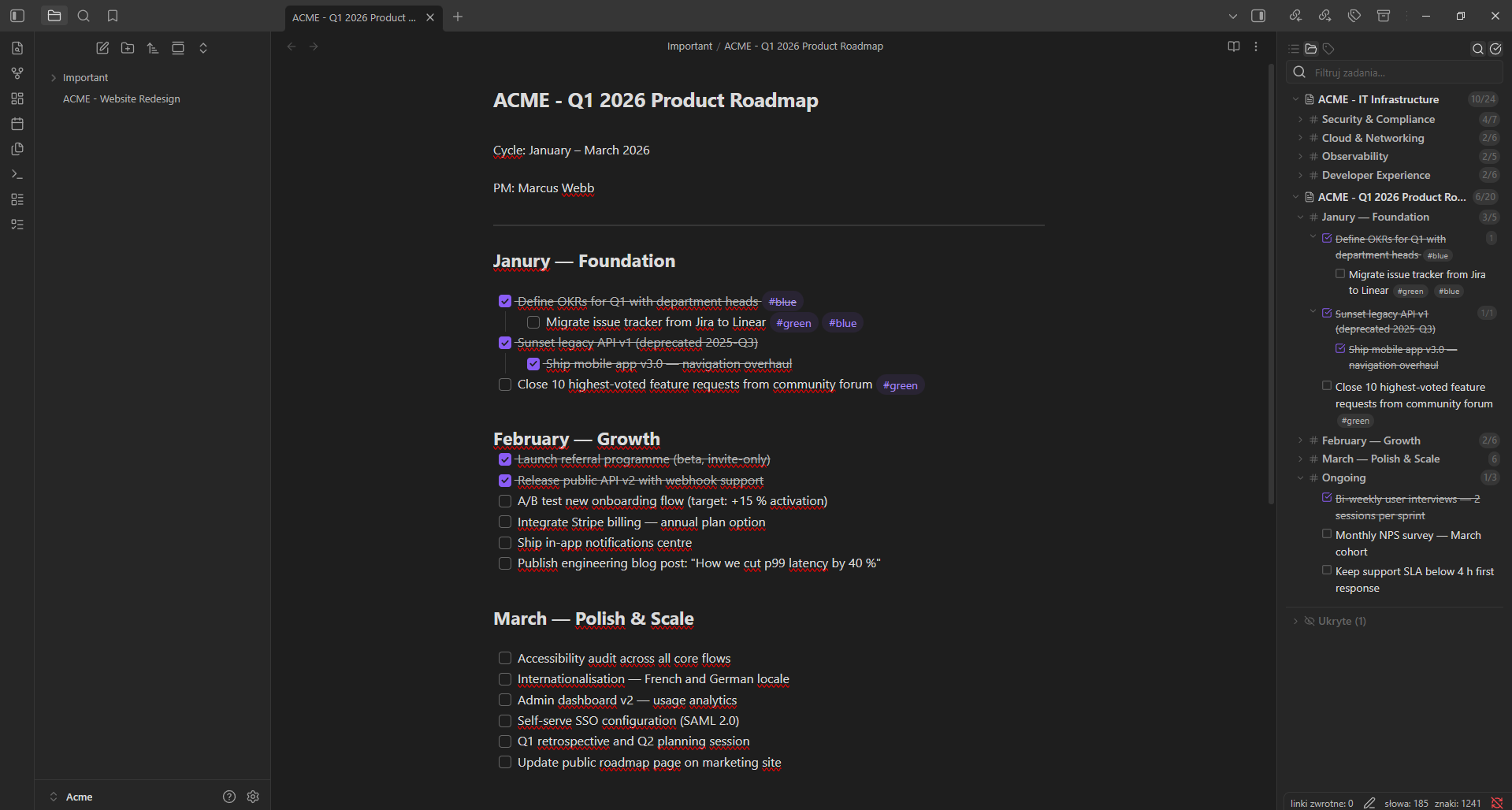
Focus view
Shows only tasks from the folder of the currently open file. The view updates automatically when you switch to a file in a different folder. No folder grouping — just files and headings.
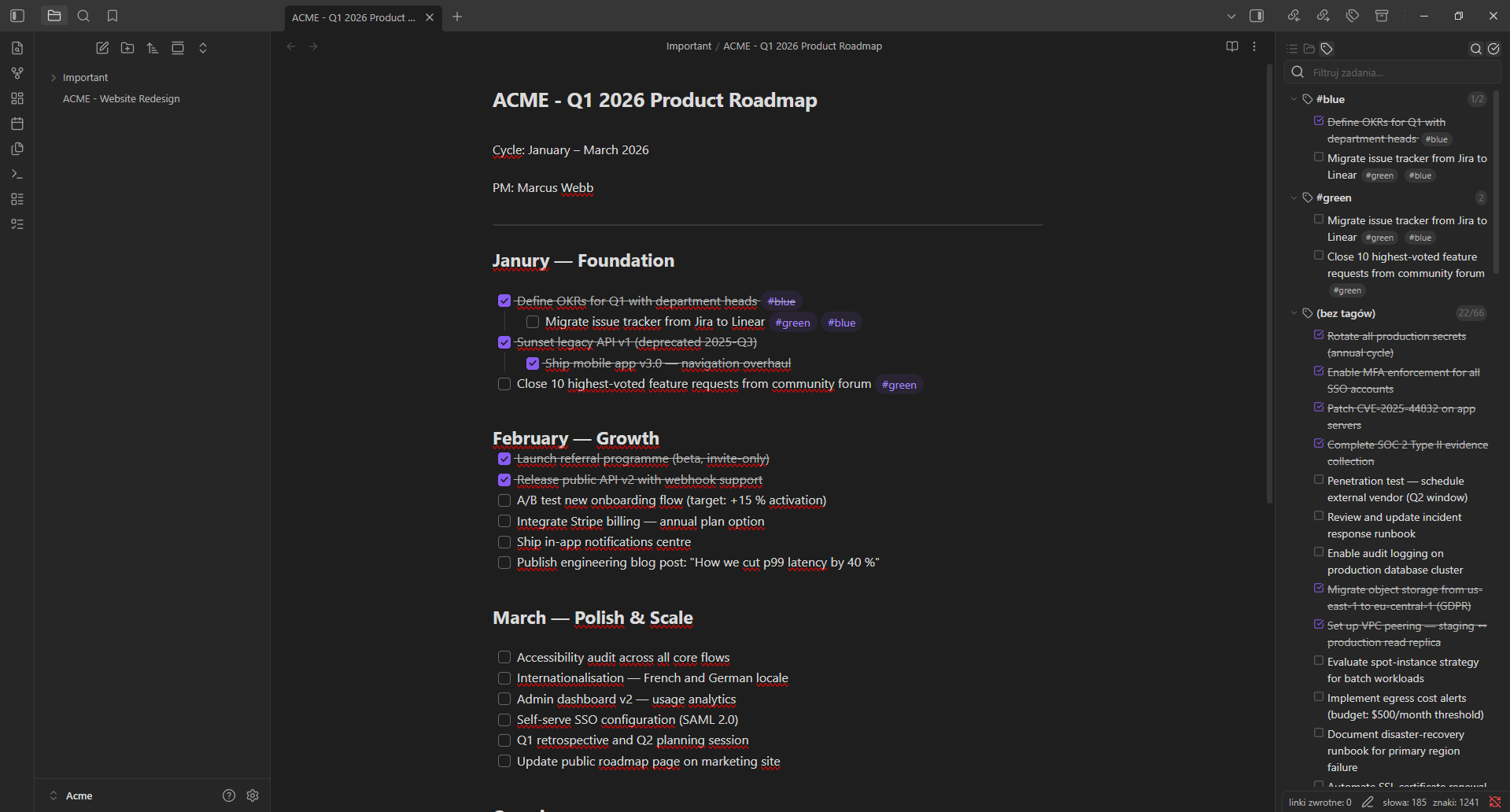
Tag view
Groups all tasks by their #tags. Tasks with multiple tags appear under each tag. Untagged tasks are collected in a separate group.
Features
- Vault-wide task scanning — finds every checkbox task (
- [ ],* [ ],+ [ ]) across all Markdown files - Three view modes — list (folder → file → heading), focus (active folder), and tag grouping
- Subtask support — indented tasks are displayed as collapsible subtasks with correct hierarchy
- Tag pills —
#tagsin task text are rendered as styled pill badges - Toggle done in-place — click the checkbox to mark a task complete or incomplete; the file updates instantly
- Click to navigate — click any task text to open the file and jump to the exact line
- Live search — filter by task text, file name, heading, or tag
- Hide tasks, files, and folders — right-click to hide items; hidden items are collected in a collapsible section at the bottom with unhide support
- Collapsed state is remembered — expand/collapse groups and the state survives re-scans
- Smart done filtering — done parent tasks with undone subtasks stay visible when "show completed" is off
- Internationalization — 14 languages auto-detected from browser locale (EN, PL, DE, FR, ES, PT, IT, RU, UK, ZH, JA, KO, AR, TR)
- Theme-native styling — uses Obsidian CSS variables; works with any community theme, light or dark
- Mobile-compatible — works on both desktop and mobile
Usage
Once enabled, the panel opens automatically in the right sidebar. You can also open it via:
- The ribbon icon (left sidebar,
list-todoicon) - Command palette: Open Task Hub (right sidebar)
Navbar
| Button | Action |
|---|---|
| List icon | Switch to list view (folder → file → heading) |
| Folder icon | Switch to focus view (active folder only) |
| Tag icon | Switch to tag view (grouped by #tags) |
| Search icon | Toggle the search/filter input |
| Check-circle icon | Toggle visibility of completed tasks |
Interactions
| Action | Result |
|---|---|
| Click checkbox | Toggle the task done/undone in the source file |
| Click task text | Open the file and jump to the exact line |
| Click chevron (▶) | Collapse/expand a group or parent task |
| Right-click task | Hide/unhide the task |
| Right-click file header | Hide/unhide the file |
| Right-click folder header | Hide/unhide the folder |
Installation
Via Community Plugins (recommended)
- Open Obsidian → Settings → Community plugins → Browse
- Search for Sidebar Task Hub
- Click Install, then Enable
Via BRAT (beta testing)
- Install BRAT
- In BRAT settings, add:
kamil-bartczak/obsidian-sidebar-task-hub
Manual
- Download
main.js,styles.css, andmanifest.jsonfrom the latest release - Copy them to
<YourVault>/.obsidian/plugins/sidebar-task-hub/ - Reload Obsidian and enable the plugin under Settings → Community plugins
Development
git clone https://github.com/kamil-bartczak/obsidian-sidebar-task-hub
cd obsidian-sidebar-task-hub
npm install
npm run dev      # watch mode
npm run lint     # ESLint (always run before build)
npm run build    # type-check + production build
Copy main.js, manifest.json, and styles.css to your vault's plugin folder to test.
License
ISC © License
How to Install
- Download the template file from GitHub
- Move it anywhere in your vault
- Open it in Obsidian — done!
Stats
Stars
9
Forks
0
License
ISC
Last updated 1mo ago