zotero-obsidian-yaml-template
Updated Zotero Integration literature note template for Obsidian, using YAML frontmatter and Properties. A drop-in replacement for the template in Alexandra Phelan's academic workflow guide.
Zotero → Obsidian literature note template (YAML frontmatter)
An updated Zotero Integration literature note template for Obsidian, rewritten to use YAML frontmatter so it works with Obsidian's Properties system.
This is a drop-in replacement for the template in Alexandra Phelan's guide An Updated Academic Workflow: Zotero & Obsidian, which predates Obsidian Properties. The original stored bibliographic metadata as inline Dataview-style fields in the note body. Those keys now live in frontmatter, where Obsidian can index, filter, sort and display them natively, and where Bases and Dataview can query them without custom parsing.
Requirements
- Obsidian 1.4 or later, for Properties support.
- The Zotero Integration community plugin, reasonably up to date. The
per-annotation page links use
a.desktopURIand image annotations usea.imageRelativePath; on older plugin releases these variables don't exist and those lines render empty rather than erroring. - Zotero 7 with the PDF reader, if you want annotation import.
Installation
- Install the Zotero Integration plugin in Obsidian.
- Save
literature-note.mdfrom this repo into your vault, for example in atemplates/folder. You can also copy the template out of the code block at the bottom of this README. - In the plugin settings, add a Citation Format with format
Create/Update Noteand point Template File at that file. - Set the output folder, then run the command from Zotero or from the Obsidian command palette.
What it produces
Frontmatter
title, citekey, year, authors (a YAML list of wikilinks, so every author
becomes a hub note), itemType, publication (journal or containing book),
volume, issue, pages, publisher, place, DOI, ISBN,
category: literaturenote, importdate, and tags normalised to lowercase with
underscores and brackets stripped. Fields absent from the Zotero item are omitted
rather than left blank.
Body
- The formatted bibliography in a
> [!cite]callout. - Links to attached PDFs, with URL-encoded file paths.
- The abstract, and any notes written in Zotero.
- PDF annotations: highlights as
> [!quote]callouts, comments as> [!note], image annotations embedded, each with azotero://link back to its page in the desktop app. The whole annotation section sits inside a{% persist %}block, so re-importing an item appends newly added highlights without touching the synthesis you have written around them.
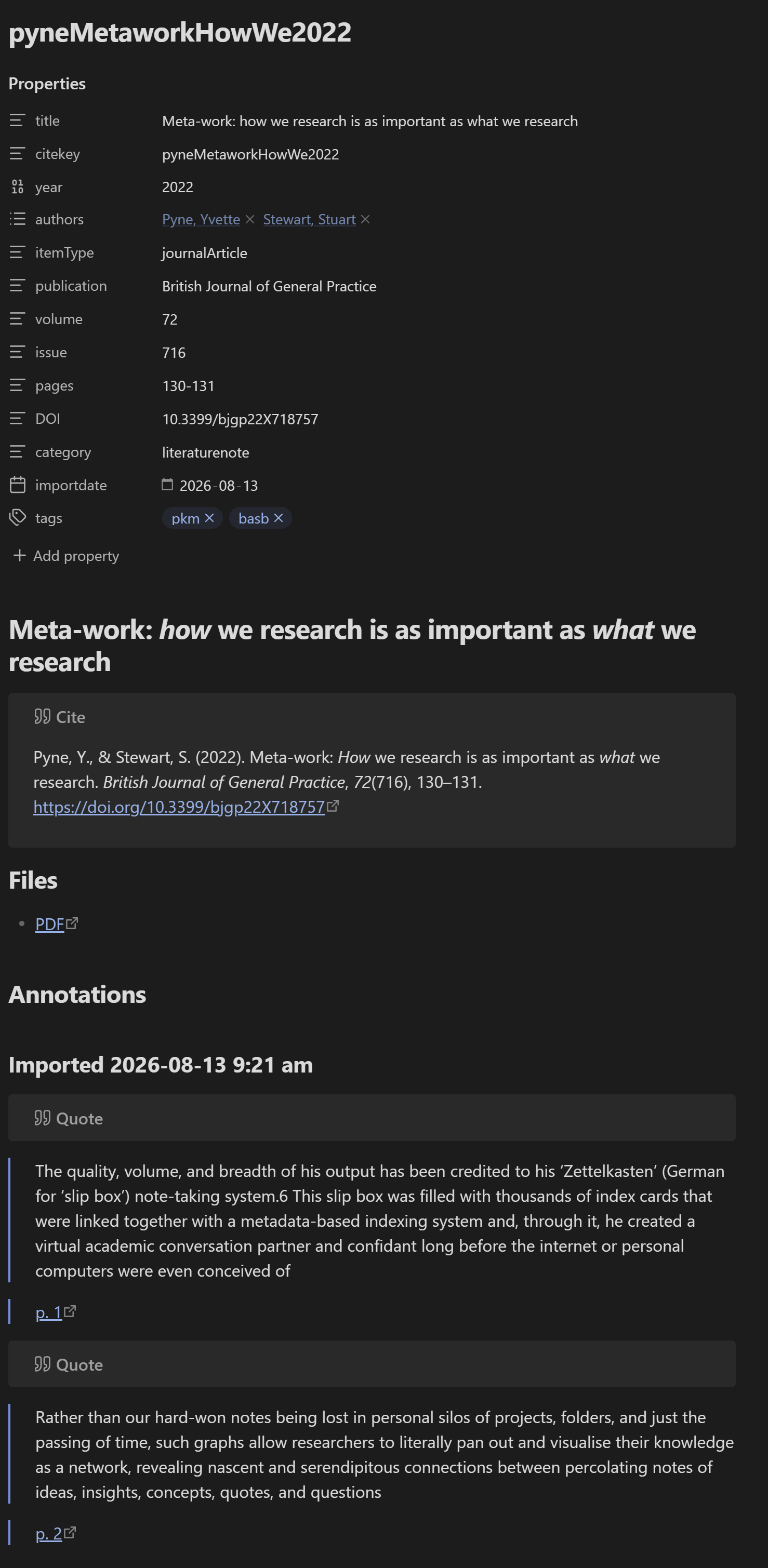
Example output
---
title: "Meta-work: how we research is as important as what we research"
citekey: pyneMetaworkHowWe2022
year: 2022
authors:
  - "[[Pyne, Yvette]]"
  - "[[Stewart, Stuart]]"
itemType: journalArticle
publication: British Journal of General Practice
volume: "72"
issue: "716"
pages: 130-131
DOI: 10.3399/bjgp22X718757
category: literaturenote
importdate: 2026-08-13
tags: []
---

# Meta-work: <i>how</i> we research is as important as <i>what</i> we research
> [!cite]
> Pyne, Y., & Stewart, S. (2022). Meta-work: _How_ we research is as important as _what_ we research. _British Journal of General Practice_, _72_(716), 130–131. [https://doi.org/10.3399/bjgp22X718757](https://doi.org/10.3399/bjgp22X718757)

## Files
- [PDF](file://C:\Users\lhambrec\Zotero\storage\F4H5GKUC\pyne_and_stewart-2022-meta-work_how_we_research_is_as_important.pdf)

## Annotations
%% begin annotations %%

### Imported 2026-08-13 9:21 am
> [!quote]
> The quality, volume, and breadth of his output has been credited to his ‘Zettelkasten’ (German for ‘slip box’) note-taking system.6 This slip box was filled with thousands of index cards that were linked together with a metadata-based indexing system and, through it, he created a virtual academic conversation partner and confidant long before the internet or personal computers were even conceived of
>
> [p. 1](zotero://open-pdf/library/items/F4H5GKUC?page=1&annotation=JK4WTND8)
> [!quote]
> Rather than our hard-won notes being lost in personal silos of projects, folders, and just the passing of time, such graphs allow researchers to literally pan out and visualise their knowledge as a network, revealing nascent and serendipitous connections between percolating notes of ideas, insights, concepts, quotes, and questions
>
> [p. 2](zotero://open-pdf/library/items/F4H5GKUC?page=2&annotation=KI5Y7YNW)
%% end annotations %%
%% Import Date: 2026-08-13T09:21:55.450-07:00 %%
Editing this template
Zotero Integration runs Nunjucks
with trimBlocks enabled, which removes the newline immediately following any
{% %} tag. This has one practical consequence that governs the whole template:
Every block tag sits alone on its own line. A tag on its own line disappears cleanly, tag and newline together, leaving the surrounding line breaks intact. A tag placed at the end of a content line eats that line's break instead. Do that inside the frontmatter and the whole block collapses onto a single line, at which point Obsidian stops recognising it as Properties and renders it as body text.
The corollary is that separating blank lines belong inside conditional blocks,
immediately after the {% if %}, not around them. A blank line placed outside the
block survives even when the block itself produces nothing, so sections that don't
apply to an item leave their padding behind and the note fills with gaps.
If you edit the template and the note comes out on one line or full of whitespace, this is almost always the cause.
Notes and caveats
- Testing changes. Annotations live inside
{% persist %}, which preserves whatever is already between the persist markers. Re-importing an item that already has a note will not reformat its existing annotations, so template changes appear to have no effect. Test against an item you haven't imported before, or delete the note first. - GitHub's preview of
literature-note.mdis broken. GitHub tries to parse the Nunjucks frontmatter as real YAML, fails, and shows an "Error in user YAML" banner above a mangled preview. This is expected and says nothing about the template. Use the Raw view, or the code block below. - Author wikilinks. Remove the
[[and]]from theauthorsline if you don't want a note per author. - Tag normalisation is opinionated. Adjust or drop the
replacefilters. yearis unquoted, so Obsidian types it as a number. That is usually what you want for sorting; quote it if you'd rather have text.- Titles containing a backslash will break the double-quoted YAML scalar, since
YAML treats
\as an escape character there. Double quotes in titles are already handled by areplacefilter. Backslashes are rare enough that they aren't.
Template
---
title: "{{title | replace('"', "'")}}"
citekey: "{{citekey}}"
{% if date %}
year: {{date | format("YYYY")}}
{% endif %}
authors: [{% for creator in creators %}"[[{% if creator.name %}{{creator.name}}{% else %}{{creator.lastName}}, {{creator.firstName}}{% endif %}]]"{% if not loop.last %}, {% endif %}{% endfor %}]
itemType: {{itemType}}
{% if publicationTitle %}
publication: "{{publicationTitle}}"
{% endif %}
{% if volume %}
volume: "{{volume}}"
{% endif %}
{% if issue %}
issue: "{{issue}}"
{% endif %}
{% if pages %}
pages: "{{pages}}"
{% endif %}
{% if publisher %}
publisher: "{{publisher}}"
{% endif %}
{% if place %}
place: "{{place}}"
{% endif %}
{% if DOI %}
DOI: "{{DOI}}"
{% endif %}
{% if ISBN %}
ISBN: "{{ISBN}}"
{% endif %}
category: literaturenote
importdate: {{importDate | format("YYYY-MM-DD")}}
tags: [{% for t in tags %}"{{t.tag | replace('"', '') | replace('[', '') | replace(']', '') | replace(' ', '_') | lower}}"{% if not loop.last %}, {% endif %}{% endfor %}]
---

# {{title}}

> [!cite]
> {{bibliography}}
{% if attachments | filterby("path", "endswith", ".pdf") | length %}

## Files
{% for attachment in attachments | filterby("path", "endswith", ".pdf") %}
- [{{attachment.title}}](file://{{attachment.path | replace(" ", "%20")}})
{% endfor %}
{% endif %}
{% if abstractNote %}

## Abstract
{{abstractNote}}
{% endif %}
{% if markdownNotes %}

## Notes
{{markdownNotes}}
{% endif %}

## Annotations
{% persist "annotations" %}
{% set newAnnotations = annotations | filterby("date", "dateafter", lastImportDate) %}
{% if newAnnotations.length %}
### Imported {{importDate | format("YYYY-MM-DD h:mm a")}}
{% for a in newAnnotations %}
{% if a.type == "highlight" %}
> [!quote]
{% endif %}
{% if a.type == "text" or a.type == "note" %}
> [!note]
{% endif %}
{% if a.type == "image" %}
> [!example] Figure
{% endif %}
{% if a.annotatedText %}
> {{a.annotatedText | replace("\n", "\n> ")}}
{% endif %}
{% if a.imageRelativePath %}
> ![[{{a.imageRelativePath}}]]
{% endif %}
{% if a.comment %}
>
> {{a.comment | replace("\n", "\n> ")}}
{% endif %}
{% if a.pageLabel %}
>
> [p. {{a.pageLabel}}]({{a.desktopURI}})
{% endif %}

{% endfor %}
{% endif %}
{% endpersist %}
Credit
The original workflow and template are by Alexandra Phelan (article). This repo only updates it for YAML frontmatter and Obsidian Properties.
License
MIT. See LICENSE.
How to Install
- Download the template file from GitHub
- Move it anywhere in your vault (or your sidebar notes)
- Open it in Obsidian — done!
Stats
Stars
1
Forks
0
License
MIT
Last updated 2mo ago