SNIPPETgwusun
Kanban Sidebar
CSSAny theme
# Obsidian Kanban Sidebar Plugin
A modified version of [obsidian-kanban](https://github.com/mgmeyers/obsidian-kanban)
# Why change this?
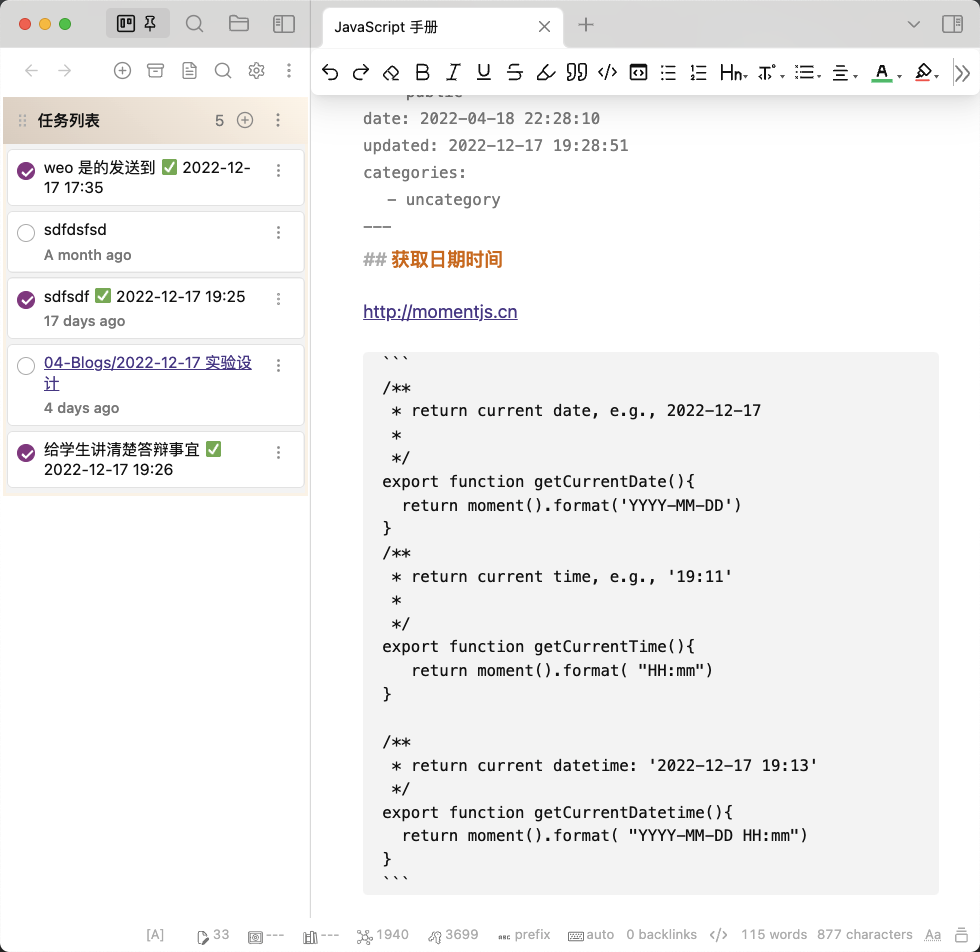
I need a task manager and navigation on the left sidebar for the Obsidian, i.e.,

## settings in .md
Add the settings to the end of the kanban file (a .md file).
%% kanban:settings
```
{"kanban-plugin":"basic","new-line-trigger":"enter","show-checkboxes":true,"link-date-to-daily-note":true,"new-card-insertion-method":"prepend-compact","hide-card-count":false,"hide-tags-in-title":false,"hide-tags-display":false,"show-add-list":true,"show-relative-date":true,"hide-date-display":false,"date-picker-week-start":0,"prepend-archive-date":true}
```
%%
## obsidian.css
append the following css to file `.obsidian/snippets/obsidian.css`.
```css
/* obsidian kanban */
.kanban-plugin__board>div{
display: block;
margin-bottom: 10px;
}
.kanban-plugin__lane{
border: none;
}
.kanban-plugin__scroll-container.kanban-plugin__vertical{
padding: 0;
border: 3px solid #fcf3e8;
border-top: none;
border-radius: 0;
margin: 0 0.12px;
margin-bottom: 2em;
}
.kanban-plugin__item-button-wrapper{
border-radius: 2px !important;
padding: 0.2em !important;
background-color: none;
border:none;
}
.kanban-plugin__lane-header-wrapper{
background: linear-gradient(220.55deg, #FFF6EB 0%, #DFD1C5 100%) !important;
}
```
## Features
- Single columns to fit the left sidebar.
- Automatically append datetime to the task. For example, when you type the `task name`, the task will be `task name @{2022-11-6} @@{16:13}`
- Automatically the task finished datetime to the task. For example, when you click the checkbox of the task named `task name`, the task will be `task name ✅ 2022-11-6 13:20`
-
## Code
### Generate Finished Data
```javascript
//✅ 2022-11-6 13:20
const d=new Date()
const post_datatime=" ✅ "+d.getFullYear()+"-"+(d.getMonth()+1) +"-"+d.getDate()+" "+d.getHours()+":"+d.getMinutes()
//
```
### Replace old data
```javascript
const d=new Date()
const current_datetime=" ✅ "+d.getFullYear()+"-"+(d.getMonth()+1) +"-"+d.getDate()+" "+d.getHours()+":"+d.getMinutes()
const finshed_datetime_reg=/\s?✅\s\d+-\d+-\d+\s\d+:\d+/g
" ✅ 2022-11-6 13:20".replaceAll(finshed_datetime_reg,current_datetime)
// if the fished datetime is existed.
if(" ✅ 2022-11-6 13:20".search(finshed_datetime_reg) === -1){
//not existed the finished datatime
}else{
//the finished datatime is existed
}
//update the item
boardModifiers.updateItem(
path,
update(item, {
data: {
$toggle: ['isComplete'],
// the enssence update code
titleRaw:{
$set: target_task_item
}
},
})
);
```
### update the list
```javascript
stateManager
.updateItemContent(item, titleRaw)
.then((item) => {
boardModifiers.updateItem(path, item);
})
.catch((e) => {
stateManager.setError(e);
console.error(e);
});
```
### Hide the header

```
.workspace-leaf-content[data-type='kanban'] {
.view-content {
padding: 0;
}
> .view-header {
display: none; # hide header
}
}
```How to Install
- Download the CSS file below
- Move it to your vault's
.obsidian/snippets/folder - Open Obsidian → Settings → Appearance → CSS Snippets → Enable it
Stats
Stars
3
Forks
1
License
GPL-3.0
Last updated 40mo ago
Categories