SNIPPETfelixqueisler
FileLink Styling
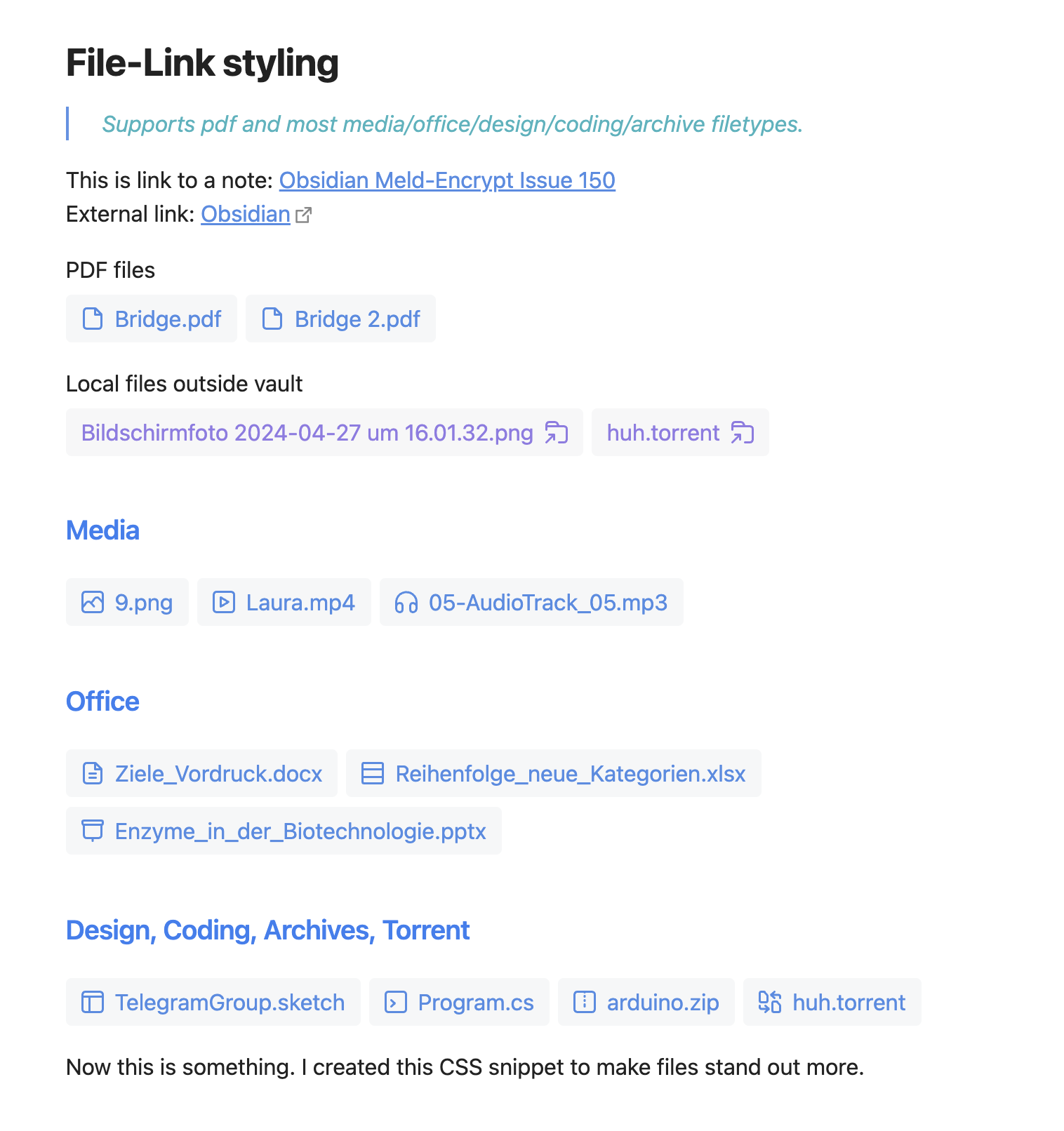
Improves the way linked files are displayed in Obsidian, making them beautifully distinct from notes.
CSSAny theme
# Obsidian-FileLink-Styling
Improves the way linked files are displayed in Obsidian (reading view), making them beautifully distinct from notes.
## Features
* Beautiful simple button-style links for files
* Inline SVG-Icons
* Easily expandable through SCSS
* Follows your theme
* Multi-Icon support
## Screenshot

## Usage
1. Download the css-file or compile your own version using scss/sass compiler.
2. Open Obsidian settings > appearance > CSS Snippets and move the file to the snippet folder.
3. Activate the snippet in the Obsidian settings.
Read more here: [Obsidian Help](https://help.obsidian.md/Extending+Obsidian/CSS+snippets)
4. Open your notes in reading view.
## Supported filetypes
_As of now. Ask for more with GitHub's issue feature._
Due to limitations in writing selectors for anchors based on their href property, filetypes have to be set specifially.
- **Code Files**
- Extensions: `html`, `css`, `js`, `php`, `py`, `java`, `cpp`, `c`, `cs`, `rb`, `go`, `lua`, `swift`, `ts`, `json`, `xml`, `scss`, `sass`, `sh`, `asm`, `sql`, `r`, `pl`, `h`, `hpp`
- [Icon Source](https://iconic.app/code/)
- **PDF Files**
- Extensions: `pdf`
- [Icon Source](https://iconic.app/file/)
- **Video Files**
- Extensions: `mp4`, `avi`, `mov`, `wmv`, `mkv`, `flv`, `mpeg`, `mpg`, `webm`, `vob`, `m4v`, `3gp`, `3g2`, `f4v`
- [Icon Source](https://iconic.app/video/)
- **Audio Files**
- Extensions: `mp3`, `wav`, `aac`, `ogg`, `flac`, `alac`, `wma`, `m4a`, `ape`, `mid`, `midi`, `mpa`, `ogg`, `aif`
- [Icon Source](https://iconic.app/headphones/)
- **Image Files**
- Extensions: `jpg`, `jpeg`, `png`, `gif`, `bmp`, `tiff`, `svg`, `psd`, `webp`, `ico`, `heic`, `raw`, `arw`, `svgz`, `nef`, `orf`,`pxd
- [Icon Source](https://iconic.app/photo/)
- **Archive Files**
- Extensions: `zip`, `rar`, `7z`, `tar`, `gz`, `bz2`, `xz`, `tar.gz`, `jar`, `iso`, `cab`, `rar5`, `dmg`
- [Icon Source](https://iconic.app/zip-file/)
- **Word Files**
- Extensions: `txt`, `doc`, `docx`, `odt`, `rtf`, `docm`, `wps`
- [Icon Source](https://iconic.app/file-text/)
- **Spreadsheet Files**
- Extensions: `xls`, `xlsx`, `ods`, `csv`, `xlsm`, `xlt`, `xlm`
- [Icon Source](https://iconic.app/table-rows/)
- **Slide Files**
- Extensions: `ppt`, `pptx`, `odp`, `pps`, `pptm`
- [Icon Source](https://iconic.app/projector/)
- **Design Files**
- Extensions: `psd`, `ai`, `sketch`, `eps`, `indd`, `xcf`, `dwg`, `svg`, `fig`, `cdr`, `afdesign`, `stp`, `3ds`, `iges`, `max`
- [Icon Source](https://iconic.app/dashboard/)
- **Torrent Files**
- Extensions: `torrent`
- [Pro Icon Source](https://iconic.app/file-share/)
- **Route Files**
- Extensions: `gpx`, `kml`, `fit`, `tcx`
- [Pro Icon Source](https://iconic.app/map/)
- **External (Local Filesystem) Files**
- Extensions: *
- [Pro Icon Source](https://iconic.app/folder-share/)
## Thank you
[@sailKiteV](https://github.com/sailKiteV) in Obsidian Discord (https://discord.gg/obsidianmd) for helping me out and providing a first SCSS draft of my initial CSS version.
How to Install
- Download the CSS file below
- Move it to your vault's
.obsidian/snippets/folder - Open Obsidian → Settings → Appearance → CSS Snippets → Enable it
Stats
Stars
28
Forks
0
License
MIT
Last updated 6mo ago