Obsidian_vault_pipeline
A automatic pipeline that processing obsidian vault by llm from pinbord, obsidian Clipper etc.
OVP2 — grounded knowledge for your Obsidian vault
Turn the articles you save into a knowledge base you can ask — and every answer cites a real line in a real source.
OVP2 is a local-first app for Obsidian vaults. It reads what you capture, extracts grounded memory, crystallizes durable claims, and gives you a portal to browse, search, and ask — without inventing citations.
简体中文 · Install details · Operator runbook
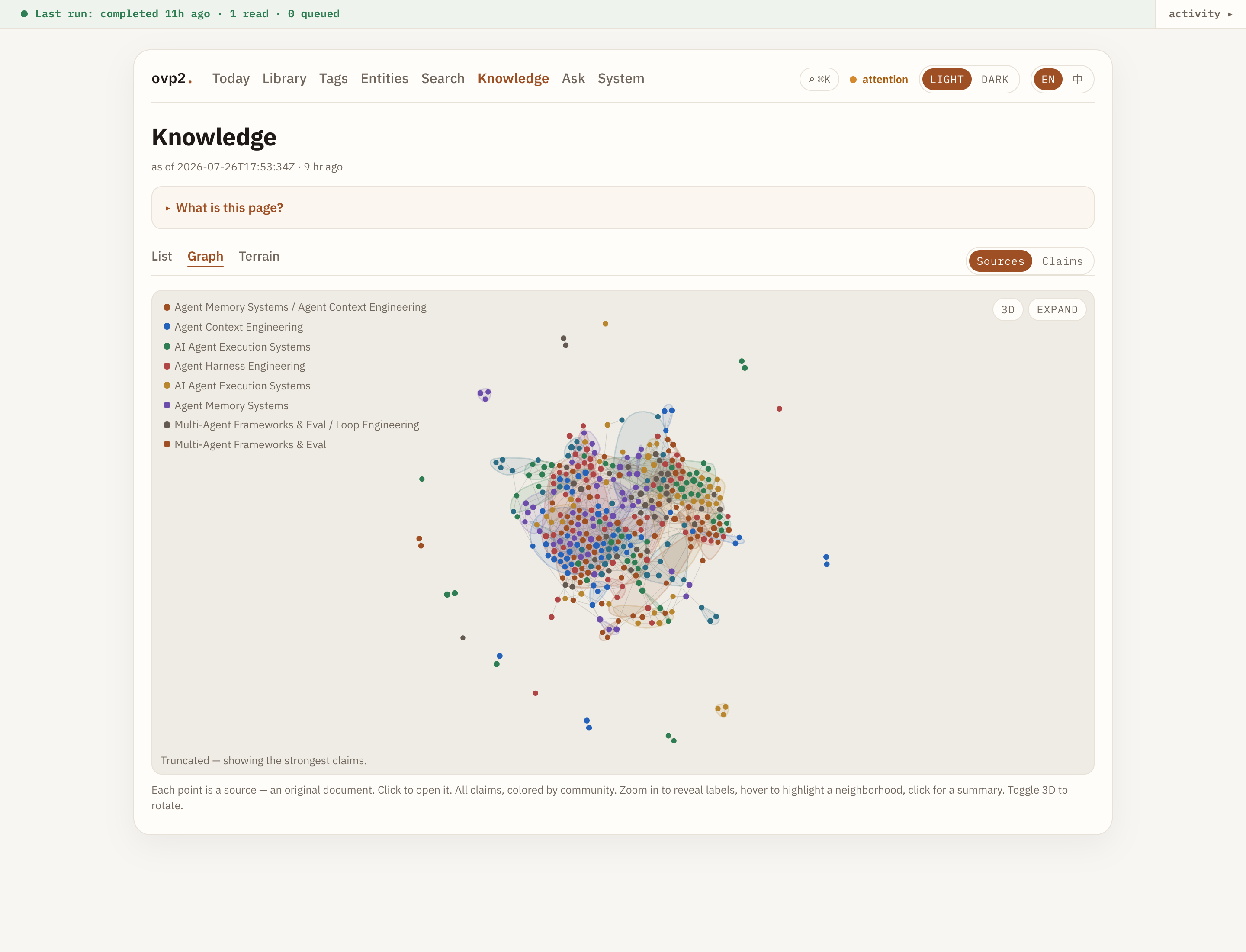
Knowledge graph: themes and claims from a real dogfood vault.
Why OVP2
Most note tools store text. OVP2 keeps a truth layer:
| Layer | What you see | Rule |
|---|---|---|
| Source | Original clippings & bookmarks | Never rewritten |
| Memory | Cards & units per article | Every unit ties to a verbatim quote + line |
| Knowledge | Cross-source claims | No claim persists without grounded citations |
If a statement cannot point at evidence in your vault, it does not become durable knowledge. Search, the graph, and Ask are projections of that ledger — rebuildable anytime.
The portal
ovp2 serve (or the OVP2 desktop app) opens a localhost portal over your vault.
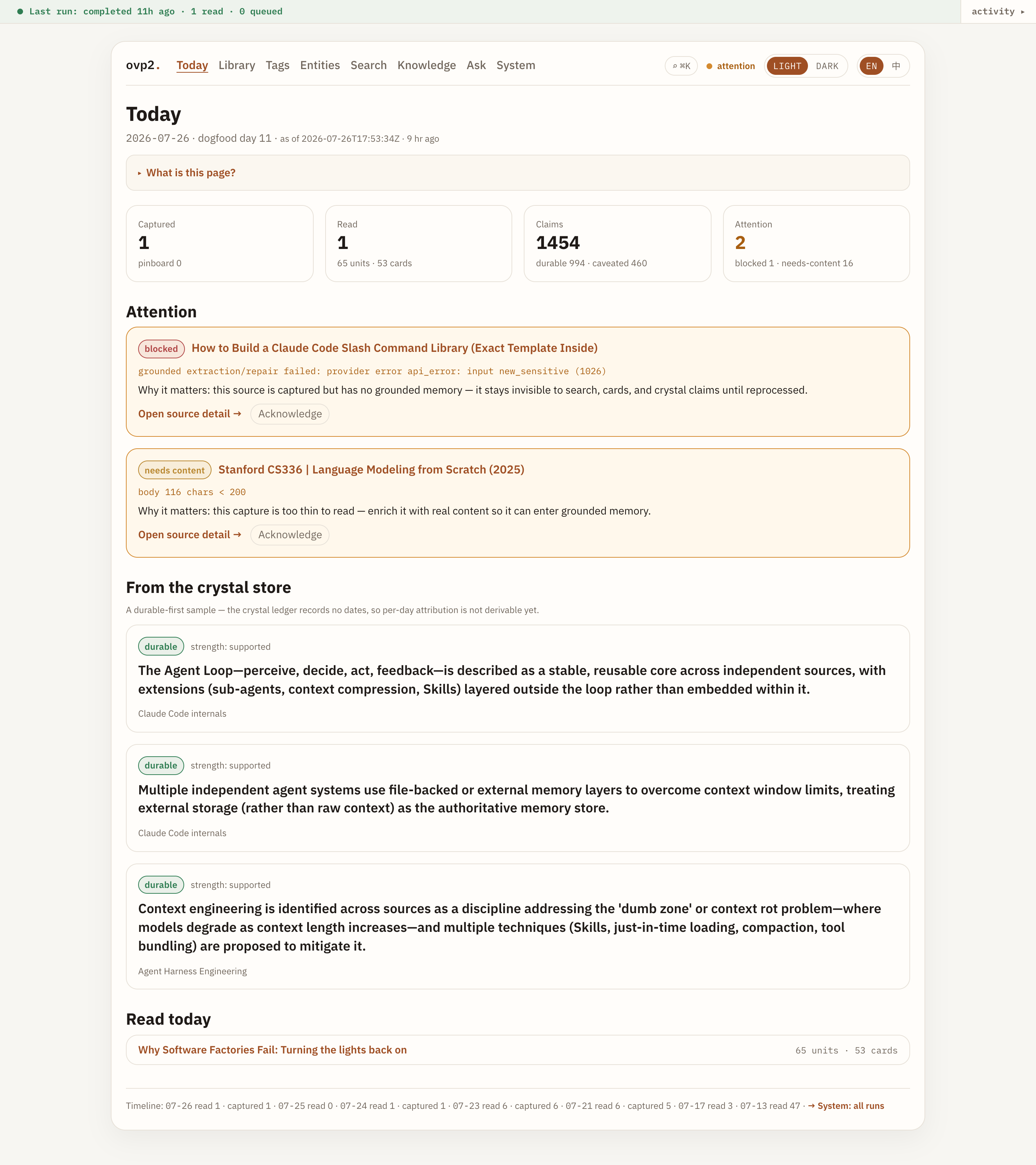
Today — what changed
A morning dashboard: captures, reads, new claims, and items that need attention.
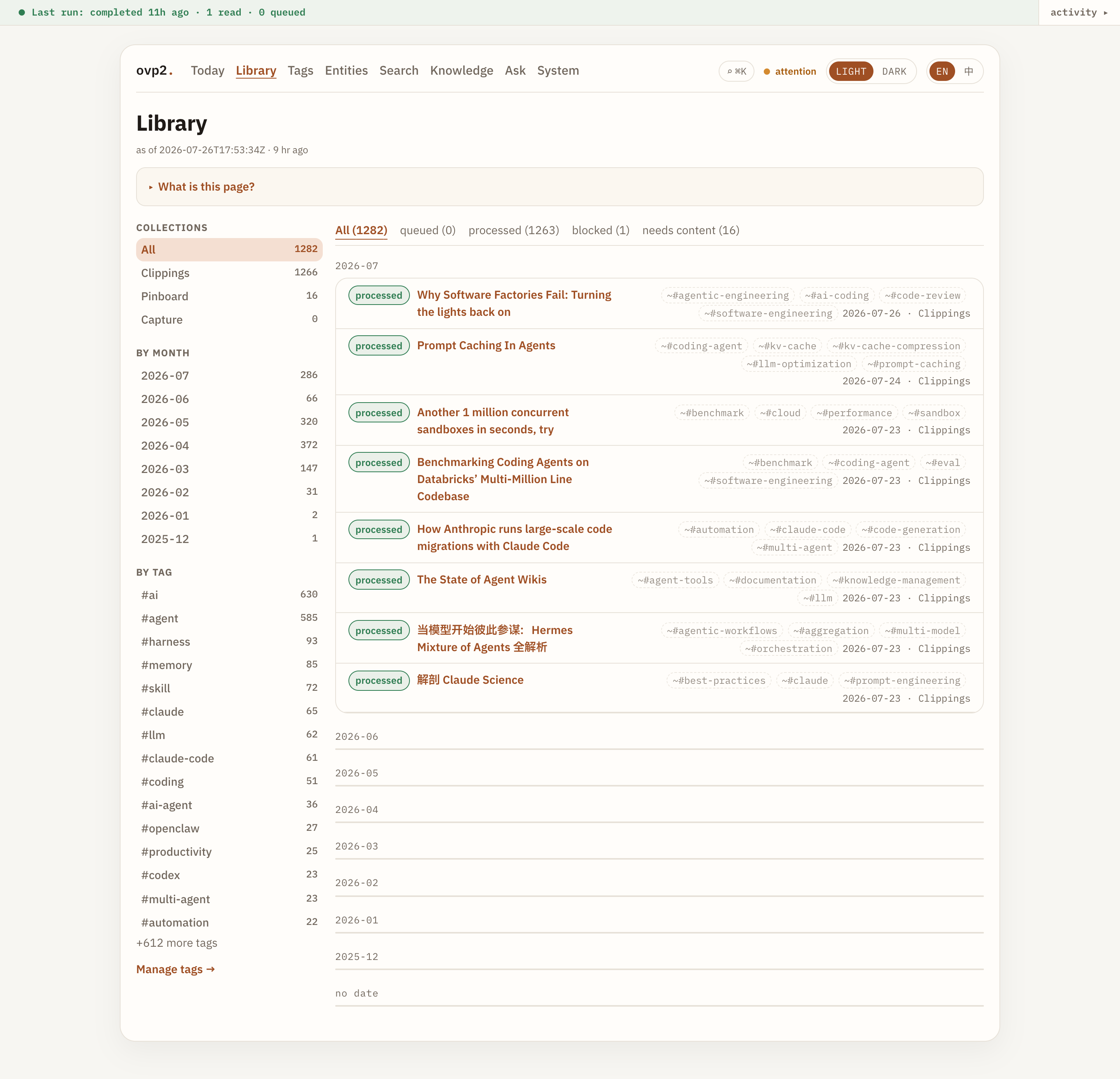
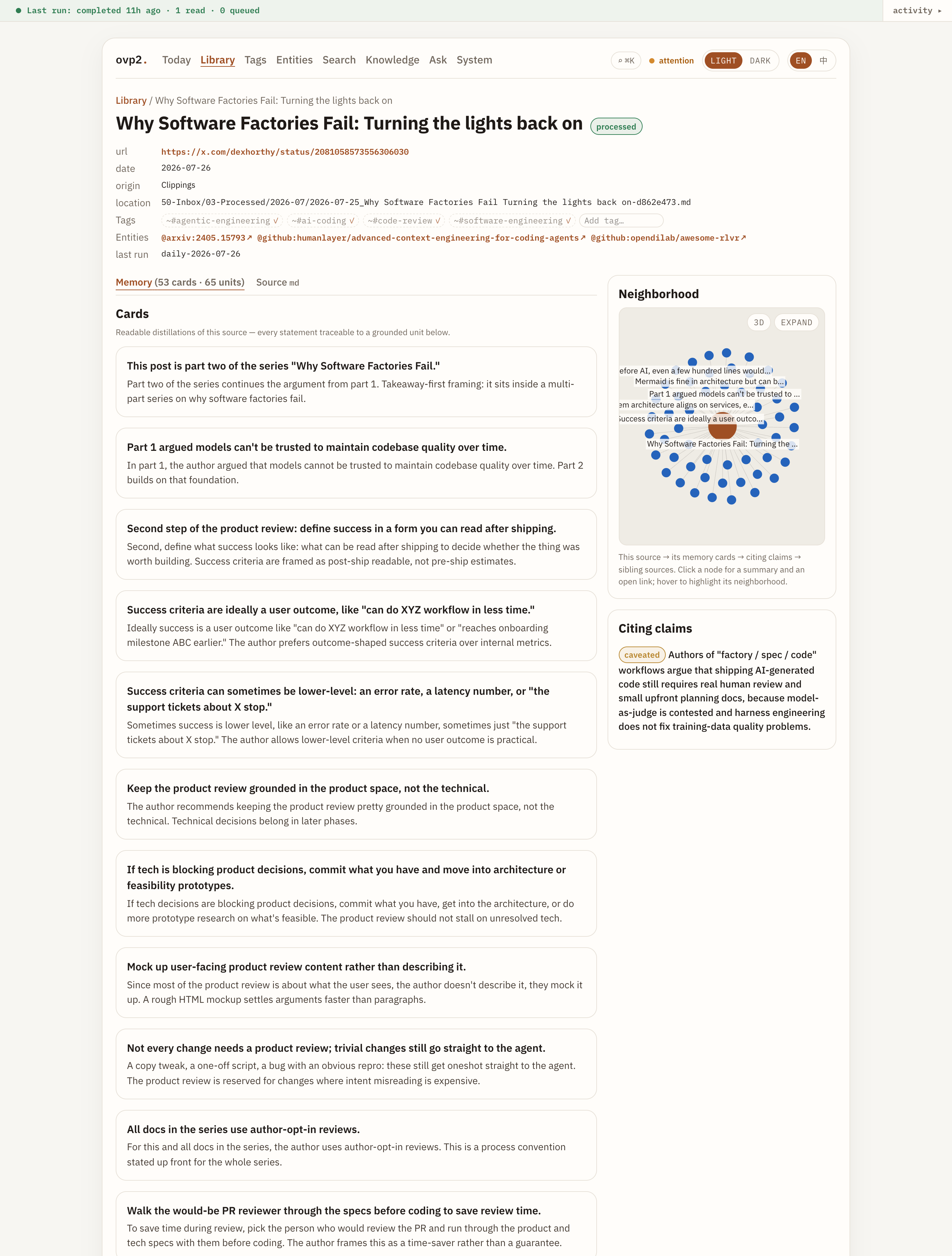
Library — everything you captured
Browse by collection and month. Open any source for memory cards, the full original document, and claims that cite it — with a neighborhood graph on the side. Markdown renders properly, Mermaid diagrams included.
Per source, on demand: a deep summary, a 中文 translation, companion links to related sources, and chat about this one — enrichment you ask for, not a bill the daily loop runs up on everything you ever saved.
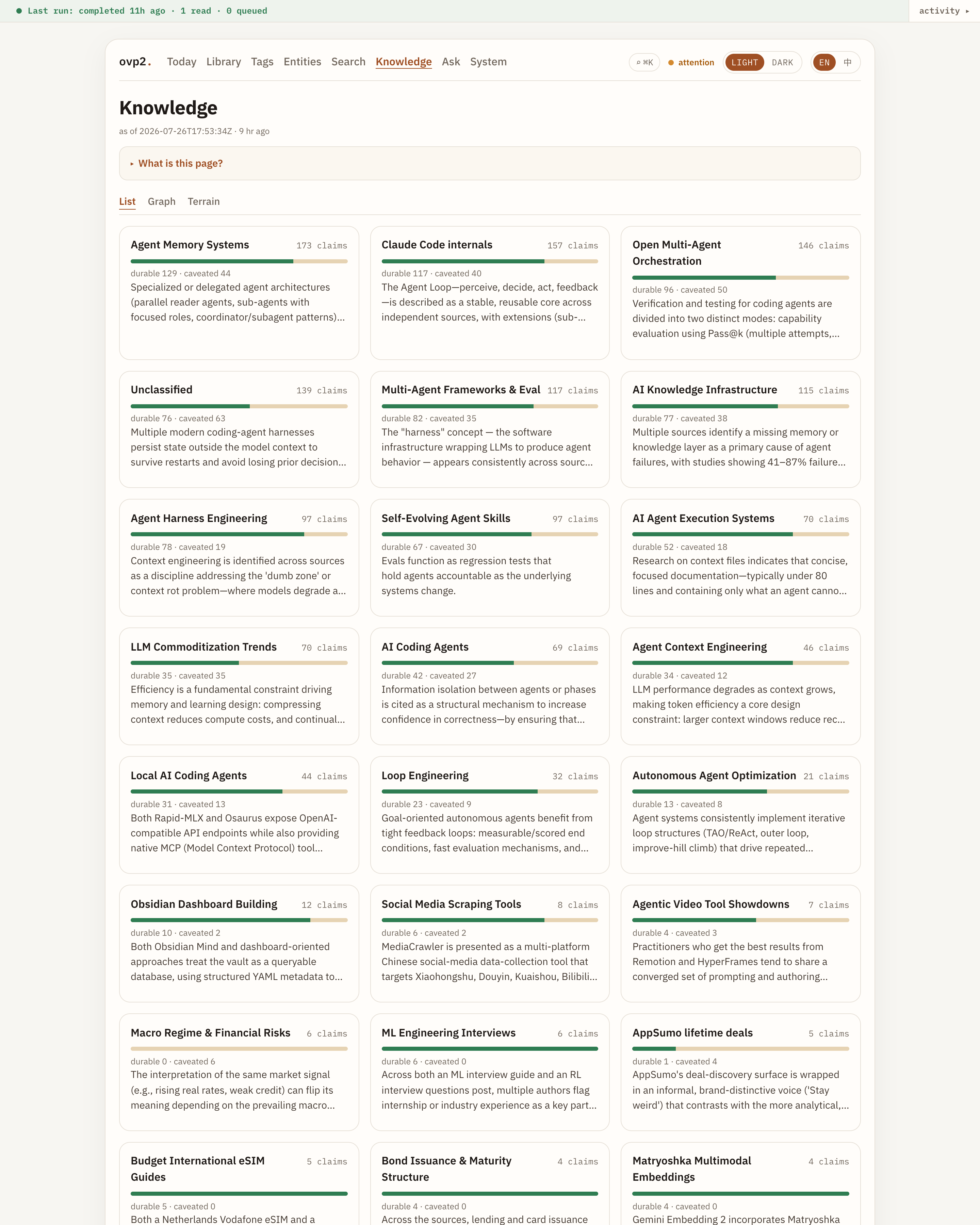
Knowledge — themes & claims
Durable vs caveated claims, grouped by theme. Switch List / Graph / Terrain when you want structure instead of a spreadsheet of notes.
Each theme also gets a topic page: its durable claims woven into prose, where every sentence cites a claim key. A draft that cannot cite is repaired once, then rejected — the page never ships ungrounded.
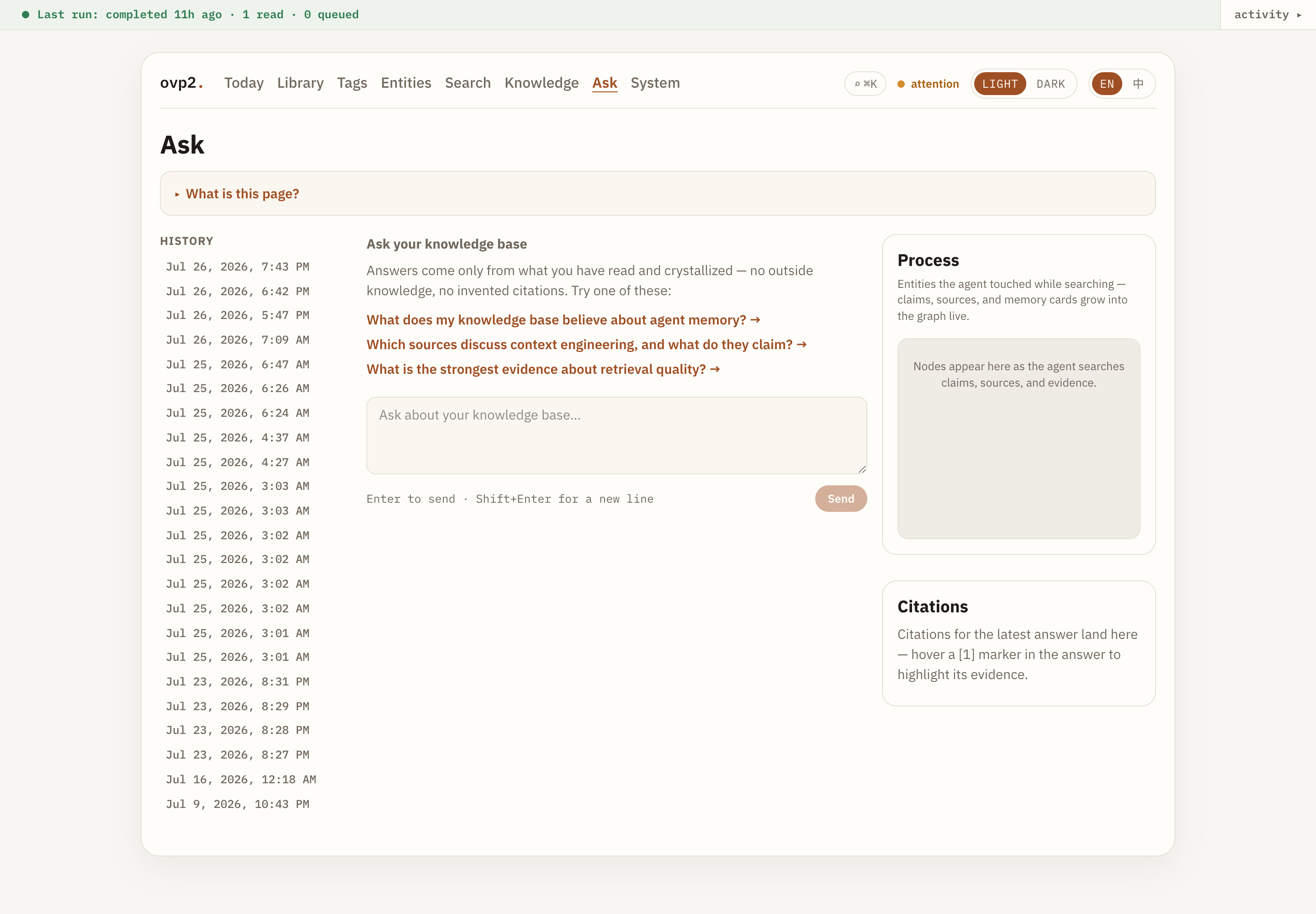
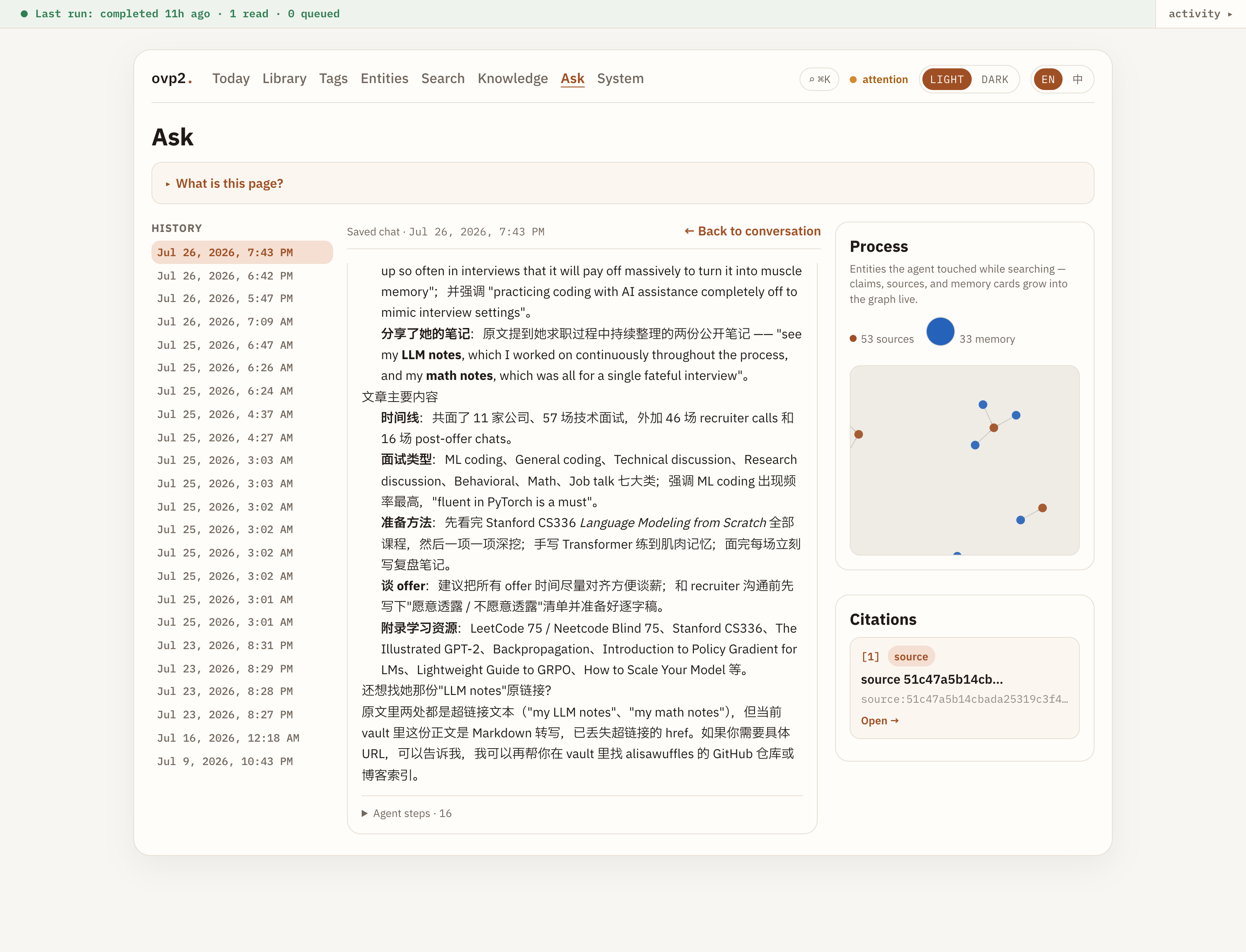
Ask — answers with receipts
Ask in natural language. The agent searches claims, sources, and evidence cards; the Process panel shows what it touched; the answer carries numbered citations you can open.
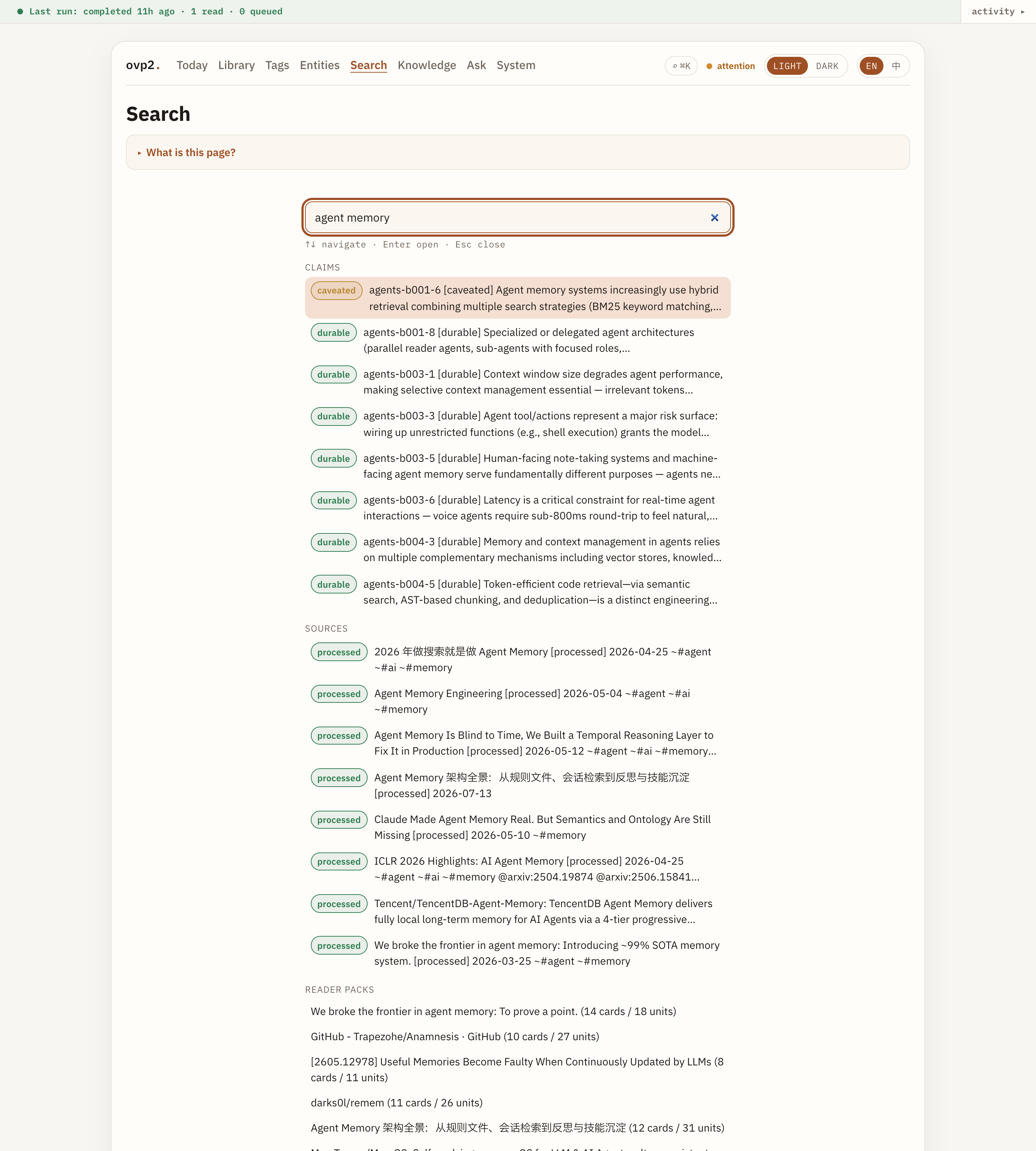
Search — one box
Sources, claims, packs, themes — and the full text of every source body, not just
titles. ⌘K / Ctrl+K from anywhere.
中文 — the knowledge, not just the buttons
The interface has always had a 中文 locale. Beyond that, OVP2 can carry a Chinese projection of the knowledge itself: claims, memory cards, and topic pages get zh versions alongside the English ones.
It is a projection, deliberately — the ledger stays English and single-authority, and the zh layer is rebuildable from it, so a translation can never become a second source of truth that quietly disagrees. New material is queued as it arrives and old material backfills in the background, both inside the vault's own token budget.
Also in the portal: Tags, Entities, Work queue (what enrichment is running, its pace and ETA), System (runs, doctor, LLM settings, schedule). Light Atelier and dark Vault themes.
What you run day to day
| You want… | Do this |
|---|---|
| Process the vault once | ovp2 daily --vault-root ~/path/to/vault --client live |
| Open the UI | ovp2 serve --vault-root ~/path/to/vault → open the printed URL |
| Desktop app | OVP2.app releases (macOS) — it carries its own clock, so ovp2 schedule init is enough; no OS unit needed |
| Ingest on a schedule, no app running | ovp2 schedule install (launchd / systemd user timer) |
| See what the LLM cost you | ovp2 usage --vault-root … — tokens by day × lane, against the soft budget |
| Ask from the CLI | ovp2 ask --vault-root … "your question" |
| Enrich sources (deep summary, 中文) | ovp2 source-work --vault-root … |
| Publish durable knowledge as a public site | ovp2 publish --vault-root … --out <dir> |
| Agent tools in an editor | ovp2 mcp (stdio MCP: find / search / ask / doctor …) |
The daily loop: capture sweep → grounded read per new source → ledgers → rebuild the read model. Crystal synthesis turns reader packs into cross-source claims behind mechanical gates.
Bookmarks you never meant to read
Some things you save are entry points, not articles — a brand homepage, a gallery, a docs
index. Tag the capture ovp_skip and the pipeline drops it at intake, before it fetches or
spends anything. Remove the tag later and it is picked up again on the next sweep; nothing
is deleted. ovp_force is the other direction: read this one even though it is too short to
clear the automatic gate.
We tried to detect these pages automatically and measured that it does not work — on a real 1,448-source corpus the structural signals flagged a 73k-character engineering writeup and a 46k-character CUDA article next to the three genuine navigation pages. Whether a bookmark is worth reading is your call, so it stays a tag.
Install
Prebuilt CLI for macOS arm64 and Linux x64 (current line: v2.0.1). No Rust toolchain required.
curl --proto '=https' --tlsv1.2 -LsSf \
  https://github.com/fakechris/obsidian_vault_pipeline/releases/latest/download/ovp-cli-installer.sh | sh
or:
brew install fakechris/ovp2/ovp2
ovp2 --version
Full channels, desktop DMG, and rollback notes: docs/install.md.
Quick start
-
LLM credentials (for live reads / Ask) — write
<vault>/.ovp/providers.toml, which the app reads itself. Shell env still wins when set, so one-off overrides keep working.[env] ANTHROPIC_API_KEY = "sk-ant-..." OVP_LLM_TIMEOUT_SECS = "480" [budget] daily_token_budget = 2000000 # optional; reported by `ovp2 usage`, not enforcedThe portal's System → LLM settings page edits this file for you (keys masked once saved). A scheduled job cannot reliably shell-source an env file — that is why this is a config file and not
daily.env. -
One daily pass (try
--dry-runfirst):ovp2 daily --vault-root ~/Documents/my-vault --client live -
Schedule (optional):
ovp2 schedule install --vault-root ~/Documents/my-vault -
Portal:
ovp2 serve --vault-root ~/Documents/my-vault -
Pinboard (optional):
PINBOARD_TOKEN=user:TOKENthen
ovp2 pinboard-sync --vault-root … --live --max 200
Privacy & trust
Local-first: product state is plain files under your vault (.ovp/ ledgers + notes). No account, no telemetry.
Only leave the machine when you configure them:
- LLM calls — text you process is sent to the provider behind your API key (or local endpoint). No key → offline/replay only.
- Pinboard — only with
--liveand your token (never logged). - Web / GitHub enrichment — fetches bookmarked URLs (and repo metadata for GitHub links) when enabled. Set
XQUIK_API_KEYto resolve X/Twitter status bookmarks through Xquik. - Manual diagnostic compare — only if you run the compare command against an external service you choose; not part of
daily. - Publishing —
ovp2 publishis the only command that pushes anything outward, only to a repo you name, and only durable claims.
What it costs is visible too: every metered LLM call lands in .ovp/usage/, and
ovp2 usage reports tokens by day and by lane against your budget line. The budget is
soft — it reports, it does not cut you off mid-run. Per-run limits are the throttle
(--max-sources, the enrichment queue's own cap).
Xquik is an independent third-party service. Not affiliated with X Corp. "Twitter" and "X" are trademarks of X Corp.
More documentation
| Doc | For |
|---|---|
docs/install.md | Installers, desktop, versions |
docs/operator-runbook.md | Real-vault operation, failures, recovery |
CLAUDE.md | Contributors: what to rebuild after which change — a machine with the desktop app installed runs four independent artifacts, and updating the wrong one looks exactly like "my change did nothing" |
docs/ovp-to-ovp2.md | Story of the rewrite & migration (中文) |
docs/architecture.md | Crate map & dataflow (engineers) |
docs/product-state-layout.md | Where state lives on disk |
CHANGELOG.md | Release history |
Screenshots in docs/images/ were taken from a local dogfood vault (public tech clippings). Re-capture anytime with the portal running; review for secrets before publishing.
Status
Rust workspace (CLI + portal + optional desktop). The daily loop, crystal synthesis, topic pages, Ask agent, source enrichment, the 中文 projection, and the portal all run on a real dogfood vault daily — currently ~1,450 sources and ~1,500 durable + caveated claims. See releases for the latest artifacts.
License
Dual-licensed under either of
- MIT license (LICENSE-MIT)
- Apache License, Version 2.0 (LICENSE-APACHE)
at your option. Unless you explicitly state otherwise, any contribution intentionally submitted for inclusion in this work by you, as defined in the Apache-2.0 license, shall be dual licensed as above, without any additional terms or conditions.
Exception: the vendored IBM Plex web fonts
(console-ui/src/design/fonts/) remain under the SIL Open Font License 1.1 —
see console-ui/src/design/fonts/LICENSE.txt.
How to Install
- Download the template file from GitHub
- Move it anywhere in your vault (or your sidebar notes)
- Open it in Obsidian — done!
Stats
Stars
163
Forks
17
License
Apache-2.0
Last updated 1mo ago
Categories