SNIPPET
ezioleqezioleq-obsidian-snippets
Collection of my Obsidian CSS Snippets, extending the vanilla only a bit at a time
ezioleq-obsidian-snippets
Collection of my Obsidian CSS Snippets, extending the vanilla only a bit at a time
Snippets
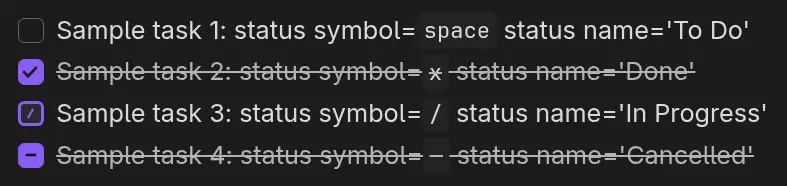
Add support for In Progress and Cancelled checkboxes
native-task-statuses
Works best with Tasks as you can change the flow of statuses when tapping tasks/checkboxes and support the newly styled ones.
Installation
Download the snippet you like the most as .css file and put it in .obsidian/snippets/
directory of your chosen vault. You may also need to enable it in the interface via
Appearance > CSS Snippets > [name of a snippet] > switch the toggle.
How to Install
- Download the repository ZIP below
- Unzip it and find the CSS snippet file
- Move the CSS file into your vault's
.obsidian/snippets/folder - Open Obsidian → Settings → Appearance → CSS Snippets → Enable it
Stats
Stars
0
Forks
0
License
MIT
Last updated 1mo ago