Rationale
Rationale
A thoughtful Obsidian theme for writers, researchers, and academics.

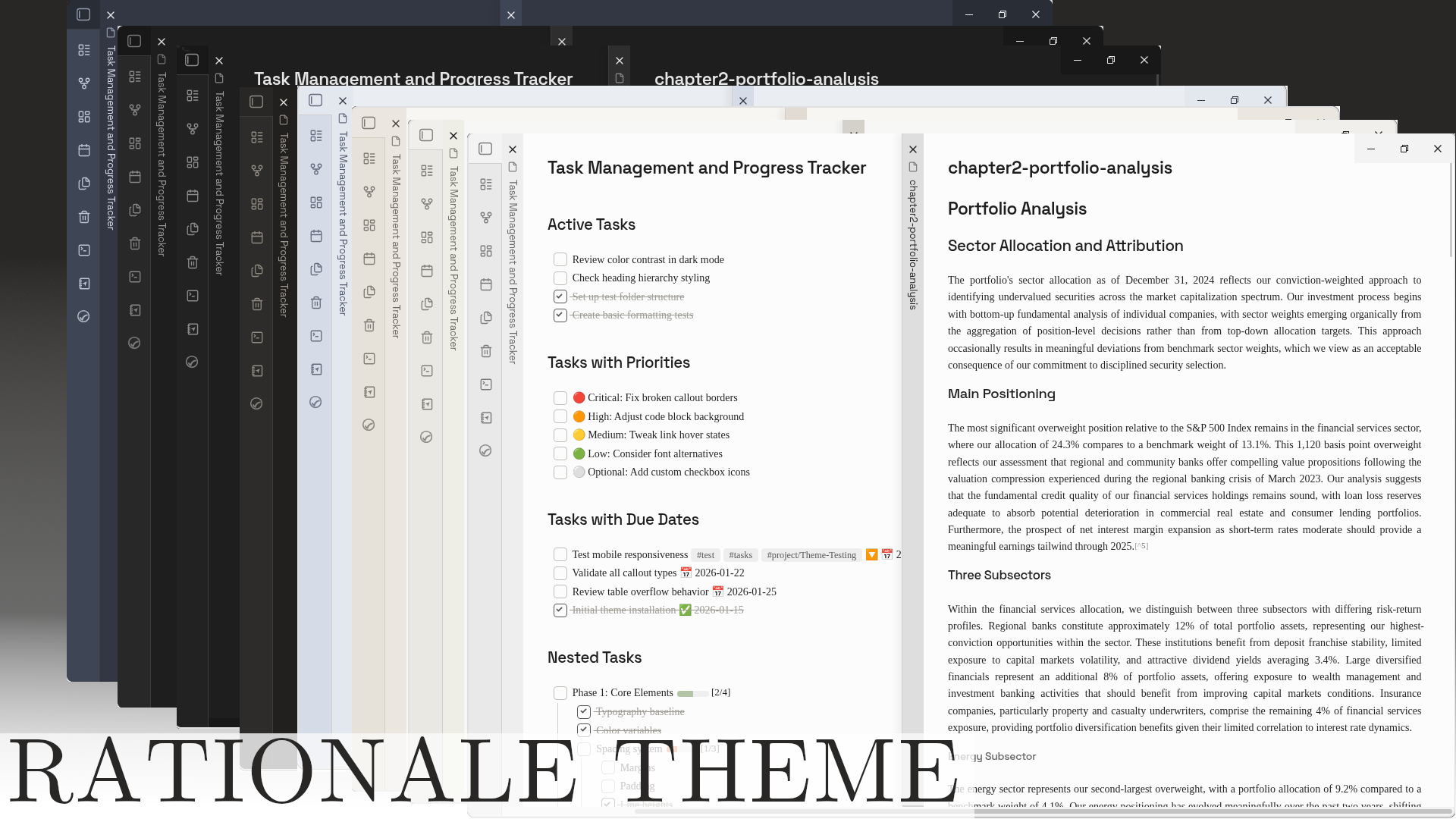
Rationale creates a calm, focused environment for deep work. Four carefully crafted color schemes adapt to your mood and context—from pure monochrome for distraction-free writing to warm, inviting palettes for long research sessions.
| Light | Dark |
|---|---|
 |  |
Why Rationale?
Most themes optimize for aesthetics. Rationale optimizes for the work.
- Serif body text reduces eye strain during extended reading and writing
- Clean visual hierarchy helps you navigate complex documents
- Monochrome icons keep your attention on content, not chrome
- Multiple schemes for different contexts—focused writing, evening research, or professional presentations
Color Schemes
Rationale includes four distinct schemes, each available in light and dark modes:
| Scheme | Character |
|---|---|
| Academic | Monochrome—black, white, grey |
| Anthropic | Warm cream, terracotta accents |
| Nordic | Cool blue-grays, frost highlights |
| Old Money | Warm ivory, walnut, bronze |
Switch schemes instantly via Style Settings. Each scheme maintains consistent readability while offering a distinct atmosphere.
Features
Typography System
Rationale pairs fonts intentionally:
- Body: Source Serif 4—optimized for extended reading
- Headings: Space Grotesk—modern geometric sans-serif for clear hierarchy
- Code: JetBrains Mono—ligatures and excellent distinction from prose
All fonts are customizable. Bring your own typography via Style Settings.
Writer-Focused Details
- Extended checkbox states — 20+ task statuses with monochrome outline icons (
[/]in-progress,[>]deferred,[?]question,[!]important, and more) - Refined callouts — scheme-aware styling that complements rather than distracts
- Justified text option — for that published-document feel
- Focus mode — hide UI elements for immersive writing
- Cards layout — transform dataview tables into visual grids
Customization
Rationale integrates deeply with Style Settings:
- Color scheme selection
- Custom accent color override
- Typography (body, headings, monospace fonts)
- Layout (border radius, line width)
- Tab styling and visibility
- File explorer (icons, bold folder names)
- OLED dark mode for true blacks
Plugin Compatibility
Tested and styled for popular plugins:
- Full Calendar
- Task Genius
- Dataview
- Calendar
- Kanban
- Notebook Navigator
- Rich Foot
Installation
From Community Themes (Recommended)
- Open Settings → Appearance → Themes
- Click Manage and search for "Rationale"
- Click Install and use
Manual Installation
- Download
theme.cssandmanifest.jsonfrom releases - Create folder:
.obsidian/themes/Rationale/ - Place both files in that folder
- Activate in Settings → Appearance → Themes
Recommended Setup
- Install the Style Settings plugin
- Open Style Settings and find "Rationale Theme"
- Choose your color scheme
- Adjust typography and layout to taste
Screenshot incorporates Notebook Navigator and Rich Foot plugins.
Custom Checkboxes
Rationale supports extended task statuses with clean, monochrome outline icons:
| Syntax | Status | Syntax | Status |
|---|---|---|---|
[ ] | Uncompleted | [*] | Star/favorite |
[x] | Completed | [l] | Location |
[/] | In progress | [b] | Bookmark |
[-] | Cancelled | [i] | Information |
[>] | Deferred | [S] | Savings |
[<] | Scheduled | [I] | Idea |
[?] | Question | [p] | Pro (thumbs up) |
[!] | Important | [c] | Con (thumbs down) |
["] | Quote | [f] | Fire/urgent |
[k] | Key | [w] | Win |
[u] | Trend up | [d] | Trend down |
Contributing
Found a bug or have an idea? Open an issue.
License
MIT License
Acknowledgments
How to Install
- Download the template file from GitHub
- Move it anywhere in your vault
- Open it in Obsidian — done!
Stats
Stars
1
Forks
0
License
MIT
Last updated 1mo ago