CSS Snippets
This repository contains a collection of obsidian snippets I've made to customise the look and style of my obsidian.
🌈 Obsidian CSS Snippets Collection
A curated set of beautiful, functional CSS snippets to supercharge your Obsidian vault.
Welcome to the Obsidian CSS Snippets Collection! This repository contains a variety of CSS snippets designed to enhance the look and feel of your Obsidian notes. Each snippet is modular, use them individually or combine for a unique, colorful, and highly readable workspace.
✨ Snippet Overview
| File | Description |
|---|---|
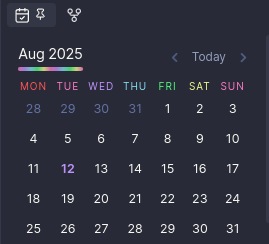
calendar-heading.css | Colors each day of the week in the calendar plugin for quick visual reference. |
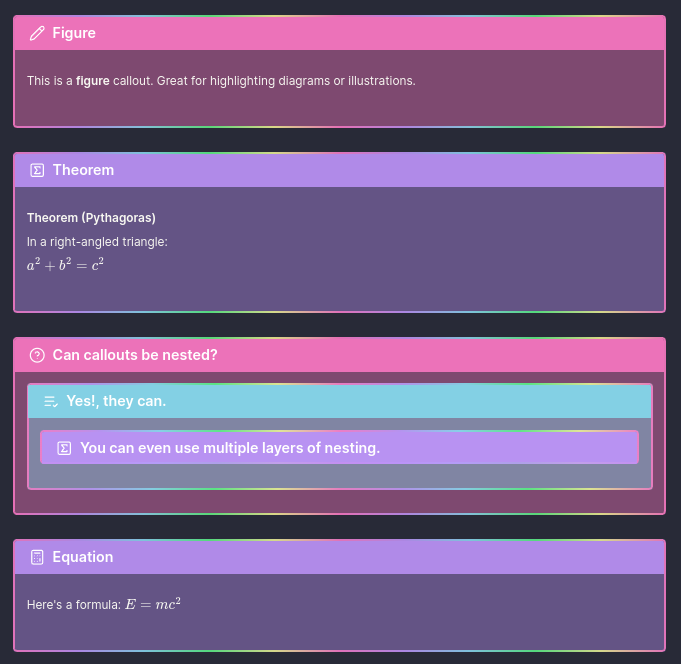
callouts.css | Adds gradient borders and semi-transparent backgrounds to callouts for a modern, vibrant look. |
codeblock.css | Adds a solid left border to code blocks for better distinction. |
colorful-headings.css | Styles all headings with a repeating rainbow gradient for both edit and preview modes. |
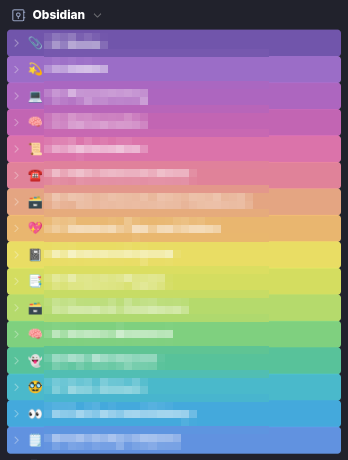
coloured-folders.css | Assigns rainbow colors to folders in the navigation pane based on their prefix, improving organization. |
external-links.css | Applies a gradient effect to all links and custom icons for external links. |
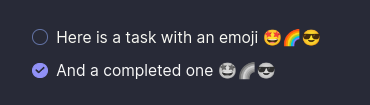
faded-task-emoji.css | Fades out emoji in checked task list items for a subtle, completed look. |
folder-callout.css | Styles folder callouts for collapsible, readable folder/file lists in notes. |
footnotes.css | Enhances footnote references and text for clarity and visibility. |
image-settings.css | Centers images and sets a max width for a cleaner appearance. |
larger-latex.css | Increases the font size of LaTeX math for better readability. |
root-colors.css | Defines the Dracula theme color palette used by other snippets. |
🎨 Snippet Details
calendar-heading.css
Colors the calendar plugin's weekday headings using Dracula theme colors. Each day gets a unique color, making it easy to spot weekends and patterns at a glance.
callouts.css
Modernizes callouts with a soft background tint and a vibrant, multi-colour gradient border. Great for making important notes or warnings stand out.
codeblock.css
Adds a solid left border to code blocks in both preview and source modes, making code snippets pop out from regular text.
colorful-headings.css
Applies a repeating rainbow gradient to all headings (H1-H6) in both edit and preview modes. Headings become visually distinct and add flair to your notes.
coloured-folders.css
Assigns a unique colour to each folder in the navigation pane based on its prefix. This helps visually organise your vault and quickly locate folders.
external-links.css
Styles all internal and external links with a gradient effect. External links also get custom icons, making it easy to distinguish them from internal links.
faded-task-emoji.css
When a task is checked off, any emoji in the task fades out, providing a subtle visual cue for completed items.
folder-callout.css
Styles callouts with the folder type to display collapsible, indented folder/file lists perfect for showing folder structures in notes.
footnotes.css
Improves the appearance of footnote references and text, making them more readable and visually distinct from regular text.
image-settings.css
Centers images in both preview and source modes, and ensures images inside links are also centered. Sets a max width for images to keep notes tidy.
larger-latex.css
Increases the font size of LaTeX math blocks, making mathematical expressions easier to read.
root-colors.css
Defines the Dracula theme color palette as CSS variables. All other snippets use these variables for consistent theming.
🚀 Getting Started
- Download or clone this repository.
- Copy any
.csssnippet(s) you want into your Obsidian vault's.obsidian/snippets/folder. - Enable the snippet(s) in Obsidian via
Settings → Appearance → CSS Snippets. - Enjoy your beautifully styled notes!
🖌️ Customization
- All snippets are modular mix and match as you like.
- Tweak colour variables in
root-colors.cssto match your own theme. - Edit folder prefixes in
coloured-folders.cssto fit your vault structure.
📸 Previews
Coloured Folders
Custom Callouts
Calendar
Faded Task Emoji
📝 License
MIT License. Feel free to use, modify, and share!
💡 Credits
- Inspired by the Dracula Theme
- Created by breezy-codes
Happy Notetaking! 🌟
How to Install
- Download the repository ZIP below
- Unzip it and find the CSS snippet file
- Move the CSS file into your vault's
.obsidian/snippets/folder - Open Obsidian → Settings → Appearance → CSS Snippets → Enable it
Stats
Stars
5
Forks
0
License
GPL-3.0
Last updated 13mo ago