199 Stars
GitHubCSSAny theme
# CollabMD
Realtime collaboration for Markdown folders, diagrams, and git-backed docs, without migrating your files.
[](https://deepwiki.com/andes90/collabmd)
<p align="center">
<img src="https://raw.githubusercontent.com/andes90/collabmd/master/docs/assets/collabmd-hero.webp" alt="CollabMD showing a file tree, markdown editor, live preview, and collaborator presence." width="100%">
</p>
<p align="center">
<strong>Turn an existing markdown-and-diagram workspace into a realtime collaborative web app.</strong>
</p>
CollabMD turns a local Markdown folder, Obsidian-style vault, or docs repo into a collaborative workspace you can open in the browser.
Throughout this guide, **vault** simply means a regular folder on your computer that contains Markdown files.
- No migration: your files stay on disk
- Your filesystem stays the source of truth: CollabMD does not move, rename, or delete files unless you explicitly do that in the app
- Realtime editing with Yjs
- External filesystem edits sync back into the app and connected browsers
- Mermaid, PlantUML, Excalidraw, and draw.io support
- Source-anchored comments, chat, and presence
- Works with plain folders, Obsidian-style vaults, and git-backed docs
Requirements for the fastest first run:
- Node.js 24 for `npx` and source installs
- Homebrew only if you want the `brew install` path
## Quick start
```bash
# Run locally first, no Cloudflare tunnel required
npx collabmd@latest ~/my-vault --no-tunnel
```
Open `http://localhost:1234`.
Expected startup output:
```text
CollabMD v0.x.y
Vault: /path/to/your-vault
Local: http://localhost:1234
Tunnel: disabled
Ready for collaboration. Press Ctrl+C to stop.
```
Prefer Homebrew or source install? Jump to [Installation options](#installation-options).
## See it in action
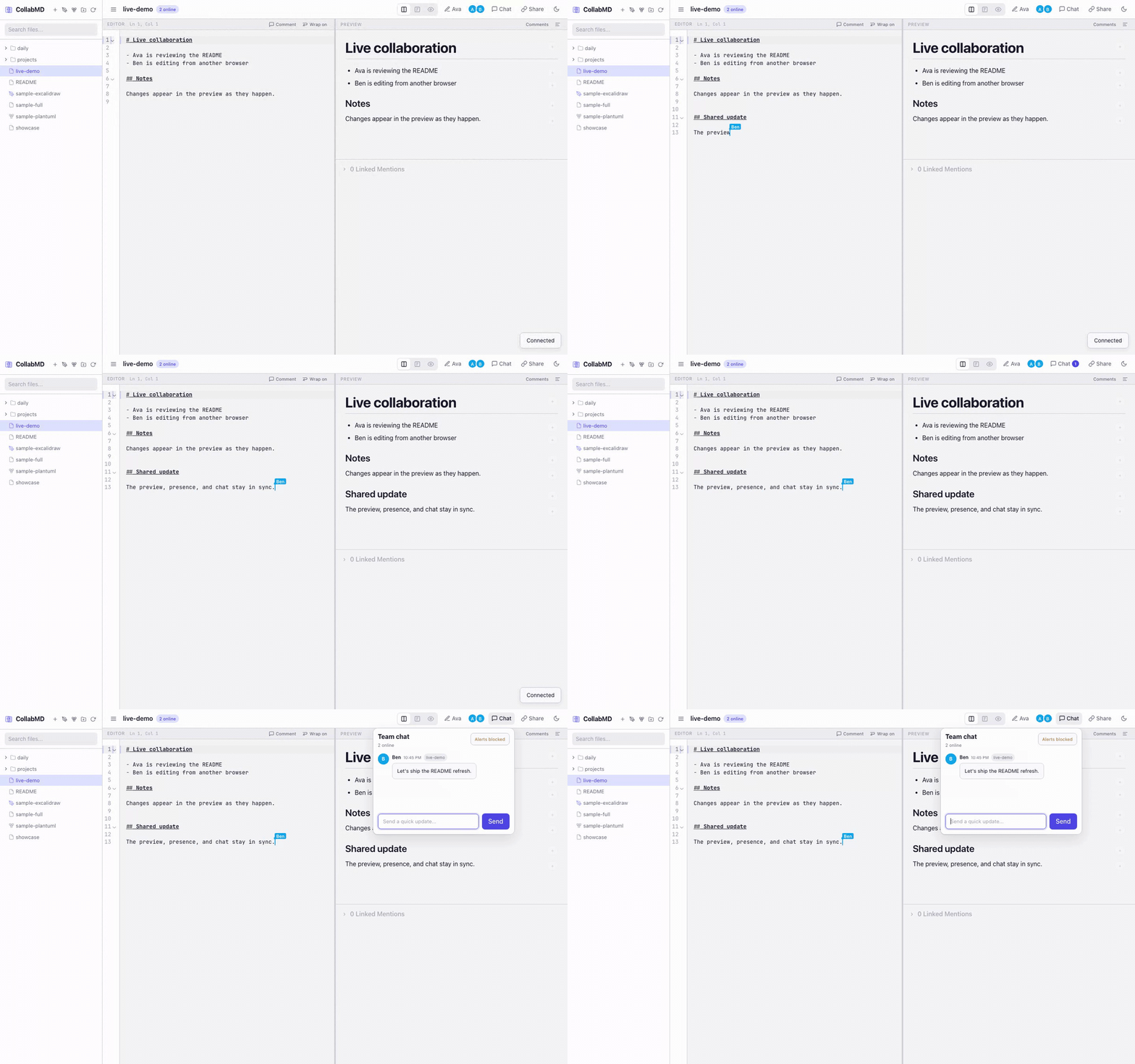
See CollabMD editing the same workspace from two browsers in realtime:

Prefer video? [Open the WebM demo](https://raw.githubusercontent.com/andes90/collabmd/master/docs/assets/collabmd-demo.webm).
## Features
- **No migration** — point CollabMD at an existing markdown folder, diagram workspace, Obsidian-style vault, or git-backed docs repo
- **Local-files-first** — your filesystem remains the source of truth
- **Realtime collaboration** — multiple people can edit the same file at the same time via Yjs
- **External edit sync** — changes made from tools like Obsidian or direct file writes are reflected back into open documents and the file explorer
- **Markdown with context** — live preview, wiki-links, backlinks, outline, quick switcher, and scroll sync
- **Source-anchored comments** — comment on lines or selected text with inline markers, preview bubbles, and thread cards
- **Collaboration built in** — collaborator presence, follow mode, and team chat
- **Diagram-friendly** — Mermaid fences and standalone `.mmd` / `.mermaid`, PlantUML `.puml` / `.plantuml`, `.excalidraw`, `.drawio`, and public video embeds in Markdown
- **Easy browser access** — optional Cloudflare Tunnel support makes a running session easy to share
## Best fit for
- Collaborating on an existing Obsidian-style vault without migrating files
- Reviewing RFCs, product docs, architecture notes, and runbooks in real time
- Reviewing drafts and diagrams with anchored comment threads instead of side-channel feedback
- Sharing markdown-heavy knowledge bases with remote teammates
- Editing notes and diagrams together while keeping everything as plain files on disk
- Giving browser access to collaborators who do not use your local markdown setup
## Installation options
### Requirements
- macOS, Linux, or Windows (via WSL2)
- Node.js 24 for `npx` and source installs
### Run via npx (Node.js)
If you have Node.js installed, you can run CollabMD directly without installing it globally:
```bash
npx collabmd@latest ~/my-vault --no-tunnel
```
Open `http://localhost:1234`.
### Install with Homebrew
```bash
brew tap andes90/tap
brew install collabmd
collabmd ~/my-vault --no-tunnel
```
Or in a single command:
```bash
brew install andes90/tap/collabmd
collabmd ~/my-vault --no-tunnel
```
Open `http://localhost:1234`.
### Install from source
```bash
git clone https://github.com/andes90/collabmd.git
cd collabmd
npm install
npm run build
npm link # optional: makes `collabmd` available globally
collabmd ~/my-vault --no-tunnel
```
Open `http://localhost:1234`.
For a safer first run, start local-only:
```bash
collabmd ~/my-vault --no-tunnel
```
If you want to share the session over the internet, protect it first:
```bash
collabmd ~/my-vault --auth password
```
If `cloudflared` is installed, CollabMD starts a quick tunnel by default unless you pass `--no-tunnel`.
## Share with a collaborator
If you want to share the workspace over the internet, start with password auth:
```bash
collabmd ~/my-vault --auth password
```
Then share the printed URL and password with your collaborator. If `cloudflared` is installed, CollabMD will start a quick tunnel automatically unless you pass `--no-tunnel`.
## Safety first
- Treat the URL as write access to the vault unless you enable auth
- `--auth password` protects `/api/*` and `/ws/*` with a host password and signed session cookie
- `--auth oidc` signs users in with Google and uses the verified Google name/email as the in-app identity and git commit author
- Set `AUTH_SESSION_MAX_AGE_MS` if you want auth sessions to stay valid longer and survive browser restarts until that expiry
- If `cloudflared` is installed, CollabMD may expose the app through a Cloudflare Quick Tunnel unless you pass `--no-tunnel`
- `--auth oidc` requires a stable `PUBLIC_BASE_URL`; Quick Tunnel URLs are not supported for OIDC
## Current limitations
- Single-instance deployment only: collaboration room state is kept in-process and is not shared across replicas
- `oidc` currently supports Google only
- Source-anchored comments currently support markdown, Mermaid, and PlantUML text files, but not `.excalidraw` or `.drawio`
- Windows use is supported via WSL2 rather than native Windows execution
## How it works
```bash
collabmd ~/my-vault --no-tunnel
```
CollabMD starts a local server, scans the vault, and opens a browser-based editor with:
- **File explorer sidebar** — browse, create, rename, and delete `.md`, `.mmd`, `.mermaid`, `.puml`, `.plantuml`, `.excalidraw`, and `.drawio` files plus folders
- **Live preview** — rendered as you type, with syntax-highlighted code blocks, public video embeds, plus Mermaid and PlantUML diagrams
- **Anchored comments** — add comments from the editor, open threads from inline markers or preview bubbles, and review them from the comments drawer
- **`[[wiki-links]]` + backlinks** — jump between notes and inspect linked mentions
- **Room chat** — discuss changes without leaving the workspace
- **Presence + follow mode** — see who is online and follow another collaborator's active cursor
- **Quick switcher + outline** — move around large vaults and long documents faster
- **Standalone diagram files** — open `.mmd` / `.mermaid` or `.puml` / `.plantuml` files in side-by-side editor + preview, `.excalidraw` files in direct preview mode, and `.drawio` files in an embedded diagrams.net editor/viewer
Comment threads are source-anchored and currently supported for markdown, Mermaid, and PlantUML text files. You can comment on a whole line or a text selection, then reopen the thread from either the editor marker or the preview bubble. Excalidraw and draw.io files are currently excluded from comments.
Draw.io files use the diagrams.net embed/runtime. Opening a `.drawio` file directly mounts an interactive editor in the preview pane. Markdown embeds such as `![[architecture.drawio]]` use the diagrams.net viewer for a lighter inline preview and include an `Open` action to jump into the full file view.
Draw.io collaboration is intentionally conservative in this release: one connected client holds the edit lease for a `.drawio` file, while other viewers open it read-only and refresh after saves land. This avoids silent overwrite races without claiming true realtime canvas co-editing.
Markdown video embeds are opt-in and use standard image syntax such as `` or ``. The preview currently supports public YouTube URLs plus direct public `https` video files ending in `.mp4`, `.webm`, or `.ogg`. The editor toolbar also includes a `Video` action that inserts the same Markdown syntax for you.
Your filesystem is the source of truth. CollabMD reads files from disk, uses Yjs for realtime collaboration, and continuously writes plain text back to disk as you type. External changes from tools like Obsidian, direct file writes, or git-driven file updates are watched and reconciled back into live rooms and the explorer.
## Usage
```bash
collabmd [directory] [options]
```
### Arguments
| Argument | Description |
|----------|-------------|
| `directory` | Path to the vault directory (default: current directory) |
### Options
| Option | Description | Default |
|--------|-------------|---------|
| `-p, --port` | Port to listen on | `1234` |
| `--host` | Host to bind to | `127.0.0.1` |
| `--auth` | Auth strategy: `none`, `password`, `oidc` | `none` |
| `--auth-password` | Password for `--auth password` | generated per run |
| `--local-plantuml` | Start the bundled local docker-compose PlantUML service | off |
| `--no-tunnel` | Don't start Cloudflare Tunnel | tunnel on |
| `-v, --version` | Show version | |
| `-h, --help` | Show help | |
### Examples
```bash
# Serve the current directory locally
collabmd --no-tunnel
# Serve a specific vault locally
collabmd ~/my-vault --no-tunnel
# Use a custom port, no tunnel
collabmd --port 3000 --no-tunnel
# Share with collaborators using a generated password
collabmd --auth password
# Require an explicit password
collabmd --auth password --auth-password "shared-secret"
# Use Google OIDC on a stable public domain
PUBLIC_BASE_URL=https://notes.example.com \
AUTH_OIDC_CLIENT_ID=your-google-client-id \
AUTH_OIDC_CLIENT_SECRET=your-google-client-secret \
collabmd --auth oidc --no-tunnel
# Use the local docker-compose PlantUML service
collabmd --local-plantuml
# Serve an Obsidian vault
collabmd ~/Documents/Obsidian/MyVault
```
## Public access
CollabMD can optionally expose the session using a [Cloudflare Quick Tunnel](https://developers.cloudflare.com/cloudflare-one/connections/connect-networks/). Since the editor uses same-origin WebSocket routing (`/ws/:file`), the tunnel works for both HTTP and collaboration traffic.
If you are exposing the session publicly, `collabmd --auth password` is the intended first-line protection. When you do not pass `--auth-password`, CollabMD generates a password for that host run and prints it in the terminal. Restarting the app rotates that password and the signed session secret.
To share safely:
```bash
collabmd ~/my-vault --auth password
```
`cloudflared` is optional. Install it only if you want public tunnel access:
- macOS: `brew install cloudflared`
- Linux/Windows: [official installer](https://developers.cloudflare.com/cloudflare-one/connections/connect-networks/downloads/)
To disable the tunnel:
```bash
collabmd --no-tunnel
```
### Google OIDC setup
`--auth oidc` uses Google OpenID Connect with the authorization code + PKCE flow.
For the full Google Cloud Console walkthrough, including where to create the OAuth client and copy the client ID/client secret, see [docs/google-oidc-setup.md](https://github.com/andes90/collabmd/blob/master/docs/google-oidc-setup.md).
Required environment variables:
```bash
PUBLIC_BASE_URL=https://notes.example.com
AUTH_OIDC_CLIENT_ID=your-google-client-id
AUTH_OIDC_CLIENT_SECRET=your-google-client-secret
```
In Google Cloud Console, create a Web application OAuth client and register this redirect URI:
```text
https://notes.example.com/api/auth/oidc/callback
```
If you mount the app under a subpath with `BASE_PATH=/collabmd`, the redirect URI becomes:
```text
https://notes.example.com/collabmd/api/auth/oidc/callback
```
Notes:
- OIDC requires a stable public URL and is not compatible with ephemeral Cloudflare Quick Tunnel URLs
- After sign-in, the verified Google name/email become the displayed app identity and the default in-app git commit author
- Set `AUTH_SESSION_MAX_AGE_MS` to keep the signed-in session valid longer than the default token lifetime
- You can restrict sign-in to exact users with `AUTH_OIDC_ALLOWED_EMAILS` or entire domains with `AUTH_OIDC_ALLOWED_DOMAINS`
- The CLI disables the tunnel automatically when `--auth oidc` is active
### Draw.io setup
CollabMD uses diagrams.net for `.drawio` rendering and editing. By default it points at the hosted embed runtime:
```bash
COLLABMD_DRAWIO_BASE_URL=https://embed.diagrams.net
```
You can also point it at a self-hosted diagrams.net deployment:
```bash
COLLABMD_DRAWIO_BASE_URL=https://drawio.example.com
```
If the draw.io runtime is unavailable, direct `.drawio` file opens fall back to plain XML editing instead of leaving the file inaccessible.
You can also configure the tunnel via environment variables:
```bash
TUNNEL_TARGET_PORT=4000 collabmd
TUNNEL_TARGET_URL=http://127.0.0.1:4000 collabmd
CLOUDFLARED_EXTRA_ARGS="--loglevel info" collabmd
```
For the full runtime env var reference, see the `Environment variables` details block in the Development section below.
## Docker / Coolify deployment
Published image: `ghcr.io/andes90/collabmd:latest`
```bash
docker run -p 1234:1234 -v /path/to/vault:/data ghcr.io/andes90/collabmd:latest
```
The container listens on `0.0.0.0:1234` and stores vault files at `/data`.
### Kubernetes / Helm
CollabMD now includes a Helm chart at [`packaging/helm/collabmd`](./packaging/helm/collabmd).
Use it when you want a Kubernetes-native deployment with:
- one supported application replica
- a persistent volume mounted at `/data`
- optional ingress
- optional bundled PlantUML
- secret-backed auth and private git bootstrap settings
Quick start:
```bash
helm install collabmd ./packaging/helm/collabmd
```
For examples covering ingress, OIDC, PlantUML, and private git bootstrap, see [packaging/helm/collabmd/README.md](./packaging/helm/collabmd/README.md).
To bootstrap `/data` from a private git repository instead, pass the repo URL plus SSH credentials:
```bash
docker run \
-p 1234:1234 \
-v /path/to/persistent/vault:/data \
-e COLLABMD_GIT_REPO_URL=git@github.com:your-org/your-private-vault.git \
-e COLLABMD_GIT_SSH_PRIVATE_KEY_B64="$(base64 < ~/.ssh/id_ed25519 | tr -d '\n')" \
-e COLLABMD_GIT_USER_NAME="CollabMD Bot" \
-e COLLABMD_GIT_USER_EMAIL="bot@example.com" \
ghcr.io/andes90/collabmd:latest
```
For a full local and Docker test walkthrough, including key generation and deploy-key setup, see [docs/private-git-deployment.md](https://github.com/andes90/collabmd/blob/master/docs/private-git-deployment.md).
When `COLLABMD_GIT_REPO_URL` is set, CollabMD clones into `COLLABMD_VAULT_DIR` on first boot, then reuses that checkout on later starts. If the checkout already exists, startup validates that `origin` matches. Clean checkouts are fast-forwarded to the remote default branch; dirty checkouts are reused as-is and startup skips the sync.
After bootstrap, CollabMD adds `.collabmd/` to the checkout's local git exclude file at `.git/info/exclude` so runtime metadata stays out of git status without modifying the repo's tracked `.gitignore`.
File-based secrets are also supported and take precedence over base64 input:
```bash
docker run \
-p 1234:1234 \
-v /path/to/persistent/vault:/data \
-v ~/.ssh/id_ed25519:/run/secrets/collabmd_git_key:ro \
-v ~/.ssh/known_hosts:/run/secrets/collabmd_known_hosts:ro \
-e COLLABMD_GIT_REPO_URL=git@github.com:your-org/your-private-vault.git \
-e COLLABMD_GIT_SSH_PRIVATE_KEY_FILE=/run/secrets/collabmd_git_key \
-e COLLABMD_GIT_SSH_KNOWN_HOSTS_FILE=/run/secrets/collabmd_known_hosts \
-e COLLABMD_GIT_USER_NAME="CollabMD Bot" \
-e COLLABMD_GIT_USER_EMAIL="bot@example.com" \
ghcr.io/andes90/collabmd:latest
```
### Local docker-compose with a private PlantUML server
The included `docker-compose.yml` runs a prebuilt CollabMD image together with a local `plantuml/plantuml-server:jetty` container and points `PLANTUML_SERVER_URL` at the private service automatically.
```bash
mkdir -p data/vault
docker compose up
```
Open `http://localhost:1234`.
To test Google OIDC locally with the included compose setup, register this redirect URI in Google Cloud Console:
```text
http://localhost:1234/api/auth/oidc/callback
```
Then start compose with the OIDC env vars:
```bash
AUTH_STRATEGY=oidc \
PUBLIC_BASE_URL=http://localhost:1234 \
AUTH_OIDC_CLIENT_ID=your-google-client-id \
AUTH_OIDC_CLIENT_SECRET=your-google-client-secret \
docker compose up
```
If you change `COLLABMD_HOST_PORT`, update `PUBLIC_BASE_URL` and the Google redirect URI to match that host port.
By default, compose uses `COLLABMD_IMAGE=ghcr.io/andes90/collabmd:latest`. If you want to test a local image while developing instead:
```bash
docker build -t collabmd:local .
COLLABMD_IMAGE=collabmd:local docker compose up
```
The PlantUML container is also published on loopback by default at `http://127.0.0.1:18080`, so the host-based CLI can reuse it with:
```bash
npm run start:local-plantuml
```
To use an existing vault on your machine instead of `./data/vault`:
```bash
HOST_VAULT_DIR=/absolute/path/to/vault docker compose up
```
`HOST_VAULT_DIR` controls the host-side bind mount source. The app uses `COLLABMD_VAULT_DIR` for the in-container vault path and defaults that to `/data` in Docker.
To bootstrap the compose-managed vault from a private repo, set the git env vars in `.env` and keep `HOST_VAULT_DIR` on a persistent host path. For file-based SSH auth, point `COLLABMD_GIT_SSH_PRIVATE_KEY_FILE` and `COLLABMD_GIT_SSH_KNOWN_HOSTS_FILE` at mounted secret paths; for simpler setups, set `COLLABMD_GIT_SSH_PRIVATE_KEY_B64` instead.
If you want the in-app Git commit action to work inside the container without OIDC, also set `COLLABMD_GIT_USER_NAME` and `COLLABMD_GIT_USER_EMAIL` so CollabMD can configure the checkout identity automatically. With `AUTH_STRATEGY=oidc`, CollabMD uses the signed-in Google identity for each commit instead.
To change the host port:
```bash
COLLABMD_HOST_PORT=3000 docker compose up
```
To change the local PlantUML host port used by both `docker compose` and `--local-plantuml`:
```bash
PLANTUML_HOST_PORT=18081 npm run start:local-plantuml
```
Recommended Coolify setup:
1. Use the included `Dockerfile`.
2. Expose port `1234`.
3. Mount a persistent volume to `/data` for the vault checkout and runtime files. It can be pre-populated with markdown files or start empty when `COLLABMD_GIT_REPO_URL` is enabled.
4. Add `COLLABMD_GIT_REPO_URL` plus either `COLLABMD_GIT_SSH_PRIVATE_KEY_FILE` or `COLLABMD_GIT_SSH_PRIVATE_KEY_B64` if the vault should be cloned from a private repo.
5. Mount `known_hosts` and set `COLLABMD_GIT_SSH_KNOWN_HOSTS_FILE` if you want strict host verification.
6. Add a health check for `GET /health` with enough startup grace for the initial clone.
7. Run a single replica only because room state is in-process and not shared across instances.
8. Set `BASE_PATH` if the app is mounted under a subpath such as `/collabmd`.
9. Set `PUBLIC_WS_BASE_URL` only if your WebSocket endpoint differs from the app origin.
For a standard Coolify reverse-proxy setup, the default same-origin WebSocket routing works as-is and you should not need `PUBLIC_WS_BASE_URL`.
Health check: `GET /health`
## Troubleshooting
- `npx collabmd@latest` fails immediately: confirm you are running Node.js 24, which is the supported runtime for source and npm usage
- The app is reachable only from localhost: pass `--host 0.0.0.0` or set `HOST=0.0.0.0` when you intend to expose it on your network
- Port `1234` is already in use: pass `--port 3000` or set `PORT` to another free port
- Tunnel did not start: install `cloudflared`, or pass `--no-tunnel` to stay local-only
- `--auth oidc` fails on startup: set `PUBLIC_BASE_URL`, `AUTH_OIDC_CLIENT_ID`, and `AUTH_OIDC_CLIENT_SECRET`, and make sure the Google redirect URI matches `/api/auth/oidc/callback`
- Google login loops back to the auth screen: verify the configured `PUBLIC_BASE_URL` matches the browser URL and that your reverse proxy forwards HTTPS correctly
- `--local-plantuml` fails: make sure Docker is installed and running, or point `PLANTUML_SERVER_URL` at another PlantUML server
- Private git bootstrap fails on startup: verify `COLLABMD_GIT_REPO_URL` plus either `COLLABMD_GIT_SSH_PRIVATE_KEY_FILE` or `COLLABMD_GIT_SSH_PRIVATE_KEY_B64`
- WSL2 path issues: run CollabMD against a directory inside your Linux filesystem when possible rather than a mounted Windows path
## Development
Install dependencies:
```bash
npm install
```
Build and run:
```bash
npm start
```
Open `http://localhost:1234`.
Useful commands:
```bash
npm run build # Build the Vite client into dist/client
npm run check # Syntax check all entry points
npm run dev:client # Start the Vite dev server with API/WebSocket proxying
npm run dev:server # Start only the backend server for local frontend development
npm run start # Build + start server
npm run start:local-plantuml # Build + start server with local docker-compose PlantUML
npm run start:prod # Start server (expects previous build)
npm run test # Run unit + e2e tests
npm run test:unit # Fast Node-based unit tests
npm run test:e2e # Playwright browser tests
npm run tunnel # Start only the Cloudflare tunnel
npm run plantuml:up # Start only the local docker-compose PlantUML service
npm run plantuml:down # Stop only the local docker-compose PlantUML service
npm run capture:readme-assets # Regenerate the README screenshot and demo assets
```
## Testing
### Unit tests
```bash
npm run test:unit
```
Covers the vault file store, HTTP endpoints, collaboration room behavior, WebSocket integration, and supporting domain logic.
### End-to-end tests
```bash
npx playwright install chromium # first time only
npm run test:e2e
```
Playwright boots the full app against the `test-vault/` directory and verifies the file explorer, editor, preview, collaboration, chat, outline, and scroll sync flows.
### All tests
```bash
npm run test
```
<details>
<summary>Architecture</summary>
```text
bin/
collabmd.js CLI entry point
src/
client/
app/ Vite-owned HTML entries and browser entry modules
application/ app orchestration, preview rendering, workspace coordination
bootstrap/ app-shell composition and startup wiring
domain/ markdown editing, wiki-link, room, and vault helpers
infrastructure/ runtime config, auth bootstrap, browser ports, collaborative editor session
presentation/ file explorer, backlinks, quick switcher, outline, scroll sync, theme, layout
static/ Vite passthrough assets copied into the built client
styles/ app CSS
domain/ shared wiki-link helpers
server/
auth/ strategy selection and cookie-backed auth sessions
config/ environment loading
domain/ collaboration room model, registry, backlink index, server-side abstractions
infrastructure/ HTTP handlers, git service, vault file store, PlantUML, WebSocket gateway
startup/ preflight vault bootstrap, including remote git checkout setup
dist/
client/ built client served by the backend and packaged for release
scripts/
cloudflare-tunnel.mjs Cloudflare quick tunnel helper
local-plantuml-compose.mjs
capture-readme-assets.mjs
vite.config.mjs Vite multi-page build and dev-server proxy config
```
</details>
<details>
<summary>Environment variables</summary>
| Variable | Description | Default |
|----------|-------------|---------|
| `HOST` | Bind host | `127.0.0.1` (dev), `0.0.0.0` (prod) |
| `PORT` | HTTP + WebSocket port | `1234` |
| `AUTH_STRATEGY` | Auth strategy: `none`, `password`, `oidc` | `none` |
| `AUTH_PASSWORD` | Shared password for `AUTH_STRATEGY=password` | generated per run |
| `AUTH_SESSION_COOKIE_NAME` | Session cookie name | `collabmd_auth` |
| `AUTH_SESSION_SECRET` | Cookie signing secret | generated per run |
| `AUTH_SESSION_MAX_AGE_MS` | Optional auth session lifetime in milliseconds; when set, cookies persist until that expiry | |
| `PUBLIC_BASE_URL` | Stable public app origin required for `AUTH_STRATEGY=oidc` | |
| `AUTH_OIDC_CLIENT_ID` | Google OAuth client ID used for `AUTH_STRATEGY=oidc` | |
| `AUTH_OIDC_CLIENT_SECRET` | Google OAuth client secret used for `AUTH_STRATEGY=oidc` | |
| `AUTH_OIDC_ALLOWED_EMAILS` | Comma-separated exact email allowlist for `AUTH_STRATEGY=oidc` | |
| `AUTH_OIDC_ALLOWED_DOMAINS` | Comma-separated email domain allowlist for `AUTH_STRATEGY=oidc` | |
| `BASE_PATH` | URL path prefix for subpath deployments | |
| `PLANTUML_SERVER_URL` | Upstream PlantUML server base URL used for server-side SVG rendering | `https://www.plantuml.com/plantuml` |
| `COLLABMD_DRAWIO_BASE_URL` | diagrams.net base URL used for `.drawio` viewing and editing | `https://embed.diagrams.net` |
| `COLLABMD_VAULT_DIR` | Vault directory path | CLI: current directory, server entrypoint: `data/vault`, Docker: `/data` |
| `COLLABMD_GIT_ENABLED` | Enable or disable git integration in the UI and API | `true` |
| `COLLABMD_GIT_REPO_URL` | Remote git repository used to bootstrap the vault checkout | |
| `COLLABMD_GIT_SSH_PRIVATE_KEY_FILE` | SSH private key file path for remote git auth; preferred over base64 input | |
| `COLLABMD_GIT_SSH_PRIVATE_KEY_B64` | Base64-encoded SSH private key used when no key file path is provided | |
| `COLLABMD_GIT_SSH_KNOWN_HOSTS_FILE` | Optional `known_hosts` file path for strict SSH host verification | |
| `COLLABMD_GIT_USER_NAME` | Fallback git author/committer name for in-app commits when OIDC is not active | |
| `COLLABMD_GIT_USER_EMAIL` | Fallback git author/committer email for in-app commits when OIDC is not active | |
| `WS_BASE_PATH` | WebSocket base path | `/ws` |
| `PUBLIC_WS_BASE_URL` | Public WebSocket URL override for reverse proxies | |
| `HTTP_KEEP_ALIVE_TIMEOUT_MS` | Keep-alive timeout | `5000` |
| `HTTP_HEADERS_TIMEOUT_MS` | Header read timeout | `60000` |
| `HTTP_REQUEST_TIMEOUT_MS` | Request timeout | `30000` |
| `WS_HEARTBEAT_INTERVAL_MS` | Heartbeat interval for evicting dead clients | `30000` |
| `WS_ROOM_IDLE_GRACE_MS` | Delay before closing empty collaboration rooms to disk | `15000` |
| `WS_MAX_BUFFERED_AMOUNT_BYTES` | Max outbound buffer per WebSocket | `16777216` |
| `WS_MAX_PAYLOAD_BYTES` | Max inbound WebSocket frame | `16777216` |
| `CLOUDFLARED_BIN` | `cloudflared` binary path | `cloudflared` |
| `TUNNEL_TARGET_HOST` | Tunnel target host | `127.0.0.1` |
| `TUNNEL_TARGET_PORT` | Tunnel target port | `1234` |
| `TUNNEL_TARGET_URL` | Full tunnel target URL override | |
| `CLOUDFLARED_EXTRA_ARGS` | Extra `cloudflared` flags | |
Copy the example file:
```bash
cp .env.example .env
```
</details>
## Notes
- The filesystem is the source of truth; Yjs provides the collaboration layer.
- When `COLLABMD_GIT_REPO_URL` is set, startup clones the configured repo into `COLLABMD_VAULT_DIR` on first boot and reuses an existing same-origin checkout on later starts.
- If `COLLABMD_GIT_SSH_KNOWN_HOSTS_FILE` is not set, SSH falls back to `StrictHostKeyChecking=accept-new`.
- External filesystem edits are reconciled back into active rooms and the explorer. Ambiguous watcher bursts still fall back to batched workspace reconciliation.
- `.obsidian`, `.git`, `.trash`, and `node_modules` directories are ignored.
- Only `.md`, `.markdown`, and `.mdx` files are indexed.
- PlantUML preview rendering is server-side and uses `PLANTUML_SERVER_URL`; point it at a self-hosted renderer if you do not want to use the public PlantUML service.
- `docker compose up` uses the included local PlantUML service and avoids the public renderer by default. The initial git clone may also require a longer health-check grace period than a purely local vault.
- `collabmd --local-plantuml` and `npm run start:local-plantuml` will start the local PlantUML compose service first, then run CollabMD against `http://127.0.0.1:${PLANTUML_HOST_PORT:-18080}`.
## License
MIT
How to Install
- Download the CSS file below
- Move it to your vault's
.obsidian/snippets/folder - Open Obsidian → Settings → Appearance → CSS Snippets → Enable it
Stats
Stars
199
Forks
8
License
MIT
Last updated 2d ago