SNIPPETSublimePeace
ObsidianHelpbox
User-friendly, no-code collection of solutions to ease the learning curve of the note taking app Obsidian. Specifically aimed at casual users who can't/don't want to code or use complicated community plugins, while also helpful for advanced users.
CSSAny theme
# SublimePeace's ObsidianHelpboxes
User-friendly, no-code collection of solutions to ease the learning curve of the note taking app Obsidian.
Specifically aimed at casual users who can't/don't want to code or use complicated community plugins, while also helpful for advanced users.
**Currently has only one snippet, but will be expanded in the future, so star this repo and check back for updates!** Contributions/suggestions welcome.
## Callouts & Checkboxes Reminder
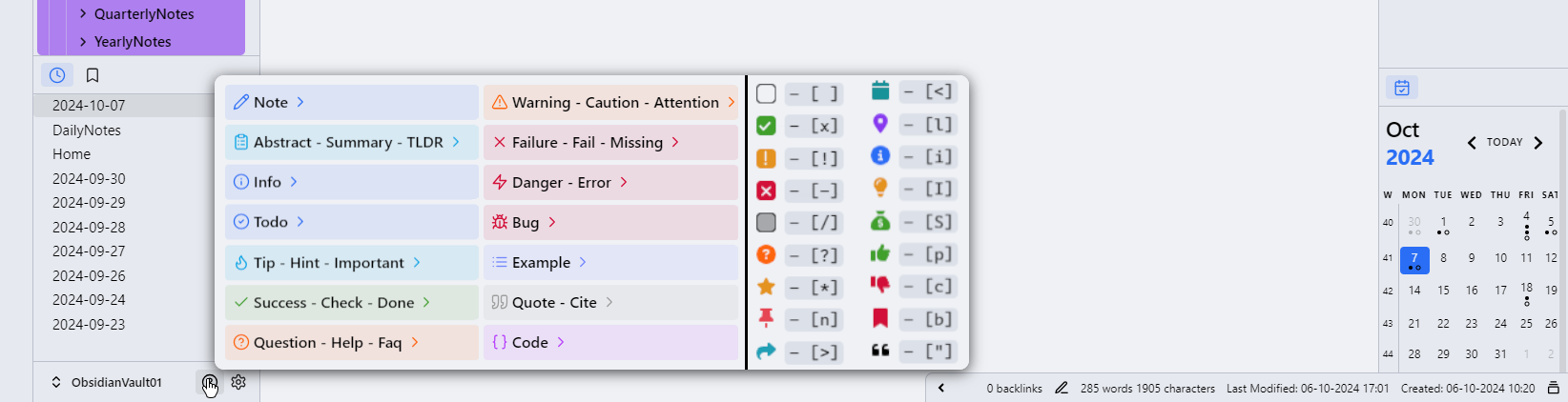
CSS cheat-sheet snippet for callouts and checkboxes. No plugins needed, won't break with Obsidian updates.
With this sippet, you will be able to hover the ? icon in the bottom left of Obsidian to display default callout and checkbox options.

### Instructions:
1) Navigate to your Obsidian vault's snippets folder in -> <vaultname>/.obsidian/snippets
2) Make a "CalloutsAndCheckboxesReminder.css" file and copy paste the code in it, then enable the snippet in Settings->Appearance->CSS snippets
##### Please Note:
You may not be able to use the custom checkboxes displayed in the cheatsheet unless you are using a theme that utlizes them (most do). If you do use a theme that uses custom checkboxes, they may not be enabled by default and may need to be toggled on in the Style Settings community plugin's menu.
How to Install
- Download the CSS file below
- Move it to your vault's
.obsidian/snippets/folder - Open Obsidian → Settings → Appearance → CSS Snippets → Enable it
Stats
Stars
185
Forks
3
Last updated 18mo ago