CSSAny theme
# Obsidian Callout Tasks
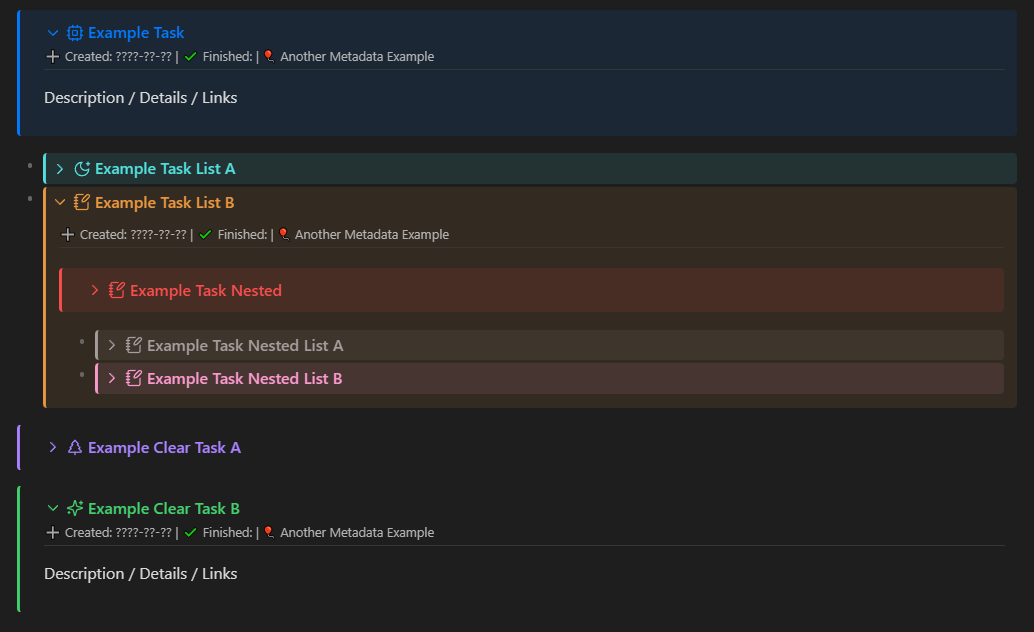
An alternative approach to create, track, and link tasks in Obsidian.md.

## Installation
1. Copy both `.css` files from the `.obsidian/snippets/` directory into your Obsidian vault’s `.obsidian/snippets/` folder.
2. Use the provided template, or refer to the examples for setup guidance.
Since this uses Obsidian’s callout system, metadata is not required.
However, if you choose to use metadata, it can be anything (text, emojis, etc.) just make sure it’s placed inside the provided `<div>` element.
## Customization
Obsidian callouts use built-in icons from [Lucide](https://lucide.dev/), including options like Success, Failure, Quote, and more. For a full list of built-in icons, please visit the Lucide website.
If you want to add custom icons, you’ll need to update the `callout-metadata.css` file.
You can also use your own SVG icons, but they must be converted to CSS format first.
## Wishlist
- [x] Native to Obsidian, no plugins.
- [x] Title, Custom Metadata, Description.
- [x] Collapsable details.
- [x] Internal links (wiki-links)
- [x] Metadata on a seperate line than title.
- [x] Formatted for use with lists.
- [x] Infinite nesting with lists.
- [x] Custom colors and status icons.
## Drawbacks
- ❌ Cannot be queried like Obsidian Tasks.
- ❌ Requires a space between a task description and its metadata. (Provided in the template)
## Inspirations & References
- ✨ Obsidian Tasks: https://publish.obsidian.md/tasks/Introduction
- ✨ https://forum.obsidian.md/t/callouts-galore-some-callout-css-i-made/63440
- https://www.reddit.com/r/ObsidianMD/comments/17jhzxa/these_are_my_call_outs_what_are_yours/
How to Install
- Download the CSS file below
- Move it to your vault's
.obsidian/snippets/folder - Open Obsidian → Settings → Appearance → CSS Snippets → Enable it
Stats
Stars
1
Forks
0
Last updated 9mo ago
Categories