claude-company-template
Virtual organization template for Claude Code with 6 departments, role-based personas, and Obsidian-vault integration. MIT.
claude-company-template
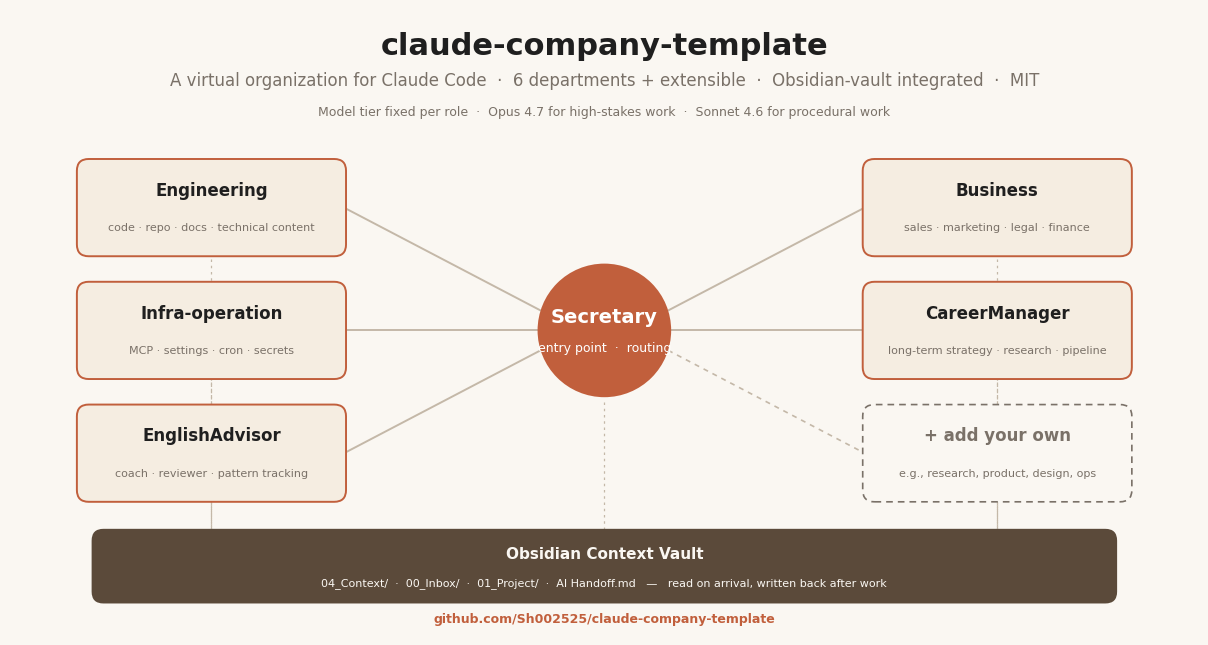
A virtual organization template for Claude Code that turns your CLI-based AI assistant into a multi-department "company" — with role-based personas, cross-cutting skills, and a shared knowledge vault. Drop it into any project and improve the quality of Claude's output by giving it the same context you'd give a real teammate.
What it is
- A
.company/directory structure with 6 departments (Secretary, Engineering, Infra-operation, Business, CareerManager, EnglishAdvisor) each with role specs, shared rules, and skill registries. - A CompanyBrain (Secretary) as the single entry point — routes work to departments, maintains cross-cutting memory, and keeps design language consistent.
- A shared context vault convention (
04_Context/) that every AI in the company reads on arrival and writes back to after meaningful work.
What it isn't
- Not a package. There's no install step — you copy the folder, replace
{{PLACEHOLDERS}}with your own information, and start using Claude Code inside the folder. - Not opinionated about your work. The departments are the ones the original author used; adapt, add, or remove them freely.
- Not a substitute for good prompting. The template gives Claude persistent context, but you still drive the conversation.
- Not a knowledge base by itself. It's the framework — the actual knowledge (about you, your projects, your decisions) lives in an Obsidian vault that you set up alongside it (see Quick start Step 3). Claude reads the vault on every session and writes back to it after meaningful work.
Quick start
-
Clone or copy this repo into the root of your working directory:
git clone https://github.com/YOUR_USER/claude-company-template.git my-workspace cd my-workspace -
Fill in your Owner Profile at
.company/CLAUDE.md:- Replace
{{OWNER_ACTIVITY}},{{GOAL_1}}… with your own answers - Rewrite the Personalization Notes section
- Replace
-
Set up your Context Vault in Obsidian (strongly recommended):
- Install Obsidian (free, cross-platform)
- Create the folder structure at your workspace root:
mkdir -p 00_Inbox/_processed 01_Project/_done 02_Ideas 03_Resources 04_Context 05_Studies 06_Todo - Open the workspace as an Obsidian vault (File → Open vault → this folder)
- Populate
04_Context/with 5–7 short files about yourself, your working style, your projects, and your current situation — this is where the biggest quality gain comes from - See Context vault below for full setup
-
Adapt departments to your context:
- Not doing a business? Delete
.company/business/. - Not in school? Delete
.company/career-manager/or repurpose it. - Add your own department:
mkdir -p .company/my-dept/{inbox,notes,roles}+ write aCLAUDE.md.
- Not doing a business? Delete
-
Open Claude Code inside the folder:
cd my-workspace
claude
Claude will read
.company/CLAUDE.mdautomatically and follow the company structure. If you set up the vault (Step 3), Claude will also read04_Context/_My Context.mdand04_Context/AI Handoff.mdon arrival. -
Route your first request through the Secretary — just talk to Claude naturally. The Secretary handles routing, TODO management, note-taking, and sparring directly. Department work gets written to the department's folder. Meaningful decisions and handoffs get logged to your vault so the next session picks up cold.
Why this template exists
The original author (a CS student juggling coursework, an internship, and side projects) built this company structure to solve one problem: Claude's output quality drops when it has to re-derive context from scratch every session.
The company structure gives Claude:
- A stable identity per conversation — the tech-lead persona doesn't drift into legal advice; the marketing-director doesn't hedge like a security engineer.
- A place to write things down — decisions, TODOs, learnings, handoffs all have a canonical home. Next session picks up cold.
- A routing convention — "this is an infra task, not an engineering task" saves hours of wrong-direction work.
- Model tier discipline — Opus 4.7 for cascading-stakes work, Sonnet 4.6 for procedural work, fixed per role. No decision fatigue mid-session.
Pairing the company with an Obsidian vault as the context store adds:
- Persistent memory across sessions — Claude reads your
04_Context/files on arrival, so it knows who you are, how you work, and what you're currently building without you re-explaining. - A human-editable knowledge base — Obsidian gives you backlinks, graph view, and search over the same files Claude reads. You navigate as a human; Claude reads as an AI. Same source of truth.
- Zero lock-in — plain Markdown on disk. If Obsidian disappears tomorrow, your vault still works.
After a few weeks of using it, the author noticed:
- Cross-session continuity dramatically improved
- Fewer "wait, why is Claude answering like a generic assistant?" moments
- Handoffs between conversations became reliable (via
AI Handoff.md) - Output for high-stakes work (career decisions, security reviews, technical content) got sharper because the right voice was locked in
This template is the redacted, generalized version of that setup, published so others can adapt it.
Structure
The template ships only .company/. You add the Obsidian vault folders yourself (see Quick start
Step 3). Recommended full layout for your workspace after setup:
my-workspace/                      ← open this folder in Obsidian AND from Claude Code
│
├── 04_Context/                    ← Obsidian vault: foundational context (every AI reads first)
├── 00_Inbox/                      ← Obsidian vault: unsorted captures
├── 01_Project/                    ← Obsidian vault: active projects
├── 02_Ideas/                      ← Obsidian vault: ideas / sparks
├── 03_Resources/                  ← Obsidian vault: references
├── 05_Studies/                    ← Obsidian vault: study / lifelong-learning notes (optional)
├── 06_Todo/                       ← Obsidian vault: master TODO dashboard (optional but recommended)
├── .obsidian/                     ← Obsidian config
│
├── .claude/                       ← from this template (project-level skills & hooks)
│   └── skills/morning/            ← daily kickoff skill (see Skills section below)
│
└── .company/                      ← from this template
    ├── CLAUDE.md                  ← company-wide charter (Owner Profile, routing table, rules)
    ├── secretary/                 ← the entry point (single Opus persona)
    │   ├── CLAUDE.md
    │   ├── inbox/                 ← quick captures
    │   ├── todos/                 ← daily TODO files (YYYY-MM-DD.md)
    │   ├── notes/                 ← decisions, learnings, memos
    │   └── skills/                ← implementations of registry skills
    ├── engineering/               ← code, repo, technical content
    │   ├── CLAUDE.md
    │   ├── roles/
    │   │   ├── tech-lead.md       (Opus)
    │   │   ├── eng-director.md    (Sonnet)
    │   │   └── aws-specialist.md  (Sonnet, learning companion example)
    │   ├── inbox/  notes/  skills/
    ├── infra-operation/           ← MCP, settings.json, cron, backups, secrets, infra security
    │   ├── CLAUDE.md
    │   ├── roles/
    │   │   ├── ops-engineer.md    (Sonnet)
    │   │   └── security-engineer.md (Opus)
    │   ├── inbox/  notes/  runbooks/  routines/  skills/
    ├── business/                  ← sales, marketing, legal, bookkeeping, brand
    │   ├── CLAUDE.md
    │   ├── roles/
    │   │   ├── marketing-director.md  (Opus)
    │   │   ├── sales-outreach.md  (Opus)
    │   │   ├── partnership-legal.md (Opus)
    │   │   └── finance-bookkeeping.md (Sonnet)
    │   ├── inbox/  notes/  skills/
    ├── career-manager/            ← long-term career strategy (optional — delete if N/A)
    │   ├── CLAUDE.md
    │   ├── roles/
    │   │   ├── advisor.md         (Opus)
    │   │   ├── researcher.md      (Sonnet)
    │   │   └── planner.md         (Sonnet)
    │   ├── inbox/  notes/{self,research,advice,plan}/
    └── english-advisor/           ← ongoing English coaching (optional)
        ├── CLAUDE.md
        ├── roles/
        │   ├── coach.md           (Opus)
        │   └── reviewer.md        (Sonnet)
        ├── inbox/  lessons/  reviews/  notes/
Runtime folders inside .company/ (inbox/, notes/, etc.) are empty in this template — they
fill up as you use it. The Obsidian vault folders (04_Context/, 00_Inbox/ …) are not
included in the template — you create them yourself (see Quick start Step 3).
Core concepts
Departments and roles
Each department has:
- A
CLAUDE.mdwith dept-wide shared rules (routing, escalation, voice) - One or more role files under
roles/— each role has its own spec: voice, scope, workflow, output format, escalation, and skill calls - Runtime folders (
inbox/,notes/) where actual work accumulates
Load both dept CLAUDE.md and role file when working in a role.
Model tier discipline
Two tiers, fixed per role by priority:
- Opus 4.7 (
claude-opus-4-7): outputs with cascading stakes (routing, security, legal, strategy), long-arc decisions (career, brand positioning), or where quality compounds (production code, real-relationship outreach, lesson design) - Sonnet 4.6 (
claude-sonnet-4-6): procedural / rule-based work where mistakes are cheap and easy to spot
The role file states the default. Override at session start if a Sonnet role needs Opus for a deep one-off.
Skills registry
Cross-cutting skills (owned by Secretary, callable from any department):
qa-review— quality check before "done"root-cause— drill from symptom to underlying causeanti-ai-slop— reject low-signal AI-generated fillersecurity-review— code / auth / data-handling security scanbrand-voice— voice/tone consistencylegal-glance— first-pass legal sanitysilent-failure-hunter— swallowed exceptions / dangerous fallbacks
Skill implementations live under the owning department's skills/ folder when actually built.
Until then, the registry table in .company/CLAUDE.md is the spec.
Project-level skills (.claude/skills/)
Distinct from the company skills registry above (which is invoked by department AIs), the template also ships project-level skills that Claude Code invokes via slash commands from the CLI.
Currently included:
/morning(.claude/skills/morning/SKILL.md) — daily kickoff. Refreshes company context (rereads.company/CLAUDE.mdand the vault arrival files), scans recent notes for implicit tasks, then updates06_Todo/dashboard.mdwith an execution-ordered Today list. Writes a handoff entry to04_Context/AI Handoff.mdat the end so the next session picks up cleanly. Requires the vault to have04_Context/and06_Todo/dashboard.md; adjust the timezone placeholder in the SKILL.md to your local timezone.
Add your own project skills by creating .claude/skills/<name>/SKILL.md with a frontmatter
containing name, description, and trigger (e.g., /<name>).
Routines registry
Scheduled/recurring routines (owned by Infra-operation):
morning-standup— daily plan surfacemorning-brainstorm— capture overnight ideasknowledge-sync— vault ↔ Notion syncnightly-organize— inbox triage + next-day TODO generation
Context vault (recommended — powered by Obsidian)
The .company/ structure gives Claude a role framework, but it does not give Claude
persistent knowledge about you, your projects, your past decisions, or your working style. That
job belongs to a Context Vault — a personal knowledge base that every AI in the company reads
on arrival and writes back to after meaningful work.
Why Obsidian: this template is designed around the assumption that your vault is an
Obsidian vault stored as plain Markdown files alongside .company/.
Obsidian gives you:
- A visual/editable interface for your knowledge (whereas Claude only sees the raw files)
- Backlinks, graph view, and search — so you can navigate your own vault as a human
- Zero lock-in — it's just Markdown on disk. Claude reads the same files directly.
- Free for personal use, cross-platform (macOS / Windows / Linux / iOS / Android)
Recommended layout (open in Obsidian as the vault root):
your-vault/                          ← open this folder as an Obsidian vault
├── 00_Inbox/                        ← unsorted quick captures
│   └── _processed/                  ← archive after sorting
├── 01_Project/                      ← active projects (one folder each)
│   └── _done/                       ← completed projects
├── 02_Ideas/                        ← ideas, sparks, half-baked thoughts
├── 03_Resources/                    ← objective references (articles, briefs, specs)
├── 04_Context/                      ← FOUNDATIONAL — every AI reads first
│   ├── _My Context.md               ← master index (points to the files below)
│   ├── AI Handoff.md                ← relay log between AI sessions/tools
│   ├── Professional Identity.md     ← bio, career history, current roles
│   ├── Philosophy & Values.md       ← what you optimize for, non-negotiables
│   ├── Working Style.md             ← how you like to be worked with
│   ├── Technical Setup.md           ← your dev environment, tools, constraints
│   └── Voice & Messaging.md         ← how you sound in writing (for content depts)
├── 05_Studies/                      ← study notes / lifelong-learning (optional — e.g., {unit}/week{N}/notes.md)
├── 06_Todo/                         ← master TODO dashboard (optional — used by the /morning skill)
│   └── dashboard.md                 ← Today / This Week / Upcoming / Recently Completed
└── .obsidian/                       ← Obsidian config (auto-generated, safe to commit)
Where to put the vault relative to .company/:
Two viable placements — pick one:
| Option | Layout | When to use |
|---|---|---|
| A. Side-by-side (recommended) | my-workspace/.company/ + my-workspace/my-vault/ | You want Claude Code launched from my-workspace/ to see both. Open the vault in Obsidian, and Claude Code from the parent. |
| B. Nested | my-workspace/.company/ with vault folders at repo root (00_Inbox/, 04_Context/) | Simpler paths, but mixes company files and knowledge in git. Only if you keep everything private. |
The .company/CLAUDE.md references paths like 04_Context/AI Handoff.md in relative form — adjust
if you use option A with a different vault folder name.
Vault arrival protocol (before starting any task — every AI in the company follows this):
- Read
04_Context/_My Context.md(vault master index) - Read
04_Context/AI Handoff.md(what other AIs did recently) - Load only the
04_Context/files this task needs (via the index) - Check
00_Inbox/for unprocessed notes
Write-back protocol (after meaningful work):
- Append a handoff entry to
04_Context/AI Handoff.md - Sort processed inbox items into
01_Project//02_Ideas//03_Resources/ - Move completed projects to
01_Project/_done/
Recommended Obsidian settings for a Claude-friendly vault:
- Files & Links → Default location for new attachments: subfolder (e.g.,
_attachments/). Prevents images from cluttering vault root. - Files & Links → Use [[Wikilinks]]: your call. Claude reads either wikilinks or standard Markdown links; wikilinks give Obsidian better navigation.
- Editor → Show line number: on. Makes it easier to reference
file.md:42when talking to Claude. - Core plugins to enable: Backlinks, Outgoing links, Graph view, Search, Quick switcher, Templates.
- Community plugins worth considering:
- Dataview — query your vault like a database (great for TODO aggregation)
- Templater — richer templates than the core plugin (for daily notes, handoff entries)
- Advanced URI — deep-link into notes (useful if you build routines)
Getting started with the vault:
- Install Obsidian (free).
- Create the folder structure above next to your
.company/folder (or however you chose to organize it). - Open the folder as an Obsidian vault (File → Open vault → this folder).
- Populate
04_Context/with 5–7 short files describing yourself, your working style, your projects, and your current situation. This is where the AI's quality gain comes from — more concrete context → more useful responses. - Add a first
AI Handoff.mdwith a placeholder entry so Claude knows the file exists. - Start using Claude Code from the parent folder. Watch it read
04_Context/_My Context.mdon its first turn.
The template does not ship a starter vault — the vault is your own knowledge, and any starter
would either be too generic to be useful or too specific to leak the original author's context.
See .company/CLAUDE.md → "Context Vault Integration" for the full protocol Claude follows.
File deletion rule
AIs must NOT delete files. They move to _recycle-bin/ at the repo root instead. The owner
reviews and empties. Reason: past AI runs prematurely removed files the owner still needed.
Customization guide
Adapt the Owner Profile — this drives every department's tone.
Add or remove departments — the framework is modular. If you don't do marketing, delete
business/. If you need legal, add it.
Adjust the skills registry — delete skills you don't need, add your own. The registry lives in
.company/CLAUDE.md; the implementations live under the owning department's skills/ folder.
Change model tiers — if your Anthropic plan doesn't include Opus, change all Opus roles to Sonnet. The framework doesn't depend on model tier — it depends on the discipline of picking one model per role and sticking to it.
Language — the template is English-first. If you want a department to operate internally in
another language (e.g., Japanese), add a line to that department's CLAUDE.md saying so, and keep
cross-cutting surfaces (AI Handoff, decision logs) in the company's default language for
routability.
What's NOT in this template
- Any owner-specific data — no real names, employers, schools, applications, financial decisions, or project details. The template was generated from a private source repo by running a redaction pipeline; that generator is intentionally not distributed to avoid leaking the source-side patterns.
- A working vault — the vault is your own knowledge. The template references the protocol but doesn't provide a starter vault.
- Company skill implementations — only the registry (spec) for cross-cutting company skills
(qa-review, brand-voice, etc.) is included. Implementations belong to the owning department's
skills/folder and get built as needed. (Note: the.claude/skills/morning/project-level skill is included as an example of a shipped skill — see the Skills section above.) - Routines — same as company skills, only the registry.
Contributing
This is intentionally an opinionated starting point, not a framework maintained by a team. If you adapt it in useful ways, feel free to open a PR with generic improvements (new department example, better skill spec, clearer README section). Do not contribute anything specific to your own context — the whole point is that this stays a generic template.
License
MIT. See LICENSE. Use it, fork it, adapt it, ignore the license entirely for personal use — the point is that it's useful.
Credits
The framework was originally designed for personal use by a CS student to manage the interplay between coursework, an internship, personal SaaS development, and job-hunt prep. The public template is a redacted generalization published so others can benefit from the pattern.
If this template helps you, a link back to the original repo is appreciated but not required.
How to Install
- Download the ZIP or clone the repository
- Open the folder as a vault in Obsidian (File → Open Vault)
- Obsidian will prompt you to install required plugins
Stats
Stars
0
Forks
0
License
MIT
Last updated 1mo ago