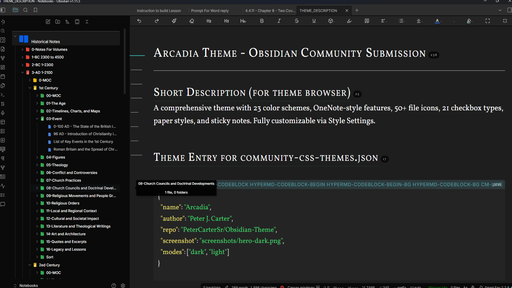
Arcadia Theme for Obsidian
A comprehensive, professional Obsidian theme with 34 color schemes (16 dark + 18 light), OneNote-style features, and extensive customization through Style Settings.

Enjoying Arcadia?

Table of Contents
- Getting Started
- Installation
- Color Schemes
- Style Settings Configuration
- Feature Guide
- Accessibility
- Plugin Compatibility
- Troubleshooting
- FAQ
- Support This Theme
- Credits
- Changelog
Getting Started
- Install the theme (see Installation below)
- Install the Style Settings plugin (Settings > Community Plugins > Browse > "Style Settings")
- Pick a color scheme: Settings > Style Settings > Arcadia Theme > Dark/Light Theme Variant
- Choose your fonts: Settings > Style Settings > Arcadia Typography > Content Font
- Explore features: Try alternate checkboxes, paper styles, sticky notes, and callouts
Without Style Settings, Arcadia uses sensible defaults. With it, you unlock 55+ customization options.
Installation
From Community Themes (Recommended)
- Open Obsidian Settings
- Go to Appearance > Themes
- Click Manage and search for "Arcadia"
- Click Install and use
Manual Installation
- Download
theme.cssandmanifest.jsonfrom this repository - In your vault, navigate to
.obsidian/themes/ - Create a new folder called
Arcadia - Place both files inside the
Arcadiafolder - In Obsidian: Settings > Appearance > Themes > Select "Arcadia"
Requirements
Required
- Obsidian version 0.16.0 or higher
Highly Recommended
- Style Settings Plugin for all customization options
Color Schemes
Dark Themes (16)
| Theme | Description | Best For |
|---|---|---|
| Granite (Default) | Neutral dark gray | General use |
| Stone | Cool slate tones | Minimalist preference |
| Olive | Warm earthy greens | Nature lovers |
| Flint | Cool professional blue-gray | Focused work |
| Navy | Deep ocean blues | Late night writing |
| Ember | Warm firelight oranges | Cozy reading |
| Twilight | Purple dusk tones | Creative work |
| Forest | Deep woodland greens | Calm focus |
| Crimson | Elegant wine reds | Dramatic appearance |
| Slate | Modern cool gray | Clean aesthetic |
| Amber | Golden warmth | Nostalgic feel |
| Parchment | Aged document sepia | Genealogy, archival work |
| Heritage | Leather and gold tones | Family records, formal study |
| Sepia | Vintage photograph | Classic, warm nostalgia |
| Registry | Iron gall ink blue | Parish records, court documents |
| Rootwood | Walnut and earth tones | Natural, family tree research |
Light Themes (18)
| Theme | Description | Best For |
|---|---|---|
| Marble (Default) | Clean white | Daytime use |
| Sage | Soft green tint | Gentle on eyes |
| Pearl | Cool ivory | Elegant writing |
| Cloud | Soft blue | Calm atmosphere |
| Dawn | Warm peach | Morning sessions |
| Lavender | Purple tint | Creative mood |
| Mint | Fresh green | Energizing |
| Rose | Soft pink | Gentle aesthetic |
| Silver | Cool gray | Professional |
| Cream | Golden white | Warm comfort |
| NY Times | Classic newspaper | Long-form reading |
| Wikipedia | Encyclopedia style | Research and reference |
| Crownwell | Classic publishing | Academic writing, theology |
| Parchment | Aged paper cream | Genealogy, archival reading |
| Heritage | Ivory with burgundy | Family history, formal documents |
| Sepia | Vintage warm tones | Old photograph aesthetic |
| Registry | Blue-gray ledger | Parish registers, court ledgers |
| Rootwood | Earthy birch white | Natural, family tree research |
How to Change Color Scheme
- Open Settings > Style Settings
- Expand Arcadia Theme > Color Scheme
- Choose Dark Theme Variant or Light Theme Variant
- Select your preferred scheme from the dropdown
Style Settings Configuration
After installing the Style Settings plugin, you'll find these option categories:
Arcadia Theme (Main)
- Dark Theme Variant: Choose from 16 dark color schemes
- Light Theme Variant: Choose from 18 light color schemes
Arcadia Typography
- Content Font: Vollkorn, Georgia, Merriweather, Crimson Pro, Lora, Literata, EB Garamond, Libre Caslon Text, Cormorant Garamond, Source Serif 4, Inter, Roboto, Open Sans, System Sans-Serif
- Code Font: JetBrains Mono, Fira Code, Source Code Pro, IBM Plex Mono
- Enable OpenDyslexic: Toggle dyslexia-friendly font
Arcadia Accent Colors
Choose from 15 accent colors: Blue, Purple, Pink, Red, Orange, Yellow, Green, Teal, Cyan, Indigo, Violet, Rose, Amber, Emerald, Sky
Arcadia Code Blocks
- Syntax Theme: Dracula, Nord, GitHub Dark, GitHub Light
- Show Line Numbers: Toggle line numbers in code blocks
- Show Language Label: Toggle language badge on code blocks
Arcadia File Icons
- Enable File Icons: Toggle custom file type icons
- Icon Color Mode: Colorful or Monochrome
Arcadia Checkboxes
- Enable Alternate Checkboxes: Toggle custom checkbox styles
Arcadia Editor
- Line Width: Narrow, Medium, Wide, Full
- Line Height: Compact, Normal, Relaxed, Spacious
Arcadia UI
- Tab Style: Default, Rounded, Pill, Underline
- Enable Rainbow Folders: Color-code top-level folders
- Enable Cards View: Grid layout for file lists
Arcadia Paper and Notes
- Paper Styles: Lined, Grid, Dot, Legal, Cornell, Graph, Music
- Page Tint: White, Cream, Blue, Green, Pink, Yellow, Lavender
- Sticky Note Style: Default, Pushpin, Folded Corner, Flat
Feature Guide
File Icons
Custom colored icons appear next to files in the file explorer, making it easy to identify file types at a glance.
Supported file types (50+):
| Category | Extensions |
|---|---|
| Documents | .md, .txt, .rtf, .pdf |
| Microsoft Office | .doc, .docx, .xls, .xlsx, .ppt, .pptx |
| Images | .png, .jpg, .jpeg, .gif, .bmp, .webp, .svg |
| Audio | .mp3, .wav, .ogg, .flac, .m4a |
| Video | .mp4, .webm, .mov, .avi, .mkv |
| Code | .js, .ts, .py, .java, .html, .css, .json, .xml, .yaml |
| Archives | .zip, .rar, .7z, .tar, .gz |
| Ebooks | .epub, .mobi |
| Fonts | .ttf, .otf, .woff |
To enable/disable: Settings > Style Settings > Arcadia File Icons > Enable File Icons
Alternate Checkboxes
21 unique checkbox styles for task management and note-taking.
Usage: Type a checkbox with a special character inside the brackets.
| Syntax | Result | Use Case |
|---|---|---|
- [ ] | Empty checkbox | Incomplete task |
- [x] | Green checkmark | Completed task |
- [-] | Red strikethrough | Canceled task |
- [>] | Blue arrow right | Forwarded/Deferred |
- [<] | Purple calendar | Scheduled |
- [?] | Blue question mark | Question to answer |
- [!] | Red exclamation | Important/Urgent |
- [*] | Gold star | Starred/Favorite |
- ["] | Cyan quote marks | Quote or citation |
- [l] | Orange pin | Location |
- [i] | Blue info circle | Information |
- [b] | Pink bookmark | Bookmark |
- [S] | Green dollar | Savings/Money |
- [p] | Green thumbs up | Pro/Positive |
- [c] | Red thumbs down | Con/Negative |
- [/] | Orange half-fill | In Progress |
- [u] | Red up arrow | High Priority |
- [d] | Blue down arrow | Low Priority |
- [w] | Gold trophy | Win/Achievement |
- [k] | Yellow key | Key point |
- [f] | Orange flame | Urgent/Hot |
- [I] | Yellow lightbulb | Idea |
To enable/disable: Settings > Style Settings > Arcadia Checkboxes > Enable Alternate Checkboxes
Custom Callouts
Extended callout types beyond Obsidian's defaults: timeline, profile, aside, definition, pro, con, goal, bookmark, question, answer, recipe, kanban, paraphrase, stats.
Usage: Create a blockquote with [!callout-type] on the first line.
> [!timeline] Project History
> **2024-01** - Project started
> **2024-06** - Version 1.0

> [!pro] Advantages
> - Fast performance
> - Easy to use

> [!con] Disadvantages
> - Learning curve
Sticky Notes
OneNote-style sticky note callouts in 8 colors: yellow, pink, blue, green, purple, orange, gray, teal.
Usage:
> [!sticky-yellow] Remember
> Don't forget the meeting at 3pm!
Style variations (enable in Style Settings): Pushpin, Folded Corner, Flat.
Add -sm or -small suffix for compact stickies.
Paper Styles
Transform your editor into realistic paper backgrounds.
| Style | Description | Best For |
|---|---|---|
| Lined | College ruled horizontal lines | Note-taking |
| Grid | Square graph paper | Diagrams, math |
| Dot | Bullet journal dot grid | Flexible layouts |
| Graph | Engineering graph paper | Technical drawing |
| Legal | Yellow legal pad | Traditional notes |
| Cornell | Cornell note-taking format | Study notes |
| Music | Musical staff lines | Sheet music |
Page tint colors: White, Cream, Blue, Green, Pink, Yellow, Lavender (in both light and dark modes).
To enable: Settings > Style Settings > Arcadia Paper and Notes
Media Embedding
OneNote-style polished media presentation with shadows, rounded corners, and hover effects.
Image size presets:
![[image.png|small]]   // 200px
![[image.png|medium]]  // 400px
![[image.png|large]]   // 600px
![[image.png|full]]    // 100% width
Float images:
![[image.png|left]]    // Float left
![[image.png|right]]   // Float right
Code Blocks
Enhanced code block styling with syntax themes: Dracula, Nord, GitHub Dark, GitHub Light.
Features: language label badge, optional line numbers, copy button styling, smooth scrolling.
To configure: Settings > Style Settings > Arcadia Code Blocks
Cards View
Display file lists as a grid of cards. Works with file explorer, search results, and Dataview TABLE queries.
To enable: Settings > Style Settings > Arcadia UI > Enable Cards View
Rainbow Folders
Automatically color-code top-level folders in the file explorer using a 10-color cycle. Subfolders inherit a muted version of their parent's color.
To enable: Settings > Style Settings > Arcadia UI > Enable Rainbow Folders
Tag Colors
Tags are displayed as colored pills. Colors are automatically assigned based on tag text patterns.
Progress Bars
Create visual progress indicators using HTML <progress> elements or Dataview queries.
<progress value="75" max="100"></progress>
Image Controls
![[image.png|100]]       // 100px wide
![[image.png|center]]    // Centered
![[image.png|rounded]]   // Extra rounded corners
![[image.png|no-shadow]] // Remove shadow
![[image.png|border]]    // Add border
![[image.png|300|center|rounded]]  // Combine multiple
Accessibility
- WCAG AA compliant contrast ratios across all 34 color schemes
- OpenDyslexic font option for dyslexia (Settings > Style Settings > Arcadia Typography)
- Reduced motion support (respects system preference)
- High contrast mode available
Plugin Compatibility
| Plugin | Compatibility |
|---|---|
| Style Settings | Full integration (required for customization) |
| Dataview | Styled tables and lists |
| Tasks | Checkbox styling |
| Kanban | Board styling |
| Calendar | Date styling |
| Excalidraw | Canvas integration |
| Templater | Compatible (no conflicts) |
| Periodic Notes | Compatible (no conflicts) |
| Advanced Tables | Table styling applies |
| Outliner | List styling applies |
| Obsidian Git | Compatible (no conflicts) |
Troubleshooting
Theme not loading
- Verify both
theme.cssandmanifest.jsonare in.obsidian/themes/Arcadia/ - Restart Obsidian after manual installation
- Check that no other theme is overriding (Settings > Appearance > Themes)
Style Settings options not appearing
- Install and enable the Style Settings plugin
- After enabling, check Settings > Style Settings > Arcadia Theme
- If options are missing, try switching themes and switching back
Fonts not loading
- Fonts load from Google Fonts and require internet on first use
- After first load, fonts are cached by the browser engine
- If a font fails, the fallback stack (Georgia, system serif, or system sans) provides acceptable rendering
Checkboxes not rendering
- Enable alternate checkboxes in Style Settings > Arcadia Checkboxes
- Use the exact syntax:
- [x],- [!], etc. - Only works in reading mode and live preview (not source mode)
Paper styles not showing
- Paper styles require the
cssclassesfrontmatter property - Add
cssclasses: paper-lined(or other style) to the note's YAML frontmatter - Paper tints are applied via Style Settings, not frontmatter
Plugin conflicts
- If another theme's CSS is cached, clear the Obsidian cache (Settings > About > Debug info > Clear cache)
- Some CSS snippet plugins may conflict; disable them temporarily to test
FAQ
Can I use this theme commercially? Yes. Arcadia is released under the MIT license. You can use, modify, and distribute it freely.
Does Arcadia work on mobile? Arcadia is primarily designed for desktop Obsidian. Most features work on mobile, but paper styles and some visual effects may render differently on smaller screens.
Do I need Style Settings? No, but it is highly recommended. Without it, you get the Granite (dark) and Marble (light) defaults. With it, you unlock all 34 color schemes and 55+ customization options.
Can I create my own color scheme?
Not through the UI. Custom schemes require editing theme.css directly. Each scheme needs ~20 CSS custom properties defined in an RGB triplet format.
How do I request a feature? Open an issue on GitHub with the "Feature Request" template.
How do I report a bug? Open an issue on GitHub with the "Bug Report" template. Include your Obsidian version, OS, and steps to reproduce.
Support This Theme
If you find Arcadia useful for your work, consider supporting its development:

Credits
Author: Peter J. Carter Website: theologyinfocus.org
License
MIT License - Free to use, modify, and distribute. See LICENSE for details.
Changelog
Version 2.1.0 (Current)
- 34 color schemes (16 dark + 18 light)
- 5 genealogy-inspired schemes (Parchment, Heritage, Sepia, Registry, Rootwood)
- Font loading optimized: 32 HTTP requests reduced to 2
- CSS architecture overhaul: nav colors consolidated to variables
- 4 additional fonts added to Style Settings (EB Garamond, Libre Caslon Text, Cormorant Garamond, Source Serif 4)
- 50+ file type icons with colors
- 21 alternate checkbox types
- OneNote-style media embedding
- Paper styles (lined, grid, dot, legal, Cornell, graph, music)
- Sticky notes callouts (8 colors with style variations)
- Code syntax themes (Dracula, Nord, GitHub)
- Rainbow folders
- Cards view for Dataview
- Tag color pills
- Progress bar styling
- Custom callouts (timeline, profile, definition, pro/con, and more)
- Full Style Settings integration (55+ options across 11 categories)
- WCAG AA accessibility compliance
- OpenDyslexic font support
- Mobile responsive design
Version 2.0.0
- Initial community release with 23 color schemes
- Core feature set established
How to Install
- Download the template file from GitHub
- Move it anywhere in your vault
- Open it in Obsidian — done!
Stats
Stars
2
Forks
0
License
MIT
Last updated 23d ago